
Admin Posts Navigation
| 开发者 | mbrinson |
|---|---|
| 更新时间 | 2026年9月15日 07:05 |
| PHP版本: | 7.4 及以上 |
| WordPress版本: | 7.1 |
| 版权: | GPLv2 or later |
| 版权网址: | 版权信息 |
详情介绍:
- Seamless Navigation: Navigate directly between posts without returning to the post list
- Customizable Sorting: Choose between Date Published, Alphabetical, Post ID, or Sort Order (the manual order used by the page Order attribute and plugins such as Simple Custom Post Order)
- User Preferences: Each user's sort preferences are saved per post type
- Universal Support: Works with posts, pages, and all custom post types automatically
- Dual Editor Support: Full compatibility with both Classic Editor and Gutenberg Block Editor
- Smart Ordering: Sort Order by default for pages and any post type with a manual order; Date Published for everything else
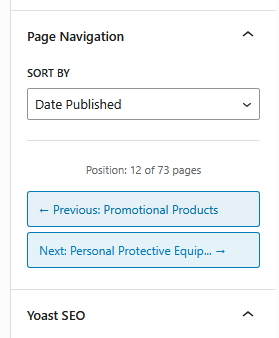
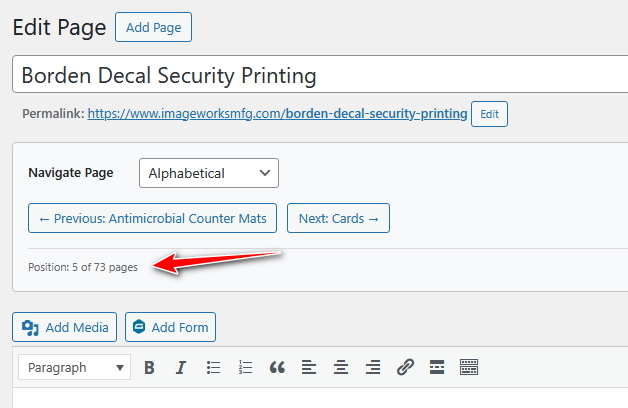
- Position Tracking: Shows your current position (e.g., "Position: 3 of 15 posts")
- Security First: Rate limiting, nonce verification, and capability checks
- Performance Optimized: Intelligent caching and optimized database queries
- Developer Friendly: Multiple filter hooks for customization
- Date Published: Navigate by publication date, newest first
- Alphabetical: Navigate by post title in alphabetical order (A-Z)
- Post ID: Navigate by WordPress post ID in ascending order
- Sort Order: Navigate by the manual order (menu order) — the page "Order" attribute, or the drag-and-drop order set by plugins such as Simple Custom Post Order. This is the default for pages and for any post type those plugins manage.
- Content managers editing multiple posts in sequence
- Bloggers reviewing and updating existing content
- Developers working with custom post types
- Anyone who finds the default WordPress admin workflow tedious
安装:
- Upload the plugin files to the
/wp-content/plugins/admin-posts-navigationdirectory, or install the plugin through the WordPress plugins screen directly. - Activate the plugin through the 'Plugins' screen in WordPress.
- Start editing any post or page - navigation buttons will appear automatically.
屏幕截图:
常见问题:
Does this work with custom post types?
Yes! The plugin automatically detects and supports all public custom post types. No configuration needed.
Does this work with both Classic Editor and Gutenberg?
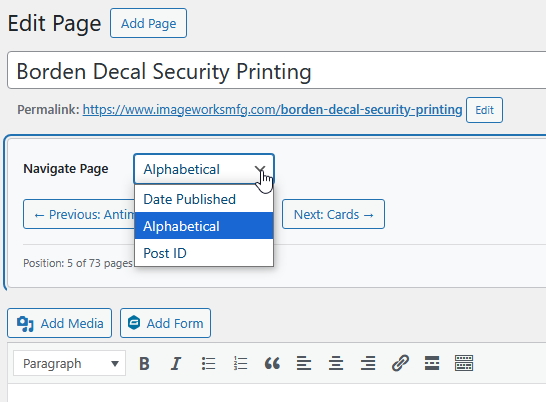
Absolutely. In Classic Editor, buttons appear below the post title with an inline sorting dropdown. In Gutenberg, a navigation panel appears in the Document Settings sidebar with an integrated sorting control.
Can I customize the sorting order?
Yes! Choose from four sorting options: Date Published, Alphabetical, Post ID, or Sort Order. Your sorting preference is saved automatically for each post type.
Are my sorting preferences saved?
Yes! Each user's sorting preferences are saved individually per post type. For example, you can choose to sort posts by Date Published while sorting pages Alphabetically, and your preferences will be remembered across sessions.
Does this work with Simple Custom Post Order or the page Order attribute?
Yes. Choose Sort Order in the dropdown to navigate in the manual order. It is selected automatically for pages and for any post type managed by Simple Custom Post Order, and the navigation updates as soon as you reorder.
Does this affect site performance?
No. The plugin only loads in the WordPress admin area and uses intelligent caching to minimize database queries.
Can I exclude certain post types?
Yes, use the twf_admin_posts_navigation_excluded_types filter to exclude specific post types.
更新日志:
- Added Sort Order (menu order) sorting — follows the page Order attribute and drag-and-drop plugins such as Simple Custom Post Order
- Sort Order is now the default for pages and for post types managed by Simple Custom Post Order (
twf_admin_posts_navigation_default_sortfilter) - Fixed: navigation cache never cleared after saving, trashing, deleting or reordering posts
- Fixed: Simple Custom Post Order silently changed "Date Published" ordering in the block editor
- Fixed: navigation stopped working on sites with more than 500 posts of a type (
twf_admin_posts_navigation_max_postsfilter) - Fixed: inconsistent Previous/Next on duplicate titles or dates (deterministic tiebreakers)
- Fixed: buttons with empty links for posts the current user cannot edit
- Fixed: block editor showed a raw parse error instead of the server message when a request failed
- Block editor strings are now translatable
- Navigation is no longer shown on brand-new (unsaved) posts
- Removed the unused activation option
- Improved security with better nonce verification
- Enhanced user permission checks
- Added customizable sorting dropdown with Date Published, Alphabetical, and Post ID options
- Added user preference storage - sort preferences saved per post type
- Enhanced Classic Editor with inline sorting dropdown
- Enhanced Gutenberg with sorting control in navigation panel
- Added AJAX functionality for real-time sort preference updates
- Improved caching system to include sort method in cache keys
- Added proper cleanup of user preferences on plugin uninstall
- Performance improvements - removed direct meta_query usage
- Fixed textdomain consistency issues
- Initial release
- Classic Editor and Gutenberg support
- Automatic custom post type detection
- Security features: rate limiting, nonce verification
- Performance optimization with intelligent caching