AIT Easy Post Customization
| 开发者 | Muhammad Kamran |
|---|---|
| 更新时间 | 2026年3月16日 09:33 |
| PHP版本: | 7.4 及以上 |
| WordPress版本: | 6.8 |
| 版权: | GPLv2 or later |
| 版权网址: | 版权信息 |
详情介绍:
AIT Easy Post Customization is a powerful yet easy-to-use plugin designed to give users control over the lifespan of their posts and custom post types by allowing you to set an expiry date. If you're managing time-sensitive content, like event announcements, special promotions, or limited-time offers, this plugin automates the process of unpublishing or archiving content, making content management hassle-free.
What problem does this plugin solve?
Manually tracking and updating expired content can be tedious and prone to errors, especially if you have a large volume of posts. Without this plugin, expired content can remain live, leading to outdated or irrelevant information on your website. AIT Easy Post Customization solves this problem by allowing you to set expiry dates on posts, ensuring that content is automatically hidden or removed after the specified date. This keeps your site fresh and up-to-date without manual intervention.
How does it improve the user experience?
- Automatic Expiry Handling: Set an expiration date for any post or custom post type, and let the plugin automatically unpublish it when the time comes. This eliminates the need for manual updates and improves content accuracy.
- Custom Post Type Support: Whether you're using standard WordPress posts or custom post types (like events, job listings, products, etc.), you can easily add expiry functionality to all of them.
- User-Friendly Interface: The plugin integrates seamlessly with the WordPress editor, making it easy for users of all skill levels to manage expiry dates. The expiry date can be set directly from the post editing screen.
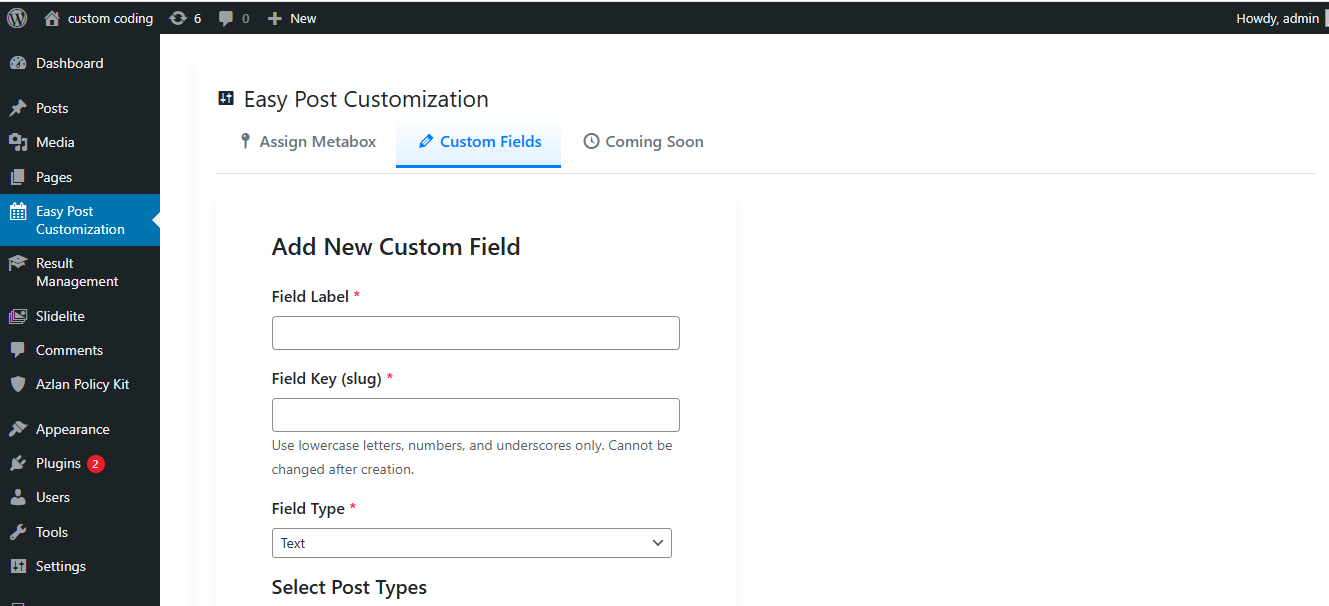
- Custom Fields Management: Add custom fields (text, textarea, date) to posts for enhanced content customization.
- Modern Admin Interface: A sleek, responsive admin panel with sticky tabs, form validation, and intuitive navigation.
- Post Expiration: Set expiration dates for posts and custom post types, automatically moving them to draft status when expired.
- Custom Fields: Add and manage custom fields (text, textarea, date) for selected post types.
- Supports All Post Types: Works with standard WordPress posts and custom post types, allowing flexible use across various content types.
- Seamless Integration: Integrated into the post editor with a modern, user-friendly interface.
- Scheduled Content Management: Perfect for managing content like event updates, limited-time offers, and seasonal announcements.
- Localization Ready: Fully translation-ready for multilingual websites.
- Custom Widgets: Optionally display a widget that shows upcoming or recently expired content to site admins for better tracking (coming soon).
- Developer-Friendly Hooks and Filters: Developers can customize the plugin’s behavior using built-in hooks and filters.
- Modern Design: Features a responsive admin interface with sticky tabs, Dashicons, and gradient effects for a premium experience.
安装:
Follow these steps to install and activate AIT Easy Post Customization:
Upload Method:
- Upload the plugin files to the
/wp-content/plugins/ait-easy-post-customization/directory. OR
- Go to the WordPress dashboard, navigate to Plugins -> Add New, and search for AIT Easy Post Customization. Click Install Now. Activate the Plugin:
- Once installed, go to the Plugins screen in WordPress and click Activate next to AIT Easy Post Customization. Configure the Plugin:
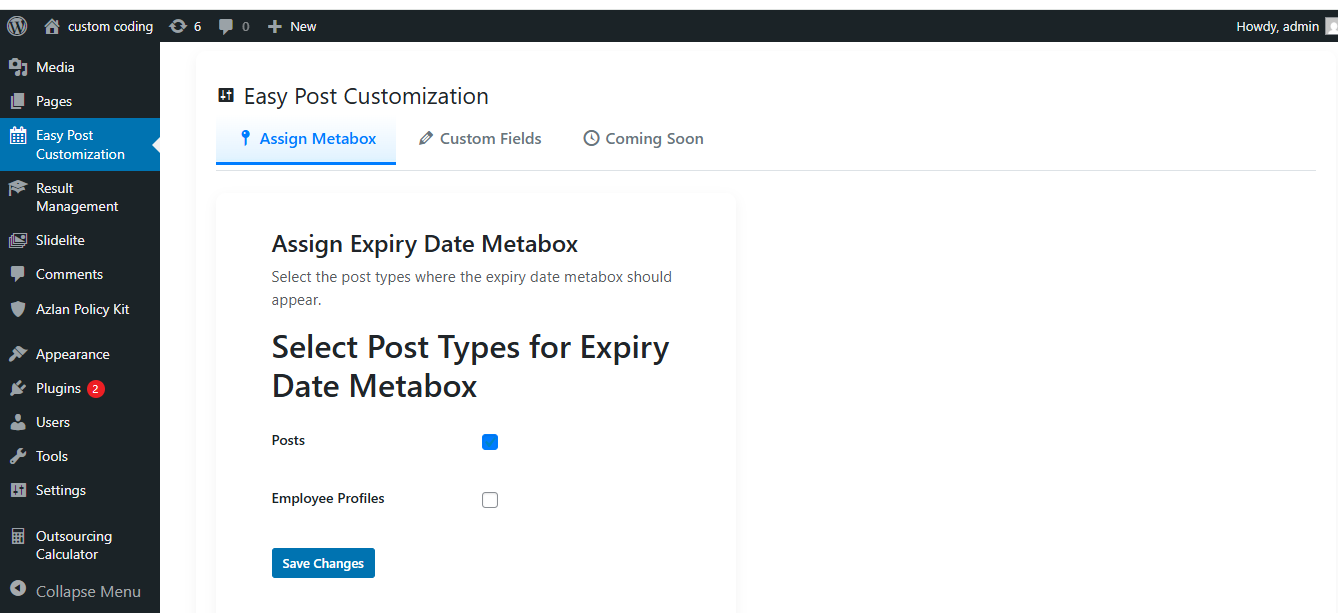
- After activation, a new menu item called Easy Post Customization will appear in the WordPress sidebar. Click on it to access the plugin settings and configure the expiry date and custom field options as needed.
屏幕截图:

更新日志:
2.1.0 - 2026-03-16
- NEW: Multiple expiry actions — choose Draft, Trash, Delete Permanently, or Redirect to URL per post or site-wide default.
- NEW: Email notifications — send automatic reminders to post authors 1, 3, 7, 14, or 30 days before expiry. Configurable sender, per-user unsubscribe link.
- NEW: Gutenberg block editor sidebar — set expiry date and action directly from the native block editor panel (no page reload needed).
- NEW: REST API unsubscribe endpoint (aitepc/v1/unsubscribe) for stateless, token-verified email opt-outs.
- NEW: Developer hooks — aitepc_before_expiry_action, aitepc_after_expiry_action, aitepc_notification_email_data filter.
- NEW: uninstall.php — clean option and cron removal when plugin is deleted.
- IMPROVED: Cron handler now delegates to configurable action processor instead of always drafting.
- IMPROVED: Email Notifications tab replaces "Coming Soon" tab in admin dashboard.
- IMPROVED: Expiry metabox retitled to "Expiry Settings" and now includes action dropdown and redirect URL field.
- IMPROVED: Post meta keys registered with show_in_rest for full Gutenberg compatibility.
- SECURITY: All new inputs sanitized and escaped per WordPress coding standards; nonce and capability checks on all save paths; hash_equals() timing-safe token comparison.
- Fixed menu icon rendering issue - icon was spreading across the interface
- Added properly sized menu-icon.svg (20x20) for WordPress admin sidebar
- Menu icon now uses currentColor for theme compatibility
- Improved icon display consistency with WordPress standards
- ✨ BRAND NEW DESIGN: Completely rebuilt dashboard with outstanding premium aesthetics
- 🎨 Stunning Gradients: Beautiful purple-to-blue gradient color scheme throughout
- 🌊 Animated Header: Eye-catching header with floating background patterns and bouncing icon animation
- 📑 Modern Tab Navigation: Pill-style tabs with smooth transitions and pulsing active state icons
- 💳 Premium Cards: Animated gradient top borders that shift colors continuously
- 🎯 Glowing Accents: Pulsing dot indicators on card titles with gradient glow effects
- ⚡ Ripple Effects: Interactive button ripple effects on hover for premium feel
- 📊 Enhanced Tables: Gradient headers with smooth row hover animations
- 🎭 Smooth Animations: Fade-in-up animations for tab content transitions
- 🖱️ Micro-interactions: Icon rotation and scale effects on hover throughout the interface
- 🎪 Custom Scrollbar: Gradient scrollbar matching the overall design theme
- 📱 Fully Responsive: Perfect on all devices from desktop to mobile
- ♿ Accessibility: Enhanced focus states and WCAG compliant color contrast
- 🚀 Performance: Optimized CSS with smooth 60fps animations
- 🎨 Color System: Professional color palette with purple, pink, and blue accents
- 💎 Premium Feel: Enterprise-level dashboard design worthy of premium plugins
- Bug fixes and performance improvements
- Enhanced security measures
- Changed admin menu name from "AIT Expiry Date" to "Easy Post Customization" for better branding.
- Introduced modern admin interface with custom CSS (
aitepc-admin.css), sticky tabs, Dashicons, and gradient effects. - Added client-side form validation for custom fields with inline feedback for improved usability.
- Enhanced custom fields table with sticky headers and hover effects for better navigation.
- Optimized CSS with variables for maintainability and improved responsive design.
- Improved security with proper sanitization, nonce verification, and output escaping.
- Ensured compatibility with WordPress 6.6 and PHP 7.2+.
- Initial release of AIT Easy Post Customization.
- Added functionality to set expiry dates for posts and custom post types.
- Integrated user-friendly interface for managing expiry settings.
- Added custom fields management for text, textarea, and date fields.