Beplus Performance Booster
| 开发者 |
bearsthemes
minhphamit |
|---|---|
| 更新时间 | 2026年10月28日 15:14 |
| PHP版本: | 8.2 及以上 |
| WordPress版本: | 7.1.1 |
| 版权: | GPLv2 or later |
| 版权网址: | 版权信息 |
详情介绍:
- JavaScript delay (Simple / Advanced mode) and defer with per-script exclude list
- JS Release Delay: image-load fallback timer for releasing delayed scripts
- CSS file and inline minification with cache
- Remove Unused CSS: per-URL cached stripping of unused CSS rules
- Non-render-blocking stylesheet loading
- WordPress Core-managed image loading policy with targeted exclusions
- Remove emoji, wp-embed, Gutenberg CSS, WooCommerce assets on non-shop pages
- HTML minification and comment stripping
- Browser cache and gzip/brotli rules via .htaccess
- Per-page option to disable the cache for specific posts/pages
- Custom CDN (pull-zone) URL rewriting for static assets
- Automatic WebP/AVIF image serving when a matching file already exists
- Cloudflare integration: one-click cache purge, zone auto-detection via API Token, and Development Mode toggle from wp-admin
安装:
- Upload the
beplus-performance-boosterfolder to/wp-content/plugins/. - Activate the plugin through the Plugins menu in WordPress.
- Navigate to Settings > Beplus Performance Booster to configure each feature.
屏幕截图:
常见问题:
Will this plugin slow down my admin panel?
No. Every optimisation hook is guarded by is_admin() and an additional check that
skips users with the manage_options capability on the front-end.
I see a flash of unstyled content (FOUC) after enabling Non-Render-Blocking CSS.
Add a URL keyword for your theme's main stylesheet to the Exclude CSS Files textarea. That file will be loaded normally while the rest are deferred.
The Browser Cache option says my .htaccess is not writable.
Your server's file permissions do not allow PHP to write to .htaccess. Set the
file to 644 (or ask your host) and try again, or add the rules manually.
Where are the minified CSS/JS cache files stored?
In wp-content/uploads/bepluspb-cache/ — inside your wp-content directory. The directory
is created automatically with an index.php stub (to prevent directory listing) and
a .htaccess stub (to block direct PHP execution).
Is WooCommerce required?
No. The WooCommerce asset-removal option is only applied when WooCommerce is active. All other features work independently.
Can I use this plugin alongside a caching plugin?
Yes. The .htaccess browser-caching rules complement full-page caches (LiteSpeed Cache, W3 Total Cache, WP Super Cache, etc.). The JS/CSS optimisations operate at the PHP output level and work with most caching setups.
What happens to my settings when I delete the plugin?
The uninstall.php script removes all plugin data: the bepluspb_settings option, the
injected .htaccess rules, every file in uploads/bepluspb-cache/, and the
_bepluspb_disable_cache post meta from every post.
Who develops this plugin?
This plugin is developed and maintained by BePlus, a WordPress and Shopify development studio. You can learn more about our work at beplusthemes.com.
更新日志:
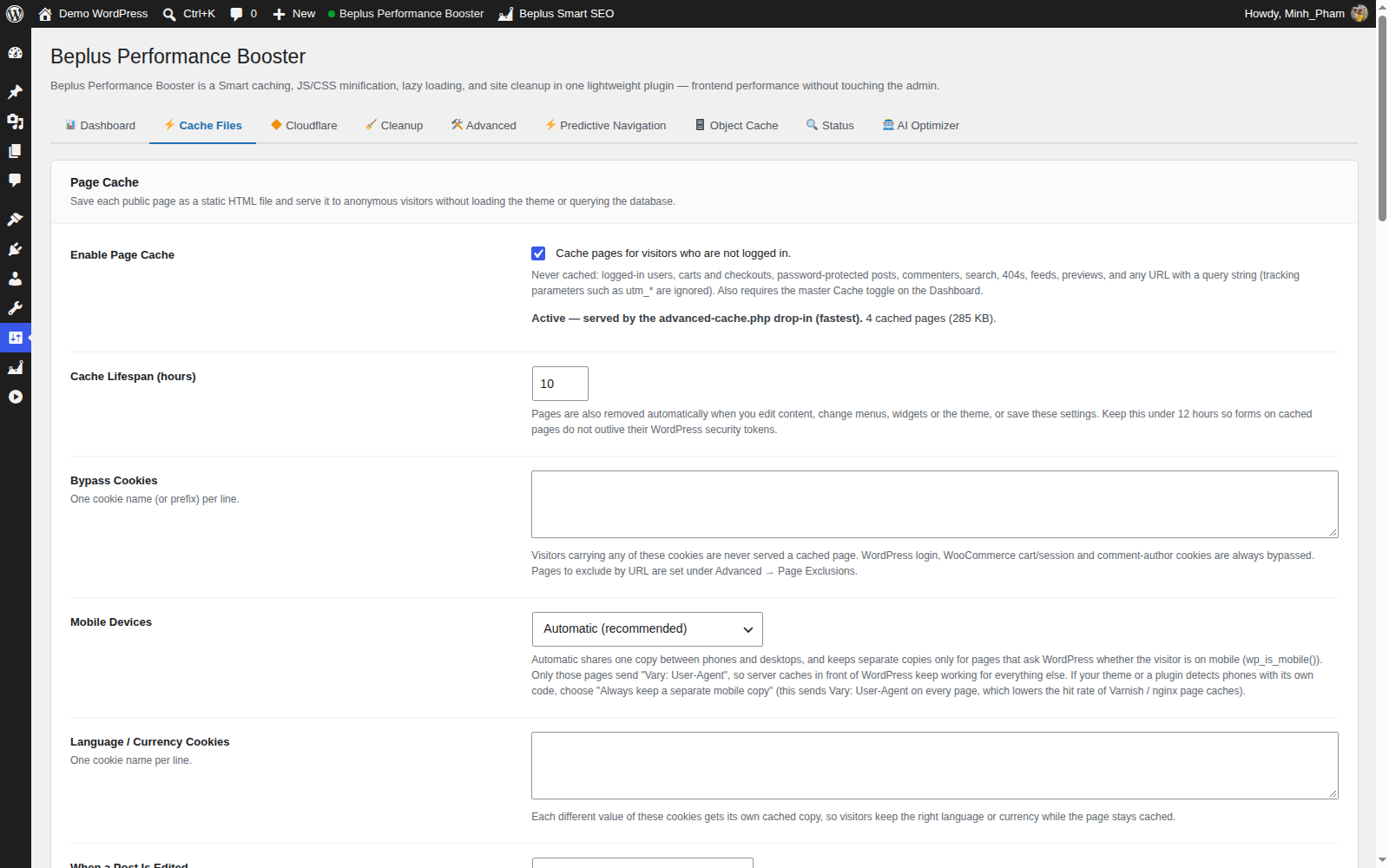
- New: optional Page Cache (off by default, Cache Files tab). Visitors who are not logged in get a stored HTML copy of public pages, served before WordPress loads the theme. Automatically skipped for logged-in users, carts/checkouts, forms and personalised pages; cleared when you edit content, menus, widgets, themes or these settings. Separate mobile copies are kept only for pages that need them. "Purge ALL Cache" now empties it too.
- New: admin bar "Purge ALL Cache" is a one-click button (with a confirmation) that returns you to the page you were on and shows the result on screen. The admin bar Object Cache purge button now also asks for confirmation on every screen.
- Fix: the admin bar "Purge ALL Cache" link could open the wrong settings tab and hide the button.
- Fix: Remove Unused CSS cache was not cleared when you saved a post or switched theme; deleted CSS/JS files no longer leave cached pages pointing at missing files.
- Fix: administrators now see the original CSS/JS (like the other optimisers) while other logged-in users get the minified files. The "Enable Cache for Logged-In Users" option was removed because it never affected anything else.
- Fix: .htaccess browser-cache rules no longer override an app's own Cache-Control, only mark versioned CSS/JS as immutable, and no longer cover feeds or robots.txt (re-save settings to refresh the rules).
- Fix: Delay JS no longer breaks inline scripts; HTML/CSS/CDN transforms fall back to the untouched page instead of a blank page on very large pages; defer JS skips scripts with inline code that must run after them; page-builder editors, AMP and the Customizer preview are left alone.
- Fix: Object Cache drop-in handles atomic add, increment/decrement, cached false values and a failed pipeline correctly, and uses fewer round trips (batched reads and writes).
- Improvement: faster CSS/JS minify cache lookups, cached inline CSS and a lighter CDN WebP/AVIF check.
- Security: block web access to the object-cache drop-in backup folder (backups of another plugin's drop-in can contain cache passwords) and use unguessable backup names.
- Security: stop a stylesheet/script symlink from exposing wp-config.php through the minified-file cache.
- Security: never save an Object Cache config containing a password unless the file's access protection is confirmed; show a clear error otherwise.
- Fix: replacing or restoring an object-cache drop-in now works on PHP-FPM hosts (a real PHP CLI is used for validation) and explains clearly when it cannot run.
- Fix: clearing the Object Cache no longer wipes other sites or apps sharing the same Redis/Memcached server; only this site's entries are removed.
- Fix: CSS minification no longer changes selectors such as ".a :hover" or text inside quoted strings.
- Improvement: admin code reorganized into smaller files for easier maintenance (no change in behavior), plus broader automated tests and real WordPress + Redis checks.
- Display boolean values in the Recommended Settings preview as Active and Inactive instead of raw 1 and 0, without changing stored values or behavior.
- Use one exact machine-readable identity across the shipped Object Cache drop-in, ownership checks, and health probes; reject foreign or mismatched drop-ins.
- Harden object-cache replacement and restoration with path/symlink checks, non-executable verified backups, authenticated restore manifests, transaction locking, retention protection, metadata restoration, isolated health checks, and automatic rollback.
- Write Object Cache configuration before installation and correct replacement/settings-tab interactions.
- Merge Fonts, CDN, and Cache Exclusions into one Advanced tab without changing saved settings. Existing deep links continue to work; Cloudflare, Predictive Navigation, and Object Cache remain separate tabs.
- Add administrator-only preflight, checksum-verified backup-and-replace, and rollback-capable restore for conflicting object-cache drop-ins.
- Reorganize Dashboard Cache Actions into clearer optimization, generated-cache, and object-cache groups with disk metrics, availability status, compact actions, and responsive layout.
- Move the shared, POST-only Object Cache purge control to the Dashboard and Admin Bar, removing the duplicate Object Cache tab action while retaining settings and health tools.
- Add POST-only Purge ALL Cache with structured disk and Cloudflare results.
- Add separately confirmed, fail-closed Object Cache purge controls. Object Cache remains excluded from Purge ALL.
- Add an integration hook for third-party page-cache purges.
- Harden Font Preload v2 origin deduplication with effective ports and render-time revalidation of filtered entries, and correct the related admin guidance.
- Add fail-closed Font Preload v2 URL validation, diagnostics, registry/filter support, and conservative CDN handling.
- Correct Lazy Load compatibility: configurable Core attribute policy starts on WordPress 6.4; WordPress 5.5–6.3 retains native Core behavior.
- Add deterministic WordPress 6.3/6.4 compatibility coverage and automatic CI execution of every standalone test.
- Replace regex image rewriting and its JavaScript fallback with WordPress Core-managed loading optimization, targeted exclusions, safe thresholds, request gates, and fail-open compatibility behavior.
- Add local-only, site-aware Recommended Settings with exact preview, safe atomic apply/disable, and one-time restore.
- Redesign Predictive Navigation settings with clearer status, accessible mode cards, exclusions, compatibility/privacy guidance, responsive styling, and unchanged saved settings and behavior.
- Add Predictive Navigation for WordPress 6.8+ through Core Speculation Rules, with safe/balanced/fast modes, commerce and sensitive-path exclusions, sanitized custom paths, and no telemetry or external calls. Disabled by default.
- Fix: an internal diagnostic log message related to the 1.0.10 buffer-order fix could write to the PHP error log even when debug logging was not enabled. It now only logs when the site owner has explicitly turned on WordPress debug logging (WP_DEBUG_LOG). No visible behavior change for normal site operation.
- Fix: Delay JS (Advanced mode) could silently do nothing when Remove Unused CSS was also enabled. Both features open a nested PHP output buffer; Remove Unused CSS's shutdown handler used a weak check that could close Delay JS's still-open inner buffer first and discard its rewritten output before the real page content was delivered — sites received the original, un-delayed scripts even though the setting was on. Both buffers now close in the correct order and Remove Unused CSS verifies it is closing exactly its own buffer before doing so.
- Fix: Delay JS (Simple mode) now preserves a script's original
type(e.g.module) plusintegrity,crossorigin,nonce, andreferrerpolicyattributes when the script is restored after user interaction. Previously these were dropped, which could break ES module scripts and scripts protected by Subresource Integrity or a nonce-based Content-Security-Policy.
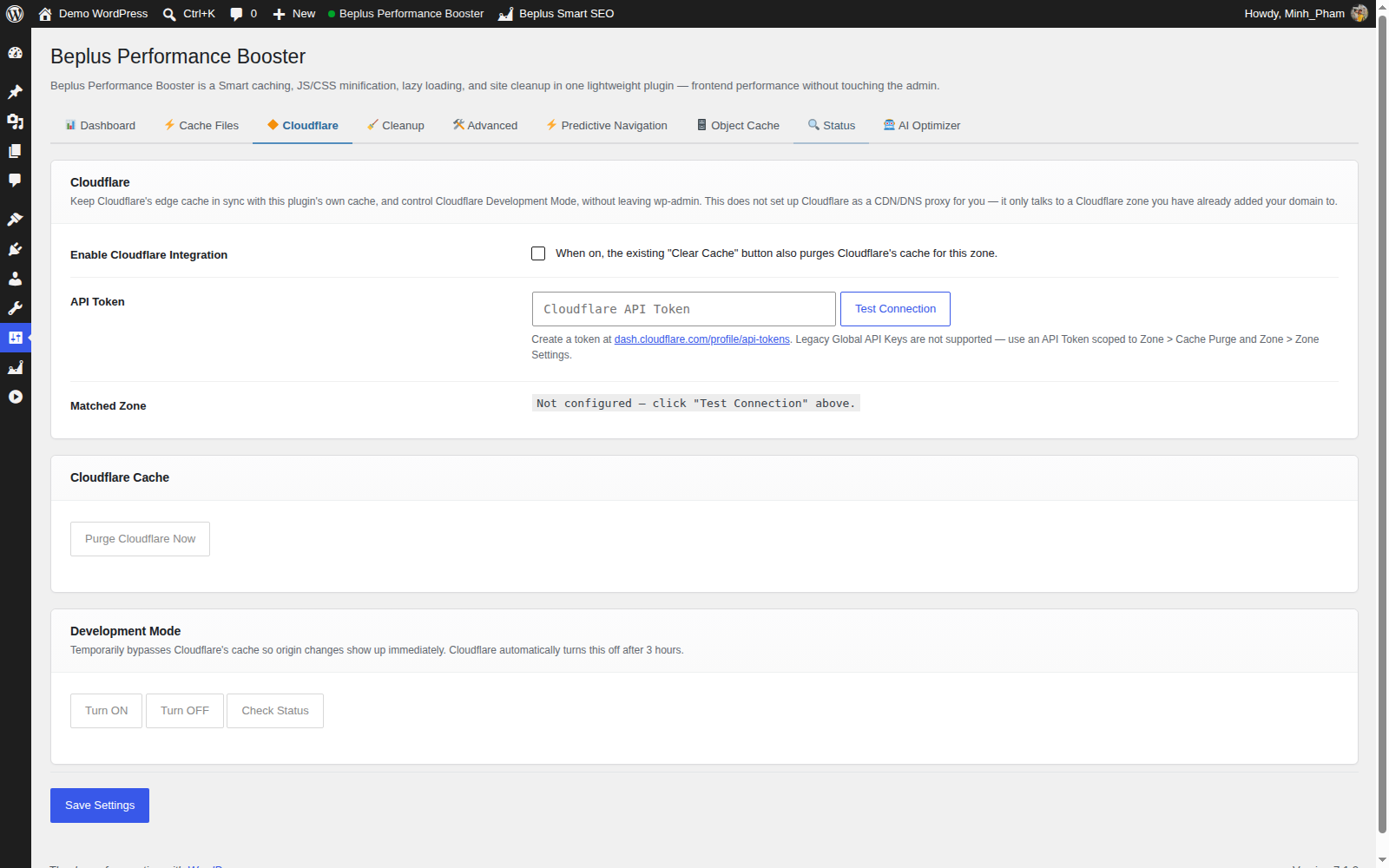
- New: "Cloudflare" settings tab — connect a Cloudflare zone with an API Token (auto-detects the matching zone for this site's domain via "Test Connection"), purge the Cloudflare edge cache with one click (optionally in sync with the plugin's own Clear Cache button), and turn Cloudflare Development Mode on/off/check status without leaving wp-admin. All calls are admin-triggered only and rate-limited; nothing runs on a normal front-end page load.
- New: optional "Serve WebP/AVIF Images" toggle in the CDN tab. When enabled, JPG/PNG image URLs are swapped for a same-named .avif or .webp file when one already exists next to it and the visitor's browser declares support for that format. Prefers AVIF over WebP when both are supported and both files exist. This plugin does not generate or convert any images itself — it only rewrites the URL when a matching file is already present on disk (e.g. created by WordPress core, a theme build step, or another optimization tool). Off by default.
- Fixed: Object Cache (Redis) reported "connected" in the settings page but was silently never actually being used — a scoping bug meant the saved config never reached the connection code. Object Cache now actually connects and caches.
- Fixed: two crashes that could bring down wp-admin (white screen) on
sites using the Object Cache: caching the logged-in user (
usersgroup) or the update-count indicator (site-transientgroup) through Redis could corrupt on read-back. Both groups are now kept out of the persistent Redis cache. If you already had Object Cache enabled, clear/flush your Redis cache once after updating to remove any already-corrupted entries. - Fixed:
install_dropin()no longer installs the Object Cache drop-in on a site with no valid saved configuration, which could previously crash the entire site.
- Maintenance:
Requires PHPraised to 8.1 (7.4 reached end-of-life in November 2022 and no longer receives security patches). No functional changes.
- Security (hardening): the internal URL-to-path resolver used by CSS/JS
minification and Remove Unused CSS now canonicalizes candidate paths with
realpath()and verifies they stay insidewp-content/site root, and only ever resolves genuine.css/.jsasset URLs. Previously a crafted asset URL containing../could point the resolver at files outside the intended directory, or at a non-asset file inside the site root (e.g.wp-config.php) that could then be read and cached. Defence-in-depth: asset URLs come from registered themes/plugins, so exploitation required elevated access, but the resolver is now strict regardless. - Reliability: the root
.htaccessfile is now backed up once (.htaccess.bepluspb-bak) before this plugin first inserts its browser-cache/compression rules, so the original can be restored if a write is ever interrupted.
- Fixed: Remove Unused CSS cache was not invalidated when a page's content changed (e.g. editing a post to add a shortcode/block whose CSS class was previously stripped out of the cached stylesheet). The cache only checked whether the source stylesheet file had changed, not whether the page content had — so a stale, over-trimmed CSS file could keep being served after a content edit until someone noticed broken styling and manually clicked "Clear Cache". Now automatically purged on: saving/publishing a post, a scheduled post going live, switching themes, and saving Customizer changes.
- Security: the Object Cache config file (
wp-content/.bepluspb_oc.json), which can contain a plaintext Redis/Memcached AUTH password, is now blocked from direct HTTP access via an auto-generated.htaccessrule inwp-content/(Apache/LiteSpeed). Previously this file was served directly if requested. Sites on nginx should add an equivalentlocation ~ /\.bepluspb_oc\.json { deny all; }rule manually, since nginx does not read.htaccessfiles. - Security: the Object Cache drop-in now unserializes cached values with
allowed_classes => false, preventing PHP Object Injection if a cache value is ever read back in a tampered or unexpected state.
- Added Object Cache support: persistent caching via Redis or Memcached with a WP drop-in (wp-content/object-cache.php).
- New "Object Cache" settings tab: driver selection (Redis/Memcached), host/port, Redis AUTH password, Redis DB index, persistent connection, global groups, non-persistent groups.
- Connection test button with live AJAX result.
- Install/Remove drop-in buttons directly from the settings page.
- Config file (.bepluspb_oc.json) written to wp-content for zero-overhead bootstrap by the drop-in.
- Uninstall script now removes the object-cache drop-in and config file.
- Added "⚡ Enable All Recommended" button to the Dashboard tab — activates all recommended settings in one click (skips settings that require manual prerequisites, e.g. htaccess not writable).
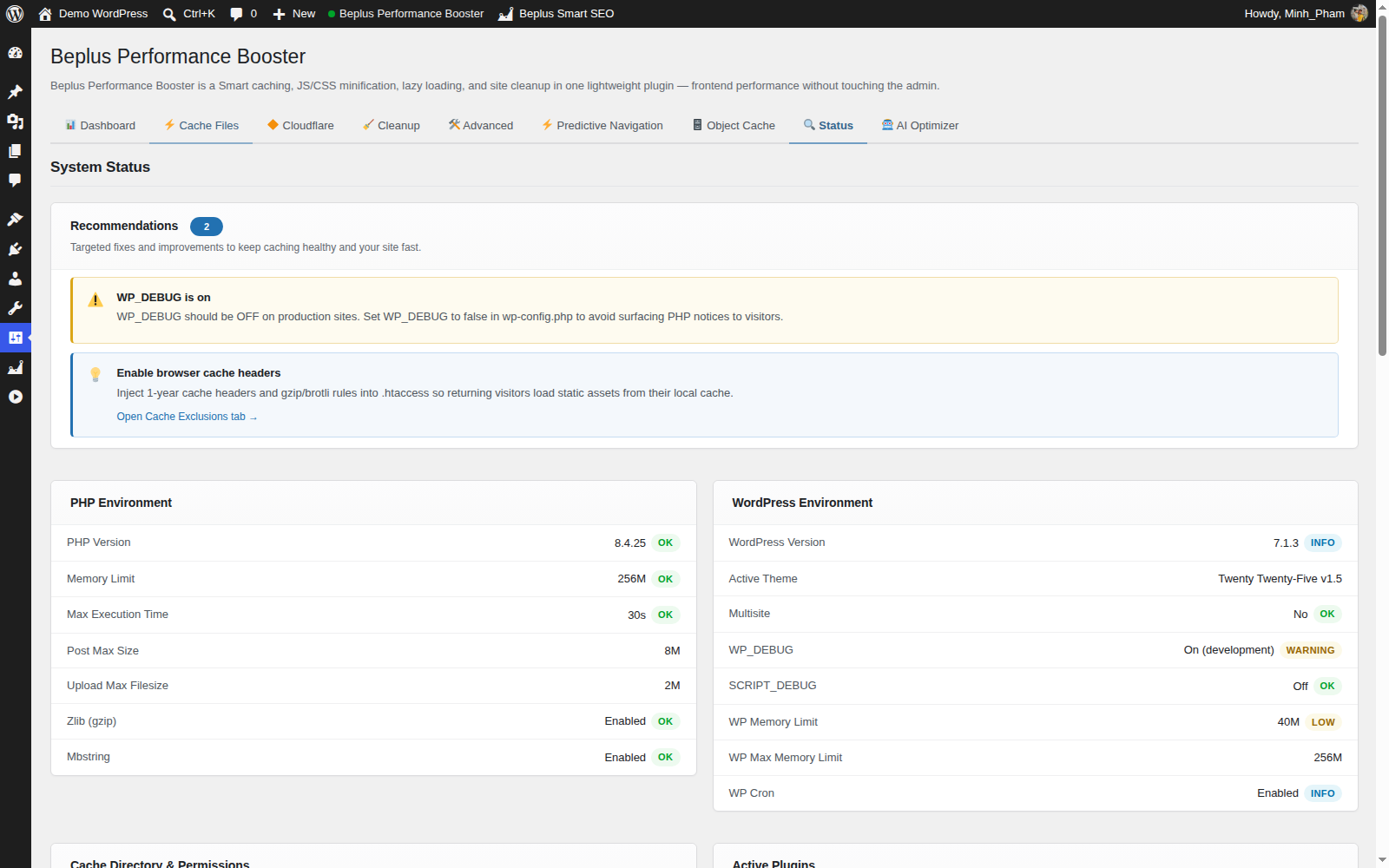
- Status tab now includes a "PHP Extensions" panel showing availability of Redis, Memcached, OPcache, cURL, GD/ImageMagick, mbstring, OpenSSL, zlib, and intl.
- Added QUIC.cloud (or any pull-zone) CDN support: new "CDN" settings tab rewrites enqueued CSS/JS, media library images (incl. srcset), and matching content/widget URLs to a configured CDN domain.
- New options: Enable CDN, CDN URL, File Types, Exclude from CDN.
- Added Remove Unused CSS: per-URL cached stripping of unused CSS rules, with Unused CSS Selector Safelist and Unused CSS URL Excludes options.
- Added Delay Mode option (Simple / Advanced) for JS delay.
- Added JS Release Delay (ms): fallback timer that releases delayed scripts after above-fold images and fonts load; 0 = user interaction only.
- JS delay now applies to all users including logged-in administrators.
- Renamed "Image-Load Wait" setting to "JS Release Delay (ms)" for accuracy.
- Initial release.
- JavaScript delay (Simple / Advanced mode) and defer with per-script exclude list.
- JS Release Delay: fallback timer that releases delayed scripts after above-fold images and fonts load;
0= user interaction only. - CSS inline minification and non-render-blocking preload swap.
- CSS file minification with content-hash disk cache.
- JS file minification with safe comment stripper (respects string literals, ASI).
- Native lazy loading for
<img>and<picture>elements. - IntersectionObserver polyfill for lazy load in older browsers.
- Skip first N images (LCP protection), exclude by class / ID / filename.
- Remove emoji, wp-embed, Gutenberg block CSS, WooCommerce assets on non-shop pages.
- HTML minification and comment/JS-comment/CSS-comment stripping.
- Browser cache and gzip/brotli rules injected into .htaccess via insert_with_markers().
- Admin bar "Beplus Performance Booster" menu with cache size/file count panel and one-click clear.
- Per-page cache-disable meta box on all public post type edit screens.
- Uninstall script cleans up all options, rules, cache files, and post meta.