
Biddut Revision Cleaner
| 开发者 | shahriarabiddut |
|---|---|
| 更新时间 | 2026年8月13日 20:37 |
| 捐献地址: | 去捐款 |
| PHP版本: | 8.1 及以上 |
| WordPress版本: | 7.0 |
| 版权: | GPL v2 or later |
| 版权网址: | 版权信息 |
详情介绍:
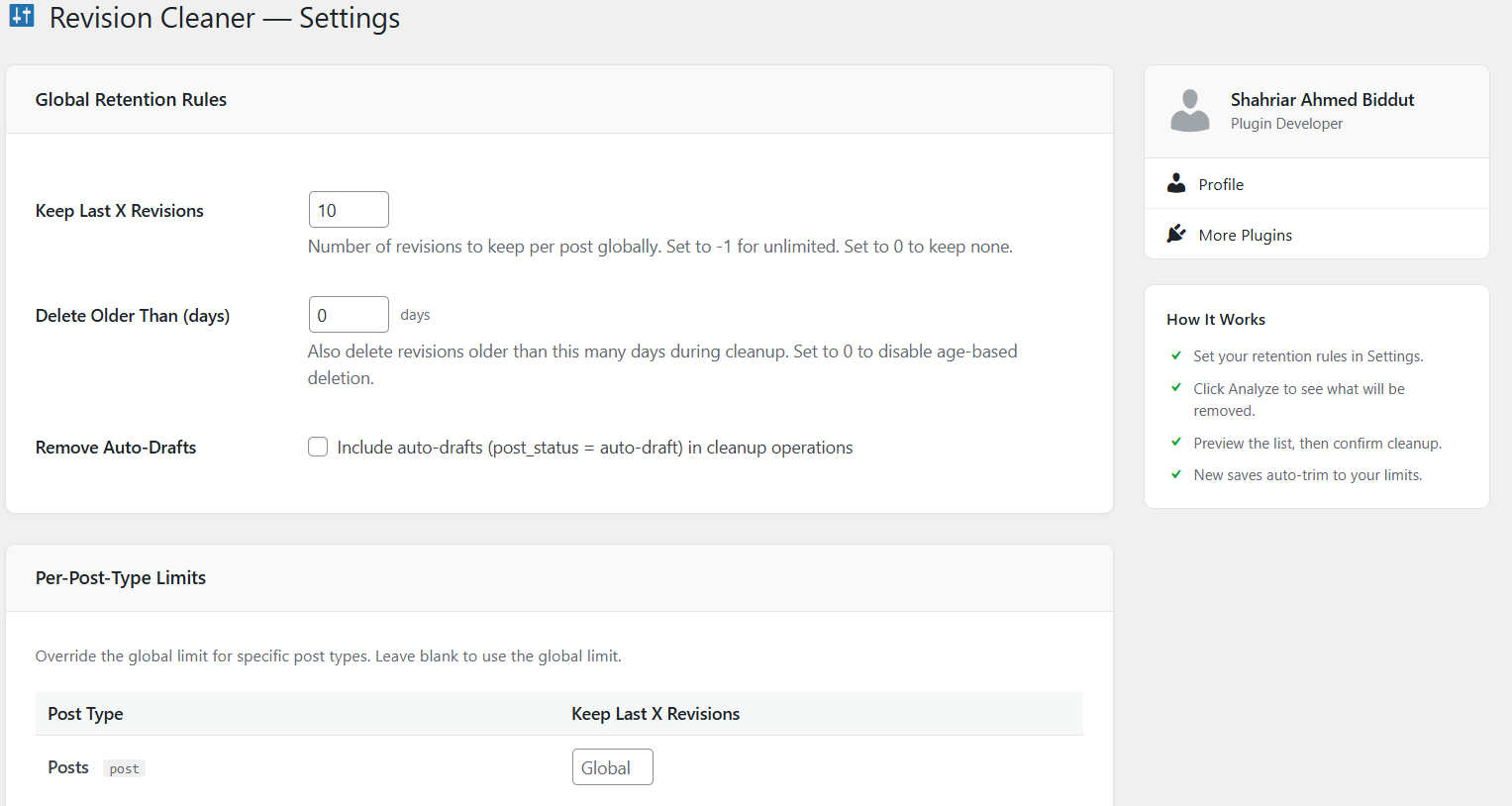
- Global Retention Limit — Keep only the last X revisions per post site-wide. Set to -1 for unlimited, 0 to keep none.
- Per-Post-Type Limits — Override the global limit for Posts, Pages, Reusable Blocks, FSE Templates, and any Custom Post Type individually
- Age-Based Deletion — Optionally delete revisions older than a configurable number of days during cleanup
- Auto-Draft Cleanup — Option to remove orphaned auto-drafts alongside revision cleanup
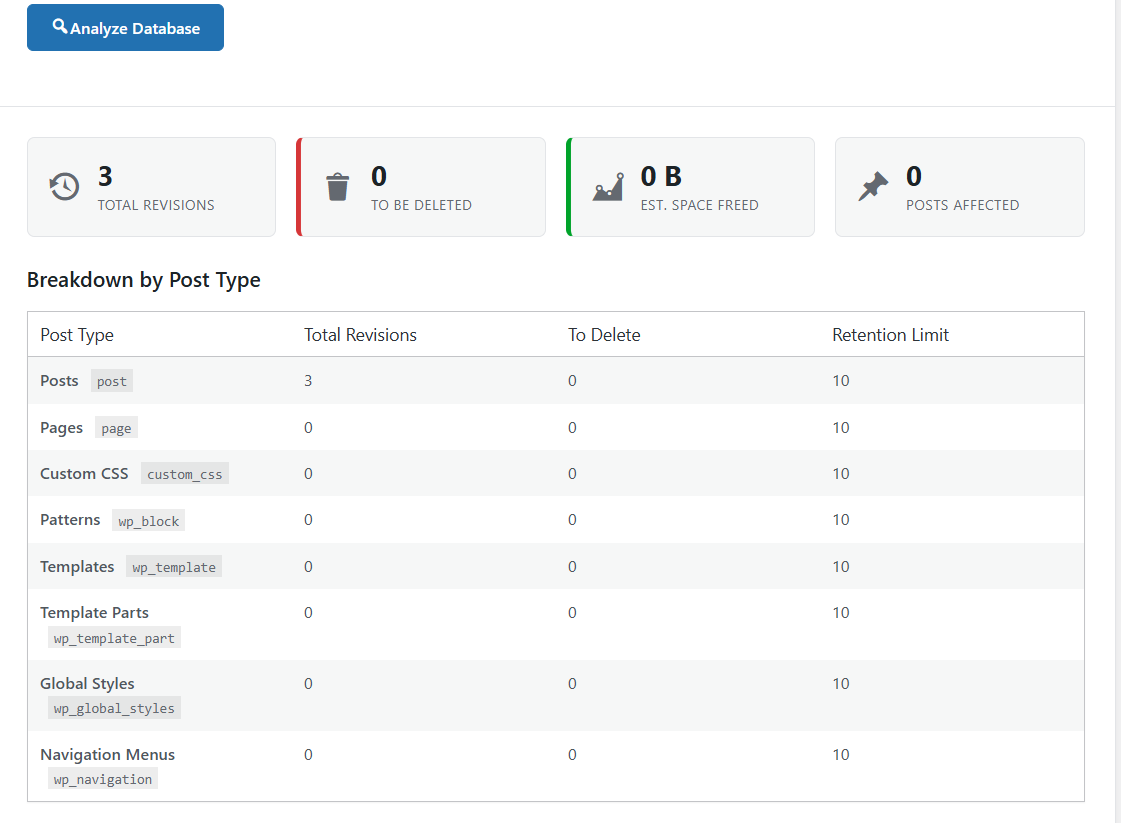
- Analyze First — Scan your full database before making any changes
- Live Stats — See total revision count, how many will be deleted, estimated space freed, and number of posts affected
- Breakdown Table — Per-post-type summary showing total revisions, revisions to delete, and active retention limit per type
- Preview List — See individual revisions (up to 50) queued for deletion — post title, date, and author shown
- Confirmation Prompt — Explicit confirmation step before any deletion takes place
- Enable Auto-Cleanup — Run cleanup automatically on a schedule, no manual action required
- Daily / Weekly / Monthly — Choose the default frequency that suits your site
- Preferred Run Hour — Set the hour of the day (0–23, site local time) when the scheduled cleanup fires. Choose an off-peak window to avoid busy traffic periods.
- Per-Post-Type Frequency — Each post type can have its own cleanup schedule independent of the global default. Options: Use Default, Daily, Weekly, Monthly, or Disabled (excludes the type from scheduled cleanup entirely).
- WP-Cron Integration — Runs silently via WordPress's built-in task scheduler
- Next Run Indicator — Settings page shows when the next scheduled cleanup will fire
- Enable Email Summary — Automatically receive a summary email after every scheduled or smart-triggered cleanup run
- Configurable Recipients — Enter one or more email addresses (comma-separated). Invalid addresses are silently skipped.
- Email Content — Summary includes: trigger type, revisions removed, auto-drafts removed, space freed, duration, and the date/time of the next scheduled run
- Manual cleanup runs do not trigger an email — only automated (scheduled or smart) runs send notifications
- SMTP Delivery (v1.2.0) — Configure an authenticated SMTP server (host, port, encryption, username/password, from name/email) so notifications still arrive when PHP's mail() function is blocked or unreliable on your host
- Send Test Email (v1.2.0) — Verify your email/SMTP setup with one click from the Settings page
- Delivery failure notice (v1.2.0) — If a notification fails to send, the reason is shown inline on the Email & SMTP settings tab
- Enable Smart Triggers — Master toggle for all threshold-based auto-cleanup
- Global Revision Count Threshold — Trigger a full site-wide cleanup when total revisions exceed a configured number
- Per-Post-Type Revision Thresholds — Each post type can have its own threshold. Only that type is cleaned when its individual count is exceeded — without touching the rest of the site
- Database Size Threshold — Trigger a full site-wide cleanup when the estimated revision table footprint exceeds a configured MB value
- Asynchronous Execution — The threshold check on each page load is lightweight (at most two queries). When triggered, the actual cleanup is dispatched to a background WP-Cron job so the current page request is never blocked
- Concurrency guard — A short-lived transient prevents multiple concurrent jobs from being queued simultaneously
- Evaluation order — Global count → Per-type counts → DB size (each stage only evaluates if the previous did not trigger)
- All three thresholds can be enabled simultaneously or independently
- Every smart trigger run is logged in Cleanup Logs and triggers an email notification if enabled
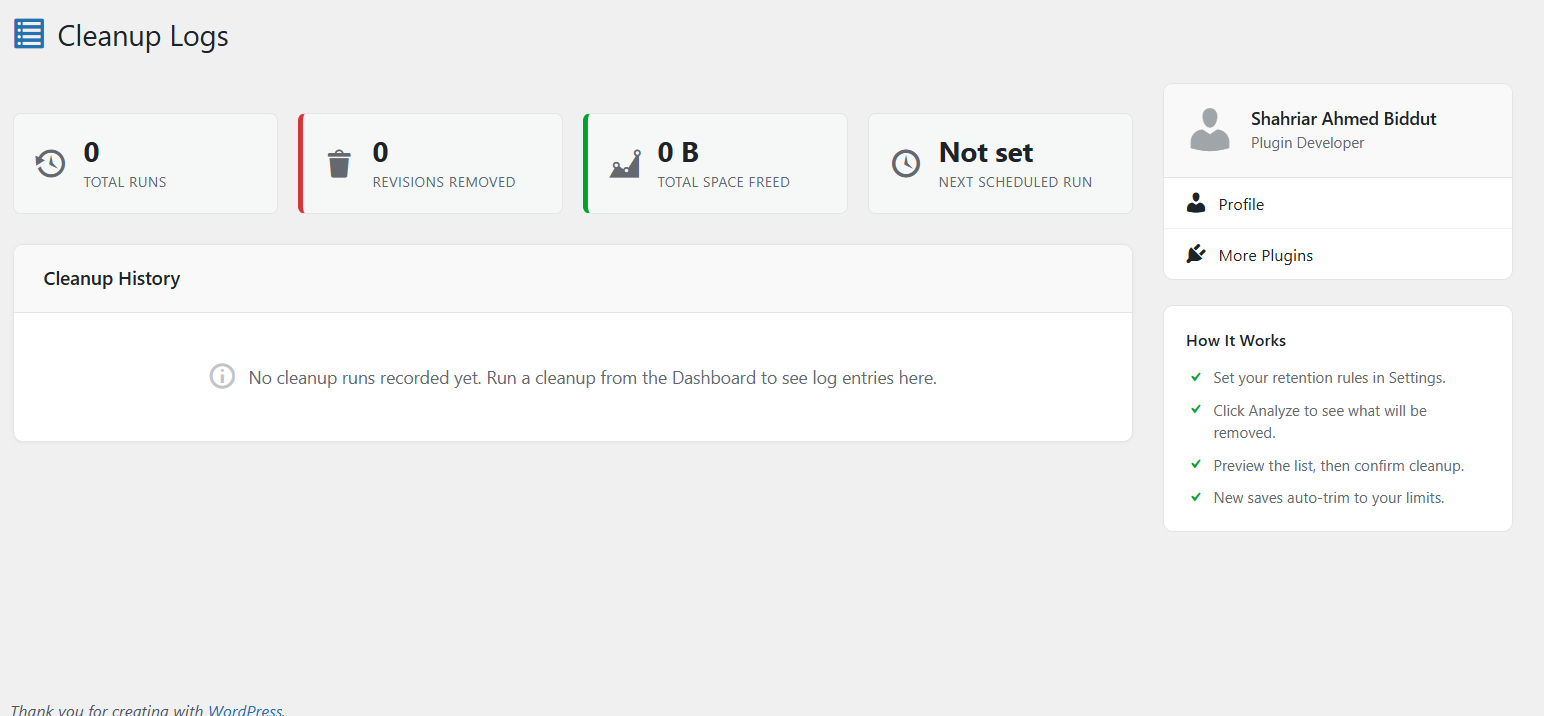
- Full Cleanup History — Every cleanup run (manual, scheduled, or smart-triggered) is logged
- Log Details — Date and time, trigger type, number of revisions deleted, auto-drafts removed, estimated space freed, and duration
- Aggregate Totals — Lifetime totals for runs, revisions cleaned, and space freed shown at the top of the logs page
- Paginated Log Table — Proper WordPress-style pagination with Prev/Next buttons, ellipsis for large page counts, and row count summary
- Trigger Badges — Color-coded badges distinguish Manual, Scheduled, and Smart trigger runs
- Clear All Logs — One-click log history reset with confirmation prompt
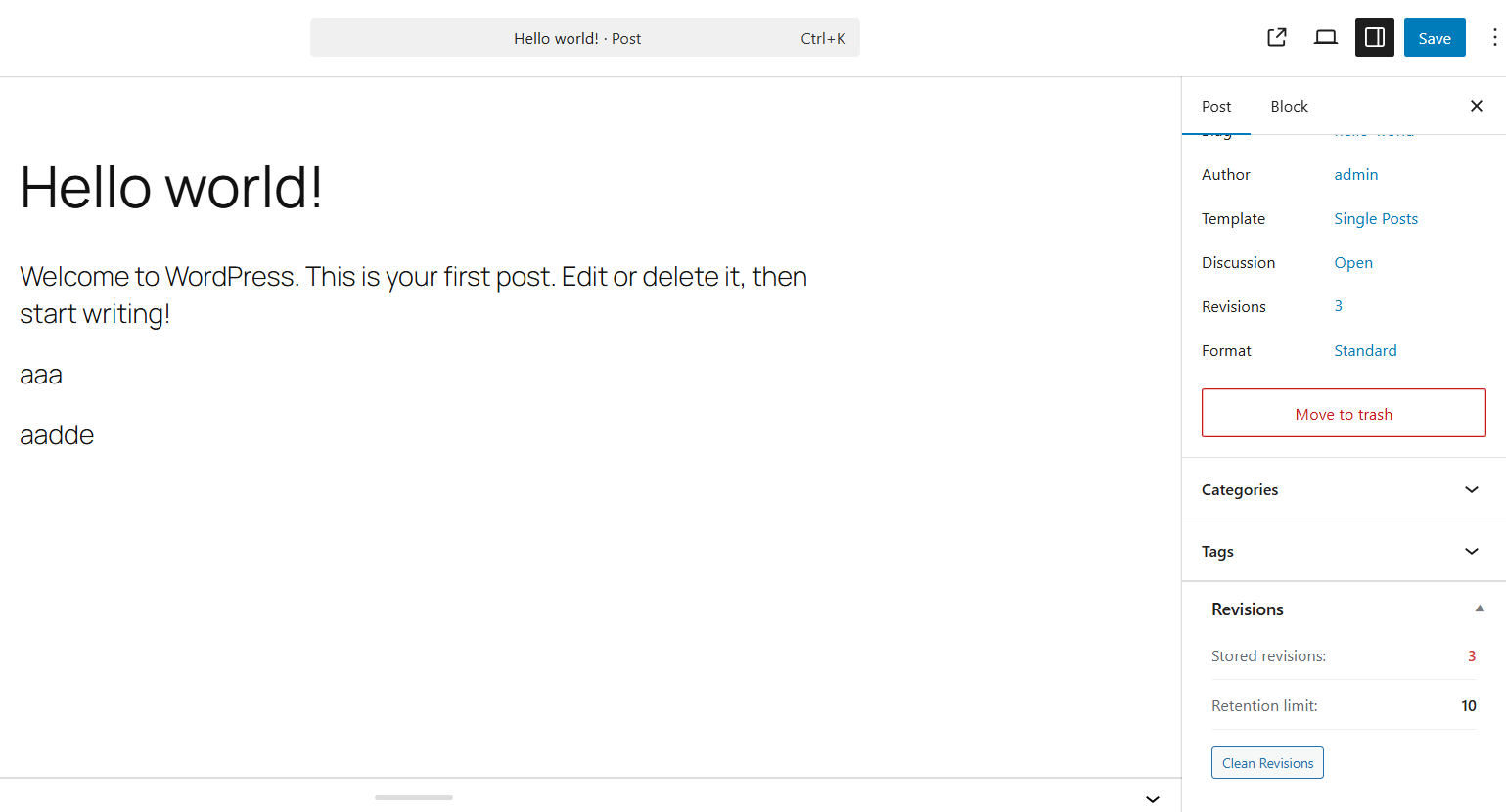
- Per-Post Cleanup Button — Remove excess revisions for a single post directly from the post editor sidebar, without running a full site cleanup
- Revision Count Meta Box — Displays the current stored revision count and active retention limit per post
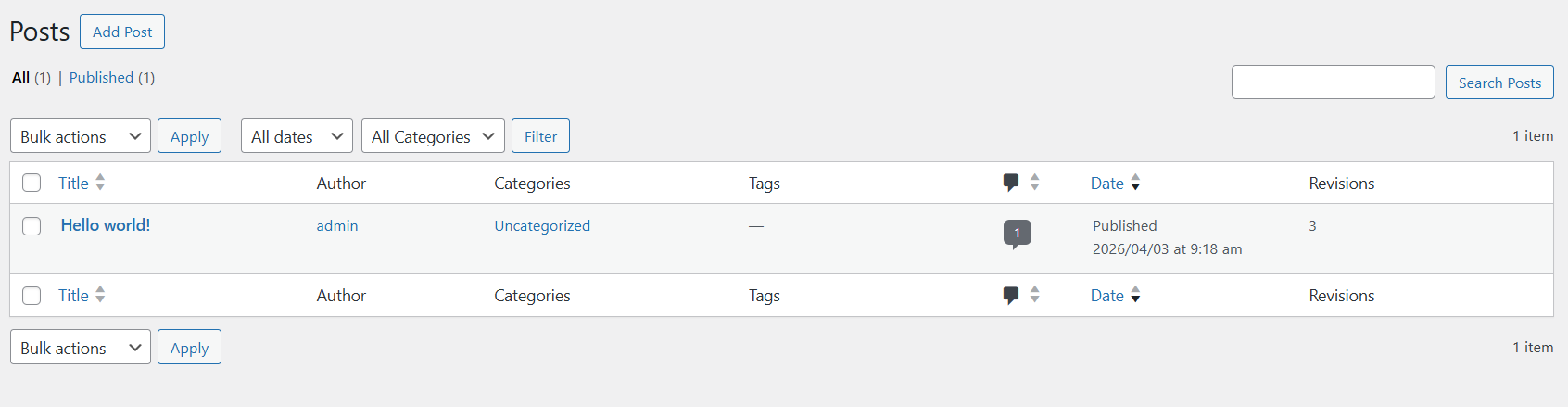
- Revision Count Column — See revision counts at a glance in the Posts, Pages, and Custom Post Type list tables
- Every time a post is saved, the plugin automatically trims revisions that exceed the configured retention limit for that post type — no manual cleanup needed for new saves
- Covers all revision-supporting post types via post_type_supports() — not just public ones
- Built using WordPress native APIs only — no external libraries or dependencies
- Nonce verification on every AJAX request and every admin page GET interaction
- current_user_can() checks before every privileged action — manage_options for admin operations, edit_post for per-post cleanup
- Full input sanitization (sanitize_text_field, absint, sanitize_key, sanitize_textarea_field, wp_unslash) and output escaping throughout
- PHP 8.1+ with declare(strict_types=1)
安装:
- Upload the plugin ZIP via Plugins → Add New → Upload Plugin
- Click Install Now then Activate Plugin
- Navigate to Revision Cleaner → Settings to configure your retention rules and optional schedule
- Go to Revision Cleaner (Dashboard) to run an analysis and cleanup
- Check Revision Cleaner → Cleanup Logs to review cleanup history
屏幕截图:
常见问题:
Is it safe to delete revisions?
Yes. WordPress revisions are historical snapshots of your content. Deleting old ones does not affect your published posts, pages, drafts, or any live content in any way. The plugin always shows you a full preview before any deletion occurs.
Which post types does this plugin cover?
All post types that support revisions — not just public ones. This includes Posts, Pages, Custom Post Types with revision support, and built-in WordPress types like Reusable Blocks (wp_block), Full Site Editing Templates (wp_template), Template Parts (wp_template_part), and Navigation menus (wp_navigation).
Will revisions be automatically managed going forward?
Yes, in two ways. First, the plugin trims excess revisions automatically every time a post is saved, enforcing your configured limits in real time. Second, if you enable Scheduled Cleanup or Smart Trigger Mode, periodic full-site cleanups run automatically.
What is the difference between the global limit and a per-post-type limit?
The global limit applies to all post types by default. Per-post-type limits override the global setting for specific types — for example, keep 10 revisions for Posts but only 3 for Pages, and use the global default for everything else. Leave a per-post-type field blank to fall back to the global limit.
What does "Delete Older Than" do?
During any cleanup run, revisions created more than the configured number of days ago will also be deleted, in addition to any that exceed the count-based limit. Set to 0 to disable age-based deletion entirely.
What are auto-drafts?
Auto-drafts are temporary copies WordPress creates automatically while you write a post. They accumulate over time and are safe to remove. Enable the "Remove Auto-Drafts" option in Settings to include them in cleanup runs.
Can I undo a cleanup?
No. Deletion is permanent. Always use the Analyze step to review exactly what will be deleted before running a cleanup.
What is the Preferred Run Hour setting?
When a scheduled cleanup is enabled, the first event will be anchored to the next occurrence of your chosen hour (in the site's local timezone). After that, the cleanup repeats at the configured frequency. Choosing an off-peak hour (for example, 02:00 at night) helps avoid running the cleanup during busy traffic windows. Note that WP-Cron is page-load driven, so the actual fire time may be a few minutes later than the target hour if no page load occurs exactly then.
What do Per-Post-Type Frequencies do?
Each post type can have an independent cleanup schedule. "Use Default" follows the global frequency. "Daily", "Weekly", or "Monthly" override it for that type only. "Disabled" excludes that type from scheduled cleanup entirely — it will only be cleaned manually or via Smart Trigger. When a per-type frequency is shorter than the global frequency, the cron fires at the shorter interval automatically.
Will I receive emails for every cleanup run?
No. Emails are sent only for Scheduled and Smart trigger runs, not for manual cleanup runs (since you are already watching the results in the browser). You can disable email notifications entirely from the Settings page.
What is Smart Trigger Mode?
Smart Trigger Mode watches two thresholds: total revision count and estimated revision table size. When either threshold is exceeded, a cleanup runs automatically in the background on a page load — without you needing to do anything. Every such run is logged in the Cleanup Logs page, and an email summary is sent if notifications are enabled.
What is Scheduled Cleanup?
Scheduled Cleanup uses WordPress's built-in WP-Cron to run a full cleanup automatically at your chosen frequency (daily, weekly, or monthly). It applies the same retention rules as a manual cleanup. Every scheduled run is logged, and an email summary is sent if notifications are enabled.
What trigger types appear in the Cleanup Logs?
Three: Manual (you clicked Run Cleanup), Scheduled (WP-Cron fired), and Smart (a threshold was exceeded automatically).
Does this affect site performance?
No. The plugin has zero frontend footprint — no scripts or styles are loaded for visitors. Admin operations only run during manual cleanup actions, scheduled cron events, or the lightweight smart trigger check on non-admin page loads.
Is the Revision Count column shown for custom post types?
The revision count column is added to all post type list tables that support revisions, including custom post types.
Where is the per-post cleanup button?
In the post editor sidebar. Open any post or page in the editor, look for the "Revisions" meta box in the sidebar, and you will see the current revision count, the active retention limit, and a "Clean Revisions" button to remove excess revisions for that post only.
更新日志:
- New: Settings page redesigned as tabs (Retention, Schedule, Email & SMTP, Smart Trigger) — fully responsive on tablet and mobile
- New: SMTP delivery — configure an authenticated SMTP server (host, port, encryption, username, password, from name/email) as a reliable alternative when PHP's mail() function fails or is blocked on the host
- New: Mail delivery failures are recorded and surfaced as an inline notice on the Email & SMTP settings tab, with guidance to enable SMTP
- New: "Send Test Email" button on the Email & SMTP tab to verify delivery after saving
- New: Help tab (top-right screen options) on the Settings page with step-by-step SMTP setup instructions for Gmail, Outlook/Office 365, and other providers
- New: "Settings" link added to the plugin's row on the Plugins list page
- Fix: Settings form now saves correctly — the save button previously targeted a form ID that didn't match the actual settings form, so no submit handler ever bound; both now use the same ID and the button is wired via the HTML5 form="" attribute
- Fix: Save Settings button now stays reliably sticky while scrolling — the whole sidebar column is sticky rather than just the button, so it no longer detaches after scrolling past a short sidebar
- Fix: Per-Post-Type Limits now show the current global limit as a live placeholder (e.g. "10") instead of a static "Global" label, and update instantly when the global limit changes
- Fix: PHPCS warning — $_POST['smtp_password'] is now sanitized with sanitize_text_field() before being stored
- Fix: readme.txt "Tested up to" corrected to a major.minor version (7.0) per plugin-check requirements
- Improvement: Per-Post-Type Limits, per-type schedule, and per-type smart-trigger tables now use the full card width on desktop and collapse into readable stacked rows on mobile instead of squeezing columns
- Improvement: Settings tabs no longer show a scrollbar — they wrap to a second row on narrow screens instead
- Improvement: Save Settings button moved into the sidebar (under "How It Works")
- Improvement: Save Settings button restyled with clearer visual weight
- Improvement: Consistent icon/text alignment across all buttons
- Improvement: Unauthorized AJAX settings-save requests now stop execution immediately instead of falling through
- Automation Update — Scheduled Cleanup enhancements and Email Notifications
- New: Smart Trigger Mode — per-post-type revision count thresholds; each type can have its own threshold and is cleaned independently without triggering a full site-wide cleanup
- New: Smart Trigger Mode — asynchronous execution via wp_schedule_single_event; the threshold check is at most two queries and the actual cleanup is deferred to a background WP-Cron job so the triggering page load is never blocked
- New: Smart Trigger concurrency guard via a short-lived transient prevents multiple jobs from being queued at the same time
- New: Smart trigger evaluation order: Global count threshold → Per-type count thresholds → DB size threshold (each stage only evaluated if the previous did not fire)
- New: Preferred Run Hour — schedule the cleanup to fire at a specific hour of the day (site local time) to avoid peak traffic windows
- New: Per-Post-Type Frequency — each post type can now have an independent cleanup schedule (Use Default / Daily / Weekly / Monthly / Disabled), fully independent of the global setting
- New: When any per-type schedule is shorter than the global frequency, the WP-Cron event automatically fires at the shorter interval so all schedules are honoured
- New: Per-type last-cleaned timestamps tracked separately so each type is cleaned at its own configured interval
- New: Post-Cleanup Email Notifications — receive an automatic email summary after every scheduled or smart-triggered cleanup run
- New: Email summary includes trigger type, revisions removed, auto-drafts removed, space freed, duration, and next scheduled run date/time
- New: Configurable recipient list (comma-separated email addresses); invalid addresses are silently skipped
- New: Email notifications apply to Scheduled and Smart trigger runs; manual cleanup runs do not trigger emails
- New: Invalid email warning shown inline in the recipients field when a saved address fails validation
- New: Sample email preview shown directly in the settings form so you can see the email format before enabling it
- Improvement: Schedule hour select shows both 24-hour and 12-hour (AM/PM) labels for clarity
- Improvement: First cron event is anchored to the next occurrence of the chosen hour in the site's local timezone
- Initial release
- Smart revision retention rules — global and per-post-type limits
- Covers all revision-supporting post types including wp_block, wp_template, wp_template_part, wp_navigation, and any CPT with revision support
- Age-based deletion — delete revisions older than X days during cleanup
- Auto-draft cleanup option
- One-click safe cleanup with analyze-first workflow
- Live stats grid: total revisions, deletable count, estimated space freed, posts affected
- Per-post-type breakdown table with active retention limit shown per type
- Preview list of revisions queued for deletion (up to 50 shown) with post title, date, and author
- Confirmation prompt before any deletion takes place
- Scheduled cleanup — daily, weekly, or monthly via WP-Cron
- Next scheduled run indicator on Settings page
- Smart Trigger Mode — auto-clean on revision count or DB size threshold breach
- Cleanup Logs — full history with date, trigger type, revisions deleted, auto-drafts removed, space freed, and duration
- Paginated log table with WordPress-style pagination (Prev/Next, ellipsis, row count summary)
- Color-coded trigger badges: Manual (grey), Scheduled (blue), Smart (green)
- Aggregate lifetime totals on Logs page: runs, revisions cleaned, space freed, next scheduled run
- Clear All Logs button with confirmation prompt
- Post-level cleanup button in the post editor meta box
- Revision count meta box in post editor showing stored count and active retention limit
- Revision count column in Posts, Pages, and Custom Post Type list tables
- Automatic revision trimming on every post save
- Admin sidebar with plugin info and quick tips
- Full nonce verification on all AJAX and paginated admin GET requests
- current_user_can() checks before every privileged action
- Full input sanitization and output escaping throughout
- PHP 8.1+ with declare(strict_types=1)