
CompanyStack – UK Company Search & Directory
| 开发者 | swilson23 |
|---|---|
| 更新时间 | 2026年10月13日 03:27 |
| PHP版本: | 7.4 及以上 |
| WordPress版本: | 7.1 |
| 版权: | GPLv2 or later |
| 版权网址: | 版权信息 |
详情介绍:
- Company Lookup Form. A finished form you can drop on any page: the visitor types a company name, picks it, and the company number, address, town and postcode are filled in. Choose which fields show and what they are called. An optional send button emails what the visitor entered to the site administrator; nothing is stored.
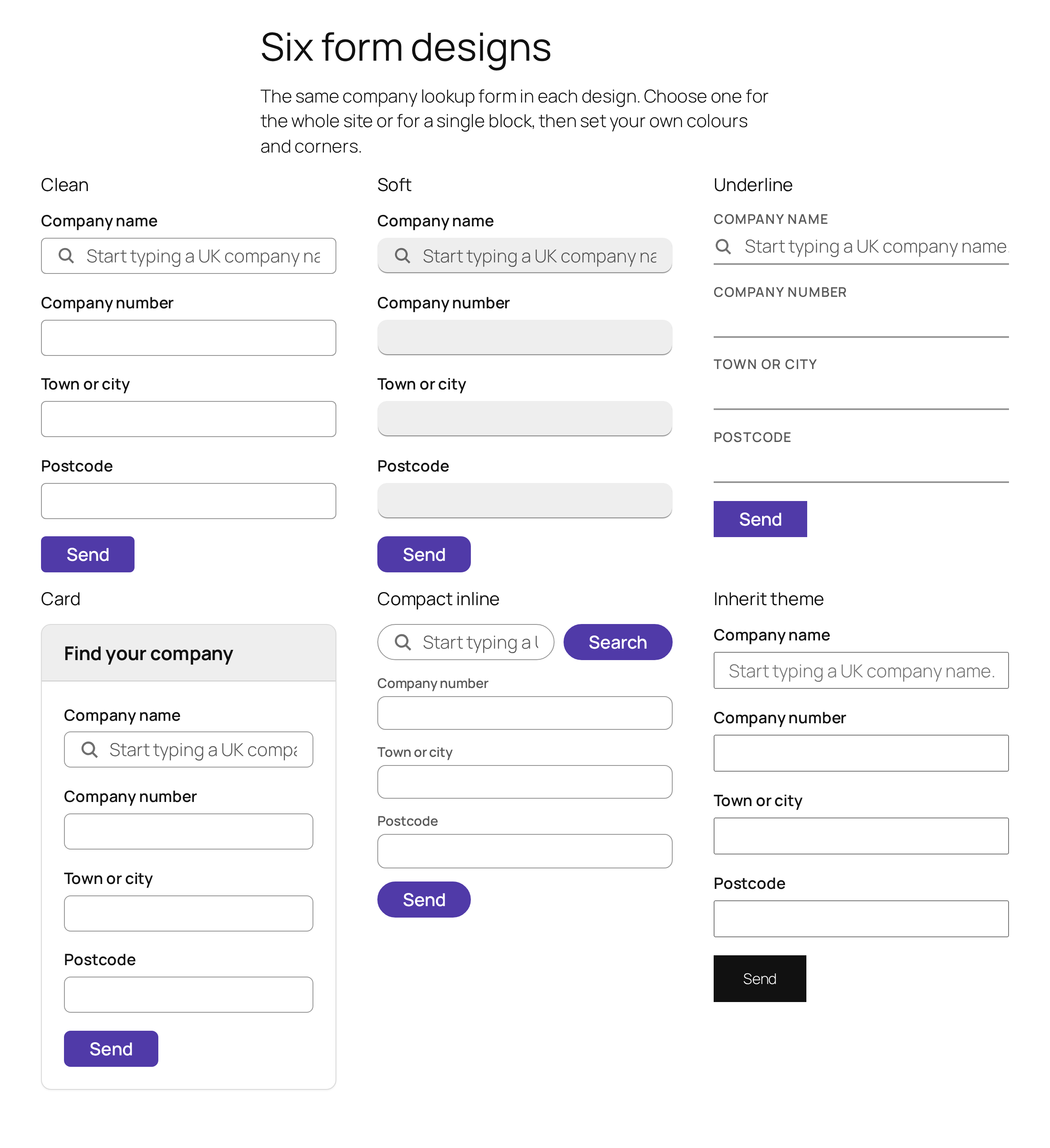
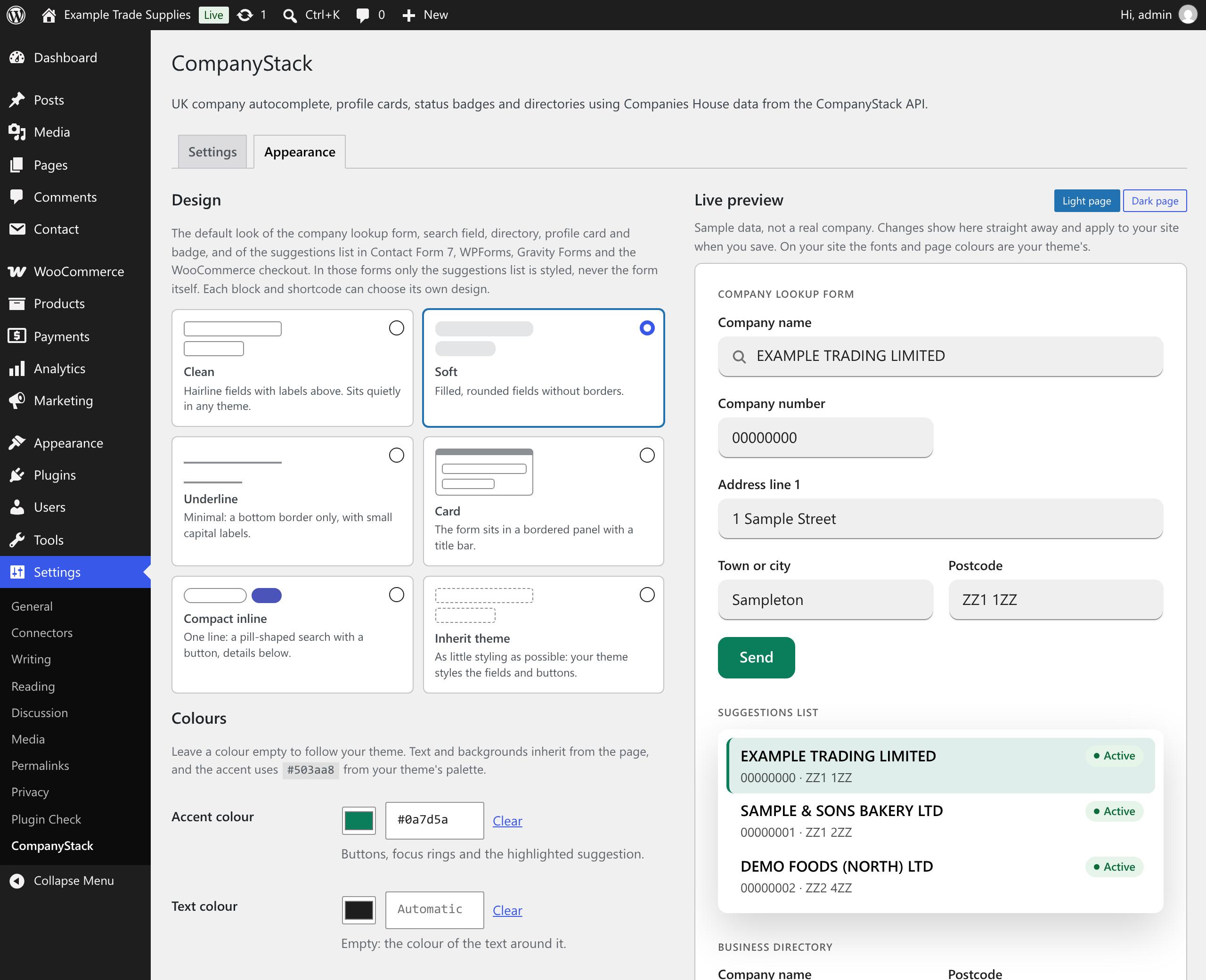
- Six designs, fully customisable. Clean, Soft, Underline, Card, Compact inline and Inherit theme. Set a site-wide design, accent colour, corner radius, field size and font under Settings › CompanyStack › Appearance, with a live preview and a warning when colours fail WCAG AA contrast. Every block has its own design controls, and the blocks support the editor's own colour, typography, spacing and border settings where they apply.
- Looks right in your theme. By default the plugin inherits your theme's font and text colour and picks an accent from its palette. It follows dark themes, right-to-left languages, high-contrast mode, 200% zoom and reduced-motion settings, with visible focus rings and 44-pixel touch targets. No external fonts or files are loaded.
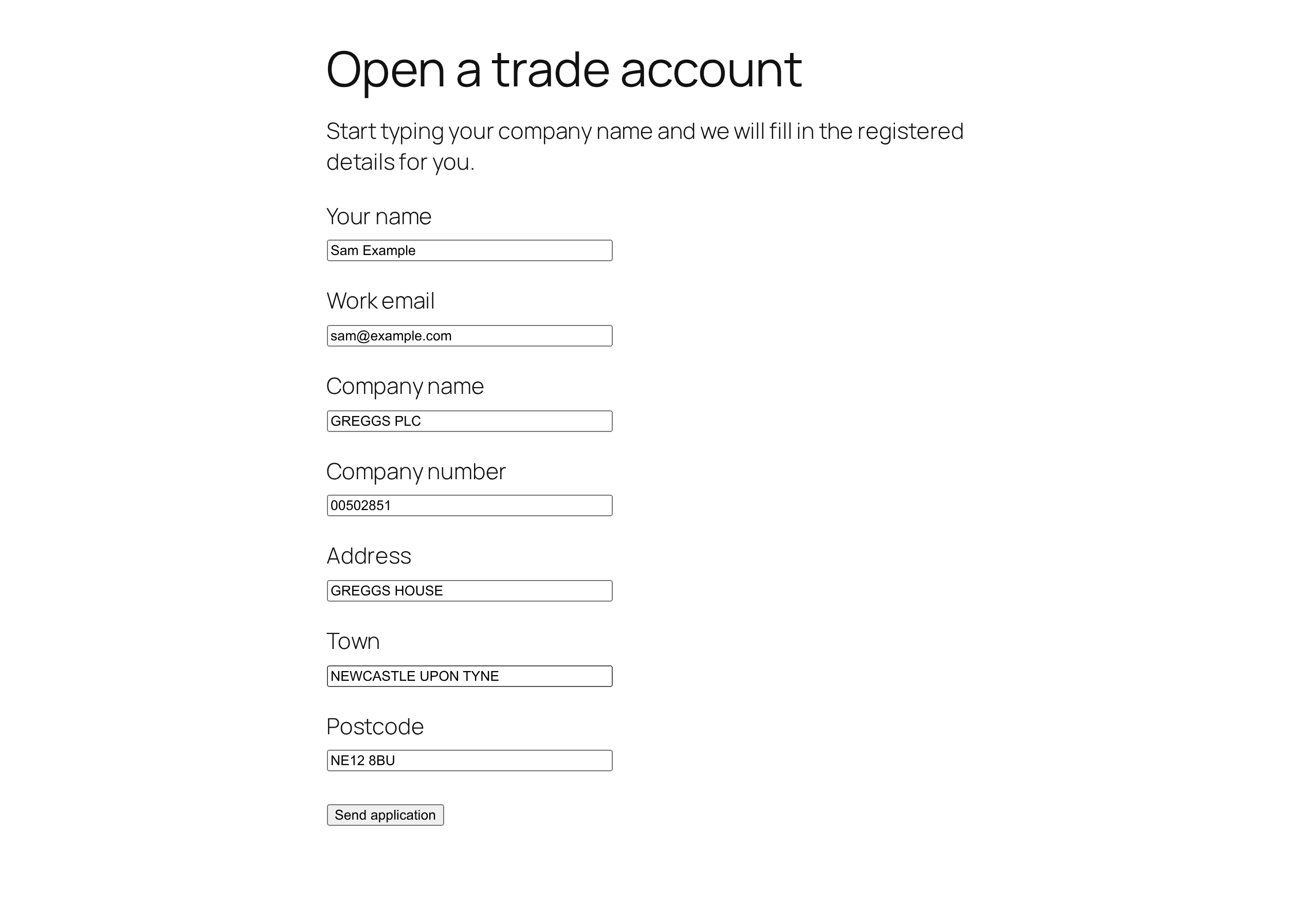
- Company autocomplete with form auto-fill. Works with the Company Search block or
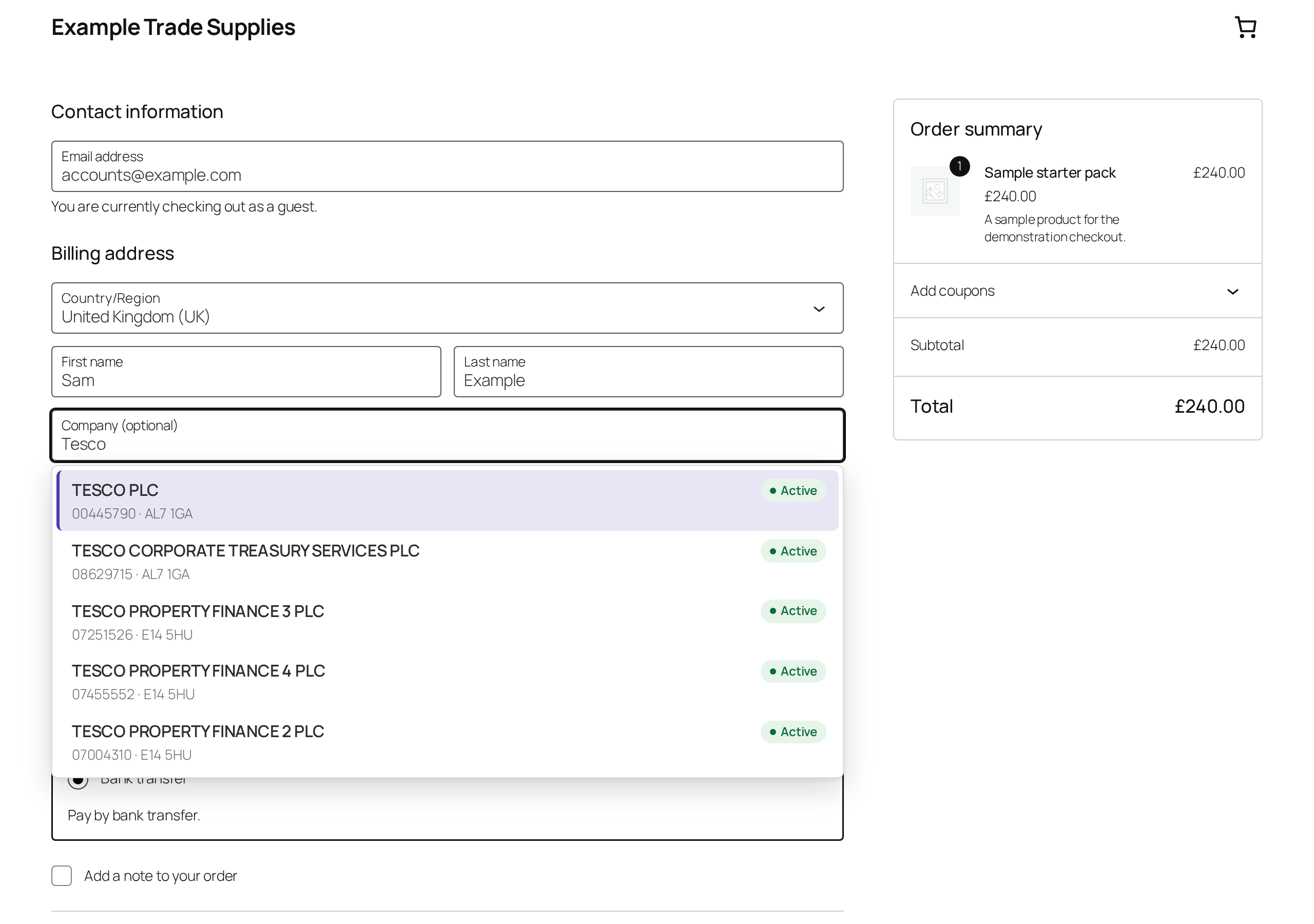
[companystack_search], with Contact Form 7, WPForms and Gravity Forms (add a CSS class to your fields), and with any HTML form (data attributes). In those forms only the suggestions list is styled, never the form itself. - WooCommerce B2B checkout. The checkout Company field suggests UK companies and fills in the address. An optional "Company registration number" field is filled automatically, validated and saved with the order. Works with both the Checkout block and the classic checkout, and is compatible with High-Performance Order Storage.
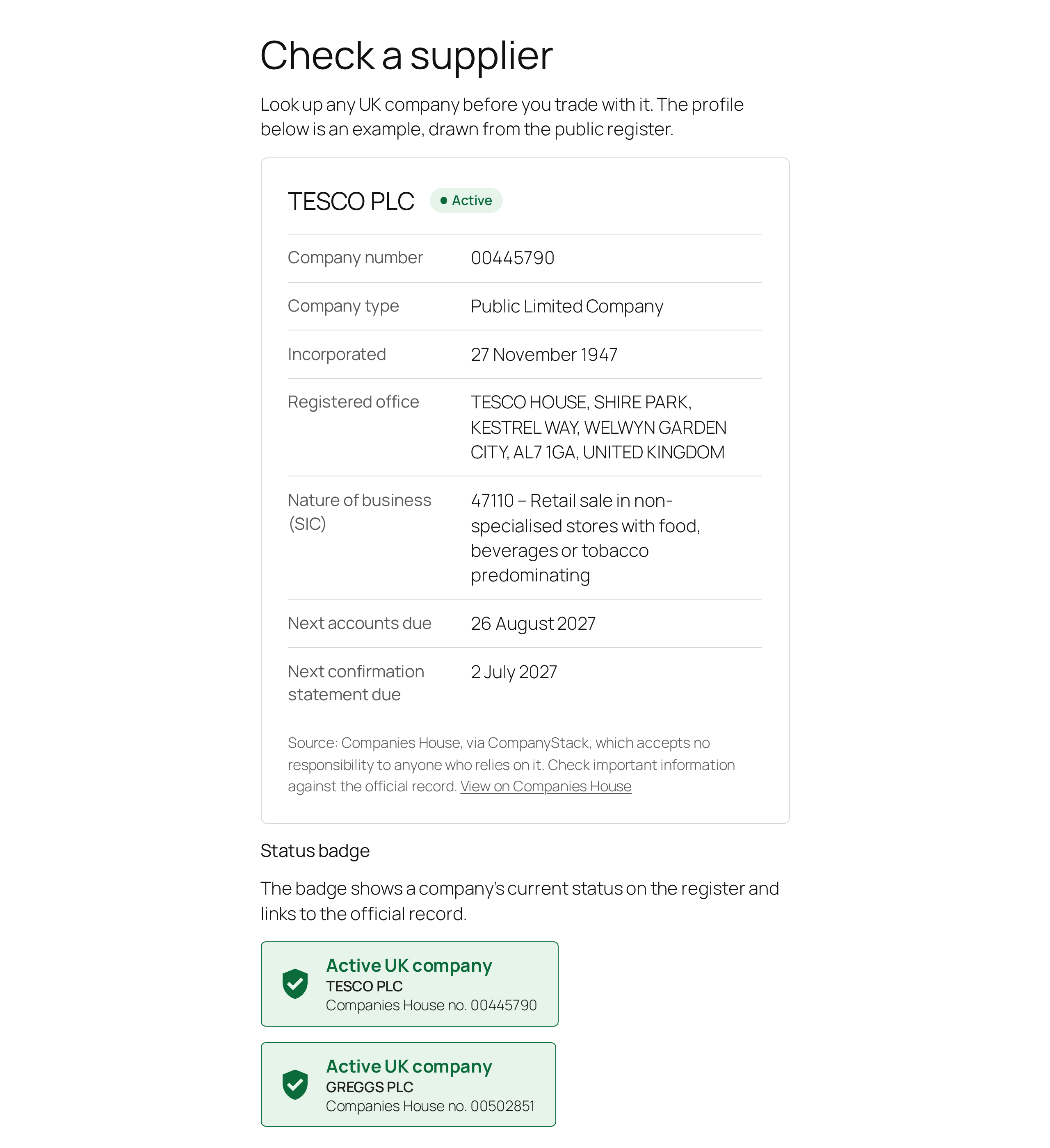
- Company profile card. Status, company number, type, incorporation date, registered office, nature of business (SIC codes) and accounts and confirmation-statement due dates, with overdue warnings.
- "Active UK company" status badge. Show visitors that your business (or a supplier, member or client) is registered and active at Companies House, linked to the official record. The badge hides itself automatically if the company stops being active. It shows the register entry only: it does not verify who runs the website it appears on.
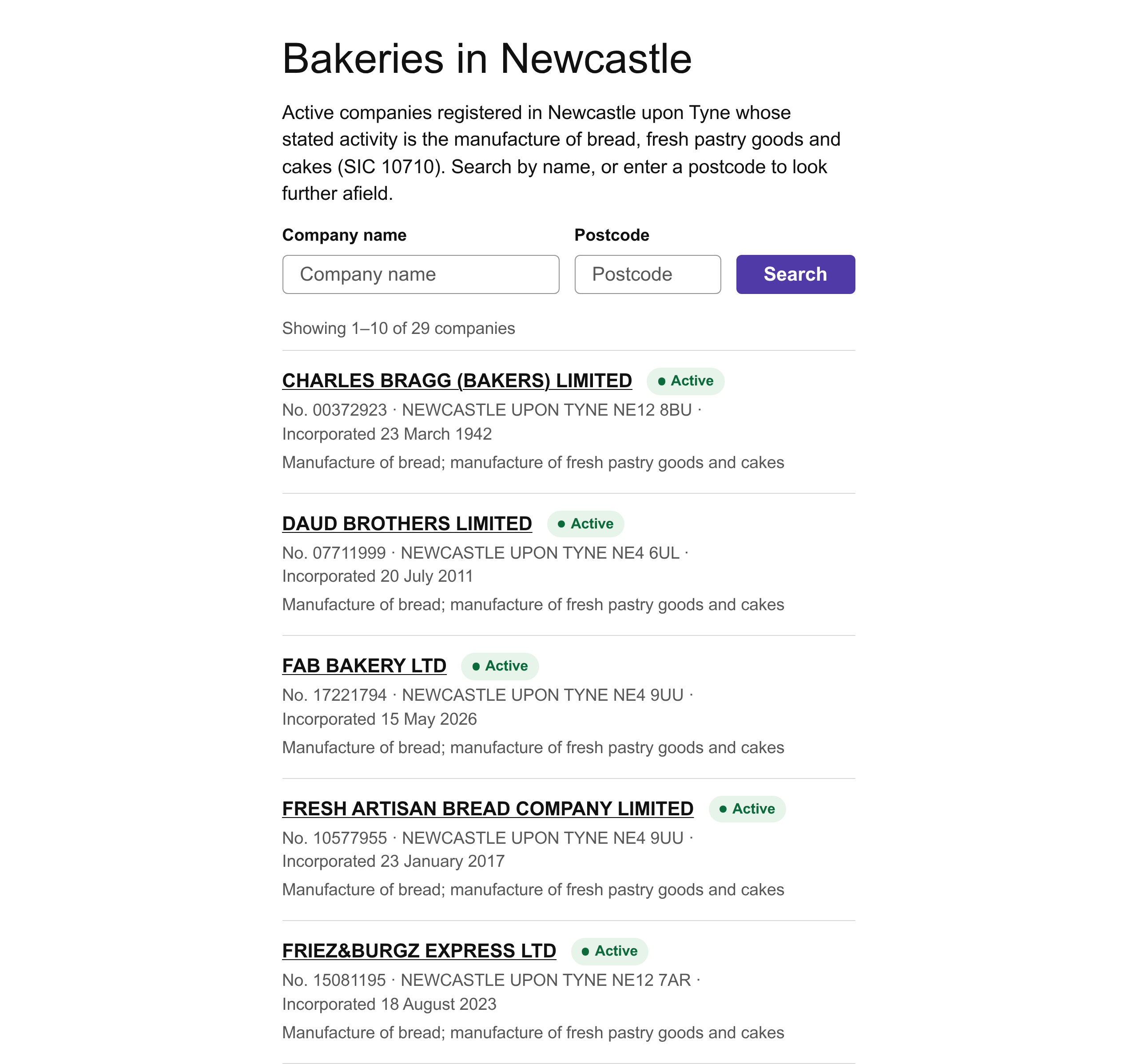
- UK business directory. List companies by SIC code, postcode area or district (for example NE or M1), town or name, with an optional visitor search form. Ideal for trade associations, local business listings and industry directories.
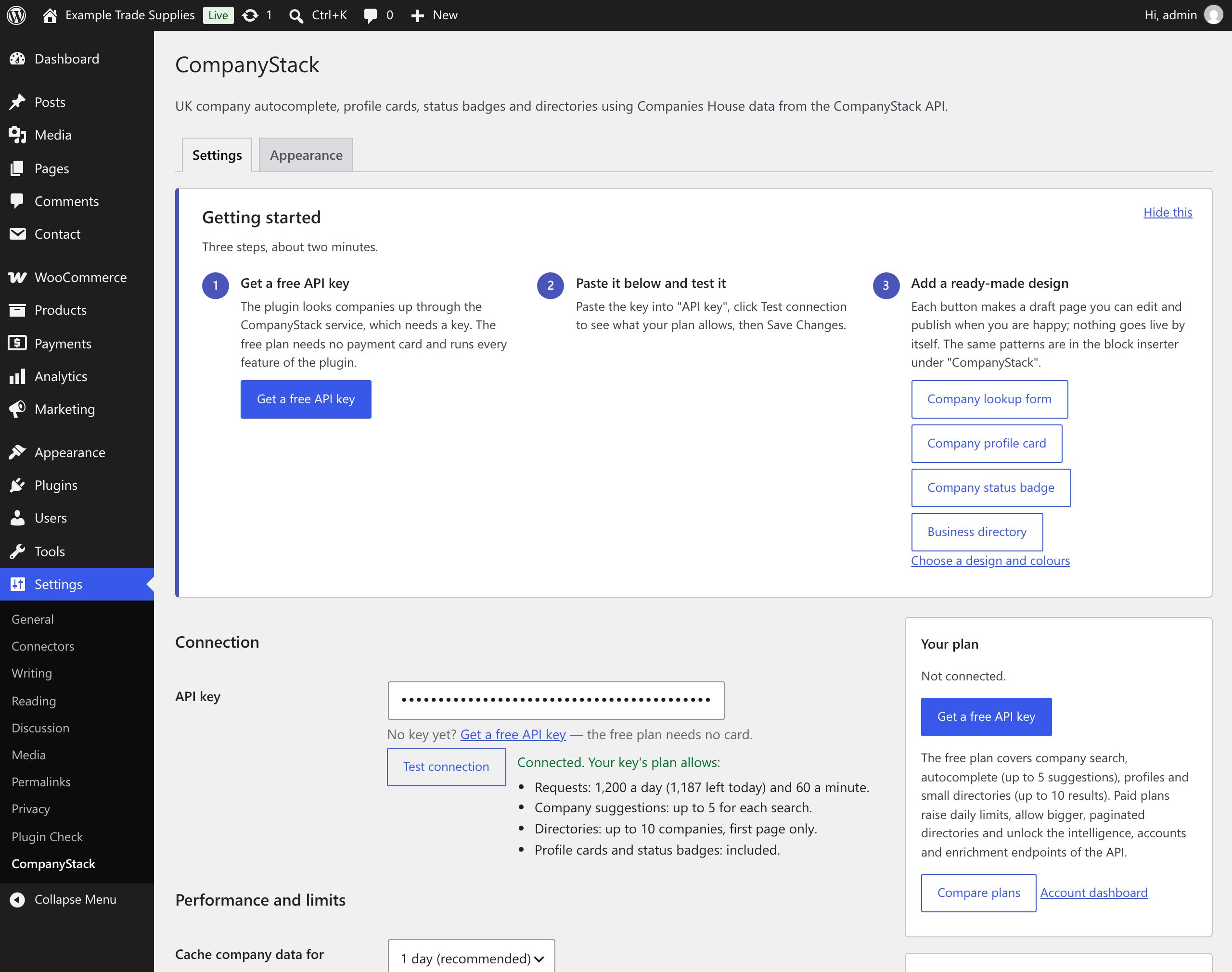
- Ready-made patterns. "Company lookup form", "Company profile card", "Company status badge" and "Business directory" are in the block inserter under CompanyStack, and one click on the settings screen makes a draft page from any of them.
- Your API key stays on your server. Browsers only talk to your own site's REST API, which calls CompanyStack server-side.
- Visitor searches are protected by a nonce and a per-visitor rate limit, so nobody can burn through your allowance.
- Answers are cached (one day by default) to keep pages fast and API usage low.
- No jQuery, no tracking of you or your visitors, no upsell notices (one welcome message on the Plugins screen, which you can dismiss), no front-end credit link unless you switch it on.
- Blocks are built with core WordPress components; there is no heavy JavaScript bundle.
安装:
- Install the plugin from Plugins › Add New (search for "CompanyStack"), or upload the
companystackfolder to/wp-content/plugins/, then activate it. - Get a free API key at companystack.co.uk/signup.
- Go to Settings › CompanyStack, paste the key, click Test connection, then Save Changes.
- Add a CompanyStack block (Company Lookup Form, Company Search, Company Profile Card, UK Company Status Badge or UK Business Directory), a pattern or a shortcode to any page. The "Getting started" panel on the settings screen can make a draft page for you.
- Optional: choose a design and colours under Settings › CompanyStack › Appearance.
wp-config.php instead of the database:
define( 'COMPANYSTACK_API_KEY', 'cs_your_key_here' );屏幕截图:
常见问题:
Is it free?
The plugin is free and open source (GPL). It needs a CompanyStack API key; the free plan requires no card and runs every feature, with smaller limits. Paid plans are for busier sites that need more requests per day or bigger directories.
Do I need an account?
Yes: a CompanyStack API key, which is free and needs no payment card. Get one at companystack.co.uk/signup, paste it under Settings › CompanyStack and click Test connection.
Is this an official Companies House plugin?
No. CompanyStack is an independent service and is not affiliated with, or endorsed by, Companies House. The data originates from the public register under the Open Government Licence v3.0, and each card and badge links to the official record.
How does the WooCommerce integration work?
With WooCommerce active, the checkout Company field suggests UK companies, and choosing one fills in address line 1 and 2, town, county and postcode, plus the company registration number field. The number is validated and saved with the order and shown in the order screen and emails. With the Checkout block, first make the Company field visible in the block's settings. Both options can be switched off under Settings › CompanyStack.
What is the Company Lookup Form?
A complete form supplied by the plugin, as the Company Lookup Form block or [companystack_form]. It has a company name field with suggestions and the fields it fills in: company number, two address lines, town, county, postcode and company status. In the block settings (or with shortcode attributes) you choose which fields show, their labels and the placeholder.
Switch on "Add a send button" (show_submit="true") and the form emails what the visitor entered to the site administrator. Nothing is saved in the database and nothing is sent to CompanyStack beyond the company search itself. Developers can handle submissions with the companystack_form_submitted action, change or reject them with the companystack_form_submission filter, change the email with companystack_form_email, or switch the email off with companystack_form_send_email. Without a send button the fields simply join any form they sit inside.
Styling: how do I change how it looks?
Three ways, from simplest to most flexible.
- Settings › CompanyStack › Appearance. Choose one of six designs (Clean, Soft, Underline, Card, Compact inline, Inherit theme), an accent, text and surface colour, corner radius, field size, font and how dense the suggestions list is, with a live preview. Leave colours empty to follow your theme.
- Per block or shortcode. Each block has a Design panel (design, corner radius, accent colour and, for blocks with fields, field size). The form, search and directory blocks also support the editor's own colour, typography, spacing and border controls; the profile card supports colour, typography and spacing. Shortcodes take
preset,size,accent,text,surfaceandradius, for example[companystack_form preset="card" accent="#0a7d5a" radius="12"]. - CSS custom properties. Set any of these on
:rootor on a wrapper:--cstk-accent,--cstk-on-accent,--cstk-text,--cstk-muted,--cstk-surface,--cstk-border,--cstk-radius,--cstk-font,--cstk-control-height,--cstk-shadow,--cstk-space, and for status colours--cstk-ok,--cstk-ok-bg,--cstk-bad,--cstk-bad-bg,--cstk-warn,--cstk-warn-bg.
cstk plus its design (cstk--clean, cstk--soft, cstk--underline, cstk--card, cstk--inline, cstk--inherit) and size (cstk--size-compact, cstk--size-regular, cstk--size-large). Fields are .cstk-input, labels .cstk-label, buttons .cstk-button. Components are .companystack-form, .companystack-search, .companystack-card, .companystack-badge, .companystack-directory and the suggestions list .companystack-ac (options .companystack-ac__option, name .companystack-ac__name, details .companystack-ac__meta).
Filters: companystack_suggestion_template (the markup of one suggestion, with the placeholders {company_name}, {company_number}, {status}, {postcode} and {sic_description}), companystack_autofill_targets (which fields are filled, by CSS selector), companystack_form_fields (the lookup form's fields) and companystack_theme_accent (the accent borrowed from your theme).
The suggestions list attached to Contact Form 7, WPForms, Gravity Forms and WooCommerce fields uses the site-wide design and takes its colours from the field it belongs to, so it suits dark themes without any set-up. The plugin never restyles those forms.
How do I auto-fill a Contact Form 7 form?
Add CSS classes to the form tags:
[text company class:companystack-autocomplete]
[text company-number class:companystack-fill-company_number]
[text address class:companystack-fill-address_line_1]
[text town class:companystack-fill-town]
[text postcode class:companystack-fill-postcode]
The script loads automatically on pages with such a form.
How do I auto-fill WPForms or Gravity Forms?
Open the field's Advanced settings and enter companystack-autocomplete in "CSS Classes" for the company name field, and companystack-fill-postcode (etc.) for the fields to fill. Available fields: company_number, address_line_1, address_line_2, town, county, postcode, country, address (the whole address on one line), company_status, company_type, date_of_creation and sic_codes.
How do I auto-fill my own HTML form?
Mark the fields with data attributes and add [companystack_autofill] (or the Company Search block) to the page:
<input name="company" data-companystack-autocomplete>
<input name="number" data-companystack-fill="company_number">
<input name="postcode" data-companystack-fill="postcode">
Developers can also map fields by CSS selector with the companystack_autofill_targets filter, and listen for the companystack:select browser event, whose detail.company holds the chosen company.
Which shortcodes are there?
[companystack_form preset="card" title="Find your company" show_number="true" show_address1="true" show_address2="true" show_town="true" show_county="false" show_postcode="true" show_status="false" show_contact="false" show_submit="false" submit_label="Send"](labels:label,placeholder,label_number,label_address1,label_address2,label_town,label_county,label_postcode,label_status)[companystack_search label="Company name" name="company_name" number_name="company_number" show_details="true"][companystack_card number="00445790" show_address="true" show_sic="true" show_filings="true"][companystack_badge number="00445790" show_name="true" link="true" show_inactive="false"][companystack_directory sic="62012" postcode="M1" town="" query="" status="active" limit="10" layout="list" show_filter="false"][companystack_autofill]
preset, size, accent, text, surface and radius.
Is my API key exposed to visitors?
No. The key is only used by your web server. Visitors' browsers call your site's own REST endpoints (/wp-json/companystack/v1/…), which are nonce-protected and rate limited per visitor.
What data does the plugin store?
Settings (including the API key) in one option, the appearance choices in a second, a note of which welcome messages you have dismissed in a third, cached API answers and short-lived rate-limit counters as transients, and, if enabled, the company registration number on WooCommerce orders. Company Lookup Form submissions are emailed, not stored. Deleting the plugin removes everything except order data.
What happens if the service is unavailable or my limit is reached?
Forms keep working as normal text fields, cards, badges and directories are simply left out for visitors, and administrators see an explanatory notice on the page and on the settings screen. The plugin pauses requests briefly after errors so it never slows your site down.
I use full-page caching. Will search still work?
Search requests carry a WordPress nonce, which is valid for up to 24 hours. If your cache keeps pages longer than about 12 hours, exclude the pages with company search forms (for example the checkout) or lower the cache lifetime. Cards, badges and directories are rendered on the server and cache normally.
My site is behind a proxy or CDN. Is rate limiting per visitor?
By default the limit uses the connecting IP address, which behind a proxy may be the proxy's. If your proxy sets a trusted header, return the real address with the companystack_client_ip filter.
更新日志:
- New: a design system for everything the plugin shows, built on CSS custom properties (
--cstk-*). It inherits your theme's font and colours, picks an accent from the theme palette, and respects dark themes, right-to-left languages, high-contrast mode, zoom and reduced motion. - New: six designs to choose from: Clean, Soft, Underline, Card, Compact inline and Inherit theme.
- New: Company Lookup Form block and
[companystack_form]shortcode, with a choice of fields, labels and an optional send button that emails the site administrator (nothing is stored; developers get an action and filters). - New: Settings › CompanyStack › Appearance, with a live preview, WCAG contrast warnings and a reset button.
- New: design controls on every block (design, corner radius, accent colour, field size) and support for the editor's colour, typography, spacing and border settings where they apply; matching shortcode attributes.
- New: four block patterns, a getting started panel that makes draft pages from them, and a "Test connection" result that says what your key's plan allows.
- New: the suggestions list shows each company's status as a pill, takes its colours from the field it belongs to, and can be made more compact. Home and End move to the first and last suggestion.
- New: filters
companystack_suggestion_template,companystack_form_fields,companystack_form_submission,companystack_form_email,companystack_form_send_emailandcompanystack_theme_accent; actioncompanystack_form_submitted. - Fixed: a letters-only postcode area such as NE or M is now accepted in the directory (it used to be dropped, so the directory ignored the filter), and a postcode that cannot be read now shows a message.
- Fixed: the suggestions list says "Searching UK companies…" while a search runs.
- Fixed: the directory search form is aligned and styled, grid entries no longer overlap, entries no longer break in the middle of a company number or date, the badge title is bold with a larger icon, the profile card gives its values more room, and the "Test connection" result sits beside its button.
- Changed: the stylesheet is loaded by the blocks and shortcodes themselves, so it appears only on pages that use them.
- Changed: the one admin notice (on the Plugins screen, until a key is saved) can now be dismissed.
- Readme: states plainly that CompanyStack is independent of Companies House.
- Clearer description: company data comes from the Companies House register as held and updated by CompanyStack, not from live Companies House calls.
- Tested with WordPress 7.1.
- The badge now reads "Active UK company" and, on hover, says it shows the register entry only and does not verify who runs the website. The block is renamed UK Company Status Badge; existing blocks and shortcodes keep working.
- The source line under cards and directories says the data comes from Companies House via CompanyStack, which accepts no responsibility to anyone who relies on it, and to check important information against the official record. This keeps sites that show CompanyStack data in line with its Terms (clause 15B).
- Rebuilt on the CompanyStack API at api.companystack.co.uk; the old API address no longer works, so please update.
- Security: the API key is no longer sent to browsers. All look-ups go through nonce-protected, rate-limited REST endpoints on your own site.
- New: blocks for Company Search, Company Profile Card, Verified UK Company Badge and UK Business Directory.
- New: WooCommerce checkout company autocomplete and company registration number field (Checkout block and classic checkout, HPOS compatible).
- New: auto-fill for Contact Form 7, WPForms, Gravity Forms and any HTML form via CSS classes or data attributes.
- New: business directory by SIC code, postcode area, town or name, with optional visitor search and pagination on paid plans.
- New: settings screen with connection test, plan limits, cache controls and a privacy-policy suggestion.
- Removed jQuery dependency, activation redirect and unused CRM code.
- Uninstall now removes all settings and cached data.
- Initial release.