
CompatNav – PHP Upgrade Checker
| 开发者 | mouadwp |
|---|---|
| 更新时间 | 2026年10月27日 15:42 |
| PHP版本: | 7.4 及以上 |
| WordPress版本: | 7.1 |
| 版权: | GPLv2 or later |
| 版权网址: | 版权信息 |
详情介绍:
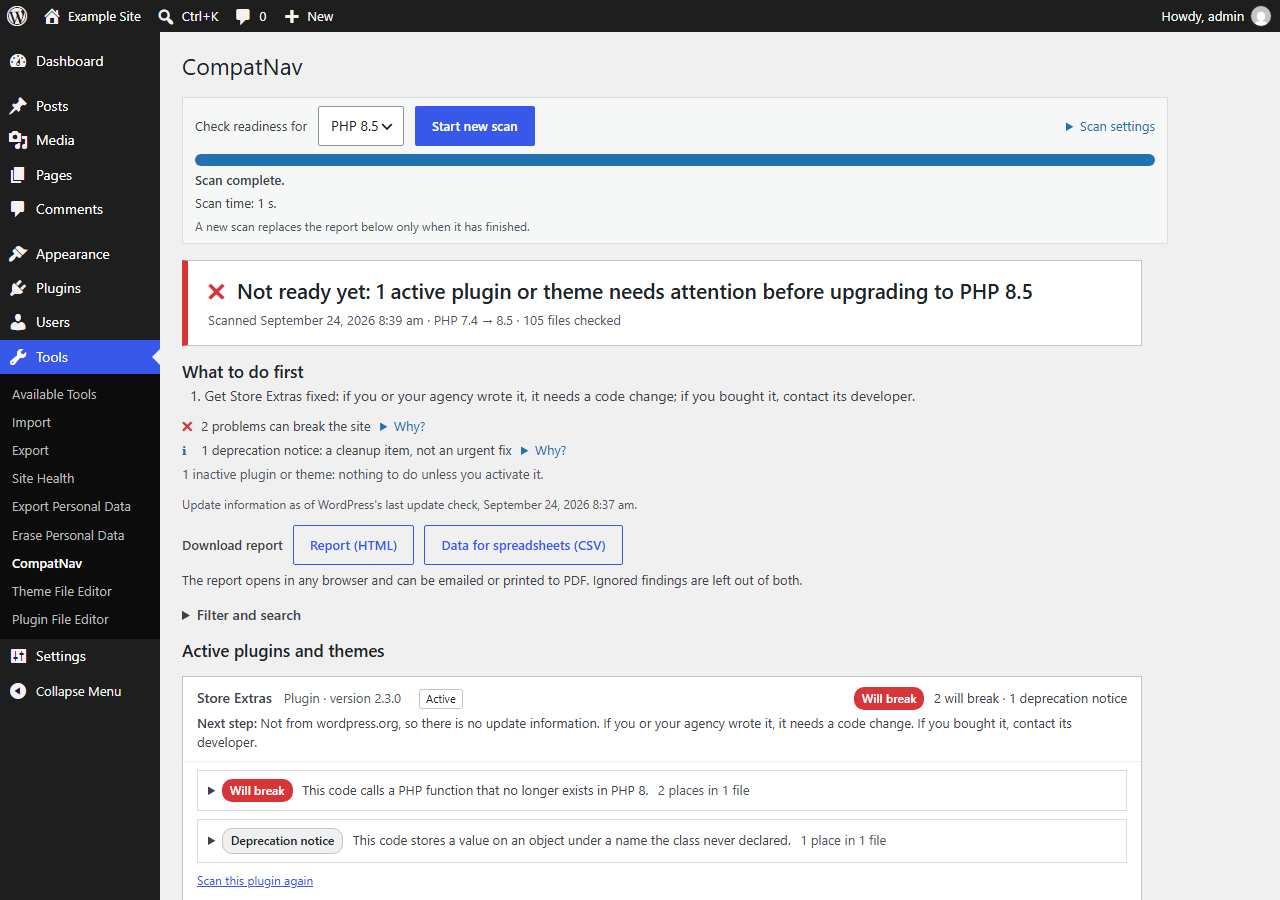
- One clear answer. "Safe to upgrade to PHP 8.5", or "Not ready yet" with a short "What to do first" list.
- How far you can upgrade. For each PHP version up to the one you chose: what will break and how many deprecation notices come up, and the highest version with nothing found that will break. All from one scan.
- Your PHP version's support status. Whether the PHP version your site runs still gets official fixes, and until when (dates from php.net, bundled with the plugin). Before your first scan, CompatNav suggests a target that keeps getting security fixes for at least a year.
- Checks for PHP 8.0 to 8.5. 58 checks for the changes each PHP version brings, from removed functions to new deprecations. You choose the version you plan to move to.
- Only what changes for your site. CompatNav compares the PHP version your site runs today with the one you choose, and reports only what changes between the two.
- Few, meaningful results. Each check looks for exact code patterns, and code that is already protected (by a PHP version check or
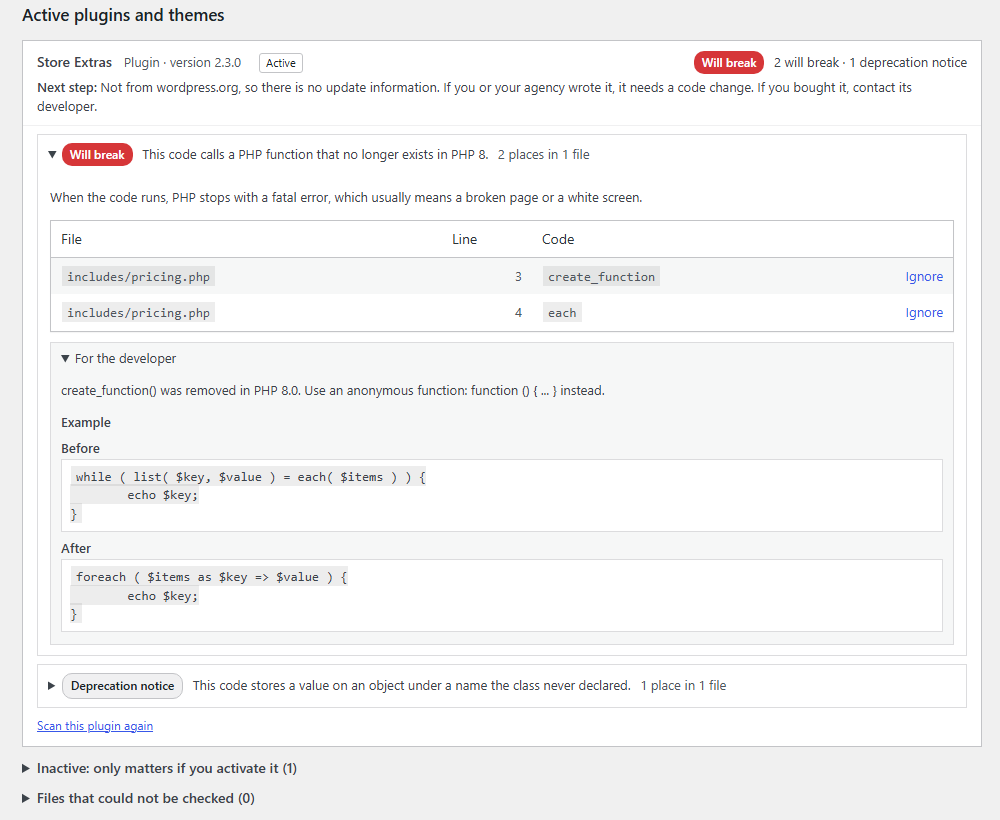
function_exists()) is not reported. On three of the most-installed plugins (about 7,800 PHP files together), it reports 27 items for an upgrade from PHP 7.4 to 8.5 (tested in September 2026), all of them deprecation notices, each checked by hand. - Next steps you can act on. For each plugin and theme: whether an update is available, whether the code looks like your own, a plain explanation of each issue, and a before/after example for whoever maintains the code.
- Reports to share. Download a self-contained HTML report (opens in any browser, can be printed to PDF) or a CSV file, or copy a plain-text summary for your developer or host (no site name or address in it; also as a .txt file).
- In Site Health too. WordPress's Site Health shows whether the last scan found something that will break. It reads the stored report and never starts a scan.
- Built not to hang. The scan runs in short background steps with a progress bar, and you can pause, resume or cancel it. A file too heavy for your server's memory is skipped and listed, and the scan continues. On a test site with 17 plugins and themes (8,374 PHP files), a full scan took about 70 seconds.
- The scan runs entirely on your own server. No code, file names or results are sent anywhere, and CompatNav makes no external requests.
- It only reads files. It never runs or changes the code it checks.
- It stores only scan results (file paths, line numbers, check IDs), never personal data.
安装:
- In your WordPress admin, go to Plugins → Add New Plugin and search for "CompatNav", or upload the zip file.
- Activate the plugin.
- Go to Tools → CompatNav. Next to "Check readiness for", choose the PHP version you plan to upgrade to, then click "Start scan".
屏幕截图:


常见问题:
Does CompatNav change my code?
No. It only reads the files of your plugins and themes. It never changes them, never runs them, and never applies fixes. The report explains each issue and shows a before/after example for whoever maintains the code.
Does any data leave my site?
No. The scan and the report are made entirely on your own server, and CompatNav makes no external requests. The "update available" information comes from WordPress's own update check, which is already stored on your site.
Does CompatNav protect my site from PHP2Shell or other PHP vulnerabilities?
No. Security fixes for PHP come from updating PHP itself on your server, which your host does (or you, if you manage the server). CompatNav helps you upgrade PHP safely: it shows which plugins and themes may break on the newer version, so you can update or replace them before the move.
My site is on PHP 7.4, 8.0 or 8.1. What should I do?
These versions get no official PHP releases any more, security fixes included. Ask your host whether they patch these versions themselves, and plan an upgrade to a supported version. PHP 8.2 gets security fixes only until 31 December 2026, so PHP 8.3 or newer gives you more time. Run CompatNav first to see what needs attention before the move. The PHP project lists its supported versions and their dates on php.net.
Do I need CompatNav to install a patch update (e.g. 8.3.x → 8.3.36)?
Usually not. Patch updates within the same version (for example from 8.3.30 to 8.3.36) fix bugs and security issues and don't remove features, so plugins and themes normally keep working as before. CompatNav is for moving to a newer version, for example from PHP 8.1 to 8.3.
Why so few results?
CompatNav reports only what changes when you move from your current PHP version to the one you chose, and only exact patterns, so it does not flag code that is fine. Code that already protects itself with a version check is not reported either. Well-maintained plugins often have nothing to report. The report always shows how many files were checked, so few results means good news, not a skipped scan.
What about files that could not be checked?
They are listed in the report with the reason, for example a file that already contains a syntax error, or one that is too large or too complex for your server's memory. Such a file may hide a problem, so while any active file could not be checked, the verdict says "Nothing found that will break" together with the number of files that could not be checked, never "Safe to upgrade".
Does it work on multisite?
Yes. On a multisite network only super admins can use CompatNav, because plugins, themes and the PHP version are shared by the whole network. The report is made per site, and "active" means active on that site.
For developers: can other plugins use CompatNav?
Yes. Since version 1.1.0, CompatNav has a small PHP API for add-ons: start a scan from a background task (WP-Cron or WP-CLI), run it in steps, read the report and its findings, and react when a scan finishes. Since 1.2.0 it can also check a piece of code, or a plugin or theme zip file without unpacking or installing it. It works on your own server like the rest of CompatNav: no HTTP endpoints and no external requests. Documentation: compatnav.com/docs/api.
Which PHP versions does it support?
It checks upgrades to PHP 8.0, 8.1, 8.2, 8.3, 8.4 and 8.5. CompatNav itself needs PHP 7.4 or newer and WordPress 6.0 or newer. If your site still runs PHP 7.2 or 7.3, ask your host to move it to PHP 7.4 first (current WordPress needs PHP 7.4 too), then use CompatNav to prepare the move to PHP 8.
更新日志:
- New: "How far can you upgrade?" For each PHP version up to the one you chose, what will break and how many deprecation notices come up, and the highest version with nothing found that will break. From the same scan, nothing extra to run.
- New: the PHP version your site runs and its official support status (active support, security fixes only, or no longer supported), from dates bundled with the plugin.
- New: before your first scan, the version picker suggests a PHP version that still gets security fixes for at least a year. You can still choose any version.
- New: "Copy for your developer or host": a plain-text summary of the report to paste into an email or a support ticket, or to download as a .txt file. No site name or address is included.
- New: a line in WordPress's Site Health (Tools → Site Health) and a CompatNav section on its Info tab. They read the last report and never start a scan.
- New: a "Run a scan" link on CompatNav's row of the Plugins screen.
- The checks, the scan and its results are the same as in 1.2.1.
- After a completed scan, the bottom of the report has one short line with links to the support forum and to the review form on wordpress.org.
- The description and FAQ now answer common questions about PHP security updates and PHP versions that no longer get official releases.
- Nothing else changes: the scan, its results and the downloadable reports are the same as in 1.2.0.
- Nothing changes in how you use CompatNav: the screen, the scan and the reports work as before.
- While a scan that was not started from the CompatNav screen is running (for example a scheduled scan), the progress box says who started it and that it continues in the background.
- "Started by" can now name the add-on that started a scan, e.g. "Started by: scheduled scan (name of the add-on)".
- Developer API 1.1 (see the FAQ): check a piece of code, check a plugin or theme zip file without unpacking it (kept apart from your report), list the report's files, and let an add-on show its own tab on the CompatNav screen. Without such an add-on, the screen has no tabs.
- More accurate PHP 8.2 check for "self::…" and "parent::…" callbacks: it now reports them only where PHP itself calls them (for example array_map() or call_user_func()), not every text that merely looks like one.
- Nothing changes in how you use CompatNav: the screen, the scan and the reports work as before.
- When a scan was not started from the CompatNav screen (for example by a scheduled task or a command-line tool), the report now says so, e.g. "Started by: scheduled scan". Scans started from the screen show nothing new.
- The downloadable report's section for developers now says how the scan ran: the PHP version it compared against, and the server's memory and time limits.
- Adds a developer API for add-ons (see the FAQ).
- Sturdier background scans: an unexpected error while reading one file no longer holds up the scan, and scans started from different places never mix up their progress.
- First release.