
PopupReply for Contact Form 7
| 开发者 | dudaster |
|---|---|
| 更新时间 | 2026年5月19日 19:23 |
| PHP版本: | 7.4 及以上 |
| WordPress版本: | 7.0 |
| 版权: | GPLv2 or later |
| 版权网址: | 版权信息 |
详情介绍:
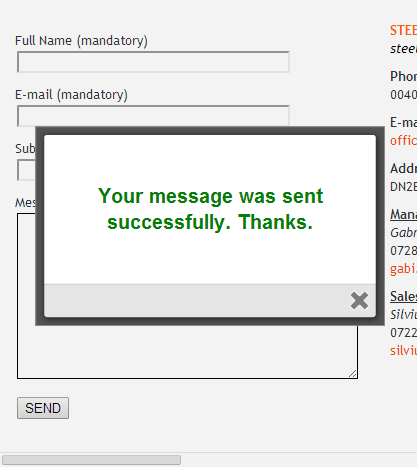
PopupReply for Contact Form 7 turns standard Contact Form 7 response messages into elegant, accessible modal popups that visitors cannot miss.
By default, Contact Form 7 prints its response message inside the form, where it is easy to miss, often appears below the fold, and is styled inconsistently by the theme. PopupReply replaces that experience with a clear, modern popup — without writing a single line of code.
Tested with WordPress 7
PopupReply has been tested with WordPress 7.0 and the latest Contact Form 7 release. It uses no deprecated APIs and is ready for the current WordPress core.
What it does
- Displays Contact Form 7 success, validation, error and spam messages in a popup modal.
- Uses the actual message returned by Contact Form 7 — nothing is hardcoded, so it respects whatever you configured under the form's Messages tab.
- Works with the modern Contact Form 7 events:
wpcf7mailsent,wpcf7invalid,wpcf7mailfailedandwpcf7spam. - Reuses a single modal for every response type, so there is no markup bloat on the page.
- De-duplicates rapid repeat events, so a single submission never opens the popup twice.
role="dialog", aria-modal, labelled and described for screen readers, with a focus trap, focus restored to the previously focused element on close, ESC support and an accessible close button. If you turn off every other way to close it, an OK button is shown automatically so the dialog can never trap the user.
Global settings
A global settings page under Settings → PopupReply lets you control:
- Enable or disable PopupReply site-wide.
- Which responses open a popup — all responses, success only, or errors only.
- Whether the original inline Contact Form 7 response also stays visible under the form.
- Close behaviour — close button, ESC key, click on the overlay, and optional auto-close with a configurable delay in seconds.
- Popup size — small, medium or large.
- Popup style — Clean, Rounded, Minimal or System.
- Disable the plugin CSS entirely, so you can style the modal yourself.
- Debug mode, which logs popup activity to the browser console.
- Use global settings, disable PopupReply for that form, enable it only for success messages, or enable it for all responses.
- Custom popup titles for success, error, validation and spam responses.
- A custom success message that replaces the Contact Form 7 message inside the popup.
- A custom CSS class added to the popup for that form only.
安装:
- Install and activate Contact Form 7.
- Install and activate PopupReply for Contact Form 7.
- Go to Settings → PopupReply to configure the global behaviour.
- Optionally open any Contact Form 7 form and use the PopupReply tab for per-form overrides.
屏幕截图:

常见问题:
Does this still need Colorbox or Lightbox Plus?
No. Those dependencies have been removed completely. The plugin is now self-contained.
Does it require jQuery?
No. The modal is built with vanilla JavaScript.
What happens if Contact Form 7 is not active?
The plugin stays safely inactive on the frontend, shows an admin notice, and the settings page remains accessible. It never causes PHP errors.
Can I disable the popup for a single form?
Yes. Open the form in the Contact Form 7 editor, go to the PopupReply tab and choose "Disable PopupReply for this form".
Can I use my own CSS?
Yes. You can disable the plugin CSS entirely from the settings page, or add a custom CSS class per form.
更新日志:
2.0.0
- Complete rewrite and rebrand to "PopupReply for Contact Form 7".
- Removed the Colorbox and Lightbox Plus Colorbox dependencies.
- Removed the jQuery requirement; the modal is now dependency-free vanilla JavaScript.
- Added an accessible modal dialog with focus trap, ESC, overlay click and auto-close.
- Added support for success, validation, error and spam responses.
- Added a global settings page and per-form settings inside the Contact Form 7 editor.
- No external or CDN assets.
- Tested with WordPress 7.0 and refreshed plugin assets (banner, icon and screenshots).
- Initial release (Colorbox-based).