
Course Access Debugger for LearnDash
| 开发者 | rajaamanullah |
|---|---|
| 更新时间 | 2026年10月27日 20:21 |
| PHP版本: | 7.4 及以上 |
| WordPress版本: | 7.1 |
| 版权: | GPLv2 or later |
| 版权网址: | 版权信息 |
详情介绍:
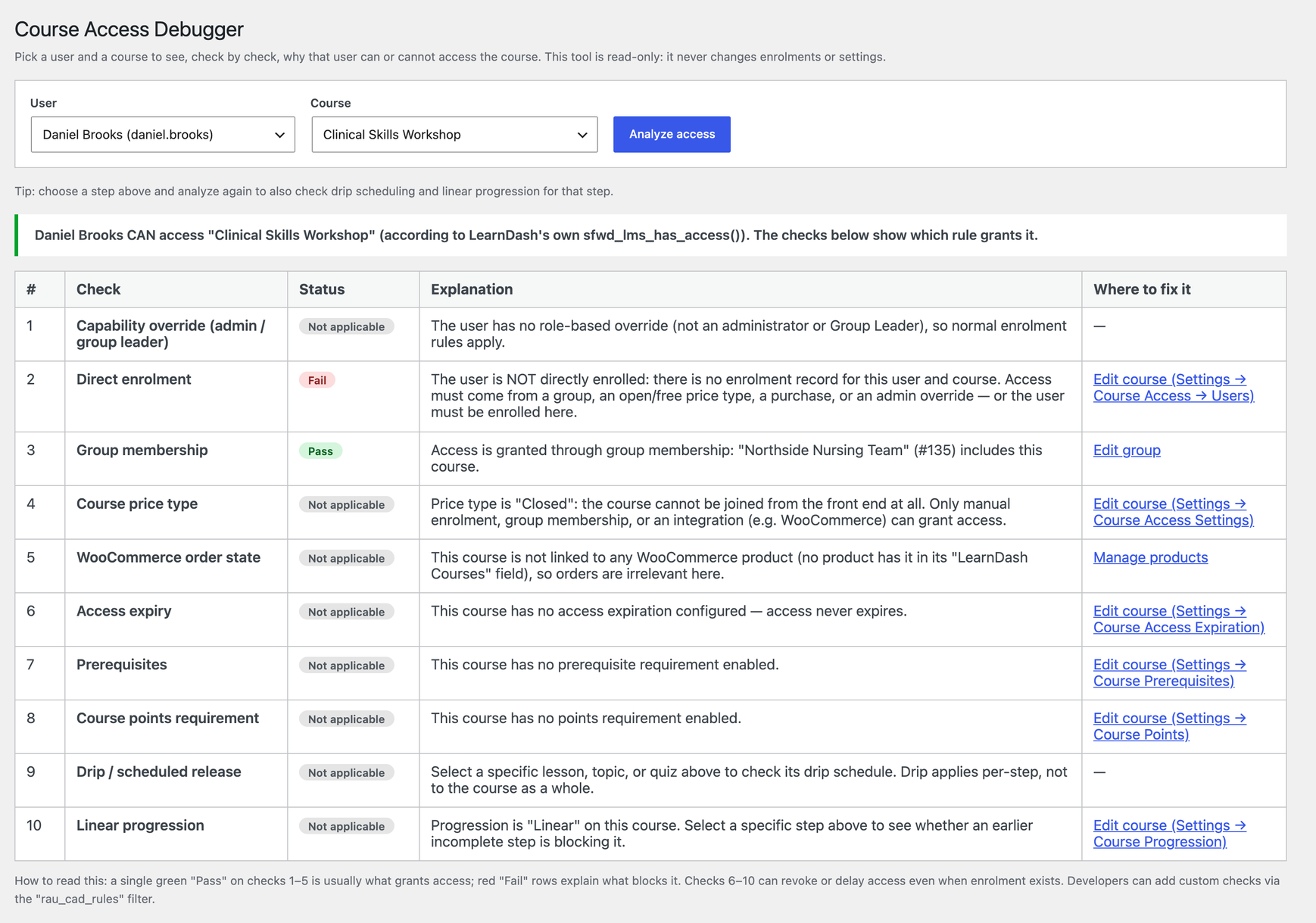
sfwd_lms_has_access() function, so it always matches what the learner actually sees. Below it, the full access-decision chain:
- Capability override — is this an administrator or a group leader who bypasses the normal rules?
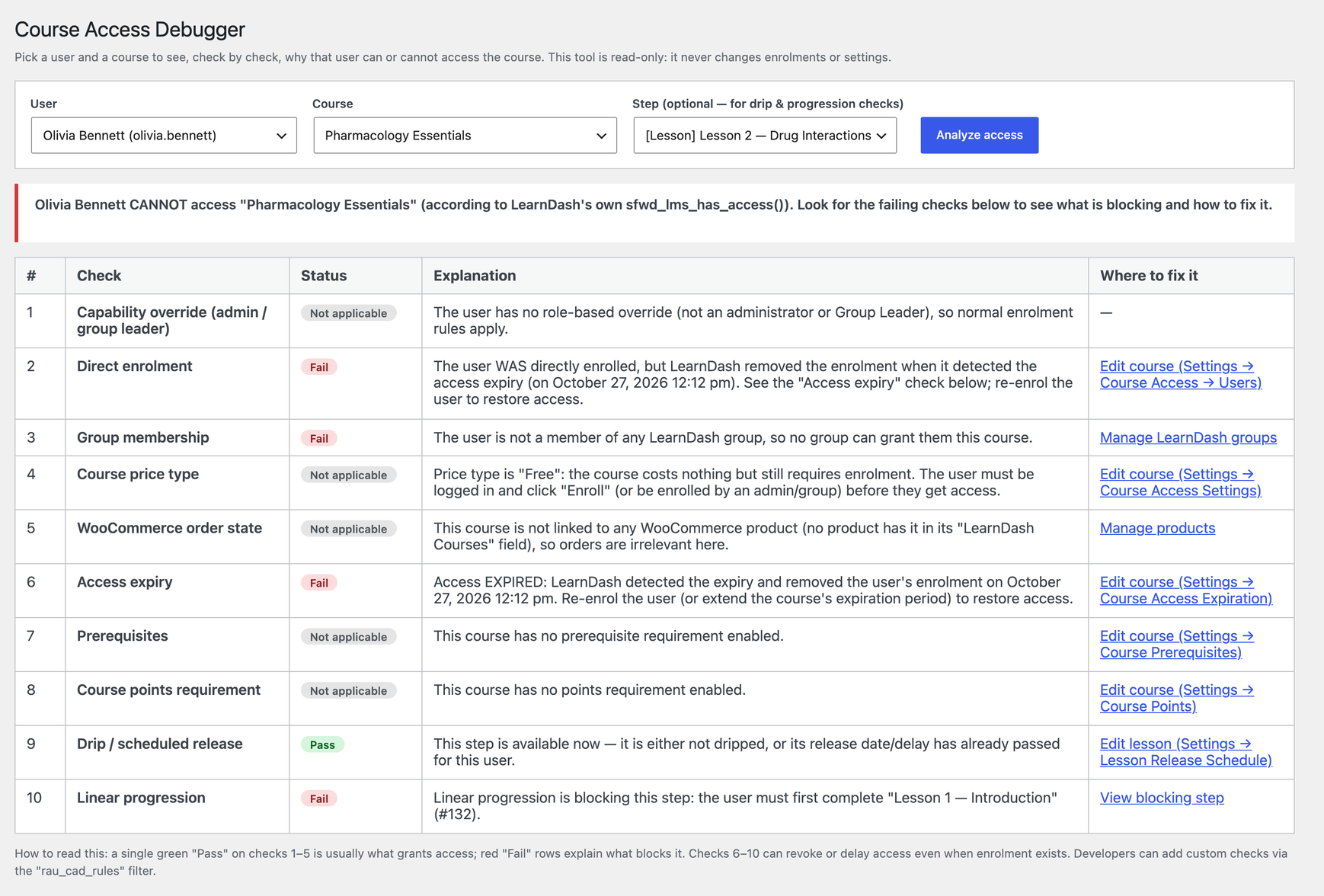
- Direct enrolment — is the user enrolled, and when? It also tells you when a user was enrolled but LearnDash removed the enrolment because access expired — something LearnDash itself does not show.
- Group membership — names the exact LearnDash group that grants the course, or confirms that none of the user's groups include it.
- Course price type — explains what Open, Free, Buy Now, Recurring or Closed means for this user.
- WooCommerce order state — if the course is sold through WooCommerce, finds the linked products and the user's orders, and flags a refunded, cancelled or failed order that removed access.
- Access expiry — when access runs out, or when it expired.
- Prerequisites — names the specific course the user still has to complete.
- Course points — for example "requires 10 points, the user has 5".
- Drip / scheduled release — choose a lesson, topic or quiz and see whether it is available yet for this user, and when it unlocks.
- Linear progression — names the exact earlier step the learner must finish first.
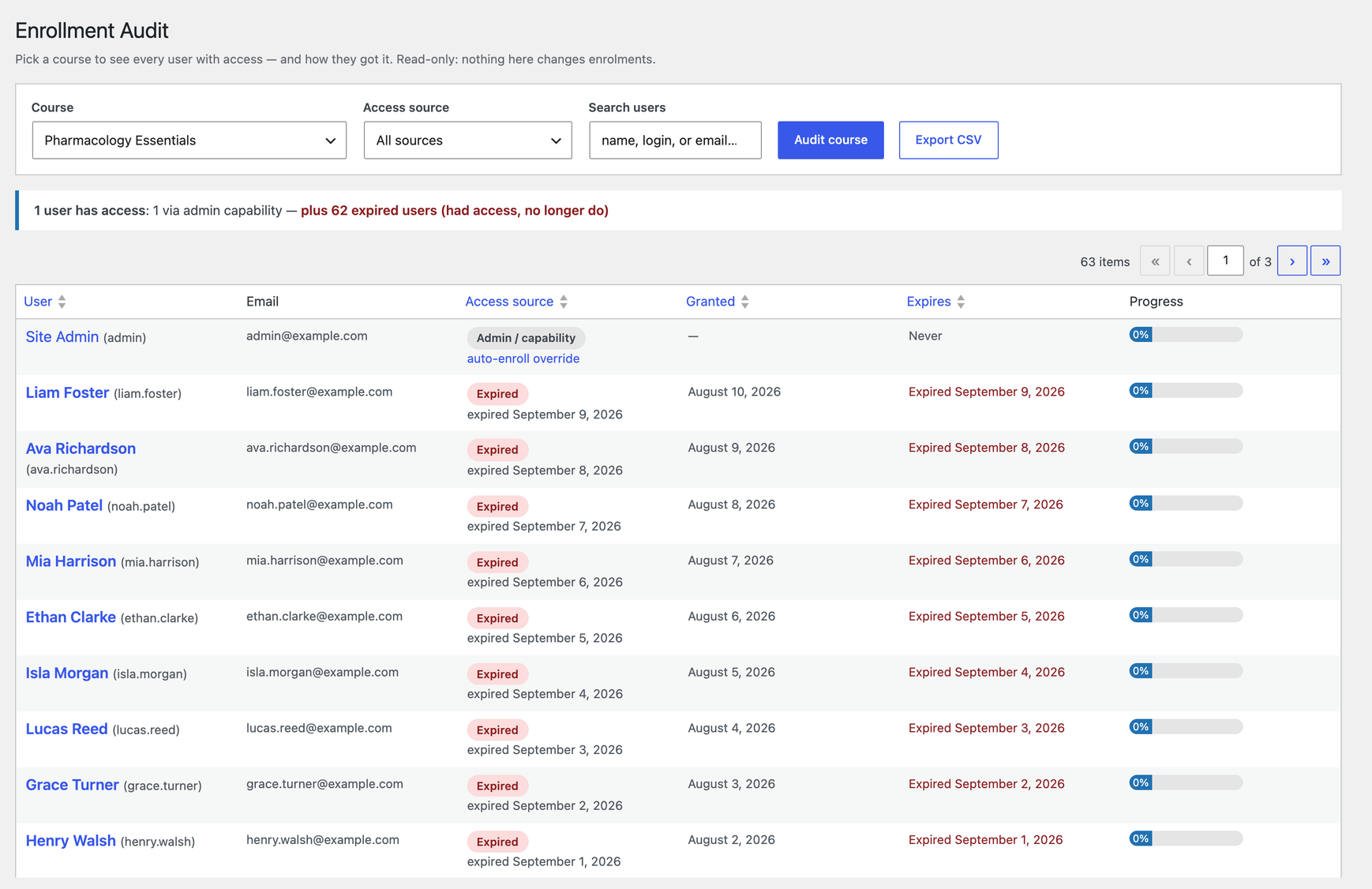
- User and email address
- Access source — direct enrolment, a named group, a WooCommerce order (with a link to it), an open course, or admin capability
- The date access was granted
- The expiry date
- Course progress as a percentage
- A summary line at the top, for example "142 users have access: 30 direct, 104 via 3 groups, 8 via WooCommerce — plus 4 expired"
- Filter by access source and search by name, username or email
- Sort by user, access source, granted date or expiry date
- Paginated, with pages loading instantly without a full reload
- Export to CSV — the file matches the filters you have applied, so you can hand someone an "expired learners" list in seconds
- Course creators and LearnDash site owners who answer "I can't access my course" emails
- Support teams and agencies maintaining LearnDash sites for clients
- Training companies and membership sites that sell courses through WooCommerce or grant them through groups
- Developers debugging custom enrolment flows, drip schedules or prerequisites
rau_cad_rules filter. A custom rule — for example one for your own membership plugin — appears in the same Pass / Fail table as the built-in checks.
The plugin is translation ready and includes a .pot file.
Also from the same developer
- Inactive Students for LearnDash — find students who started a course and stopped, see exactly which lesson they quit at, and export the list.
- Structure Audit for LearnDash — finds orphaned lessons, empty courses, quizzes with no questions and broken course links in one screen.
安装:
- In your WordPress admin go to Plugins → Add New, search for "Course Access Debugger for LearnDash", then install and activate it. You can also upload the
course-access-debugger-for-learndashfolder to/wp-content/plugins/. - Make sure LearnDash LMS is active. Without it the plugin does nothing and shows a notice saying so.
- Go to LearnDash LMS → Access Debugger, choose a user and a course, and click Analyze access.
- To check a specific lesson, topic or quiz for drip and linear progression, choose it in the Step field and analyze again.
- Go to LearnDash LMS → Enrollment Audit, choose a course and click Audit course to see everyone with access and how they got it.
屏幕截图:
常见问题:
Why can't a user access a LearnDash course?
The most common reasons are: the user is not enrolled, their access has expired, the WooCommerce order that granted access was refunded or cancelled, they have not completed a prerequisite course, they do not have enough course points, or the course is closed and they are not in a group that includes it. The Access Debugger checks all of these at once and tells you which one is blocking the user.
How do I check a user's course access in LearnDash?
Go to LearnDash LMS → Access Debugger, select the user and the course, and click Analyze access. You get a CAN or CANNOT verdict and a table of every access check with Pass, Fail or Not applicable.
Does the verdict match what the student actually sees?
Yes. The headline verdict comes from LearnDash's own sfwd_lms_has_access() function, the same function LearnDash uses on the front end. The checks underneath explain why that verdict was reached.
Will this plugin change anything on my site?
No. It is strictly read-only. It never changes enrolments, orders, progress, groups or settings, and it does not store any data of its own.
Why is a lesson locked when the user has access to the course?
Course access and lesson access are different. Choose the lesson, topic or quiz in the Step field and analyze again: the drip check shows whether the step has been released yet for this user, and the linear progression check names the earlier step they must finish first.
Can I see which users have access to a LearnDash course?
Yes. LearnDash LMS → Enrollment Audit lists every user with access to the chosen course, how they got access, when it was granted, when it expires and their progress.
How do I find LearnDash users whose course access expired?
Open the Enrollment Audit for the course. Users who had access and lost it are included and marked Expired, with the date. Filter the access source to "Expired" and export the list to CSV.
Does it work with LearnDash groups?
Yes. The Access Debugger names the group that grants the course, and the Enrollment Audit shows group-based access with the group's name.
Does it work with courses sold through WooCommerce?
Yes. When a course is linked to WooCommerce products, the plugin finds the user's orders for those products and shows their status, including refunded, cancelled or failed orders that removed access. WooCommerce is optional; the order check is simply marked Not applicable when it is not used.
Can I export the enrollment list?
Yes. The Export CSV button on the Enrollment Audit exports the roster with your current filters applied.
Will the Enrollment Audit cope with courses that have thousands of students?
Yes. The roster is built with a small number of bulk queries, and the table is paginated with search, filtering and sorting.
My site has thousands of users. Can I still pick one?
Yes. On sites with more than a thousand users, the dropdown is replaced with a lookup box. Enter a user ID, email address or username.
Who can use the debugger?
Administrators. Both screens require the manage_options capability.
Can I add my own access checks?
Yes. Use the rau_cad_rules filter to add, remove or reorder checks. Your rule is shown in the same table as the built-in checks.
Does it work without LearnDash?
No. LearnDash LMS must be installed and active. If it is not, the plugin shows a notice and does nothing else.
更新日志:
- Initial release.
- Access Debugger: 10-check access-decision chain, optional per-step drip and progression analysis, WooCommerce order inspection.
- Enrollment Audit: per-course roster with access source, granted and expiry dates, progress, source filter, search, sortable columns, CSV export and summary counts.