
Extrova – Gift Wrap, Tips & Checkout Add-ons for WooCommerce
| 开发者 | alvaroalon96 |
|---|---|
| 更新时间 | 2026年11月15日 02:00 |
| PHP版本: | 8.2 及以上 |
| WordPress版本: | 7.1 |
| 版权: | GPLv2 or later |
| 版权网址: | 版权信息 |
详情介绍:
- Higher average order value: small optional extras at checkout are an easy yes for many customers.
- Works with the new Checkout block: no need to go back to the classic checkout to sell add-ons.
- Totals update instantly through the WooCommerce Store API, with no page reload.
- Prices are always safe: they are calculated on your server, never sent by the browser.
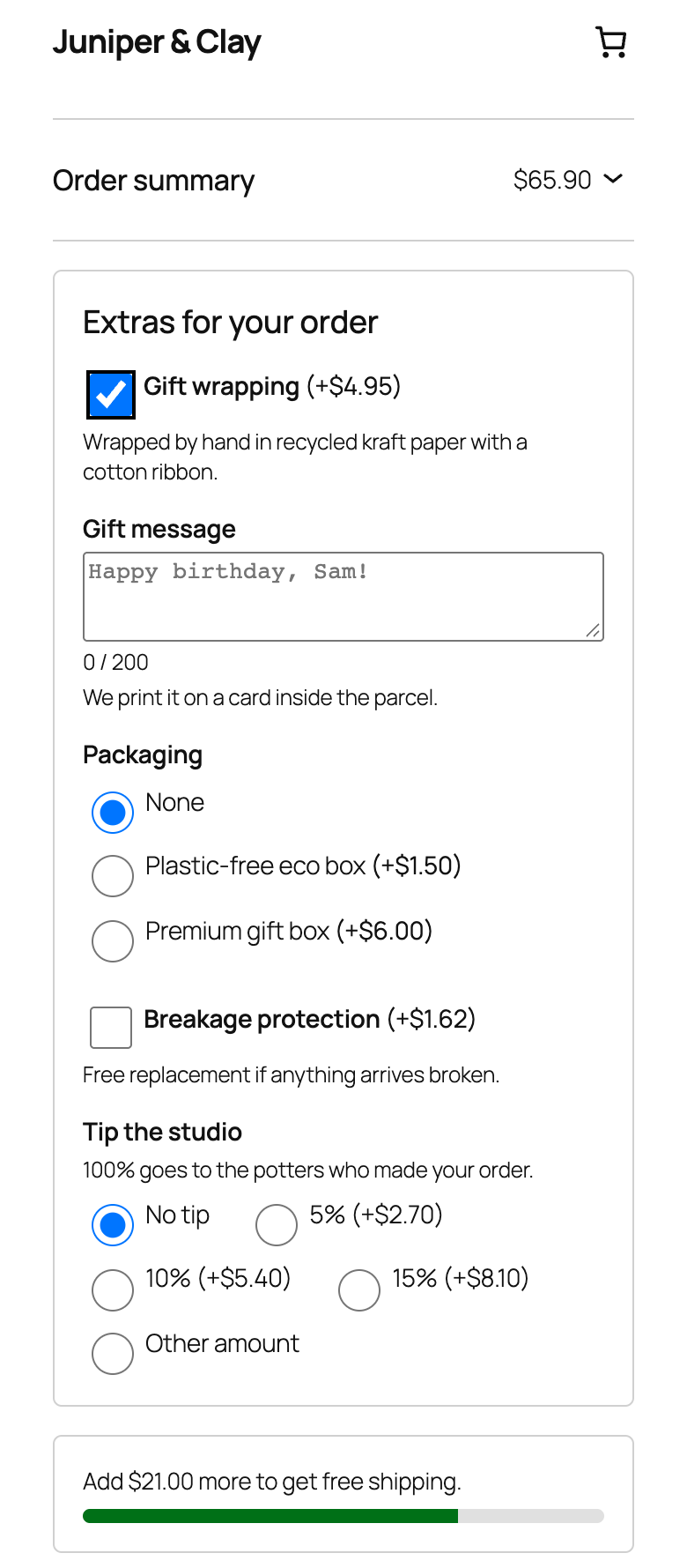
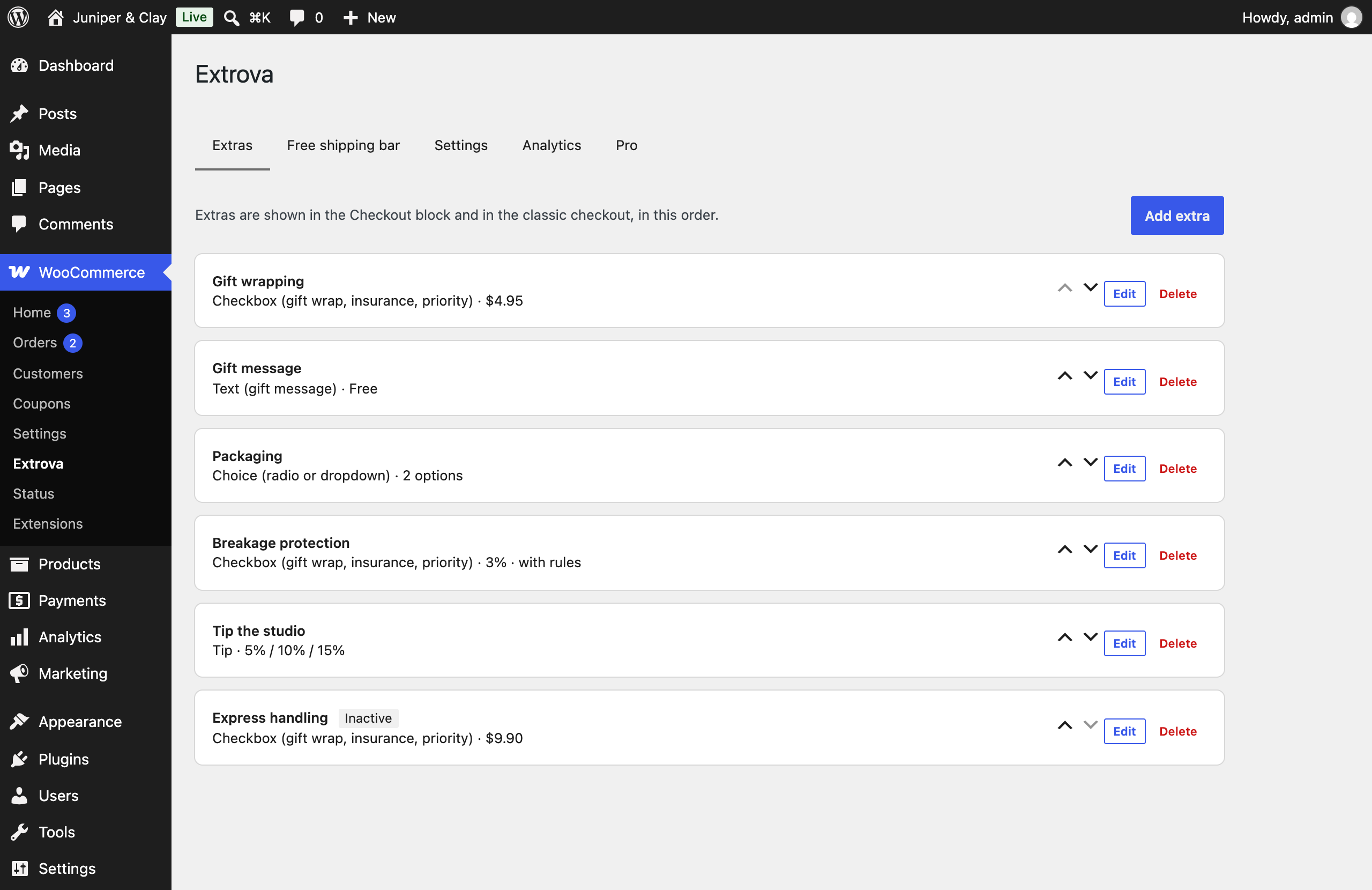
- Gift wrapping and other checkbox extras with a price: gift wrap, shipping insurance, priority handling, eco packaging. Unlimited extras.
- Choice extras (radio buttons or dropdown) with a different price per option, for example "Standard wrap / Premium wrap".
- Gift message and other text extras, with a character limit and an optional price.
- Tips: percentage presets (5 %, 10 %, 15 %…) and an optional custom amount, with a minimum and maximum enforced on the server.
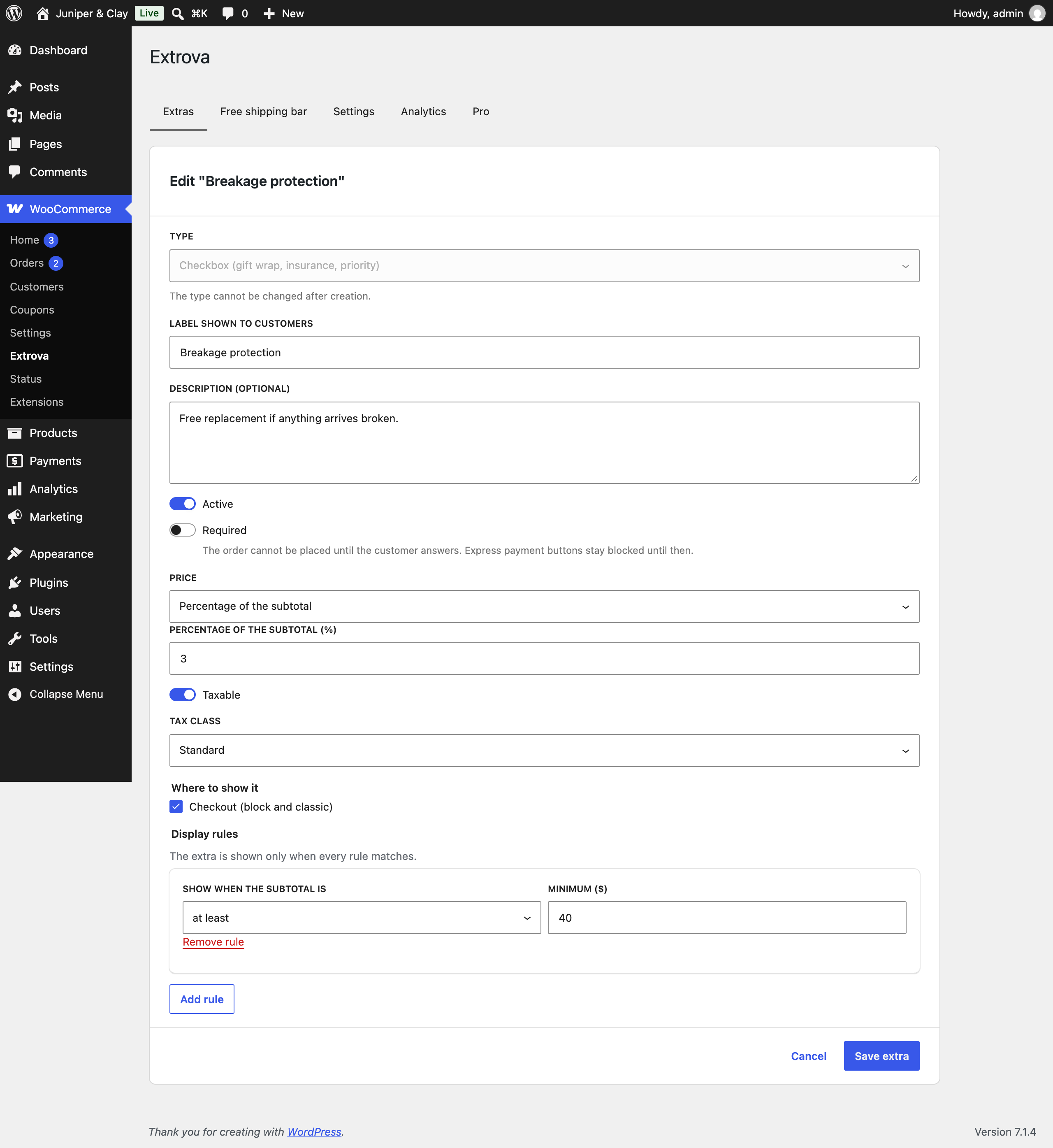
- Fixed or percentage prices with any tax class. If your prices include tax, the customer pays exactly the price you set.
- Display rule: show an extra only when the cart subtotal is between two amounts.
- Required extras: block the order until the customer answers, with an accessible error message.
- Free shipping progress bar in the checkout ("Add €12.00 more to get free shipping"), read from your Free shipping method. Optional, off by default.
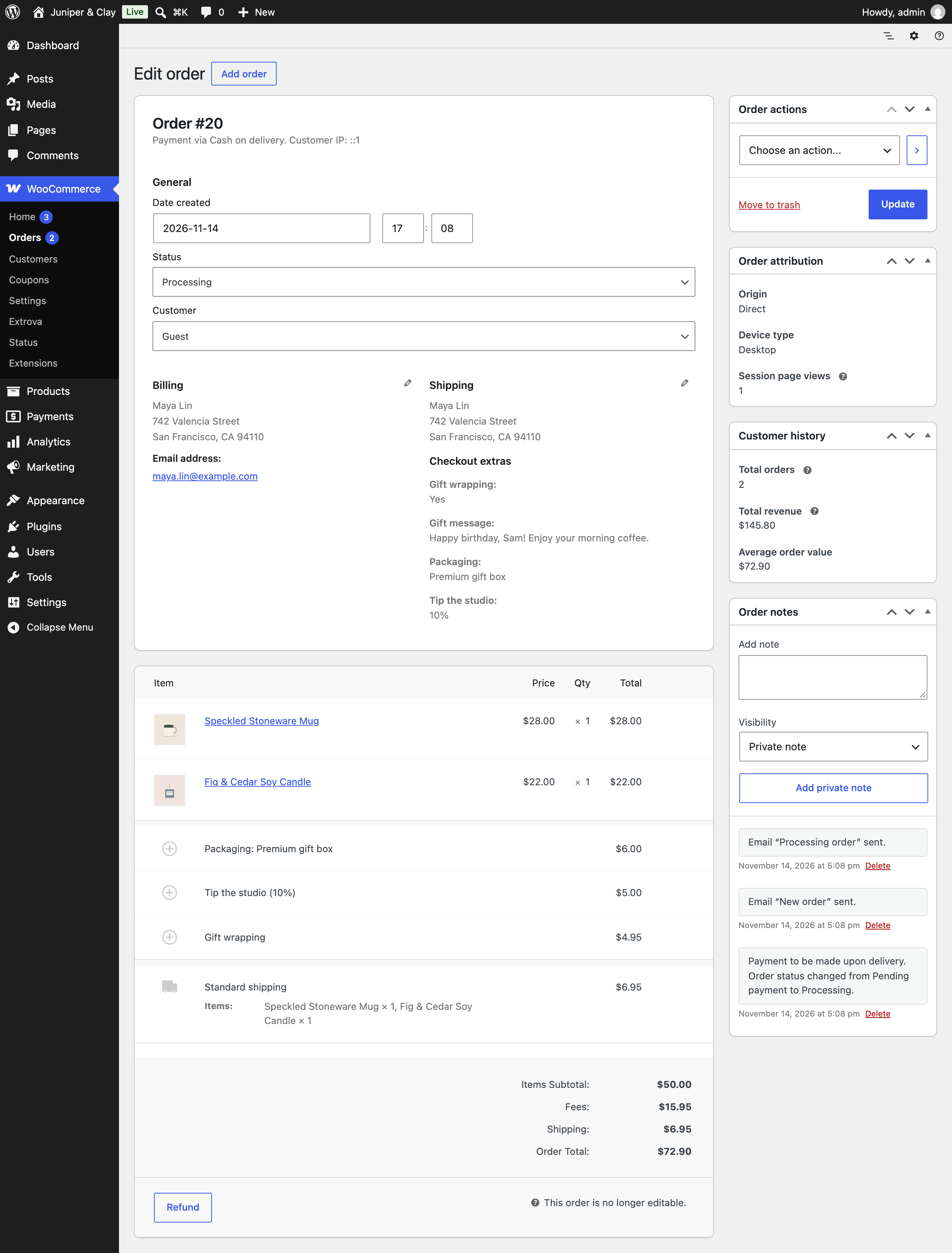
- Saved as real order fees: extras appear in order totals, the order screen, order emails, My account, the order confirmation page and refunds.
- HPOS compatible (High-Performance Order Storage) and compatible with the Cart and Checkout blocks.
- Accessible (WCAG 2.2 AA): labelled controls, visible focus, full keyboard support and screen reader announcements when the total changes.
- Lightweight: nothing is loaded on your store until you create an extra; the Checkout block script is about 5 KB gzipped.
- Private: no tracking, no external requests, GDPR exporter and eraser for gift messages.
- Developer friendly: documented PHP and JavaScript hooks (see
docs/hooks.md).
- Display rules by product, category, shipping method, payment method, country, user role and dates, combined with AND/OR.
- Order bumps: offer a real product with a discount inside the checkout.
- Extras in the Cart block and the mini-cart.
- More extra types: donations and round-up, file upload, date picker, image options.
- Quantity-based pricing, tiered discounts and "first extra free".
- Analytics with your own store data (revenue per extra, acceptance rate, average order value) and A/B tests.
- Filter orders by extra and export to CSV.
- WooCommerce Subscriptions, WPML and Polylang support.
- Priority email support.
安装:
- Install and activate WooCommerce 10.0 or later.
- Go to Plugins > Add New, search for "Extrova" and click Install now, then Activate.
- Go to WooCommerce > Extrova and click Add extra.
- Open your checkout: the extras appear automatically in the Checkout block, in the order summary column (next to the totals on desktop, above the form on mobile), and in the classic checkout.
- Optional: enable the free shipping progress bar in WooCommerce > Extrova > Free shipping bar (it is off by default).
屏幕截图:
常见问题:
Does it work with the WooCommerce Checkout block?
Yes, that is its main purpose. Extras are shown by a native inner block of the Checkout block and totals are recalculated through the Store API, without reloading the page.
And with the classic checkout (shortcode)?
Yes. The same extras, prices and rules work in the classic checkout with no extra configuration.
How do I add gift wrapping to WooCommerce?
Go to WooCommerce > Extrova, click Add extra, choose the Checkbox type, name it "Gift wrapping" and set a price. You can add a Text extra for the gift message too.
How do I accept tips in WooCommerce?
Create an extra of type Tip, choose your percentage presets and, if you want, allow a custom amount with a maximum.
Can customers change the price of an extra?
No. The browser only sends which extra and which option was chosen. Prices are always calculated on your server from your settings, and custom tips are limited to the minimum and maximum you set.
How are taxes handled?
Each extra can be taxable with any tax class. If your store enters prices including tax, the extra is treated the same way: a €1.99 gift wrap costs exactly €1.99 to the customer, tax included. Tips are not taxable by default.
What is a percentage price calculated on?
On the cart subtotal before coupons, excluding tax by default (so a 10 % tip on a €12.10 product with 21 % VAT included is €1.00). You can switch the base to the subtotal including tax in the Settings tab.
Can an extra be required?
Yes. A required extra blocks the order until the customer answers, with an accessible error message. The check is also done on the server when the order is placed, so an order cannot be created without it. How express payment buttons (Apple Pay, Google Pay) react depends on each payment gateway.
Where do I see what the customer chose?
On the order screen (with or without HPOS), in the order emails, in My account and on the order confirmation page.
Are paid extras pre-selected?
No. Paid extras are never checked by default, as required by EU consumer law. The customer always chooses them.
Is the gift message treated as personal data?
Yes. It is included in WordPress personal data exports and erased when WooCommerce removes personal data from orders.
What happens to my data if I uninstall the plugin?
Nothing is deleted unless you enable "Delete the plugin settings when it is uninstalled" in the Settings tab. Order fees and order data are never deleted because they are part of your accounting records.
Does it send any data outside my site?
No. There is no tracking and no external request.
Can developers extend it?
Yes. There are PHP and JavaScript hooks to register new extra types, pricing methods, rule conditions, goals and admin settings. See docs/hooks.md in the plugin folder.
更新日志:
- New: checkbox, choice, text (gift message) and tip extras.
- New: fixed and percentage prices with tax class, exact prices when prices include tax.
- New: display rule by cart subtotal and required extras.
- New: free shipping progress bar.
- New: Checkout block inner block with instant totals through the Store API, and classic checkout support.
- New: extras saved as order fees, shown on the order screen, emails, My account and order confirmation.
- New: HPOS and Cart and Checkout blocks compatibility.
- New: privacy exporter and eraser for gift messages.
- New: PHP and JavaScript hooks for developers.