
Filecheck – Print Preflight & File Upload Validation for WooCommerce
| 开发者 | printapp |
|---|---|
| 更新时间 | 2026年10月4日 17:53 |
| PHP版本: | 7.4 及以上 |
| WordPress版本: | 7.0 |
| 版权: | GPLv2 or later |
| 版权网址: | 版权信息 |
详情介绍:
- Resolution (DPI) – flags blurry, low-resolution graphics (e.g. below 300 DPI).
- Bleed & safety margins – ensures critical art won't get trimmed at the cutter.
- Color space – verifies CMYK vs. RGB compliance and converts color profiles.
- Dimensions & aspect ratio – confirms the file matches the selected product size.
- Fonts & vectors – detects missing or un-embedded fonts before they ruin a print run.
- Page count & structure – validates multi-page documents against your product spec.
- Auto-corrections – RGB→CMYK conversion, missing bleed, transparency flattening, EXIF stripping, and more, applied automatically where safe.
- The customer opens a product page and the Filecheck Element renders inline (or as a dialog) next to your Add to Cart button.
- They drop in their artwork. Filecheck inspects it in milliseconds and shows a per-file verdict: valid, auto-fixed, or rejected with a clear reason and a "how to fix" hint.
- Add to Cart stays disabled until every required file passes. Once files pass, the widget enables checkout, shows print-ready proof thumbnails in the cart, and attaches a unique job ID to the order line item.
- After checkout, store managers see the full preflight report on the WooCommerce order screen, and print-optimized production files are streamed into a protected folder on your server — ready for production.
- Reduce refunds and reprints – prevent orders placed with un-printable artwork.
- Cut prepress review time – stop manually opening every uploaded file.
- Fewer support tickets – customers fix their own files with instant, specific feedback.
- Seamless checkout – dynamic client-side Add to Cart gating, no page reloads.
- Visual soft-proofing – customers approve color-converted or cropped previews before they buy, reducing disputes.
- Secure production downloads – outputs are streamed into a protected folder in your uploads directory, shielded from direct access.
- Per-product control – override the workflow, connector, or presentation mode (inline / dialog) on any product.
- HPOS compatible – works with WooCommerce High-Performance Order Storage.
安装:
- WordPress 5.0 or greater
- PHP 7.4 or greater
- WooCommerce 4.0 or greater
- A Filecheck account (filecheck.io)
- In your WordPress dashboard go to Plugins > Add New.
- Search for
Filecheck. - Click Install Now, then Activate.
- Upload the
filecheckfolder to/wp-content/plugins/. - Go to the Plugins screen and click Activate under Filecheck.
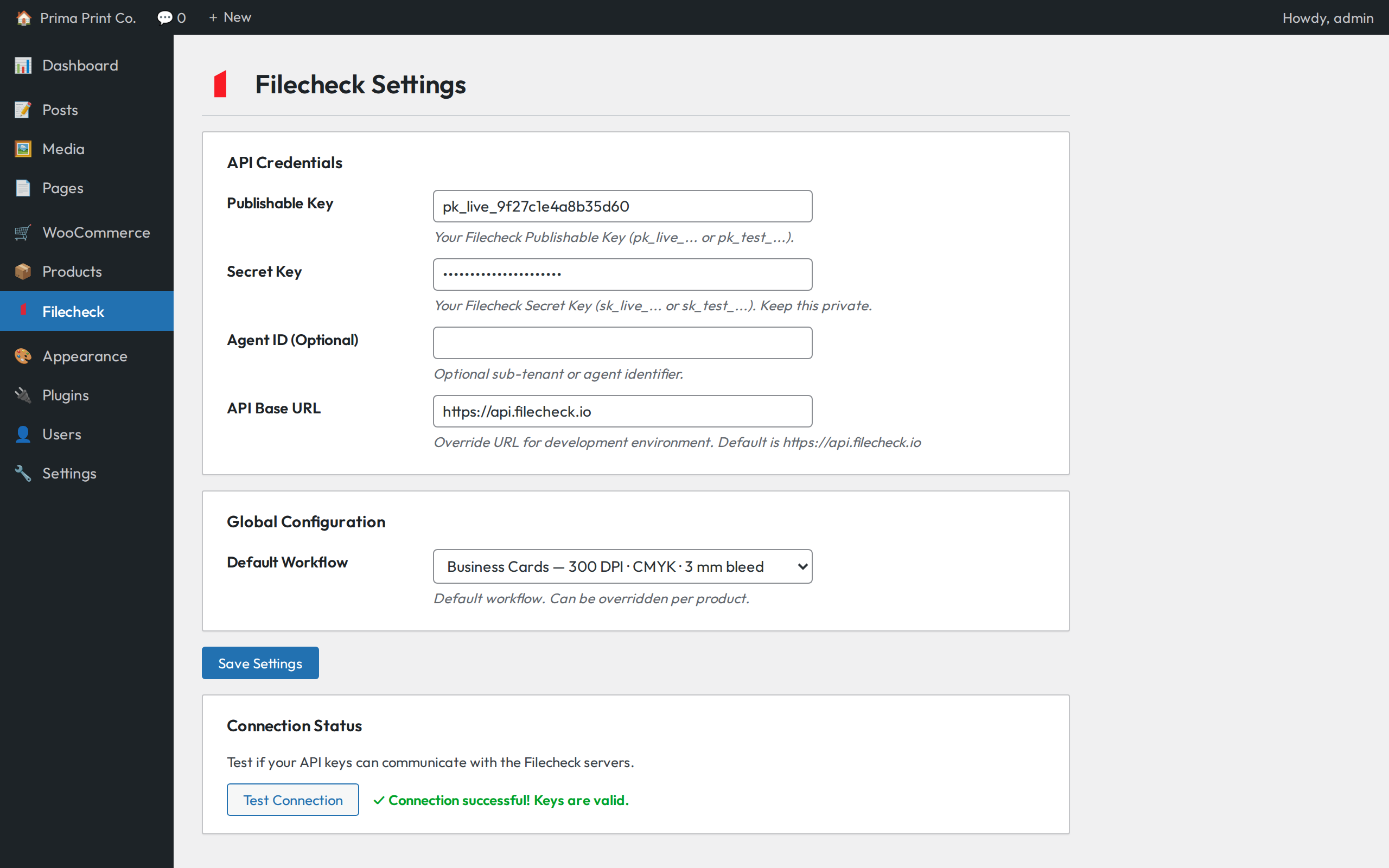
- Open the Filecheck menu in the WordPress admin sidebar.
- Enter your Publishable Key and Secret Key from your Filecheck dashboard.
- (Optional) Enter your Agent ID.
- Click Test Connection to verify your keys.
- Select your default workflow and click Save Settings.
- (Optional) Override the workflow or connector per product from the Filecheck tab on the product edit screen.
屏幕截图:


常见问题:
Do I need a Filecheck account?
Yes. Filecheck is a commercial cloud service and the plugin requires valid API keys from your Filecheck account to operate. New accounts include free test credits so you can try it end-to-end before paying. See filecheck.io.
Which file types can customers upload?
PDF, PNG, and JPEG are the most common, and workflows can be configured for the formats your production accepts. The allowed types are shown to the customer directly in the upload widget.
Can I use different validation rules per product?
Yes. Set a global default workflow, then override the workflow, connector, and presentation mode (inline or dialog) per product from the Filecheck tab on the product edit screen. Selecting "None" disables Filecheck for that product.
Does it support mobile uploads?
Yes. The Filecheck Element is fully responsive and works on iOS, Android, and tablets.
Where are the high-res files saved?
Uploads are processed on Filecheck's servers. When an order reaches processing or completed, the plugin streams the print-optimized output files back into a protected directory (wp-content/uploads/filecheck-secure/) that is not directly accessible.
Will it conflict with other product option plugins?
No. The widget uses a session-resume mechanism with an AJAX WooCommerce session fallback and does not modify native cart serialization, so it co-exists with customization editors.
Does it work with High-Performance Order Storage (HPOS)?
Yes. The plugin declares HPOS compatibility and the order metabox works on both classic and HPOS order screens.
What happens if a file has a minor, fixable issue?
Depending on your workflow rules, Filecheck can auto-correct common issues (RGB to CMYK conversion, missing bleed, transparency flattening) and mark the file "accepted with issues", or reject it with a plain-language explanation and fix instructions.
更新日志:
- Fixed order file downloads: processing an order no longer fails with "API returned HTTP code 404". Each item's print-ready files (corrected where Filecheck fixed them, otherwise as uploaded) are saved to the order.
- Soft-proof previews now work in the block-based Cart: the cart item's product image is replaced with the uploaded files' proofs (WooCommerce 9.6+). Also applies to the Mini-Cart and the Checkout Block order summary.
- Fixed a text-domain mismatch flagged by Plugin Check (the catalog "Read more" link now uses the plugin's own text domain).
- Cart page now shows soft-proof thumbnails for uploaded files — first page per file with a page-count badge, capped with a "+N more" indicator (classic cart template).
- Proof lookups are cached per job, so the cart adds at most one API call per uploaded job.
- Files without proofing enabled are skipped; the cart looks unchanged for non-proofing workflows.
- Clearer API key placeholder text on the settings screen.
- WooCommerce is now declared as a required plugin (WordPress enforces the dependency on WP 6.5+).
- Added a Settings action link and a Docs link on the Plugins screen.
- Settings page: getting-started guidance with sign-up link and Dev Hub links for locating your API keys.
- More descriptive plugin description.
- First release on the WordPress.org plugin directory.
- New store listing with banners, icons, and screenshots.
- Expanded readme documentation and FAQ.
- Maintenance release.
- Initial public release.
- Filecheck Element CDN integration with client-side Add to Cart gating.
- Native form POST capture with WooCommerce AJAX session fallback for guest and custom checkouts.
- Product and global configuration screens.
- Secure server-side fulfillment streaming output files to a protected directory.
- High-Performance Order Storage (HPOS) compatible.