Filikod – Alt Text Checker & Bulk Image Alt Text Editor
| 开发者 |
filikod
lyode |
|---|---|
| 更新时间 | 2026年10月9日 23:48 |
| PHP版本: | 7.4 及以上 |
| WordPress版本: | 7.1 |
| 版权: | GPLv2 or later |
| 版权网址: | 版权信息 |
详情介绍:
- SEO professionals who want ALT text treated as a measurable image SEO signal, not an afterthought
- Accessibility-focused teams who need a structured audit to meet WCAG 2.1 success criterion 1.1.1 (non-text content)
- Content managers with large media libraries who need to fix issues fast, in bulk
- Agencies managing multiple WordPress sites who need a repeatable quality process
- Anyone who wants full control over their ALT text quality at scale, without external services or paid credits
- Missing ALT: images with no ALT attribute at all
- Generic ALT: meaningless values like "image", "photo", "logo", "thumbnail", "untitled"
- Too Short ALT: descriptions too brief to be useful for accessibility or SEO
- Duplicated ALT: the same ALT text reused across multiple images
- Filter images by issue type (missing, generic, short, duplicated)
- Edit ALT text inline, directly from the audit view
- Save instantly without leaving the page
- Fix missing alt text on dozens or hundreds of images in minutes
- One row per copy with thumbnail, file name, ID, dimensions, size, upload date, Context (where it is used) and ALT text
- The oldest copy is flagged so you know which one to keep
- Redundant files and wasted space are summed up on the Dashboard
- List view: a dedicated ALT Status column with one badge per issue, or a green Alt: OK when everything is fine
- Grid view: badges as an overlay on each thumbnail so you can scan your entire library at a glance
- Attachment details: an ALT Status field that updates live as you type, so you see the result before saving
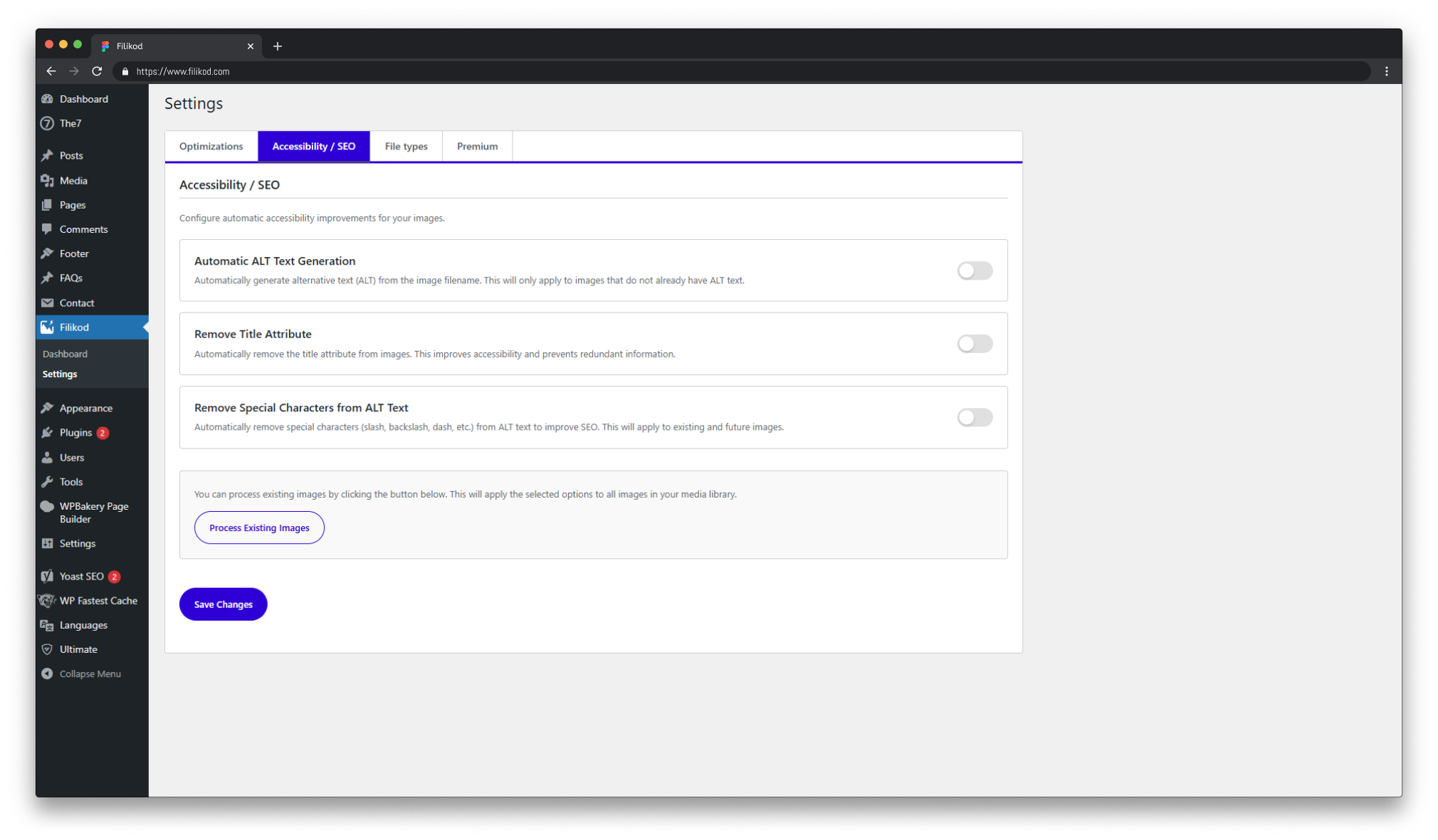
- Generate ALT from filename (only for images that have no ALT yet)
- Remove special characters from ALT text (slashes, dashes, underscores)
- Remove title attribute from images (reduces redundancy, improves accessibility)
- Bulk process your entire existing media library in one click
- ALT Quality Score (0 to 100%) across your entire library
- ALT Status badges in the native Media Library (list column, grid overlay, attachment details) with live updates after save
- Detects generic ALT values like "photo", "image", "logo"
- Detects duplicated ALT text reused across multiple images
- Detects ALT text that is too short to be useful
- Bulk filtering by issue type (missing, generic, short, duplicated)
- Detects duplicate images (exact copies uploaded more than once) with their usage context, without deleting anything
- Works on images already in your media library
- No external API, no credits, no subscription required
- Full editorial control: you write and validate every ALT text
- Works with any theme
- Compatible with Elementor, Divi, Gutenberg, WPBakery and most major page builders
- Single site and multisite supported
- Multilingual: Polylang, WPML, Bogo (translation links respected by the duplicate detection), Weglot, GTranslate, TranslatePress, WPGlobus, MultilingualPress
- No external services required, runs entirely inside WordPress
安装:
- Install from Plugins > Add New (search "Filikod" or "alt text checker") or upload the plugin zip manually
- Activate Filikod
- Go to Filikod > Dashboard to see your ALT Quality Score
- Go to Filikod > ALT Audit to find and fix issues by type
- Open Media > Library to see ALT Status in list or grid view, and in each image's attachment details
- Configure optional automation in Filikod > Settings
屏幕截图:
常见问题:
How do I check alt text in WordPress?
Install Filikod and open Filikod > ALT Audit. It checks every image in your media library and flags the ones whose alt text is missing or empty, generic, too short, too long or duplicated, each in its own tab. Fix them one by one inline, or in bulk by issue type. The Filikod > Dashboard sums it up in a single ALT Quality Score. To check a single public page without installing anything, use the free online checker at filikod.com/alt-text-checker.
Is Filikod an alt text checker or an alt text generator?
A checker first. Filikod audits the alt text that already exists in your media library and scores it. It never sends your images to an external AI service and never invents descriptions behind your back. An optional, local filename-based setting (off by default) can fill a starting ALT for images that have none, and you then review it in the ALT Audit like any other ALT text.
Does Filikod generate ALT text automatically?
Yes, but it is optional and filename-based. Filikod generates ALT from the image filename only for images that have no ALT text yet. Its core strength is structured ALT audit and bulk management, so you always stay in control of your content.
Does Filikod use AI to write ALT text?
Not currently. ALT generation is based on the image filename. The core philosophy of Filikod is editorial control: you decide what each image means in context. Filikod gives you the visibility and tools to write accurate ALT yourself, or to review and validate what automation produces.
How is Filikod different from Image Attributes Pro or BIALTY?
Image Attributes Pro and similar filename-based plugins set ALT text automatically from the filename. They do not audit your existing library, detect generic or duplicated ALT, or give you a quality score. Filikod gives you a structured audit across your entire media library and the tools to fix issues in bulk, including images uploaded before you installed the plugin.
Does it work on images already in my media library?
Yes. Filikod scans and processes your entire existing media library, including images uploaded before installation. You can run a bulk process from the Settings page at any time.
Does Filikod modify my image files?
Not by default. All ALT features (audit, score, bulk editing, badges) only change the _wp_attachment_image_alt meta in WordPress and never touch your binary image files.
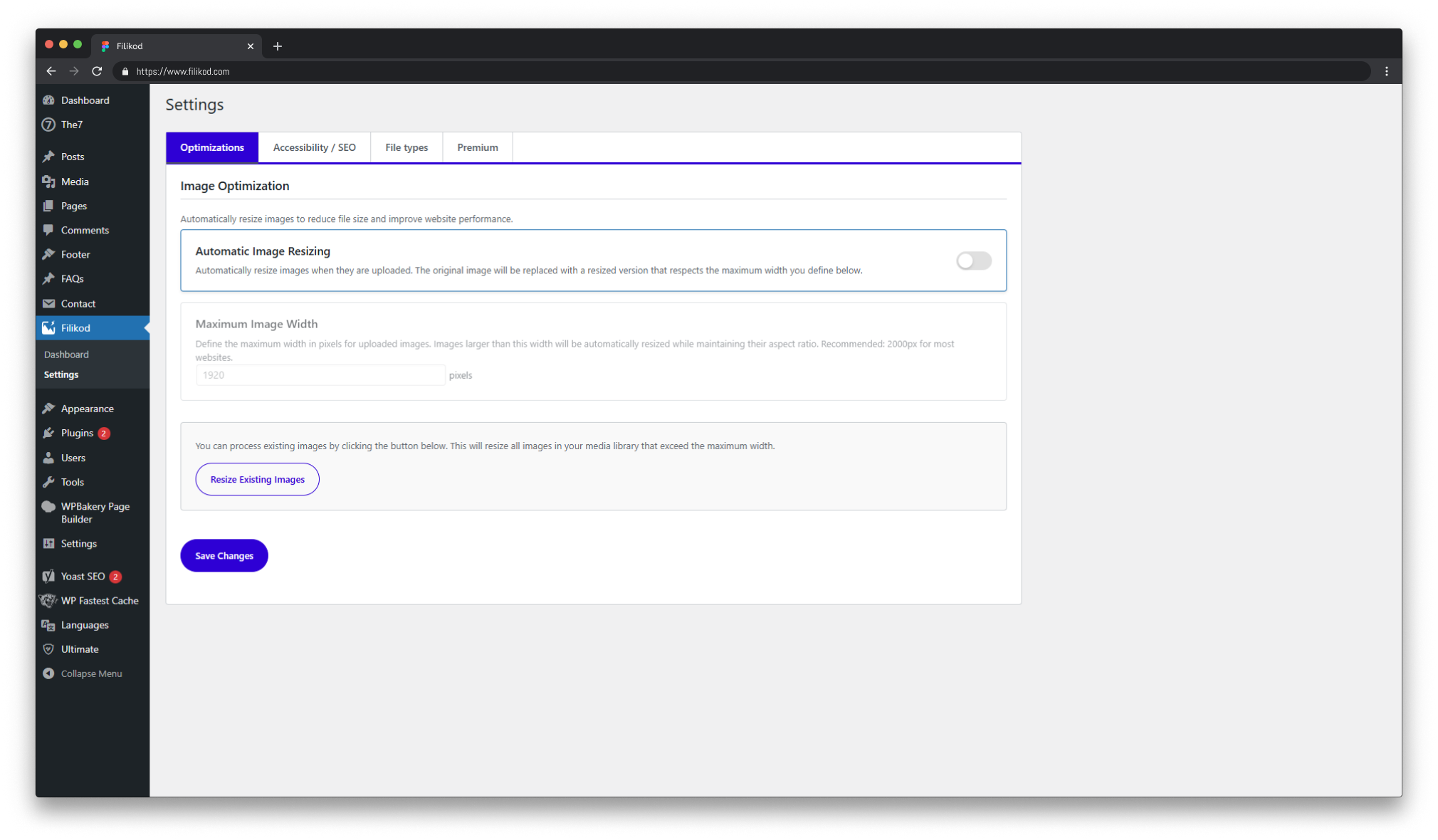
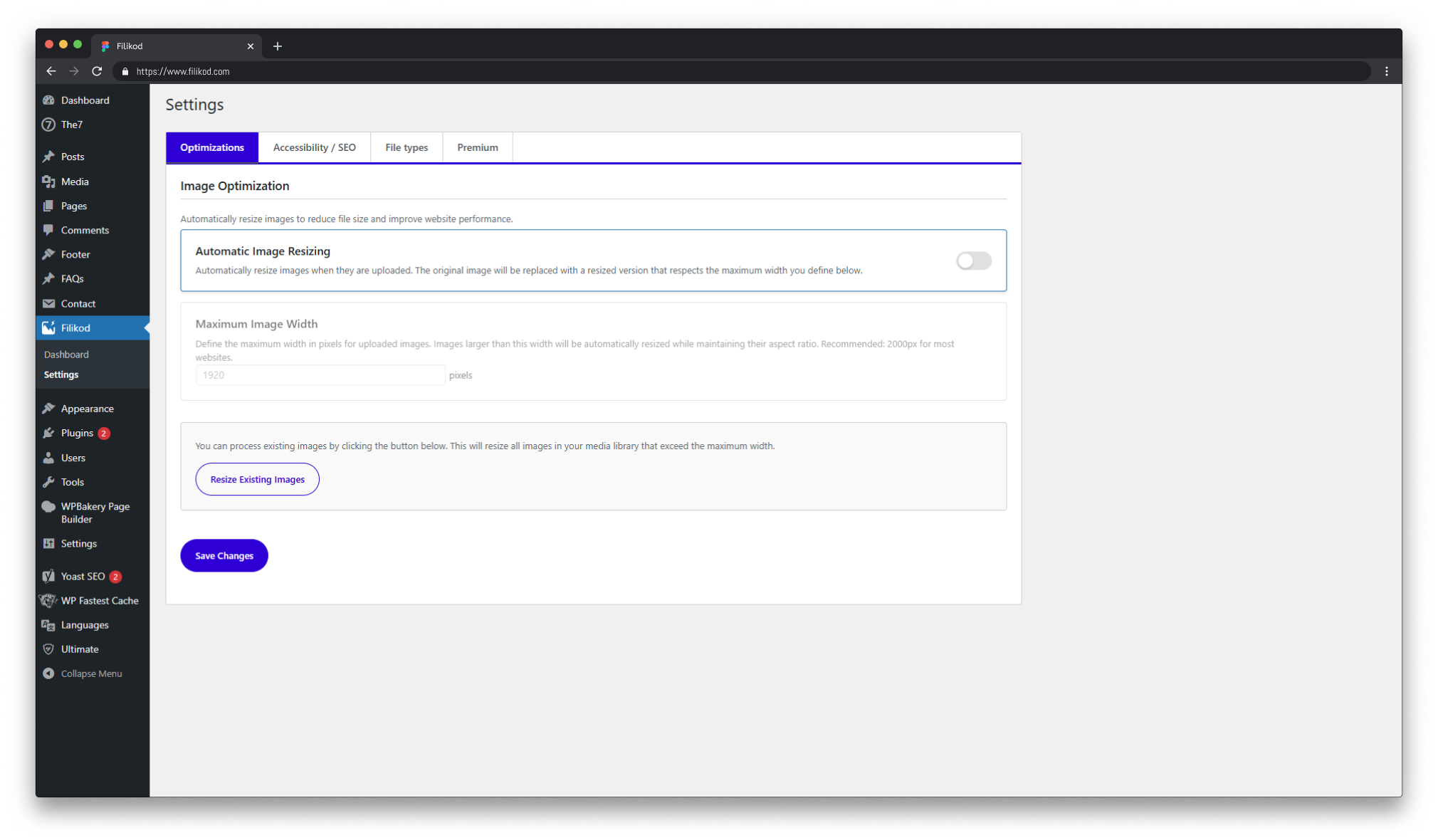
The only exception is the optional Automatic Image Resizing feature (Settings > Optimizations, disabled by default). When you enable it, images wider than your maximum width are resized and the original file is replaced by the resized version. This is not reversible, so make sure you have a backup before running it on your existing library.
What is the ALT Quality Score?
It is a score from 0 to 100% that reflects the overall ALT text health of your media library. It takes into account the proportion of images with missing, generic, too-short, and duplicated ALT attributes. It gives you a single measurable number you can track and improve over time, like an SEO or accessibility health metric.
Can I bulk edit ALT text?
Yes. The ALT Audit page lets you filter images by issue type (missing, generic, short, duplicated) and edit ALT text inline. Changes save instantly without reloading the page.
Is it compatible with Elementor, Divi, WPBakery, and Gutenberg?
Yes. Filikod manages ALT attributes directly in the WordPress media library, independently from your theme or page builder. Compatibility is universal.
Does Filikod detect duplicate images?
Yes. Filikod > Duplicates lists every group of identical files (same md5 fingerprint) with thumbnail, size, upload date, usage context and ALT text, and flags the oldest copy. Run "Scan library" once to fingerprint your existing images; new uploads are fingerprinted automatically. Filikod only detects: it never deletes or merges files, you clean up from the Media Library when you are sure. Resized or re-encoded variants of a picture are different files and are not reported as duplicates. An optional Duplicate Upload Alert (Settings > Optimizations) warns you right after uploading a copy of an existing image.
Does it work on multisite installations?
Yes. Filikod supports WordPress multisite.
Is Filikod an image optimizer like Smush or Imagify?
No. Filikod does not compress images, convert to WebP, or serve images via CDN. It focuses entirely on ALT text quality: the audit, the score, and the tools to fix issues at scale. You can use a dedicated image optimizer alongside Filikod without any conflict.
Where can I find documentation?
Full documentation is available at filikod.com.
更新日志:
- Security – SVG sanitizer hardened: uppercase .SVG files are now sanitized and size-checked like lowercase ones; nested or obfuscated DOCTYPE and entity declarations are rejected instead of cleaned; external url() references in fill, stroke and clip-path are removed (local url(#id) references are kept); the XML parser state is restored after each file.
- Fix – decorative images are never overwritten: automatic ALT generation (on upload and in "Process Existing Images") now skips images marked as decorative. Entering a real ALT on a decorative image lifts the decorative flag, so the audit reflects what screen readers actually get.
- Fix – ALT clean-up keeps your punctuation: "Remove Special Characters" only cleans ALT text inherited from file names (dashes, underscores, extension). Hand-written ALT text keeps apostrophes, commas, periods, colons, hyphens, & and %; only technical characters are removed from sentences.
- Fix – automatic ALT no longer writes generic values: an ALT that Filikod itself would flag as generic ("Img 1234", "Image", "Logo") is not written; the image stays in the Missing tab instead of hiding behind a placeholder. Proper nouns and acronyms keep their case.
- Fix – image resizing respects EXIF orientation: smartphone photos are rotated before resizing, the written file is verified before the original is deleted, format conversions (HEIC, WebP, AVIF mappings) are neutralized during the write, and the stored file path is correct (fixes broken srcset after a resize). The additional image size is only registered when resizing is enabled.
- Performance – the full audit runs with one query per 1,000 images instead of two queries per image. The Media Library (grid, list, upload response) never triggers a full audit rebuild any more, and only the current caches are invalidated on each change; caches left by older versions are purged once at update time.
- Accessibility – settings switches work with the keyboard: the toggles on the Settings and ALT Audit pages are real focusable switches with a visible focus ring and an accessible name; progress bars announce a consistent percentage.
- Audit – lengths measured in characters, not bytes: "too short" and "too long" are now correct for Cyrillic, Greek, Arabic and CJK ALT text. Generic terms are evaluated for the site language plus English, whatever the administrator's profile language, so every admin sees the same counters.
- Fix – ALT text saved from the audit keeps backslashes and is truncated safely on multi-byte characters.
- Settings: the Accessibility / SEO tab opens by default; the former "ALT badges overlay" switch is now labelled for what it does ("Hide ALT badges on Media Library thumbnails"); the Premium tab describes the Pro roadmap (no AI) with a feedback link; content type labels in the Context column are translated; batch sizes are capped server-side.
- Activation and update: activation no longer flushes the whole object cache of the site (Redis, Memcached); a silent update routine cleans caches and unused options left by older versions; the unused uploads/filikod folder is no longer created.
- Translations: French translation shipped and loaded (bundled language file, 203 strings) and translation template regenerated. Translators are welcome on translate.wordpress.org.
- Plugin name aligned with the directory listing: "Filikod – Alt Text Checker & Bulk Image Alt Text Editor".
- New – Duplicate image detection (Filikod > Duplicates): Filikod now fingerprints the original file of every image (md5, stored in the
_filikod_file_hashpost meta) and lists every group of exact copies uploaded more than once. Same layout as the ALT Audit: each copy shows its thumbnail, file name (with ID, dimensions, size and upload date), Context (where it is used), its ALT text, a Reference / Duplicate status (the reference being the oldest copy) and Edit / Library links. Groups are separated by a header line with the space that keeping a single copy would free. The scan controls sit at the top of the page. Fingerprints are computed automatically on upload and whenever the attachment metadata is regenerated (WordPress big-image scaling, Filikod resizer, image editor, Enable Media Replace, thumbnail regeneration), always from the original file when WordPress kept one, and back-filled for the existing library by a batched Scan library job (25 images per request, same engine as the other bulk jobs). Full rescan recomputes everything, for files replaced outside WordPress. Detection only: nothing is deleted or merged. Groups are cached for 15 minutes (filikod_duplicate_groups_v1) and invalidated on upload, deletion and fingerprint change. Perceptual near-duplicates (resized or re-encoded variants) are out of scope for this version. - New – Duplicate markers in the Media Library: once the library is scanned, every member of a duplicate group gets a red Duplicate file badge in the grid (under the ALT badges) and a Duplicate warning box in the attachment details, after the ALT Status field, listing every copy of the group (file name, ID, upload date, "oldest" and "this file" markers) with a single link to Filikod > Duplicates, so you never bounce from one image to another. Data travels through
wp_prepare_attachment_for_js(filikod_duplicate_of), resolved from the cached groups (no extra query per thumbnail). - New – Duplicate Upload Alert (on by default, switch in Settings > Optimizations): a dismissible notice in the uploader the moment an uploaded image carries the same fingerprint as an existing file, naming the older copy with a link. Hooks the
wp.Uploaderqueue, so it works in the Media Library and in every editor media frame. Uploads are never blocked. New optionfilikod_duplicate_upload_alert(defaultyes), removed on uninstall. - Multilingual – translations are not duplicates: attachments linked as translations of each other count as one file in the duplicate groups, so a media translated in three languages is not a group of three. Supported: Polylang / Polylang Pro (
post_translations), WPML with Media Translation (post_attachmentelement type), Bogo (_original_postmeta). Groups are recomputed when translation links change. Unlinked copies are listed with their language (FR, EN...) on the Duplicates page and in the attachment details. Weglot, GTranslate, TranslatePress, WPGlobus and MultilingualPress need nothing: they never create a second attachment for the same file on the same site. - Fix – ALT Audit covers every language on WPML and Polylang sites: the attachment query behind the audit went through the admin language filter of WPML and Polylang, so on a site whose admin language switcher was set to one language, images of the other languages were missing from the audit and the score. The query now bypasses those filters (
suppress_filters), matching the SQL counters used everywhere else in the plugin. - Fix – Duplicated ALT and media translations: the FR, EN and ES versions of one media (WPML Media Translation, Polylang media translation, Bogo) carrying the same ALT were reported as three duplicated ALTs. A translation set now counts as a single image for the duplicated-ALT rule, with or without a fingerprint scan. The translation map is loaded with one query per request (
icl_translations,post_translations,_original_post), so large libraries are not slowed down. Duplicate index bumped tofilikod_alt_norm_counts_v3. - Duplicates – SVG and ICO are fingerprinted too, broken attachments are reported: the scan covers every
image/*attachment by MIME type, so SVG logos (the most duplicated files on many sites) are detected. Attachments whose file is missing on disk are marked (x:missing) instead of being counted as "still waiting" forever; the scan block reports them and a Missing files tab lists them (expected path, context, ALT, links) so you can restore the file or delete the attachment; "Scan library" skips them and "Full rescan" retries them. - Dashboard – Duplicate images: new Library Overview counter with the number of redundant files, duplicate groups and wasted disk space, linking to the Duplicates page (or inviting you to run the first scan).
- ALT Audit – identical files no longer count as Duplicated ALT: the same ALT text on two copies of the same file was reported as duplicated ALT and lowered the score, although it was a duplicate file, not an ALT mistake. Duplicate detection now counts distinct files (by fingerprint) per ALT text, so exact copies sharing one ALT are excluded, everywhere: ALT Audit tabs, Dashboard counters, Media Library badges and the live preview in the attachment modal. Images that have not been fingerprinted keep the previous behaviour. Audit cache bumped to
filikod_alt_audit_v6, duplicate index tofilikod_alt_norm_counts_v2. - Settings – title counter: the Remove Title Attribute card now shows how many images in the library still carry a title, so you see what the option will clear before enabling it. The counter refreshes after Process Existing Images.
- Compatibility – WordPress 7.1.1: code audit against the 7.1.1 security and maintenance release (17 Core fixes, 11 security fixes, revised files in
wp-admin/includes/media.php,ajax-actions.php,plugin.php,post.php,formatting.php, HTML API, REST comments, XML-RPC). The attachment finalize fix (#66056) and the media/AJAX changes do not alter the hooks Filikod relies on (attachment_fields_to_edit,attachment_fields_to_save,wp_prepare_attachment_for_js,add_attachment,wp_update_attachment_metadata,wp_check_filetype_and_ext). No incompatibility found. - Uninstall: the
_filikod_file_hashfingerprints (plugin cache, no editorial value) are removed on uninstall, on every site of a multisite network. - Public API: new class
Filikod_Duplicates(compute_hash(),hash_attachment(),get_hash(),identity_for_attachment(),get_groups_data(),get_summary()), new helperFilikod_Alt_Audit::counts_from_identity_map(), new helperFilikod_Media_Utils::count_images_with_title().build_duplicate_map()andbuild_duplicate_map_with_alt_override()keep their signature and return type.
- Compatibility – WordPress 7.1: full code audit against WordPress 7.1 (hooks, AJAX endpoints, Settings API, Media Library integration, PHP 8 patterns), already running on several 7.1 sites without issues. No incompatibility found; "Tested up to" bumped to 7.1 in the readme and the plugin header.
- Code quality – Plugin Check compliance: resolved every warning reported by the official Plugin Check tool. Placeholder index.php files carried mixed line endings (multiple carriage returns per line, inherited from repeated CRLF conversions) and are now normalized to LF. Three phpcs annotations were separated from their target line by a blank line, which made them inoperative; they now sit next to the code they document (the two WP_DEBUG-gated error_log() calls in the SVG upload path and the direct database query used for batch image processing — all intentional and unchanged). No functional change.
- Documentation: the 1.1.3 and 1.1.1 upgrade notices were shortened to fit the 300-character limit.
- Fix – deleted media no longer linger in the ALT Audit table: the audit results are cached for 15 minutes, and the cache was only invalidated when an ALT text changed — not when a media file was added to or deleted from the library. Images deleted from the Media Library could therefore keep showing up in the ALT Audit tabs (typically under Missing) until the cache expired, and on hosts with a persistent object cache they could linger even longer. The audit cache is now invalidated on
add_attachmentanddelete_attachment, and as a safety net the audit table also skips any attachment that no longer exists when rendering the current page. Thanks to Patrick for the report.
- Generic ALT detection – filename-like single words: an ALT made of a single word containing digits (e.g. "Rggx5025", "P1040233", "A7R04512") is now flagged as Generic. These values are camera or export filenames inherited as ALT text and carry no descriptive value, but random character strings could not be caught by the existing known-prefix patterns (
IMG_,DSC_, …) and slipped through as Alt: OK. Detection applies everywhere: ALT Audit tabs, Dashboard counters, and Media Library badges (list, grid, attachment details). The audit cache is bumped tofilikod_alt_audit_v5so the new rule applies on first load after update. - Fix – ICO uploads no longer blocked: enabling the ICO file type in Settings > File types now actually allows
.icouploads. WordPress performs a second MIME check against the real file content, and PHP detects.icofiles asimage/vnd.microsoft.icon(not the declaredimage/x-icon), so uploads were rejected "for security reasons" even with the option enabled. A dedicatedwp_check_filetype_and_exthandler now accepts the real-world ICO MIME variants, including PNG-based favicons renamed to.ico. - Fix – SVG sanitizer no longer strips
viewBox, gradients and clip paths: element and attribute names were lowercased before being compared to a case-sensitive whitelist containing camelCase entries. As a result,viewBox,preserveAspectRatio,<linearGradient>,<radialGradient>and<clipPath>were removed from every sanitized SVG, breaking responsive scaling and visual rendering. Both sides of the comparison are now normalized, and gradient presentation attributes (offset,stop-color,stop-opacity,gradientUnits,gradientTransform,spreadMethod) are now whitelisted so preserved gradients actually render. The security posture (script/event-handler/external-reference removal) is unchanged. - Security – sideloaded SVG files are now sanitized: the SVG sanitization chain only covered regular uploads (
wp_handle_upload). Files brought in through sideloading (media_sideload_image(), the WordPress importer, third-party plugins) bypassed sanitization entirely. Thewp_handle_sideload_prefilterandwp_handle_sideloadhooks now run the exact same validation and sanitization chain. - Fix – the
filikod-resizedimage size is now registered: it was hooked onafter_setup_theme, which fires before the plugin's classes are instantiated oninit, so the registration never ran. The size announced for page builders (Elementor, Gutenberg) now actually exists. - Code quality – shared media utilities: the image-count query (previously duplicated in three classes) and the file-size formatter (duplicated in two) are now centralized in a single
Filikod_Media_Utilsclass. No behavior change.
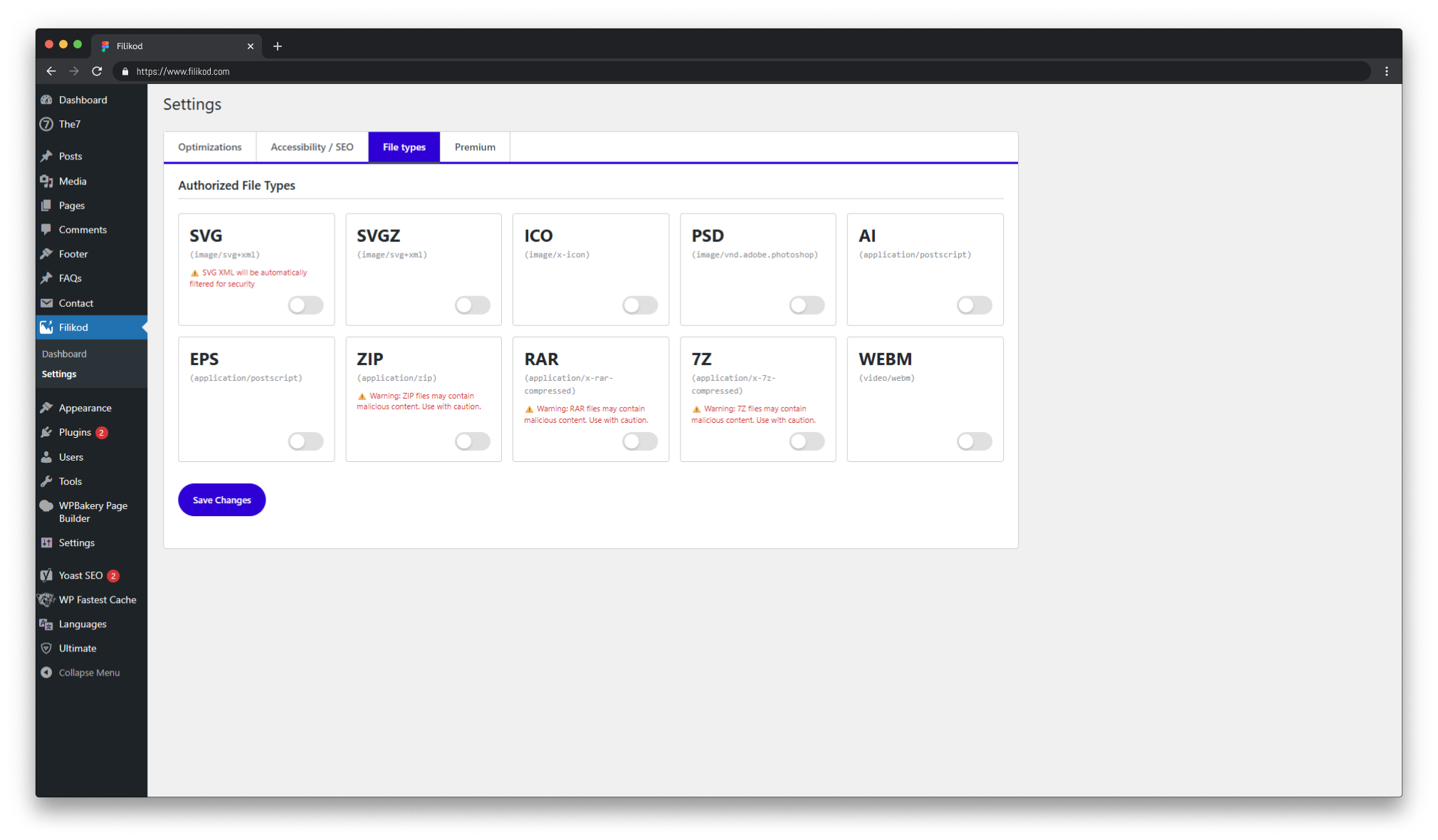
.svgz) could bypass the SVG sanitization chain, which only processes uncompressed .svg uploads. The SVGZ option has been removed from Settings > File types; sites that had it enabled will no longer accept .svgz uploads. Regular .svg uploads are unaffected and remain fully sanitized. If you previously uploaded .svgz files, we recommend reviewing them and re-uploading as standard .svg.
• Documentation – image files FAQ: the "Does Filikod modify my image files?" answer now explicitly states that the optional Automatic Image Resizing feature (disabled by default) replaces the original file with the resized version and is not reversible. All ALT features remain meta-only and never touch image files.
1.1.1
• AI-generated image detection (Generic ALT): ALT text inherited from default AI export filenames is now flagged as Generic in the audit. Two new universal patterns cover the most common cases:
Gemini_Generated_Image_*→ e.g. "Gemini Generated Image i90nz7i90nz7"ChatGPT Image *→ e.g. "ChatGPT Image Jul 7, 2024 at 02_30_00 PM" These ALT values look meaningful but carry zero accessibility or SEO value, so Filikod now surfaces them in the Generic tab of the ALT Audit and in the Alt: Generic badge across the Media Library (list, grid, attachment details). Detection is applied to the normalized ALT, so casing, underscores, dashes and dates do not bypass the rule. • Audit cache: transient bumped tofilikod_alt_audit_v4so the new detection rule applies immediately on first load after update; previousv3(and earlier) transients are explicitly cleared byinvalidate_cache(). • Performance – Dashboard media stats: the Dashboard counters (total images, total size, optimized count, original/optimized size) are now computed in a single batched loop and cached for 15 minutes (filikod_media_size_stats_v1). The cache is auto-invalidated on attachment add/delete and after each automatic resize, removing repeated heavy queries on every Dashboard page load. • Security – ALT save endpoint: the AJAX endpointfilikod_save_altnow checkscurrent_user_can( 'edit_post', $attachment_id )per attachment, verifies that the target is an actual image (wp_attachment_is_image()), and truncates ALT text longer than 1000 characters before saving. • Accessibility – SVG sanitizer: the strict SVG whitelist now allows<title>,<desc>and accessibility attributes (role,aria-label,aria-labelledby,aria-describedby,aria-hidden,tabindex,preserveAspectRatio). These elements are non-executable and required for WCAG-compliant inline SVG; the security posture against scripts, event handlers and external references is unchanged. • Settings UX: the Maximum image width setting now displays an explicit admin error notice when a value outside the supported range (100–10000 px) is submitted, instead of silently rejecting the input. • Multisite hygiene: the uninstall routine now also deletes per-site Filikod transients (_transient_filikod_*and their timeouts) on every sub-site of a multisite network, preventing orphaned cache entries after plugin removal. • Production log hygiene: non-criticalerror_log()calls in the SVG sanitization and image resizer paths are now gated behindWP_DEBUG, avoiding noise in productiondebug.logfiles. • Code cleanup: removed two dead-code paths (no-op rewrite-rule flush oninit; SVG security headers hook that never fired because static SVG files bypasstemplate_redirect). No user-visible behavior change.
title tooltip explaining the status and the recommended action (e.g. “ALT text exceeds 125 characters. Long ALTs are poorly read by screen readers and dilute SEO signals…”). Tooltips are translatable and parameterized with the actual character thresholds. A dotted underline (cursor: help) signals the tooltip on the Issue label
• New issue: Too long ALT: detection of ALT text exceeding 125 characters (after normalization). Dedicated tab on the ALT Audit page, dedicated count on the Dashboard, dedicated Alt: Too long badge in the Media Library (list, grid, modal). Score impact: 70/100 (reported but less critical than duplicate, generic, too short, or missing)
• Decorative action: mark an image as decorative (intentional alt="" per WCAG). Decorative images are fully excluded from the ALT score (neither numerator nor denominator) so logos, dividers and purely visual icons stop dragging your score down. Dedicated Decorative column on the ALT Audit page with a toggle switch that auto-saves on change; dedicated Decorative tab to review and revert; dedicated Alt: Decorative badge in the Media Library
• ALT Audit UI: decorative action moved out of the Action column into its own column with a toggle switch (auto-save on change, keyboard-accessible). The Action column now only holds the Save button for a cleaner row layout
• Badge colors refresh: new palette for the Media Library ALT Status badges. Alt: Generic in amber (#FFC736) and Alt: Too short in teal (#0DBB9C) for clearer visual differentiation
• Dashboard: two new counters, Too long and Decorative, both linking to the matching ALT Audit tab
• Audit cache: transient bumped to filikod_alt_audit_v3 (auto-rebuilt on first load); invalidation hooks now also listen to the new _filikod_decorative post meta
• i18n: new translatable strings (Too long, Decorative, Marked as decorative., Image restored as a regular image, please add an ALT text., "too long" description with parameterized character threshold)
• Public API: new helpers Filikod_Alt_Audit::is_decorative(), Filikod_Alt_Audit::set_decorative(), new constants TOO_LONG_MIN_LEN, META_DECORATIVE, AUDIT_TRANSIENT
• Backwards compatibility: existing audit results still load; collect_alt_issue_codes() gains an optional fourth parameter $is_decorative defaulting to false
1.0.9
• ALT Status labels: badges in the native Media Library (list, grid, attachment details) now use an Alt: prefix on every status (e.g. Alt: OK, Alt: Duplicated, Alt: Missing) via a translatable Alt: %s string
• OK badge: removed the checkmark character; the passing state reads Alt: OK
• Attachment details modal: new stylesheet media-modal-alt-status.css enqueued after media-views (wp_enqueue_media) so the ALT Status label stays aligned with other field labels and with the badges, including under the 900px responsive rules
• Readme: description, screenshots captions, and changelog aligned with the above
1.0.8
• Native Media Library: ALT Status column in list view; badge overlay on grid thumbnails (top-left); ALT Status field in attachment details modal/sidebar
• Modal UX: ALT Status label aligned with badges; multiple issue badges on one horizontal row in attachment details (list column still stacks badges for readability)
• Live updates: status refreshes after saving ALT text (AJAX save handlers) and while typing (server-side preview); dashboard and audit cache stay in sync when _wp_attachment_image_alt changes
• Multi-issue badges: an image can show several tags at once (e.g. Generic + Too short + Duplicated) when multiple rules apply; single green Alt: OK when there are no issues
• Reliability: audit transient cache key bumped (filikod_alt_audit_v2); normalized cache keys for object caches; attachment_fields_to_save ensures image_alt is persisted on save-attachment-compat like the classic uploader; invalidation hooks on post meta, attachment save, and related paths
• Performance: cached global map of normalized ALT → occurrence count (filikod_alt_norm_counts_v1); duplicate preview in the media modal avoids scanning every attachment per request; full audit rebuild reuses that index
• Admin JS: shared batch runner for accessibility and bulk jobs (runFilikodBatchedJob)
• Documentation: FAQ and feature list updated; default behavior is ALT meta only, no image file changes
1.0.7
• Accessibility: "Remove Title Attribute" now works for new uploads (clears post_title after use); execution order enforced: generate ALT (from title then filename) → clean special chars → remove title (same order in bulk process)
• ALT Audit page: Duplicated tab lists media sorted alphabetically by ALT so duplicates are grouped; saving an ALT in Duplicated tab reloads the list so media that are no longer duplicated disappear
• Security & coding standards: escaped outputs (menu icon via wp_localize_script; pagination printf), all variables in ALT audit view prefixed with filikod_ (PrefixAllGlobals)
1.0.6
• Readme and positioning update: ALT audit & bulk management first
• Clarified automation messaging (optional, controlled)
• Improved "Generic ALT" detection with additional real-world patterns (e.g. device/app filenames, placeholders, thumbnails)
• Reduced false positives in generic ALT classification (better normalization and matching)
1.0.5
• Added content context column in ALT audit (see where each image is used)
• Improved bulk ALT editing workflow
• Enhanced admin interface clarity
1.0.4
• Fix audit score calculation
• Adjusted description text
1.0.3
• Dashboard redesign with ALT Quality Score (0–100%)
• Multi-language generic ALT detection
• Donut gauge visualization for ALT Score
• Media Size Savings module and progress bars
• New audit utilities and filters
1.0.2
• Improved dashboard readability
• Added ALT coverage percentage
• Clarified resize behavior messaging
1.0.0
• Initial public release
• ALT automation (filename-based)
• Title removal & character cleanup
• Bulk processing for existing images
• Secure SVG sanitization
• Optional extended file types
• Modern tab-based dashboard