
GreenOrb Statistics – Google Analytics Alternative with Bot Filtering
| 开发者 | phillip2532 |
|---|---|
| 更新时间 | 2026年11月2日 22:05 |
| PHP版本: | 7.4 及以上 |
| WordPress版本: | 7.1 |
| 版权: | GPLv2 or later |
| 版权网址: | 版权信息 |
详情介绍:
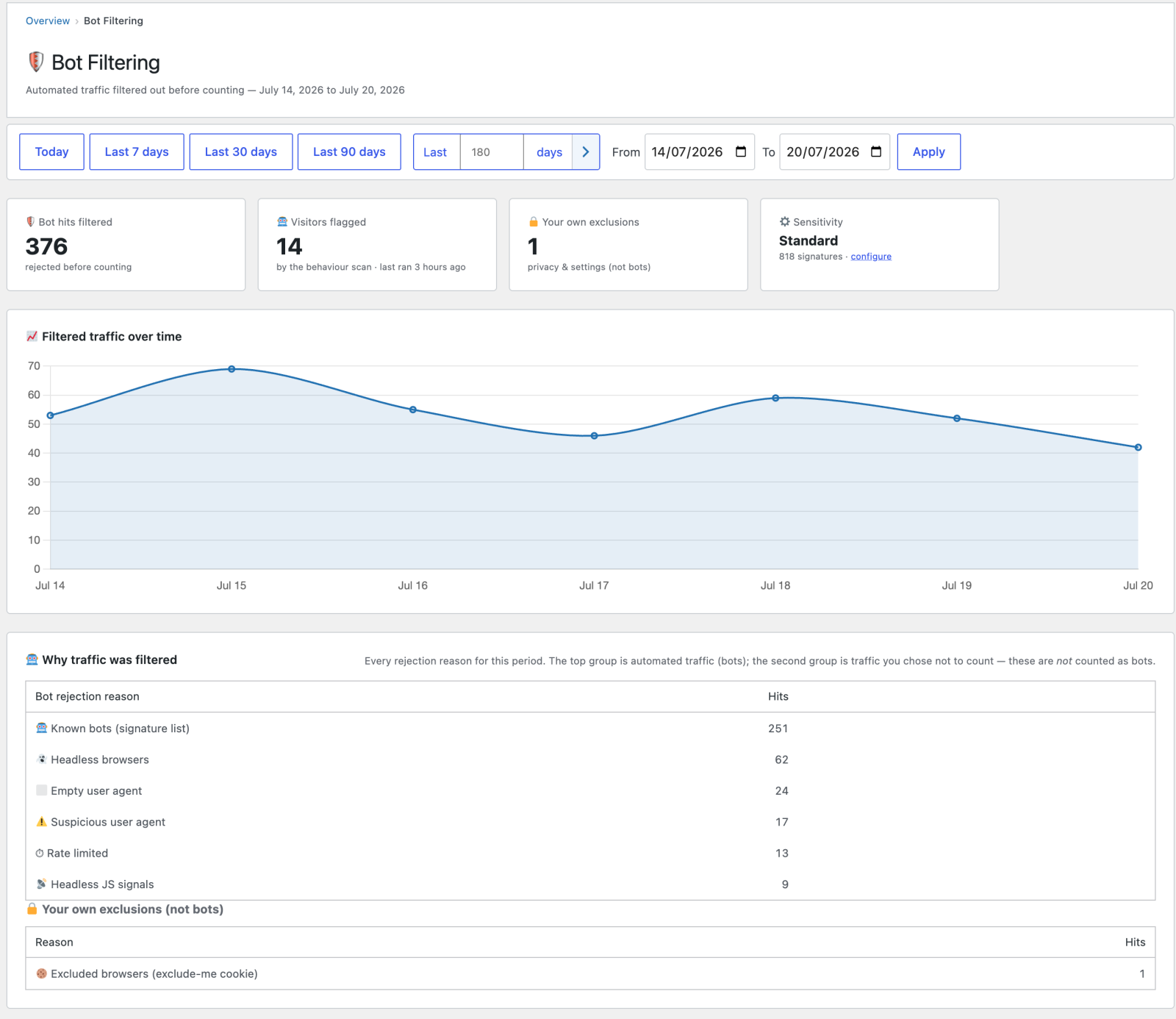
- Bot filtering — known bots, headless browsers and referrer spam are filtered; bots that get past those checks are flagged by their behaviour, including waves of look-alike visitors who each view one page and leave; an optional check flags or excludes visits from data-centre networks, and one button deletes them all. Details below.
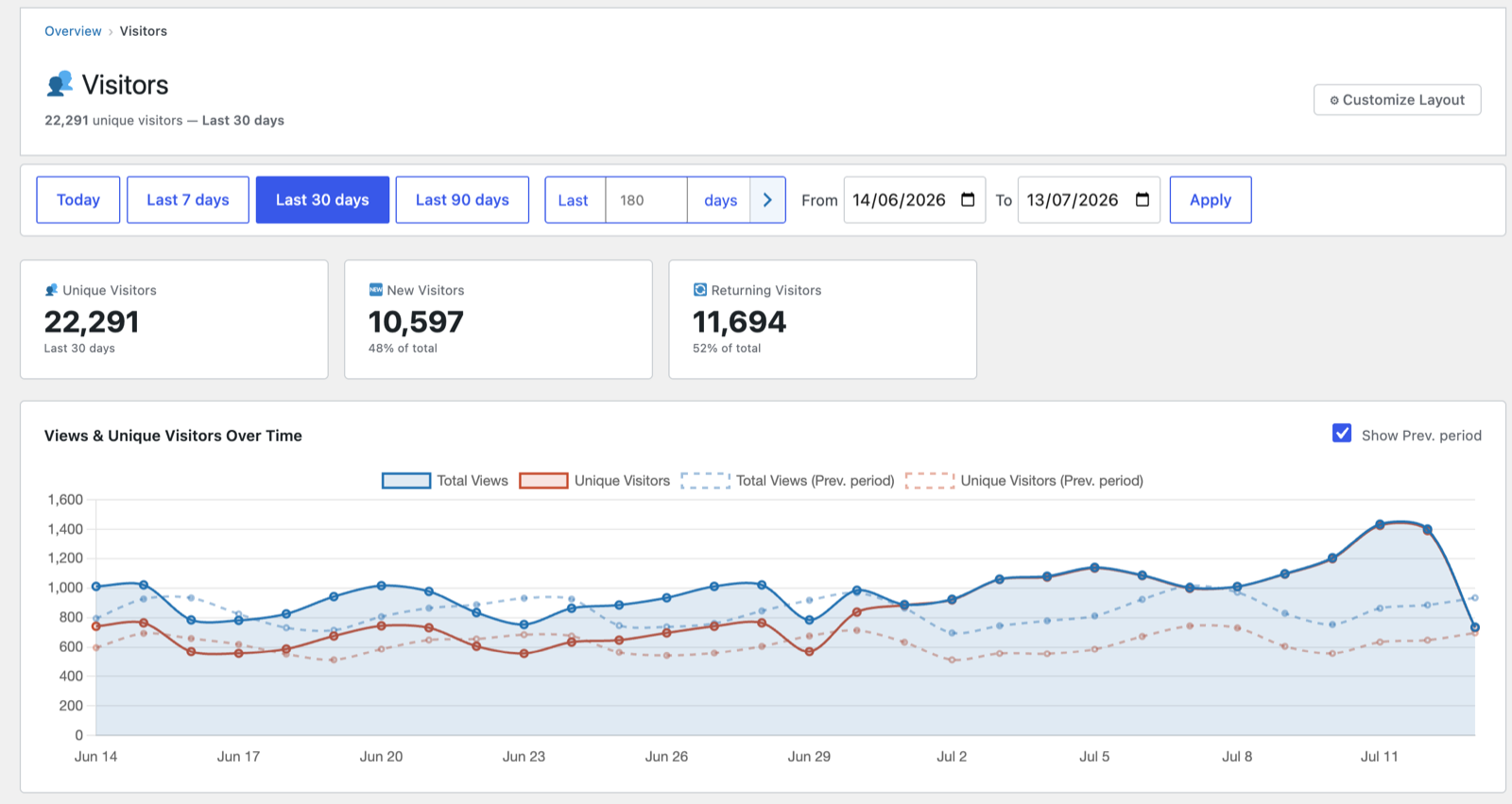
- Page views & visitors — raw pageviews with a configurable cooldown, unique visitors, sessions, engaged sessions, and bounce rate.
- Time on page — engaged time measured with the Page Visibility API (heartbeat-based) and gated on real activity: idle tabs stop counting shortly after the last scroll/mouse/key interaction, while playing audio or video keeps counting. Server-side caps stop background tabs inflating durations.
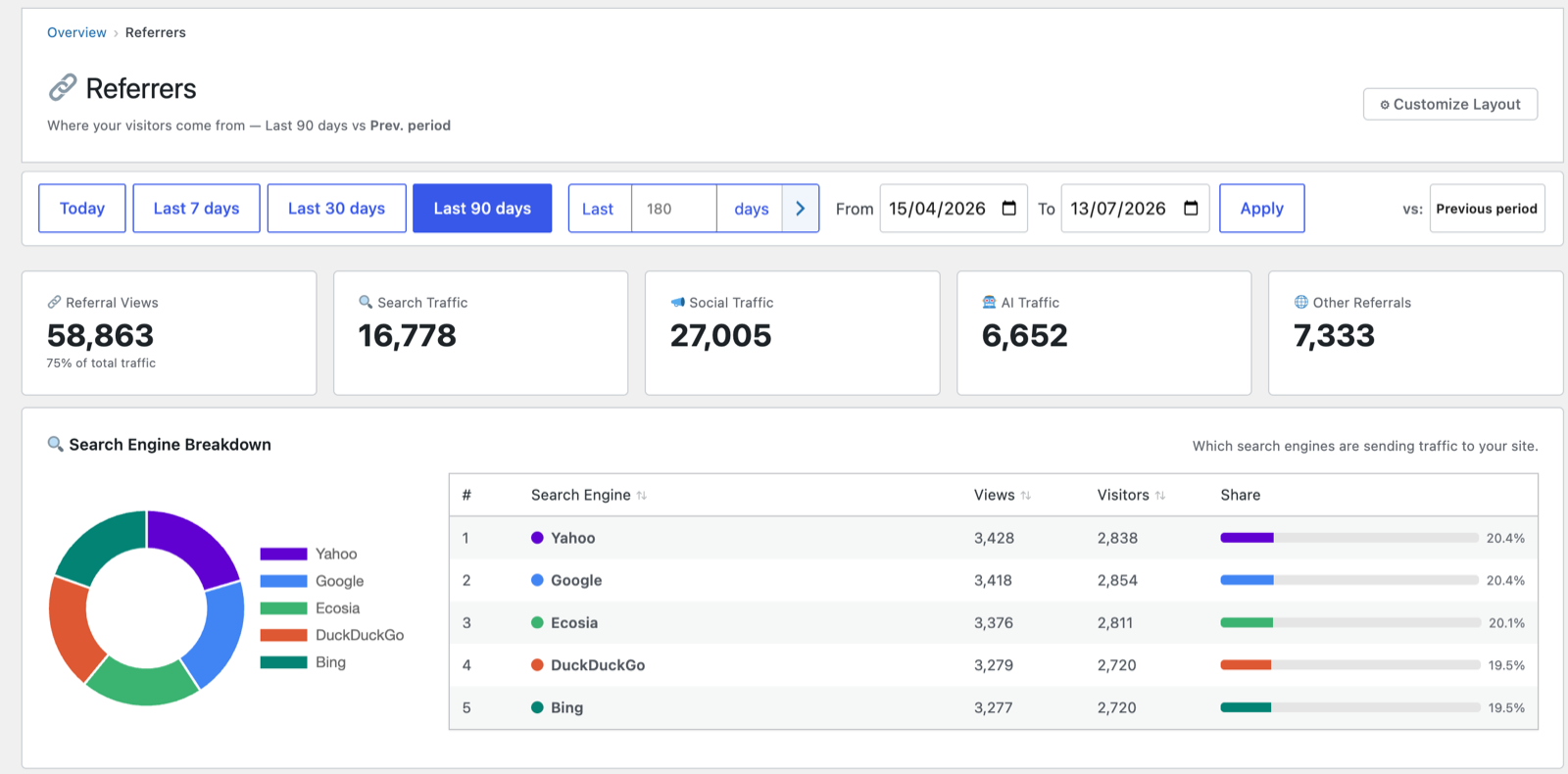
- Referrers & traffic sources — referrers, UTM campaigns, search terms, affiliates (Pretty Links short links are counted automatically), and outbound-link clicks.
- Devices — device type, browser, and operating-system breakdowns.
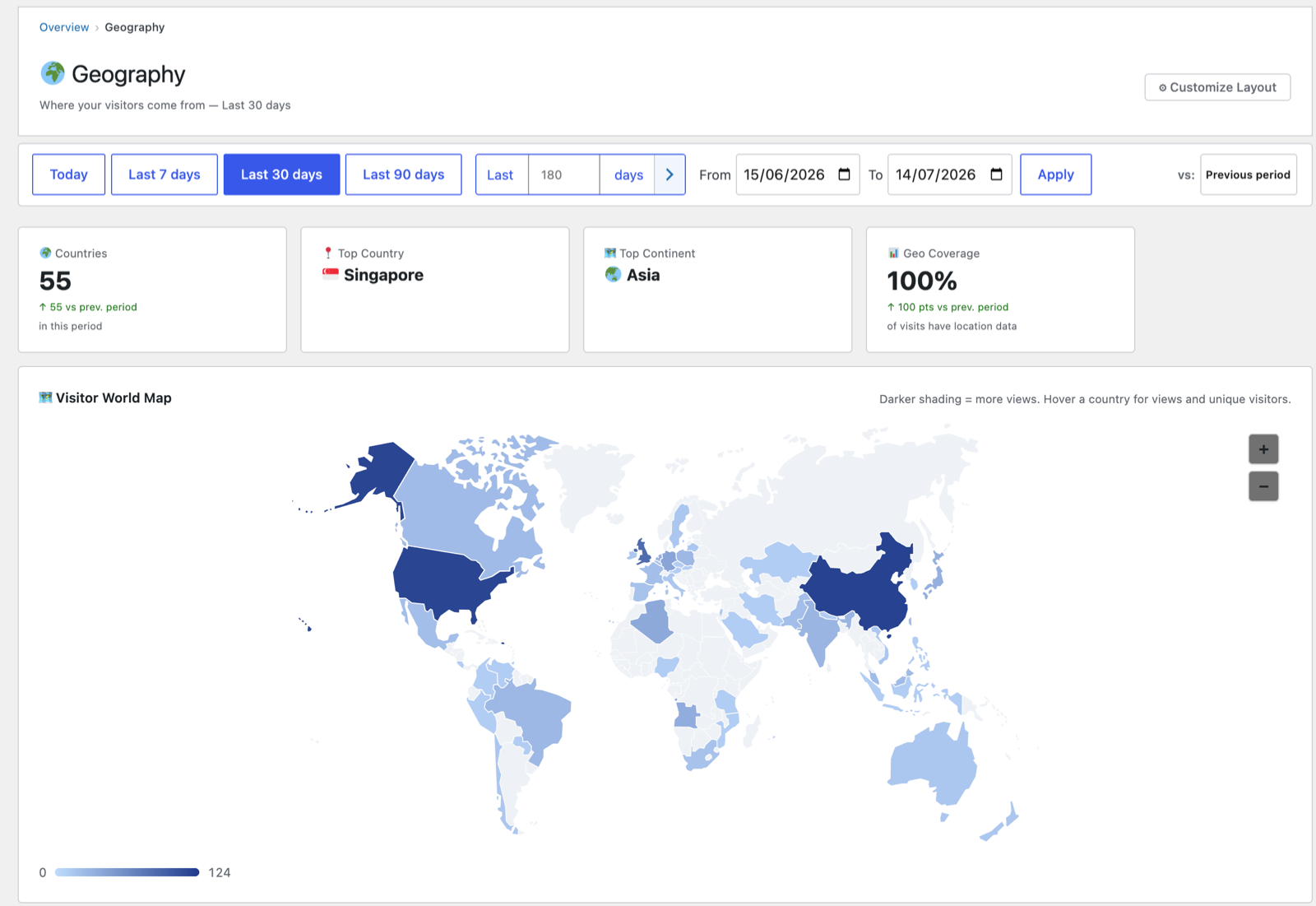
- Geography — country (and optional city) detection via Cloudflare headers, MaxMind, or the free DB-IP Lite database. No account or API key required for the DB-IP option.
- Content reports — popular posts, authors, taxonomies, entry/exit pages, journeys, and per-post detail.
- Dashboard widget & admin bar — a 30-day sparkline, "today so far," and a live "online now" count at a glance.
- Email reports — scheduled summaries delivered to your inbox.
- Tracked clicks — count clicks on any element, by CSS selector or a
data-greenorb-trackattribute. - Annotations — mark events on your charts.
- CSV export — export any report.
- Writes your privacy policy — adds a settings-aware section to WordPress's Privacy Policy Guide describing exactly what is recorded, what is not, and your own retention setting, so the published policy matches how the plugin is actually configured.
- WooCommerce — revenue overview, product performance, sales funnel, and order insights.
- Goals & conversions — custom conversion goals, conversion paths, and landing-page conversion rates.
- Web Vitals — Core Web Vitals (LCP, CLS, INP) collected from real visits.
- Media plays & downloads — SoundCloud / YouTube play detection and titles.
- Form tracking — submissions from Contact Form 7, WPForms, Gravity Forms, Elementor, and Divi.
- Traffic spike alerts — get notified when traffic jumps unexpectedly.
- SPA tracking — pushState / client-side navigation for single-page themes.
- Ask AI — ask questions about your statistics in plain English, plus a weekly AI summary.
- Excluded countries — leave visitors from chosen countries out of your statistics. It hides them from your reports only; it does not block anyone or stop a sale.
- Data is stored only in your WordPress database — nothing is sent to an external analytics service. See "External services" below for the short list of optional, non-visitor-data calls the plugin can make.
- Optional IP anonymization and configurable data retention (default 365 days), with never-pruned monthly rollups so year-on-year comparisons survive pruning.
- You choose what is stored in a visitor's browser. The returning-visitor cookie and the browser-storage note that stops quick reloads counting twice can each be switched off, and with both off the plugin stores nothing there.
- Plays nicely with consent managers (e.g. Complianz) and includes GDPR-oriented settings.
- Install and set up GreenOrb Statistics (3:23)
- How GreenOrb Statistics filters bots (3:12)
- Cookie consent settings in GreenOrb Statistics (2:46)
- Bot detection uses the open-source bot-signature list from the Matomo device-detector project (https://github.com/matomo-org/device-detector) — LGPL v3, text at
includes/lib/MatomoBots/LICENSE.txt. - Referrer-spam filtering uses the Matomo referrer-spam list (https://github.com/matomo-org/referrer-spam-list) — Public Domain, bundled at
includes/lib/ReferrerSpam/. - Charts are rendered with Chart.js (https://www.chartjs.org/), bundled locally — MIT, text at
assets/js/vendor/LICENSE.txt. - The world map uses jQVMap (https://github.com/manifestinteractive/jqvmap) — dual MIT / GPL, text at
assets/js/jqvmap/LICENSE.txt. - Country/city geolocation can optionally use the free DB-IP Lite database (https://db-ip.com/) or MaxMind GeoLite2 (https://www.maxmind.com/), and the optional data-centre check uses the free DB-IP IP to ASN Lite database. None is bundled — the site owner downloads them, under those providers' own terms (DB-IP Lite: CC BY 4.0).
安装:
- Upload the
greenorb-statisticsfolder to/wp-content/plugins/, or install the ZIP via Plugins → Add New → Upload Plugin. - Activate the plugin through the Plugins screen in WordPress.
- Open GreenOrb Statistics in the admin menu to view your reports. Tracking begins automatically once the plugin is active.
- (Optional) Visit the Settings tabs to configure privacy, data retention, bot filtering, and geography.
屏幕截图:
常见问题:
Does this send my visitors' data to a third party?
No. All tracking and reporting happens on your own server, your data is stored only in your WordPress database, and no external call is ever made to render a report. The plugin does contact a small number of third parties, none of which are sent visitor data, and all of which are itemised under "External services" above. Three of them are jobs your server does, and none of them run unless you turn them on or press a button: refreshing the bot-signature list, downloading the geolocation database, and looking up the title of an embedded YouTube or SoundCloud track. The one exception is not your server and is not optional in the same way: on a page that embeds a YouTube video or a SoundCloud player, the visitor's browser loads that provider's player API so plays can be detected. This contacts only the provider whose player is already embedded on that page — no host your visitor's browser wasn't already reaching — and it doesn't happen at all on pages with no such embed, or for a visitor who has declined statistics consent.
Why do my statistics show more visitors than I expected?
Often because some of those visitors are automated. GreenOrb Statistics filters known bots using the open-source Matomo bot list, skips headless browsers and referrer spam, and flags real-browser bots that get past those checks by how they behave: many sessions on one page and no scrolling, clicking, downloads or plays. If you switch on the optional data-centre check, it can also flag or exclude visits from cloud and hosting networks. Some automated traffic still looks exactly like a person, so treat flagged visits as likely bots, not proof.
Is it a Google Analytics alternative?
Yes, for most sites. It covers page views, visitors, sessions, traffic sources and campaigns, devices, geography and content reports. You don't need a Google account, and your statistics are not sent to Google or any other analytics service.
Can it run without cookies?
Yes. Go to Settings → Privacy & Data and turn off Visitor cookie. That is the only cookie the plugin sets for your visitors. With it off, visitors are counted with a privacy hash that changes every month, so returning visitors can't be recognised from one month to the next. The plugin also keeps a small note in the browser's local storage so a quick reload isn't counted as a second view. Turn off Browser storage in the same place and it stores nothing in the visitor's browser at all; every page load then counts. Whether you need a consent banner depends on the rules where you and your visitors are, so these two settings let you choose exactly what is stored.
Does it work with caching plugins?
Yes. View tracking is recorded server-side and via a lightweight front-end script, so it works alongside page caching.
Do I need an API key for geolocation?
No. The free DB-IP Lite database works without an account or key, and Cloudflare's country header is used automatically when your site is proxied through Cloudflare. MaxMind GeoLite2 is also supported if you prefer it. Geolocation is off until you ask for it: no database is downloaded on activation. Choose the geography step in the setup wizard, or press Download on Settings → Geography, and lookups then happen entirely on your own server.
Does it require WooCommerce?
No. The plugin works on any WordPress site. WooCommerce reporting is a Pro feature, and even in Pro it only loads when WooCommerce is active.
What is the difference between the free plugin and Pro?
The free plugin is a complete analytics tool: page views, visitors, sessions, journeys, referrers and campaigns, devices, geography, content and author reports, bot filtering, tracked clicks, email reports, the dashboard widget, annotations, and CSV export. Pro adds the modules listed under "Also available in Pro" above — WooCommerce revenue reporting, goals, Web Vitals, media, forms, spike alerts, SPA tracking, Ask AI, and excluded countries.
Where is my data stored?
In custom tables in your site's database (prefixed greenorb_statistics_). Uninstalling the plugin removes its data according to your settings.
更新日志:
- New: visits from data-centre networks (cloud and hosting companies, where most of the bots that get past every other check run) can be flagged or left out. Switch it on under Settings → Bot Filtering; the setup wizard also offers it. The network database is downloaded from DB-IP only when you press the button, or monthly if you choose. Apple iCloud Private Relay and Cloudflare WARP are never treated as data centres.
- New: a "Delete all data-centre visitors" button on the Bot Filtering report removes every flagged data-centre visitor in one go and recalculates your totals.
- New: the daily bot scan now spots waves: 5 or more brand-new visitors from the same country, device and browser, arriving within an hour of each other, each viewing one page and doing nothing else. A post going viral is never flagged, because real readers always include some who scroll, click or stay.
- New: referrer spam is blocked, using Matomo's public spam list that comes with the plugin. Tracking hits sent from another website are refused (Google Translate's copy of your page is allowed).
- New: add your own bot keywords on Settings → Bot Filtering. Any visit whose browser identification contains one is not counted.
- New: the Overview cards show how many sessions were engaged (2 or more pages, 15 seconds or more on the page, or a scroll half way down).
- New: clicks on Pretty Links short links are counted as affiliate clicks automatically.
- New: a "Browser storage" setting under Privacy & Data. It sits in one box with the visitor cookie, so you can choose exactly what the plugin stores in a visitor's browser.
- Fixed: on the data-centre setting, ticking the box and then pressing Download lost the tick. The Download and Upload buttons now save the row's settings too.
- New: the plugin now honours Global Privacy Control as well as Do Not Track. Visitors whose browser sends either signal are not tracked. Both are covered by one setting, "Browser privacy signals" on the Privacy tab, which is on by default. If you had switched Do Not Track off, Global Privacy Control is off too.
- New: "Record country only" on the Geography tab. Each new visit keeps its country but not its town, region, postcode or map position. A "Clear stored city data" button removes that detail from visits already recorded.
- Fixed: the desktop / mobile / tablet split in the email report, the Overview and the Devices report could show 0% or come up short for date ranges reaching back further than your data retention period. It now adds up to the views total for any range.
- Fixed: on sites behind Cloudflare with location detection on Automatic and no location database downloaded, the plugin said visitor countries were not being recorded and hid the Geography report, although countries were being recorded from Cloudflare.
- The warning about WordPress's scheduler being switched off (DISABLE_WP_CRON) now appears only when scheduled tasks are actually running late, and is much shorter. It used to appear straight after installing on hosts that run their own scheduler.
- The warning about the weekly data clean-up now appears only when the clean-up is failing, not after a site has simply had no visitors for a while. Closing it now keeps it closed.
- The erase-by-IP and erase-by-UUID tools now explain that report totals from more than a week ago may still include the erased visits.
- Clearer privacy wording: the suggested privacy-policy text now describes location accurately and only mentions browser privacy signals when your site honours them; the consent setting no longer calls the visitor hash "no personal data"; and the visitor cookie is described to cookie-banner plugins as a random ID that recognises a returning visitor.
- Fixed: the returning-visitor cookie could be set before a visitor had given consent, and on sites where the cookie option was switched off. It is now set only after a visitor accepts statistics cookies, and is removed if they later withdraw consent. Visits are still counted without it, as before.
- Fixed: on quieter sites, the daily totals could occasionally miss a day. Any days already missed are filled in automatically over the next few days.
- Developers: the
greenorb_statistics_idle_grace_secondsfilter now takes effect.
- Fixed: closing one of the plugin's compatibility warnings did nothing — the warning came straight back on the next page you opened. Dismissing one now keeps it dismissed. If the problem it describes is fixed and later comes back, the warning returns, so nothing is hidden for good.
- The "Upgrade to Pro" link has moved to the left of the plugin's row on the Plugins screen, next to Deactivate, where it can actually be seen. It was previously at the end of the small grey text on the right.
- Visitor and session timelines now show the clicks a visitor actually made, alongside their page views.
- Fixed: the setup wizard offered traffic-spike email alerts, which are a Pro feature. The option is no longer shown on the free plugin.
- Added an "Upgrade to Pro" link to the plugins list and a line on the Settings screen, so the paid version is findable from inside the plugin.
- Initial public release.