
Harvv Analytics
| 开发者 |
harvv
ecommercepros505 |
|---|---|
| 更新时间 | 2026年9月25日 02:52 |
| PHP版本: | 7.4 及以上 |
| WordPress版本: | 7.1 |
| 版权: | GPL-2.0-or-later |
| 版权网址: | 版权信息 |
详情介绍:
- Enqueues a vanilla-JS tracker (no jQuery, no external scripts) on your frontend.
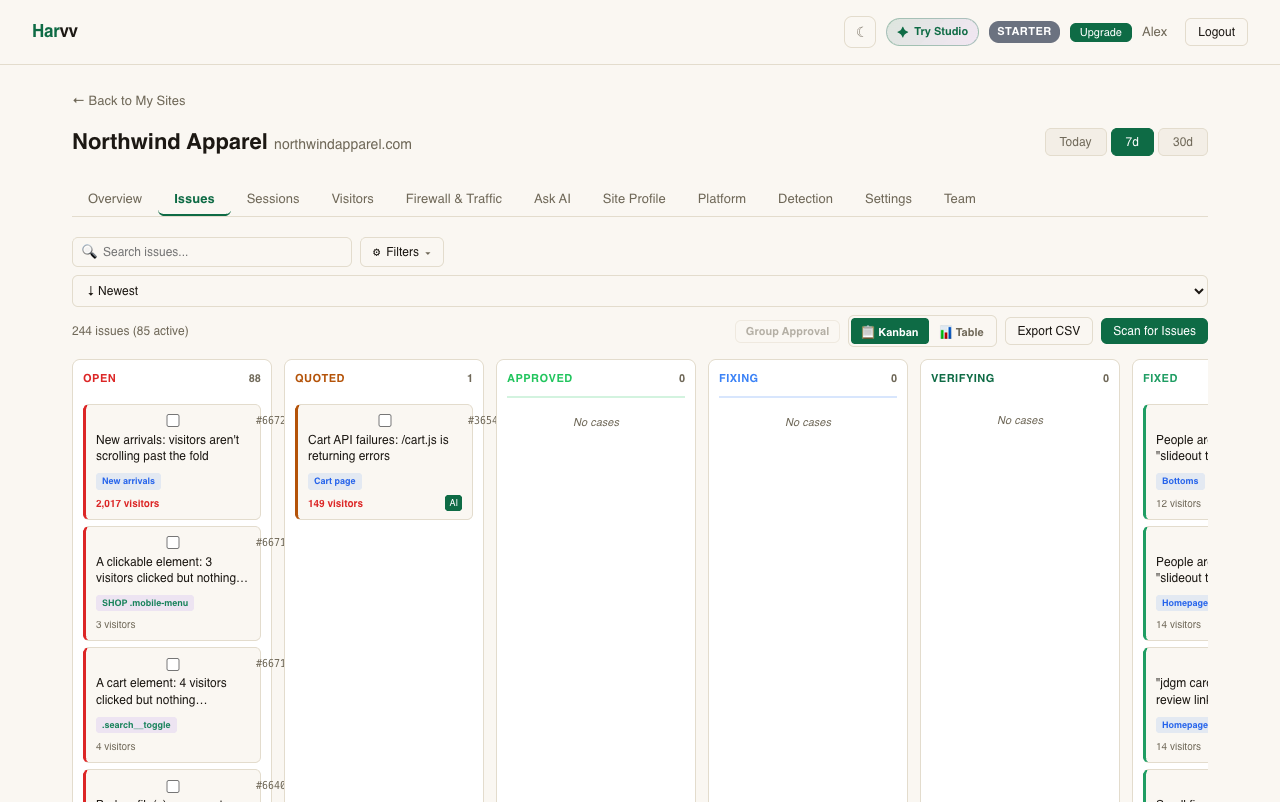
- Captures behavioral signals: scroll depth, click targets, dead/rage clicks, hover intent, page errors, engagement time.
- Syncs WooCommerce orders on
woocommerce_payment_complete(never blocks checkout). - Passes customer identity as a non-reversible hash derived from the site's own salts — the raw email never leaves WordPress.
- Works with WooCommerce HPOS (Custom Order Tables) out of the box.
- Multisite-aware: one network API key, per-subsite Site IDs, per-subsite admin overrides.
- Does not set or read cookies.
- Does not transmit email addresses, names, phone numbers, postal addresses, or IP addresses.
- Loads one script, the canonical Harvv pixel, from
https://harvv.com/px/<site_key>/pixel.js(see External Services below). Self-host it instead withdefine( 'HARVV_PIXEL_URL', '...' );. - Does not create custom database tables on your WordPress site.
- Does not record session replays or keystrokes.
安装:
- Install and activate the plugin through the WordPress Plugins screen, or upload the plugin folder to
/wp-content/plugins/harvv-analytics/. - Navigate to Settings → Harvv Analytics.
- Click Connect to Harvv — this opens harvv.com in a new tab for signup. Once you complete signup, the tab will notify this plugin and your API key will be saved automatically.
- Alternatively, expand I already have an API key and paste your key manually.
- On WooCommerce sites, no further action is needed — order events start flowing on the next completed payment.
屏幕截图:


常见问题:
Does this require a cookie consent banner?
The plugin is built to avoid the things consent rules attach to: it sets no cookies, stores nothing on the visitor's device, and transmits only behavioral signals (dead clicks, scroll depth, and similar) with no names, emails, or other personal details. Many site owners run it without an analytics banner for that reason. Consent law varies by country and by what else your site runs, so make your own assessment for your site. If your legal counsel interprets the regulations more conservatively than we do, you can still add Harvv to your privacy policy's third-party services section. The plugin provides suggested language at Settings → Privacy → Policy Guide.
Does this plugin work without WooCommerce?
Yes. The WooCommerce integration loads conditionally — on a non-Woo WordPress site, the plugin runs as a pure behavioral pixel.
Does this plugin slow down my checkout?
No. All outbound HTTP calls use wp_remote_post() with 'blocking' => false, and the browser tracker uses navigator.sendBeacon() or fetch with keepalive: true. Nothing in the plugin waits on a response from Harvv.
Is this plugin HPOS (Custom Order Tables) compatible?
Yes. The plugin declares compatibility with custom_order_tables and uses only the WC_Order CRUD API — never direct $wpdb access against order tables.
What happens if my site loses internet connectivity?
The browser tracker queues events locally and attempts to flush on each interval; unsent events are discarded silently when the browser tab closes. WooCommerce order events are fire-and-forget — if your site cannot reach harvv.com at the moment of payment_complete, the event is lost. We do not queue order events for retry on-site because doing so would require creating a custom database table, which this plugin intentionally does not do.
As of 1.0.1 the plugin records the timestamp of the most recent successful Woo sync and surfaces it on the settings page so an admin can spot a silently broken integration before reconciling Stripe and Woo manually.
How do I uninstall?
Delete the plugin from the Plugins screen. All plugin options (harvv_api_key, harvv_site_id, and related) are removed via uninstall.php. The plugin never creates custom database tables on your site, so nothing is left behind.
I use caching plugins — does this conflict?
No. The tracker is enqueued in the footer and is cache-friendly (same output for every visitor). The Connect-flow REST endpoint is under /wp-json/harvv/v1/* and is gated by a one-shot nonce, so caching that endpoint is harmless.
Is the Site key in my page source a secret?
No — the Site key is a public, per-site identifier. Think of it like a Stripe publishable key: it ships embedded in your page source so the browser tracker can authenticate its POSTs to Harvv. It can be used only to send events for the site it was issued for; it cannot be used to read your account data or events from any other site. If you ever need to rotate it, do so from the Harvv dashboard.
How do I keep Harvv exempt from my optimization plugin?
As of 1.0.4 the plugin auto-injects the exclusion attribute for every major optimization tool, so most setups are immune out of the box. The exceptions are three tools that match by URL pattern rather than HTML attribute:
- Perfmatters — Settings → Perfmatters → Assets → Script Manager → "Delay JavaScript" → Exclusions: add
harvv.com/px/. - W3 Total Cache — Performance → Minify → JS → Never minify the following JS files: add
https://harvv.com/px/*. - Hummingbird — Hummingbird → Asset Optimization → Files to exclude: add
harvv.com/px/.
How can I prevent the tracker from loading on specific pages?
Add a filter on harvv_should_load_tracker in your theme's functions.php or a small site-specific plugin:
add_filter( 'harvv_should_load_tracker', function( $load ) { if ( is_admin() || is_cart() || is_checkout() ) { return false; } return $load; } );
The filter fires before wp_enqueue_script runs, so a false return prevents the script tag from ever appearing in HTML.
How do I point the plugin at a staging or self-hosted receiver?
Define HARVV_API_BASE in wp-config.php before WordPress loads plugins:
define( 'HARVV_API_BASE', 'https://staging.example.com' );
The plugin sends every outbound API call (registration, Woo order sync) to that base URL. The Connect flow always uses https://harvv.com because Harvv's hosted signup page is the only place that can mint a fresh API key.
How do I tell if WooCommerce order sync is working?
Settings → Harvv Analytics shows the time since the most recent successful sync underneath the "Connected ✓" badge on WooCommerce sites. If a sync fails (DNS error, sslverify mismatch, etc.) the error message is shown in red and the timestamp is preserved from the last successful send. The plugin never blocks checkout — these signals are surfaced asynchronously so you can spot a failing integration before it becomes a reconciliation problem.
Does the plugin send a list of my other plugins? Why?
Yes — by default, the plugin sends Harvv a snapshot of which other plugins, theme, WordPress version, and PHP version are installed on the site. This is site metadata, not visitor data. No personal information, no user content, no option values. Why we do this: Harvv's value comes from telling you exactly what's wrong with your site's UX. The browser tracker can see "users are bouncing on /pricing because of a 600ms layout shift" — but without knowing which plugins are running, the diagnosis stops at "something is shifting layout." With the stack snapshot, we can attribute the shift to the specific plugin causing it (e.g. "Yoast 22.8 injects a meta tag late") and tell you exactly what to fix. Faster diagnosis = faster fix = better speed and UX for your visitors. That's what this plugin is for. What's sent (1.0.2 — site context):
- Installed plugins: slug only (e.g.
yoast-seo, not the human display name), version, active boolean. - Active theme: slug, display name, version, parent theme slug.
- Environment: WordPress version, PHP version, MySQL/MariaDB version, server software string, site language code (
en_US,fr_FR, …), timezone (America/Chicago), permalink-structure boolean ("pretty" vs "plain"), WP_DEBUG boolean, memory limit, max execution time, object cache backend (external / none), WP-Cron disabled boolean, multisite boolean + blog count. - Aggregate counts (no individual content): total registered users (number only), published + draft post and page counts, every custom post type's slug + publish count.
- WooCommerce (only when active): version, store currency code, store base country, total published product count.
- UI toggle (recommended for most admins): uncheck Settings → Harvv Analytics → Preferences → Share stack info.
- Site-config constant (recommended for staging-first / WP-CLI workflows): add
define( 'HARVV_SHARE_INVENTORY', false );towp-config.php. This wins over the UI toggle. - Programmatic filter (for advanced cases):
add_filter( 'harvv_share_inventory', '__return_false' );in a small mu-plugin.
Does this plugin auto-update?
Yes — Harvv Analytics defaults to auto-update from WordPress 5.5+ so new behavioral signals and bug fixes reach your site without you having to remember to click Update. Behavioral pixels are most valuable when they're current; an out-of-date pixel silently misses entire classes of issues, so the default leans toward "stay current."
If you'd prefer to manage updates manually (e.g. on a staging-first workflow), add this line to your wp-config.php:
define( 'HARVV_AUTO_UPDATE', false );
The plugin will then defer to WordPress's normal per-plugin auto-update toggle (which defaults to OFF until you click "Enable auto-updates" on the Plugins screen).
更新日志:
- Connecting now also clears Kinsta's page cache (server and edge), plus Nginx Helper, Cache Enabler, Breeze (Cloudways), GoDaddy Managed WordPress and Pantheon, so visitors get pages with the Harvv pixel right away on those hosts too.
- Fix: saving the Preferences section could disconnect the site (it cleared the saved site key), and saving a site key by hand could switch both preferences off. Connection and preferences are now saved separately and never overwrite each other.
- Page caches are cleared automatically when the site connects, reconnects or disconnects, so visitors get pages with the Harvv pixel right away. Supports LiteSpeed Cache, Bluehost / Newfold, WP Rocket, W3 Total Cache, WP Super Cache, SiteGround Optimizer, WP Fastest Cache, Autoptimize, Hummingbird and WP Engine.
- Security: the Connect flow now uses PKCE, the same protection OAuth apps use. A secret created by this plugin never leaves your server, so even if the one-time link back to WordPress were copied, nobody else could use it.
- Connect works on sites behind Cloudflare, Sucuri, Wordfence and other firewalls with bot protection. The connection now finishes through your browser: Harvv sends you back to this settings page with a one-time code, and the plugin exchanges it with Harvv. Harvv no longer needs to reach your site, so no firewall rule is needed.
- Tested with WordPress 7.1.
- Connect links now stay valid for 30 minutes, and a link is only reused when at least 15 minutes remain, so signing in with an emailed code no longer runs out the clock.
- Disconnect now asks Harvv to switch off this site's key, so a disconnected site leaves no working key behind.
- After activation you now land on the Harvv settings screen, where the Connect button is. Before, activation gave no next step, and the site was not tracked until someone found Settings > Harvv Analytics.
- Until the site is connected, the Plugins screen and the Dashboard show a notice saying so, with a Connect button. The plugin row also gets a "Connect to Harvv" link (it reads "Settings" once connected).
- The settings page shows the site key masked, and keeps the stored key when you save the page without changing it.
- The key issued by Connect only works for this one site.
- WooCommerce orders can now be traced back to the visit that produced them. The plugin reads the Harvv pixel's first-party cookies at checkout and sends them with the order, so Harvv can attribute the sale to the session, its traffic source, and its ad click. Previously every order arrived with no link to any browsing at all.
- Orders are now recorded as conversions, so they appear in revenue reporting rather than only in the raw event stream.
- Supports both the classic checkout and the newer block checkout.
- Listing copy: the short description no longer reads as WooCommerce-only. The plugin runs on any WordPress site; order sync is optional and the same pixel runs on Shopify, Magento and plain HTML.
- New: AI bot analytics. The plugin now detects server-side AI-crawler requests (GPTBot, ClaudeBot, CCBot, PerplexityBot, Bytespider, Google-Extended, Amazonbot, Applebot and more) and flags
robots.txtviolations — bots requesting paths yourrobots.txtdisallows. The behavioral pixel cannot see crawlers because they do not run JavaScript, so this is captured at the request layer. Zero-PII: bot rows only, no IP addresses, no human requests. Near-zero overhead on normal page loads (a single user-agent check; only known crawlers do more). Opt out with theharvv_enable_bot_analyticsfilter or by disabling it in settings.
- New: dataLayer source. The pixel now subscribes to
window.dataLayerand ingests GA4 recommended events (add_to_cart,begin_checkout,view_cart,purchase,view_item,generate_lead,sign_up,search) as Harvvcmevents withsrc:'dl'. When a customer's GTM container fires a GA4 conversion event, Harvv captures the same logical event via the dataLayer instead of re-detecting from the DOM. More precise, less noise. - New: dataLayer sink. Harvv's detected commerce signals are also pushed to
window.dataLayerunderevent: 'harvv_signal'(namespaced — never reuses GA4 event names, so no double-counting in customer's GA4 reports). Customers can set up GTM triggers onharvv_signalto route Harvv signals to Meta Pixel, Klaviyo, or any other tool managed through GTM. - New: in-pixel dedupe. DOM-detected events are held for 100ms; if a matching dataLayer event arrives in that window (GTM fired on the same click), the DOM emission is suppressed and the dataLayer version wins. Result: one event per real conversion, regardless of how many signal paths the customer's site has.
- New: broader optimization-tool attribution. The
pf.deferredevent'sviafield now also detects LiteSpeed Cache and Cloudflare Rocket Loader in addition to WP Rocket, Perfmatters, and NitroPack. Dashboard banner and email alert can name the specific tool deferring the pixel. - Internal: GA4 event-name mapping centralized in
GA4_NAMES(Harvv→GA4) andGA4_TO_KIND(GA4→Harvv). Adding a new mapping is a one-line change in either object.
- New: GA4 coexistence layer. The canonical pixel now detects whether Google Analytics 4 is installed on the page (via
gtag,google_tag_manager, ordataLayer) and stamps every session with aga4flag. Commerce events (cm/ca,cm/co) carry aga4alias mapping to the GA4 recommended event names (add_to_cart,begin_checkout) so the Harvv dashboard can label both. Harvv and GA4 stay separate-namespaced — no dataLayer writes by default — which means zero double-counting in the customer's GA4 reports. - New: GA4 Consent Mode v2 awareness. When
analytics_storageis denied in the site's consent config, the pixel downgrades to anonymous mode automatically (in-memory visitor ID, no cookie or localStorage writes) — mirroring GA4's own "cookieless ping" behavior so the privacy posture stays consistent across both tools. - Docs: new runbook at
docs/runbooks/ga4-coexistence.mddocuments the cross-system contract, expected number-deltas vs GA4, and the canonical answer for "why don't my Harvv numbers match GA4?" support questions.
- New conversion signals (canonical pixel): the pixel now fires on three high-value commerce moments, automatically detected from any page (no configuration needed):
- Cart-add clicks (
cm, kindca) — every time a visitor clicks an "Add to cart" /add_to_cart_button/single_add_to_cart_button/[data-add-to-cart]element. Element id + scroll depth at click attached. - Coupon attempts (
cm, kindco) — when a visitor focuses any input named coupon / discount / promo. Strong leading indicator for conversion intent. - Exit intent on commerce URLs (
cm, kindei) — mouse leaves the viewport from the top edge on/cart,/checkout,/basket, or/payment. One emit per pageload. Predicts cart abandonment. - Scroll-depth at click — every interaction (
ix) event now carriessp= scroll % of the page when the click happened. Lets the dashboard answer "are customers clicking my CTA from above the fold or after scrolling past it?". - Lazy-load attribution (Layer 5): when the pixel detects it was deferred, the
pf.deferredevent now includes the detected optimization tool (wp_rocket,perfmatters,nitropack). The dashboard banner and the email alert can now name the specific plugin causing the delay. - Plugin-side: no PHP code change in this version; new signals are in the canonical pixel that the plugin enqueues. Sites running plugin 1.0.3+ already get the new signals automatically — the 1.0.6 bump captures the changelog so admins know what's new on their dashboard.
- New: when the plugin detects Perfmatters, W3 Total Cache, or Hummingbird active on the site (the three optimization plugins that have no HTML-attribute opt-out), an admin notice now appears with the exact URL pattern to paste into that plugin's exclusion list. Dismissible per-user. We deliberately do NOT show the notice for WP Rocket, LiteSpeed, Autoptimize, WP Fastest Cache, NitroPack, or Cloudflare Rocket Loader because the 1.0.4 attribute carpet already handles those.
- New: dismiss endpoint
/wp-json/harvv/v1/dismiss-lazyload-notice(admin-gated; per-user user_meta).
- Performance: the plugin's pixel
<script>tag now ships with the full carpet of vendor-specific exclusion attributes so it is exempt from delay-JS / lazy-load passes in WP Rocket, LiteSpeed Cache, Autoptimize, WP Fastest Cache, NitroPack, and Cloudflare Rocket Loader. Before 1.0.4 these tools could catch our pixel and delay it until first user interaction, which meant we missed the initial-paint Core Web Vitals (LCP / INP / CLS) on every session. After 1.0.4 the pixel boots immediately regardless of which optimization tool is installed. - Documentation: three tools (Perfmatters, W3 Total Cache, Hummingbird) have no HTML-attribute opt-out — exclusion is URL-pattern only via their respective settings pages. The new FAQ entry "How do I keep Harvv exempt from my optimization plugin?" lists the exact URL pattern to paste into each.
- Internal: new
Harvv_Enqueue::inject_exclusion_attrs()method, hooked onscript_loader_tag. Attribute set researched 2026-05-13 against each vendor's primary documentation. Conflict-free (each tool only inspects its own attribute).
- Architecture: the plugin now loads the canonical Harvv pixel directly from
https://harvv.com/px/<site_key>/pixel.jsinstead of a bundled copy oftracker.min.js. New behavioral signals shipped to the canonical pixel propagate to your site within minutes — no plugin update required. Same source of truth our Laravel package and direct-install path already use. - Privacy + security: the per-site key is no longer rendered into page source via
wp_localize_script. The canonical pixel identifies the site via its URL path and the server-injected preamble. Tighter exposure surface for the (public-but-still-best-not-broadcasted) key. - Compat: offline-capable installs can pin to a self-hosted mirror via
define( 'HARVV_PIXEL_URL', '...' );inwp-config.php. Theharvv_pixel_urlfilter is also available for runtime overrides. - Internal: new double-install guard (
window.__harvvLoaded__) so a site running both the WP plugin AND the canonical script tag won't double-fire events. First one to boot wins; second one bails cleanly. The reconciliation event is also recorded server-side viasites.install_sourcesso the dashboard can show "both paths installed since X". - Compat: the bundled
tracker.min.jsstays in the plugin directory for backward compat (CDN cache TTLs), but the enqueue no longer references it. Slated for removal in a future release.
- New: site-context snapshot — sends a list of installed plugin slugs + versions, active theme, WordPress/PHP/MySQL versions, server software, locale, timezone, memory limit, post and page counts, custom post type slugs + counts, total user count, object cache backend, WooCommerce details when active, and other site-level configuration to Harvv. The dashboard uses this to attribute UX issues to the plugin or platform configuration causing them. Site metadata only — no personal data, no user content, no usernames, no emails, no per-user data.
- New: "Preview the exact diagnostic snapshot we would send" reveal on the settings page. Renders the literal JSON payload before it's sent, so admins can audit before opting in. (Reviewer-friendly transparency pattern.)
- New: weekly WP-Cron event refreshes the snapshot so the dashboard stays current as the site changes.
- New: opt-out UI on the settings page under Preferences → Share stack info. Defaults to on; uncheck to disable. Code-level opt-outs also available:
define( 'HARVV_SHARE_INVENTORY', false );inwp-config.phporadd_filter( 'harvv_share_inventory', '__return_false' );. - Privacy: suggested-policy text in Settings → Privacy now mentions the snapshot and how to disable it. Readme
External Servicessection enumerates every field that ships. - Internal: new option keys
harvv_share_inventory,harvv_last_inventory_sync_ts,harvv_last_inventory_error(cleaned up on uninstall). New WP-Cron hookharvv_inventory_refresh(cleared on uninstall). New REST endpoint/wp-json/harvv/v1/diagnostic-preview(admin-gated; returns the next payload that would be sent).
- New: plugin now defaults to auto-update so new behavioral signals + bug fixes ship without manual intervention. Opt out by defining
HARVV_AUTO_UPDATEasfalseinwp-config.php. - Fix: auto-register now runs on single-site installs (was multisite-only — single-site admins who only pasted a Site Key would never get a Site ID assigned, and the tracker would silently never load).
- Fix: API base URL switched from
api.harvv.com(DNS NXDOMAIN) toharvv.com. The Connect flow, registration endpoint, and Woo/v1/trackingest now resolve to the production receiver. Existing installs withHARVV_API_BASEoverridden inwp-config.phpkeep their override. - UX: "API key" renamed to "Site key" throughout the UI to reflect public-key semantics (like a Stripe publishable key). Help text explains why it's safe to expose in page source.
- Observability: Settings page now shows the time since the most recent successful WooCommerce sync, and the most-recent sync error (if any), on Woo-enabled sites. Helps spot a silently broken integration without cracking open the WP debug log.
- Observability: Settings page now surfaces a red error message under the Site ID field when auto-register fails, with a hint that re-saving retries immediately.
- Docs: Readme now documents the
harvv_should_load_trackerfilter and theHARVV_API_BASEoverride constant, both of which existed in code but weren't surfaced anywhere user-facing. - Internal:
Harvv_Multisite::maybe_auto_register_subsite()removed — the logic moved toHarvv_Core::maybe_auto_register(). Network-admin UI and per-subsite override behavior unchanged.
- Initial release.
- Behavioral tracker (dead clicks, rage clicks, scroll depth, hover intent, JS errors, engagement).
- WooCommerce
payment_completeorder sync. - HPOS (Custom Order Tables) compatibility declared.
- Connect-to-Harvv flow with one-shot nonce + HMAC-signed callback.
- Manual API-key entry as alternative path.
- Multisite support with per-subsite override.
- WordPress Privacy API integration (suggested policy text + empty exporter).