
Images Sync for Cloudflare
| 开发者 | 301st |
|---|---|
| 更新时间 | 2026年3月3日 05:09 |
| PHP版本: | 8.0 及以上 |
| WordPress版本: | 6.9 |
| 版权: | GPL-2.0+ |
| 版权网址: | 版权信息 |
详情介绍:
- Flexible Mappings — Map any image source (Featured Image, ACF fields, post meta) to Cloudflare Images with customizable delivery URL storage
- Preset System — Define reusable presets for OG images, thumbnails, heroes, squares — consistent URLs across your site
- Preview Studio — Visually test how images look with different presets before going live
- Auto-Sync — Images sync automatically on post save, or bulk-process existing content via Action Scheduler
- Flexible Variants — Smart detection prevents broken images and 9429 errors
- Headless-Ready — URLs stored in post meta, perfect for GraphQL/REST API consumption
- WP-CLI Support —
wp cfimg synccommands for scripted workflows - Secure Storage — API token encrypted with libsodium (AES-256 fallback)
- No Lock-in — Your images stay in WordPress Media Library; Cloudflare URLs are plain meta values
- Cloudflare account with Cloudflare Images subscription
- API Token with "Cloudflare Images: Edit" permission
安装:
- Upload the plugin folder to
/wp-content/plugins/or install via WordPress admin - Activate the plugin through the Plugins menu
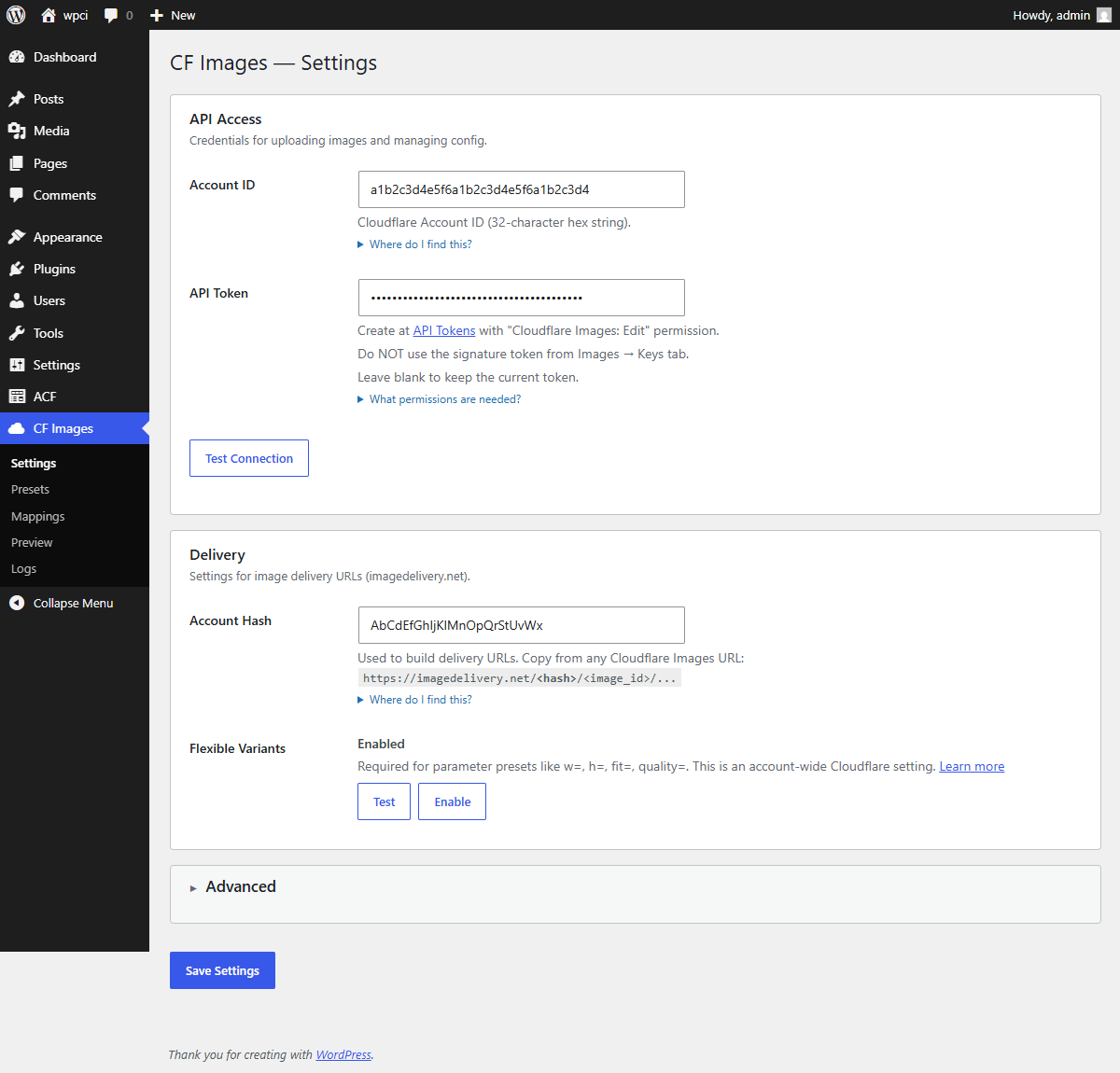
- Go to CF Images → Settings and enter your Cloudflare credentials
- Create presets under CF Images → Presets (or install recommended presets)
- Set up mappings under CF Images → Mappings to define sync rules
- Credentials — Get your Account ID, Account Hash, and API Token from Cloudflare dashboard
- Preset — Create a preset like
og_1200x630with variantw=1200,h=630,fit=cover,f=auto - Mapping — Map your CPT's featured image to a meta field like
_og_image_url - Done — Images sync on save, URLs available via
get_post_meta()
屏幕截图:


常见问题:
What Cloudflare plan do I need?
Cloudflare Images is a paid add-on available on all Cloudflare plans. Pricing is based on images stored and served.
Does this modify my original images?
No. The plugin uploads a copy to Cloudflare Images. Your WordPress media files remain unchanged.
Can I use this with ACF?
Yes. The plugin supports ACF image fields with ID, array, and URL return formats.
What are Flexible Variants?
Flexible Variants allow on-the-fly image transformations via URL parameters (width, height, quality, format). The plugin detects if this feature is enabled on your account and adjusts the UI accordingly.
What fit modes are available?
Cloudflare Images supports several fit modes for resizing:
- scale-down — Shrinks to fit within dimensions but never upscales. Best for content images where originals may be smaller than the target.
- cover — Crops to fill exact dimensions. Best for OG images, thumbnails, and heroes where consistent sizing matters.
- contain — Scales to fit within dimensions, adding letterboxing if needed. Preserves the full image.
- crop — Crops to exact dimensions from the center (or custom gravity).
fit=cover for consistent sizing. Use fit=scale-down when you want to limit max width without stretching small images.
Do I need Action Scheduler?
Action Scheduler is optional but recommended for bulk syncing. It offloads image uploads to background jobs, avoiding timeouts on large sites. Action Scheduler is bundled with WooCommerce, or you can install it as a standalone plugin.
Is this good for headless WordPress?
Absolutely. Delivery URLs are stored as standard post meta, so they're immediately available via REST API or WPGraphQL without any custom resolvers.
What happens if I deactivate the plugin?
Your Cloudflare Images remain on Cloudflare, and the delivery URLs stay in post meta. You can continue using them or migrate to another solution.
更新日志:
- Changed: Internal prefix renamed from
cfitocfimg(4+ chars required by WP.org) - Changed: External services section restructured with inline ToS/Privacy links per service
- Added: Automatic database migration from
cfi_tocfimg_option/meta keys - Fixed: Uninstall cleans up both old (
cfi_) and new (cfimg_) prefixed data - Fixed: Asset enqueue guard referenced stale prefix, preventing CSS/JS on subpages
- Changed: Text domain renamed to
images-sync-for-cloudflareto match WP.org slug - Changed: Main plugin file renamed to
images-sync-for-cloudflare.php
- Fixed: readme.txt uses required == External services == section heading (WP.org review)
- Fixed: Uninstall SQL uses $wpdb->prepare() with %i placeholder
- Fixed: Release ZIP filename without version suffix
- Removed: GitHub Plugin URI headers (not needed for WP.org)
- Added: acf tag for better discoverability
- Added: == Upgrade Notice == section
- Fixed: Uninstall now removes encrypted API token and migration version
- Fixed: Uninstall cleans up all plugin post meta from database
- New: content_1200w recommended preset (fit=scale-down, never upscales small images)
- New: FAQ — available fit modes (scale-down, cover, contain, crop)
- New: FAQ — Action Scheduler as optional dependency
- Improved: Settings page UX — API Access section moved above Delivery for logical onboarding flow
- Improved: WordPress.org Plugin Check compliance (inline styles → enqueued CSS)
- Improved: SQL queries use %i placeholder for table names (WP 6.2+)
- Improved: Third-party service disclosure per Guideline 7
- Removed: load_plugin_textdomain (automatic since WP 4.6 for .org plugins)
- Changed: Minimum WordPress version raised to 6.2
- New: Encrypted API token storage (libsodium/AES-256)
- New: Settings link on Plugins page
- New: Translation template (.pot file) for localization
- New: WordPress.org assets (icons and banners)
- Improved: Dashboard widget with connection status
- First stable release
- New: Dashboard widget on main WP Dashboard with connection status
- Improved: Plugin descriptions and documentation
- Improved: Author info updated for WordPress.org
- Fixed: Dashboard widget error — added missing LogsRepo::recent() method
- New: Dashboard widget with Connection Status, quick stats, and links
- New: Cloudflare icon in widget header
- Fixed: Auto-sync URL persistence when ACF clears target field
- Added: wp_after_insert_post fallback for maximum compatibility
- Improved: Hook priorities increased to 999
- Fixed: Auto-sync URL write on ACF save
- Improved: Debug logging verifies meta writes
- New: Universal "public" preset (works without Flexible Variants)
- New: Attachment ID validation with suggestions in Preview
- Improved: Settings page with collapsible sections
- Improved: Connection Status indicators
- New: Flexible Variants detection and one-click enable
- New: Smart UI gating — no broken previews
- Initial release