
MkWebTech CTA Studio
| 开发者 | mkwebtech |
|---|---|
| 更新时间 | 2026年7月18日 20:27 |
| PHP版本: | 7.4 及以上 |
| WordPress版本: | 6.9 |
| 版权: | GPL-2.0-or-later |
| 版权网址: | 版权信息 |
详情介绍:
- Inline - Embed CTAs directly inside posts and pages
- Sticky Bar - Show a top or bottom announcement bar across your site
- Popup - Display timed popup CTAs with overlay and close controls
- Floating Buttons - Add icon-focused floating action buttons for phone, WhatsApp, social links, and quick actions
- Normal countdown timers with a fixed end date and time
- Evergreen countdown timers for visitor-specific campaigns
- Cookie, browser storage, and session-based evergreen detection
- Restart options for evergreen campaigns
- Timer expiry actions including hide, message, and redirect
- Smooth timestamp-based frontend timer rendering to reduce skipped seconds and visual jumps
- Impressions
- Button clicks
- Conversion rate
- Inline CTA blocks, sticky bars, popup CTAs, and floating action buttons
- Modern visual builder with live preview
- Built-in impression, click, and conversion rate tracking
- Normal and evergreen countdown timers
- Drift-free frontend timer engine with smooth digit rendering
- Repeatable Floating Buttons with global and per-button styling controls
- Advanced design controls for backgrounds, typography, spacing, shadows, and radius
- Button customization with icons and gradients
- Background options: solid color, gradient, image, or transparent
- GSAP-powered entrance animations including fade, slide, zoom, and bounce
- Display delay and animation duration controls
- Device visibility (desktop, tablet, mobile)
- Popup overlay click, ESC close, and scroll lock
- Close button controls for sticky bars and popups
- Shortcode support for manual CTA placement
- Lightweight, self-hosted assets (no third-party requests)
- Translation-ready and WordPress-friendly code structure
- Add a call-to-action box inside blog posts
- Show a sticky sale announcement bar
- Create a popup for a limited-time offer
- Add floating phone, WhatsApp, YouTube, Facebook, or custom action buttons
- Add an evergreen countdown timer to a campaign
- Promote coupons, webinars, lead magnets, consultations, or product launches
- Track which CTA gets the most clicks
- Go to CTAs -> Add New.
- Choose Inline, Sticky Bar, Popup, or Floating Buttons.
- Add your heading, button text, button URL, and optional countdown timer. For Floating Buttons, add one or more icon buttons with URLs and optional hover text.
- Customize colors, typography, spacing, background, animation, and close controls.
- Publish and either:
- Enable auto display for Sticky Bar, Popup, or Floating Buttons CTAs, or
- Use the shortcode for inline/manual placement:
[mkwebtech_cta id="123"]
安装:
- Go to Plugins -> Add New in WordPress admin.
- Search for MkWebTech CTA Studio.
- Click Install Now and then Activate.
- Download the plugin ZIP.
- Upload
mkwebtech-cta-studioto/wp-content/plugins/. - Activate from Plugins in wp-admin.
屏幕截图:
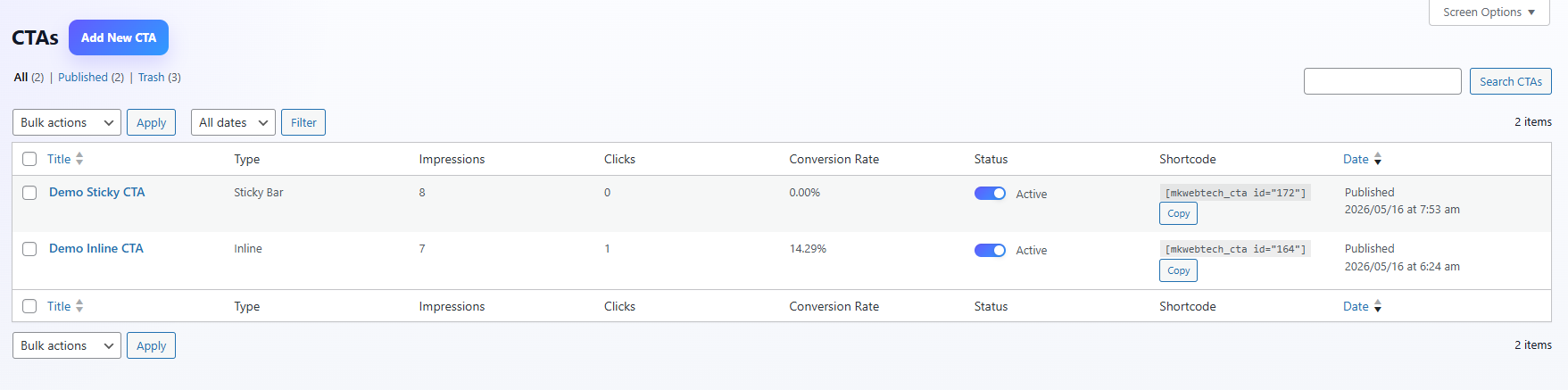


常见问题:
Can I place sticky or popup CTAs using shortcode?
Yes. Shortcode works for all CTA types. Sticky and popup CTAs are safely rendered in the footer so fixed positioning is not broken by theme content containers.
Can I create countdown timer CTAs?
Yes. You can add countdown timers to CTAs and choose between a normal fixed-date timer or an evergreen timer for visitor-specific urgency campaigns.
What is an evergreen countdown timer?
An evergreen countdown timer starts for each visitor based on the detection method you choose, such as cookie, browser storage, or session storage. This is useful for automated campaigns where each visitor should see their own deadline.
Does the timer stay accurate if the browser tab is inactive?
Yes. The frontend timer uses timestamp-based rendering instead of decrementing seconds, so it syncs from the target time when the tab becomes active again.
Can I track CTA performance?
Yes. MkWebTech CTA Studio tracks impressions, clicks, and conversion rate inside WordPress.
Does the plugin send data to third-party services?
No. CTA stats are stored in your WordPress database. Frontend assets are served locally from your site.
Where are impressions and clicks stored?
In the custom database table: wp_mkwebtech_cta_stats (prefix may vary by installation).
Can I control where CTAs appear by device?
Yes. Each CTA includes desktop, tablet, and mobile visibility controls.
What happens to data on uninstall?
On plugin delete (uninstall), CTA posts, related meta, and stats table data are removed permanently.
更新日志:
- Shortent the short description.
- Added a premium analytics dashboard under the CTA admin menu.
- Added real dashboard KPI cards for impressions, clicks, conversion rate, active CTAs, top CTA, and total CTAs.
- Added a working performance chart generated from tracked CTA impressions and clicks.
- Added working Daily, Weekly, Monthly, and date range filters for dashboard performance data.
- Added real breakdown cards for device type, CTA type mix, and traffic sources.
- Added lightweight aggregate tracking for device type and traffic source on CTA impressions.
- Added leaderboard cards for best converting, most clicked, highest impressions, and fastest growing CTAs with contextual icons.
- Improved admin dashboard controls, notification dropdown, responsive layout, and empty states.
- Added the new Floating Buttons CTA layout for icon-focused fixed action buttons.
- Added repeatable floating buttons with per-button URL, Dashicon picker, optional hover text, and add/remove controls.
- Added global floating button controls for position, spacing, icon size, border radius, icon colors, text colors, backgrounds, and hover colors.
- Added individual per-button styling overrides for icon and hover text colors/backgrounds.
- Floating Buttons layout hides countdown timer, heading, block, close, and classic CTA button controls where they do not apply.
- Added adaptive admin live preview and frontend rendering for floating action buttons.
- Added a one-time dismissible admin notice to announce the new Floating Buttons layout.
- Fixed Evergreen timers so they no longer require a normal end date.
- Improved shortcode-only CTA asset loading on singular content.
- Fixed desktop, tablet, and mobile visibility settings on the frontend.
- Renamed the Evergreen browser-storage detection label for accuracy.
- Fixed readme screenshot text typo.
- Rebuilt the countdown timer engine with timestamp-based requestAnimationFrame rendering.
- Added smooth changed-digit animations, cached DOM references, and duplicate-loop protection.
- Improved hidden-tab syncing, pause/resume support, cleanup methods, and expiry callbacks.
- Optimized timer CSS for tabular numbers, stable widths, reduced layout shift, and mobile display.
- Added timer modes: Normal and Evergreen with dedicated timer type selector.
- Added Evergreen duration controls (days, hours, minutes, seconds).
- Added Evergreen detection methods: Cookie, Browser Storage, and User Session.
- Added Evergreen restart controls: None, Restart Immediately, Restart at next visit, and Restart after a specific time.
- Added Restart-after duration inputs and Reset on page reload toggle.
- Improved timer runtime for smoother countdown updates and reduced drift/skips.
- Added rich content tab grouping (Heading, Button, Timer) for cleaner editing flow.
- Added heading visibility toggle with rich text editor support for heading/subheading content.
- Added rich text editor for timer expired message with typography and color controls.
- Expanded timer expiry actions to: None, Redirect to URL, Hide Timer, Show Message.
- Added redirect URL field and frontend redirect handling for timer expiry.
- Added built-in countdown timer support for CTAs (now available in this release).
- Added advanced timer controls for digits, separators, labels, and case styling.
- Improved timer builder UI with grouped settings and live preview parity.
- Removed free CTA creation cap; users can now create unlimited CTAs.
- Free version now limits CTA creation to 3 saved CTAs.
- Added admin upgrade notice with Pro link after the free CTA limit is reached.
- Major UI/UX upgrade to the CTA builder and preview workflow.
- Added CTA Stats sidebar box (Impressions, Clicks, Conversion Rate).
- Reworked design controls into horizontal tabs (Block, Heading, Button, Close).
- Added close button settings for sticky and popup layouts.
- Improved close button rendering consistency in admin and frontend.
- Added background mode selector: Solid, Gradient, Image, None.
- Added default background image asset support.
- Added and refined controls for border radius, content alignment, content mode, and spacing.
- Improved inline mode alignment behavior and frontend/admin parity.
- Added animation options: None, Fade, Slide Up, Slide Down, Zoom In, Bounce.
- Added animation timing input and default animation set to None for new CTAs.
- Switched animation engine to self-hosted GSAP and removed legacy CSS keyframe system.
- Added smooth entrance/exit motion handling for sticky and popup close interactions.
- Removed unfinished layouts (Floating Button and Sticky Tab) from admin and frontend.
- Removed non-functional visibility placeholders (Page Rules/Country Rules).
- Improved toggle switch usage in Behaviour and Visibility panels.
- Updated defaults, cleaner code paths, and overall codebase cleanup.
- Initial release.