
Nahnu Install Tracker
| 开发者 | ja1me4 |
|---|---|
| 更新时间 | 2026年11月15日 10:51 |
| PHP版本: | 7.4 及以上 |
| WordPress版本: | 7.1 |
| 版权: | GPLv2 or later |
| 版权网址: | 版权信息 |
详情介绍:
- Active installs from WordPress.org, shown the same way WordPress.org shows them (e.g. 10,000+ or Fewer than 10), per plugin or combined across all of them
- Downloads, star rating, and review count from WordPress.org
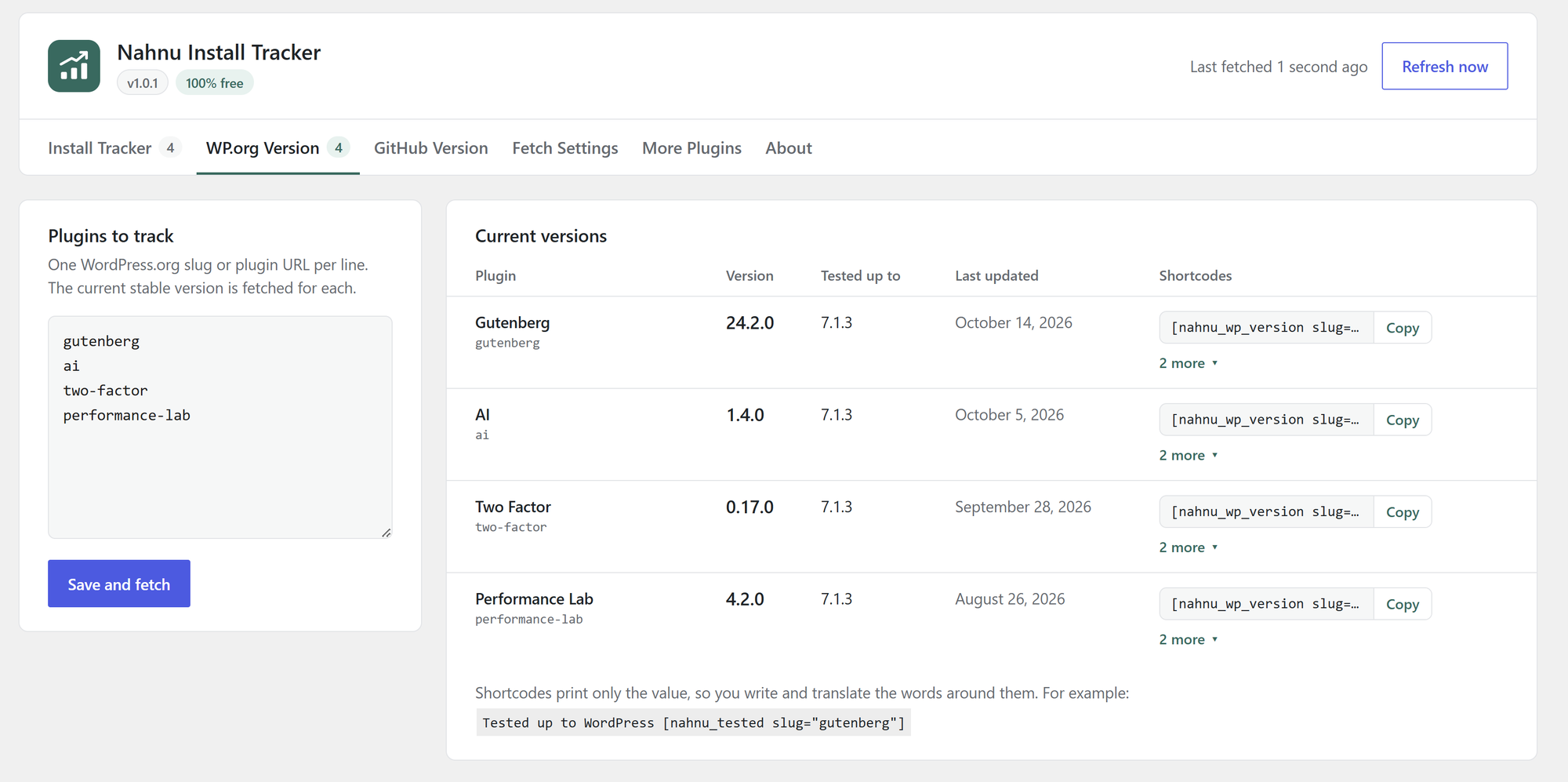
- Current version, "tested up to" version, and last updated date from WordPress.org
- Release version and stars from GitHub, from the latest release or a JSON file in your repository
- Current release version of your SureCart products
- Active installs of your SureCart products: every activation on every license, added up (on the site that runs your SureCart store)
- Manual versions you type in yourself, for anything else
Trusted on [nahnu_total_installs] sites.
WordPress.org (use the plugin slug):
[nahnu_installs slug="your-plugin"]active installs, e.g.10,000+orFewer than 10[nahnu_total_installs]active installs of every plugin on your Install Tracker list added up, e.g.50,000+(limit it withslugs="plugin-a,plugin-b")[nahnu_downloads slug="your-plugin"]total downloads, e.g.9,400[nahnu_rating slug="your-plugin"]star rating out of 5, e.g.4.9[nahnu_reviews slug="your-plugin"]number of ratings, e.g.37[nahnu_wp_version slug="your-plugin"]current version, e.g.2.1.4[nahnu_tested slug="your-plugin"]latest WordPress version it is tested with, e.g.7.0[nahnu_last_updated slug="your-plugin"]date of the last release in your site date format, e.g.July 1, 2026(change it withformat="M Y")
[nahnu_gh_version id="your-label"]GitHub version exactly as published, e.g.v1.2.3[nahnu_gh_stars id="your-label"]stars on the repository, e.g.128[nahnu_sc_version id="your-label"]current release version of a SureCart product, e.g.3.4.0[nahnu_sc_installs id="your-product"]active installs of a SureCart product, e.g.1,284(addround="true"for1,000+)[nahnu_sc_total_installs]active installs of every tracked SureCart product added up, e.g.3,950[nahnu_total_installs surecart="true"]WordPress.org and SureCart installs added up, e.g.50,000+[nahnu_manual_version id="your-label"]a version you typed in, e.g.2.0.1
- Clean tabbed settings screen: Install Tracker, SureCart Installs, WP.org Version, GitHub Version, SureCart Version, Manual Version, Fetch Settings, More Plugins, and About
- Paste plain slugs or full wordpress.org/plugins/ URLs
- Install change since the previous fetch, total downloads, rating, and review count
- Combined install total across all your plugins
- Copy button next to every shortcode
- Keeps the last good value if a fetch fails, so your site never shows a blank
- Translation ready
安装:
- Install from Plugins > Add New, or upload the
nahnu-install-trackerfolder to/wp-content/plugins/. - Activate the plugin.
- Go to Settings > Install Tracker.
- Add your plugin slugs or GitHub URLs and click Save and fetch.
- Copy a shortcode from the table and paste it anywhere on your site.
屏幕截图:

常见问题:
Is it really free?
Yes. Every feature is included and nothing is locked. There is no account or sign-up.
Why do the shortcodes print only a number?
So you can write the text around it yourself, in your own words and language. For example Trusted on [nahnu_total_installs] sites or Más de [nahnu_installs slug="my-plugin"] instalaciones activas.
How is the combined total worked out?
It adds up the active installs of every plugin on your Install Tracker list. Each count is already rounded down by WordPress.org, so the total is a minimum too.
Do the shortcodes slow down my pages?
No. Shortcodes only read data that is already saved in your database.
Why does my plugin show "Fewer than 10"?
WordPress.org reports 0 active installs for any plugin with fewer than 10. The plugin shows "Fewer than 10", the same wording WordPress.org uses.
My shortcode prints nothing. Why?
The slug has not been added yet, or it has not been fetched. Add the slug on the Install Tracker or WP.org Version tab and click Save and fetch. Shortcodes print nothing rather than an error, so your pages never show a broken message.
Which GitHub sources are supported?
Public repositories. Enter the repository as owner/repo or paste its GitHub link, then choose:
- Latest release: leave the JSON file field empty. The version is the tag of the latest release.
- JSON file: enter the path of a JSON file in the repository, such as version.json, and the key that holds the version (default
version). Branch is optional; the default branch is used when it is empty.
How do I set up a SureCart product?
- Sign in to app.surecart.com, open API in the sidebar and copy the public token (never the secret token). Enter it once on the SureCart Version tab.
- In WordPress, go to SureCart > Licenses and open a license for the product that belongs to you, for example from a test purchase with a 100% off coupon. Copy its key.
- Paste the key on the tab with a label and click Save and fetch.
What is a SureCart activation ID, and where do I find it?
When a license key is activated on a site, SureCart records an activation; its ID is what SureCart's update system pairs with the key to hand out the current release. You do not need to find it: leave the field blank and the plugin creates the activation for you when you save. The activation appears on the license in SureCart as "Nahnu Install Tracker on" followed by your site name, and uses one activation slot. Removing the product from the tab removes that activation again. If you already have an activation ID for the key (for example from a site where the product is activated), you can paste it into the optional field instead, and no new activation is created. Saved keys are never shown again on the screen. Leave a field blank to keep what is saved, or type a new value to replace it.
Can it count every install of my SureCart products?
Yes. The SureCart Installs tab adds up every activation on every license of a product that is not revoked, so every customer site counts. Tick your products and click Save and fetch.
It works on the site that runs your SureCart store, with the SureCart plugin active, because counting every license needs the store's private access. The plugin uses SureCart's own connection for this, so you never enter a secret token. On any other site the tab explains this and stays empty.
Numbers are exact (e.g. 1,284). Add round="true" to show them the WordPress.org way (1,000+). The activation the plugin makes for the SureCart Version tab is not counted.
What is the Manual Version tab for?
For anything the plugin cannot fetch: a theme sold on your own site, a mobile app, a service. Type a label and a version, save, and use the shortcode. Update the version here when you release.
What is the shortcode id for a GitHub source?
It is your label in lowercase with hyphens, so "My Plugin" becomes my-plugin. The same rule applies to SureCart products and manual entries. The exact shortcode is shown in the table on each tab.
How often is data updated?
Every 24 hours by default. Change it to every 1, 6, or 12 hours on the Fetch Settings tab. WordPress runs scheduled jobs when your site gets a visit, so on very quiet sites a fetch can run a little late.
What is removed when I delete the plugin?
All of its settings, saved data, and scheduled jobs.
更新日志:
- New SureCart Installs tab: count every activation on every license of your SureCart products, on the site that runs your store.
- New SureCart Version tab: track the current release version of your SureCart products.
- New Manual Version tab: type in versions for anything that cannot be fetched.
- New shortcodes:
[nahnu_sc_installs],[nahnu_sc_total_installs],[nahnu_sc_version]and[nahnu_manual_version]. [nahnu_total_installs surecart="true"]adds SureCart installs to the WordPress.org total.
- First public release.