奶爸笔记 EdgeOne 缓存清理器
| 开发者 | Naibabiji |
|---|---|
| 更新时间 | 2026年4月15日 09:28 |
| PHP版本: | 7.2 及以上 |
| WordPress版本: | 6.9 |
| 版权: | GPLv2 or later |
| 版权网址: | 版权信息 |
详情介绍:
安装:
- 下载插件压缩包
- 登录 WordPress 管理后台
- 进入「插件」→「安装插件」→「上传插件」
- 选择并上传插件压缩包
- 启用插件
- Upload the plugin folder to the
wp-content/plugins/directory - 登录 WordPress 管理后台 dashboard
- 进入「插件」页面
- 找到“奶爸笔记 EdgeOne 缓存清理器”插件并启用
屏幕截图:
常见问题:
什么是 EdgeOne?
EdgeOne 是腾讯云推出的边缘计算与 CDN 服务,提供全球内容分发与安全防护能力。
为什么需要清理缓存?
更新 WordPress 内容后,EdgeOne 可能仍返回旧缓存。本插件可确保访客立即看到最新内容。
本插件安全吗?
支持,插件可在 wp-config.php 中存放 API 密钥,避免密钥保存在数据库或后台界面中。
文章更新时会清理哪些 URL?
The plugin automatically purges:
- The post/page URL
- Homepage
- Category archives the post belongs to
- Tag archives the post has
- Author archive
- Date-based archives
Frequently Asked Questions
Do I need the Nginx Cache Integration?
不需要,该功能为可选。仅当服务器使用 Nginx 层级页面缓存(FastCGI 或代理缓存)时才需开启。如果你使用 WP Rocket、W3 Total Cache、LiteSpeed Cache 等 WordPress 缓存插件,则无需启用。
Nginx 缓存与 EdgeOne CDN 缓存有什么区别?
EdgeOne CDN cache is distributed across edge nodes worldwide and is managed via the Tencent Cloud API. Nginx cache is a server-side page cache stored on your own server's filesystem, managed by Nginx's fastcgi_cache or proxy_cache directives. They are separate caching layers; this plugin can clear both at the same time.
插件为何只删除缓存文件,而不删除并重建 Nginx 缓存目录?
删除并重建目录会出现短暂窗口期,可能导致 Nginx 无法写入新缓存。仅删除目录内文件、保留目录本身,可让清理更安全,避免 Nginx 报错。
Nginx 缓存路径显示“不可写”,该如何解决?
The PHP process (typically www-data or nginx) needs write permission on the cache directory. Run chown www-data:www-data /your/cache/path or chmod 755 /your/cache/path as appropriate for your server setup.
2.3.0
- 增强 Nginx 缓存清理功能:将递归删除文件改为通过 ngx_cache_purge 模块发起 HTTP 请求,实现 URL 精准清理
- Added customizable "Purge Endpoint Path" option — use a random string (e.g., /xK9mPurge_q7z) for the Nginx purge URL to enable
allow all;without security concerns - Switched purge requests from
http://127.0.0.1tohttps://your-domain/custom-path, resolving HTTP-to-HTTPS redirect issues on BT Panel (宝塔) and similar setups - 优化 Nginx 清理日志提示:将原始 HTML 输出改为易懂的文字说明(例如:“未缓存——返回的是页面内容而非清理响应”)
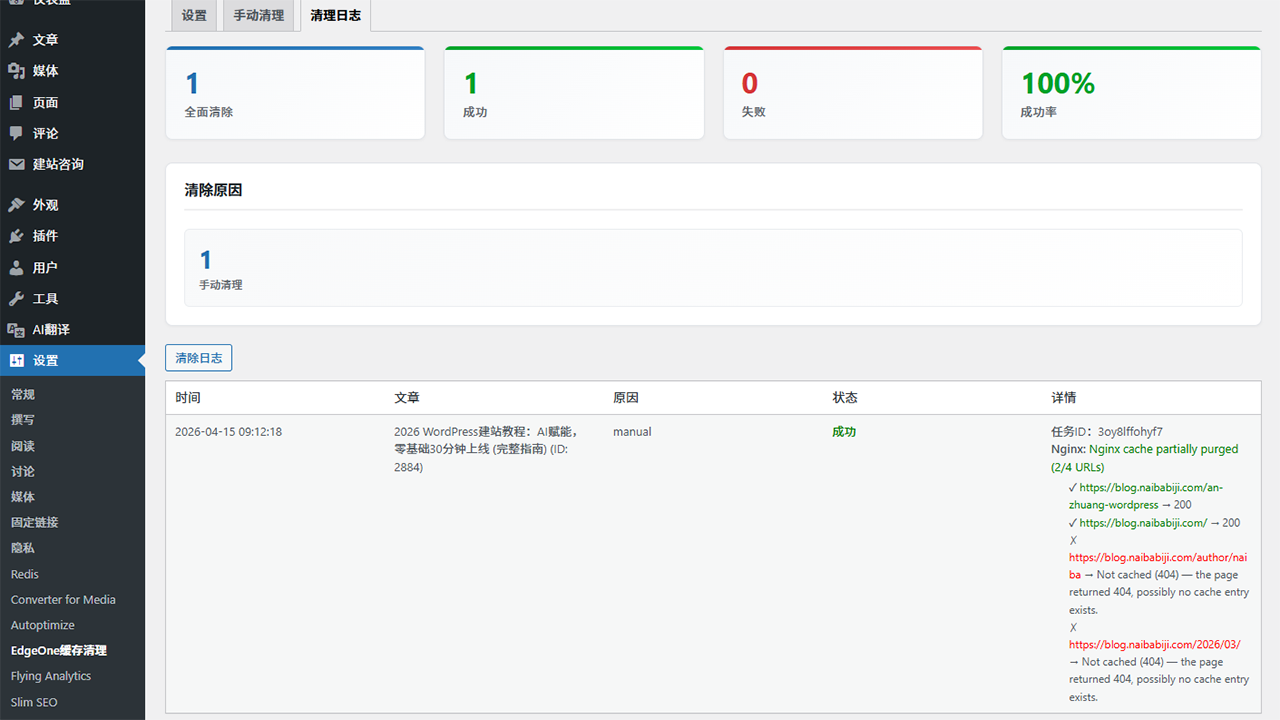
- Nginx 缓存操作新增按 URL 记录清理日志功能
- 全站清理时新增文件删除降级方案
- Updated Nginx configuration example to use
allow all; deny none;pattern with custom random path - 新增面向宝塔面板用户的配置教程链接
更新日志:
- Enhanced Nginx cache purge functionality: Replaced recursive file deletion with ngx_cache_purge module HTTP requests for precise URL-based clearing
- Added per-URL purge logging for Nginx cache operations
- 设置页面新增“测试 Nginx 清理连接”按钮,用于校验 ngx_cache_purge 模块配置
- Implemented fallback to file deletion for full-site purge operations
- 优化 Nginx 清理错误处理与状态反馈
- 优化「全部清除」行为:现在仅清理当前站点主机名的缓存(使用 purge_host 接口),而非清理整个区域缓存,避免误清除共享同一 EdgeOne 区域 ID 的其他子域名缓存。
- 品牌全面升级:插件正式更名为奶爸笔记 EdgeOne 缓存清理器
- 深度重构内部类、命名空间与文件结构,便于后续维护
- Switched all internal database option keys to standardized lowercase
nb_cache_purger_prefix. - Updated all hooks, transients, and nonces to use unified
nb_cache_purger_branding. - 提升安全性与商标合规性
- 基于现代 PHP 命名空间架构完成代码重构
- 新增异步清理模式支持(可在设置中开关)
- 新增清理统计面板,展示总清理次数、成功率及触发原因分类
- 增强日志脱敏处理,保护 API 密钥等敏感信息
- 优化顶部导航菜单,采用二级结构(EdgeOne → 清理全部 / 设置)
- 增强安全防护:在 wp-config.php 配置密钥后,后台敏感输入框自动隐藏
- 采用模块化代码结构,提升可维护性与扩展性
- 优化错误处理,新增详细 API 响应日志
- 更新界面交互,沿用 1.4 版本风格并保留 2.0 完整功能
- 恢复全部界面元素的中文翻译
- 插件列表页新增设置入口
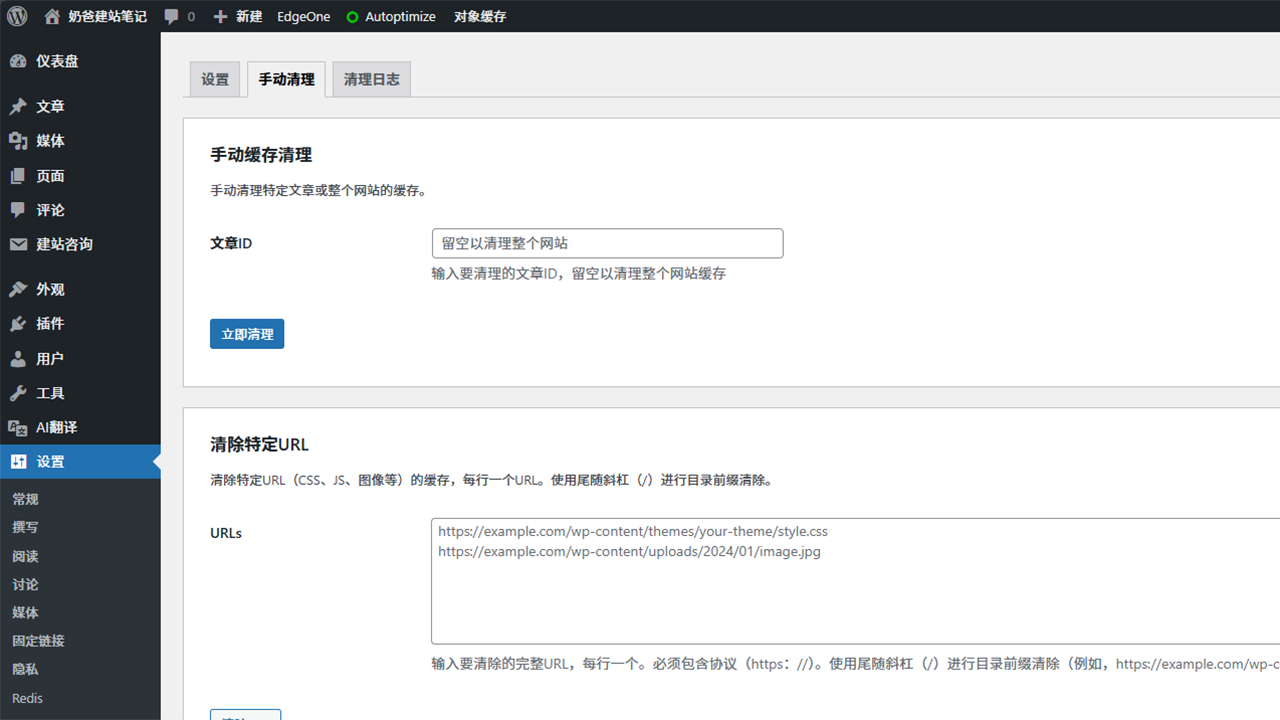
- 优化手动清理界面,将文章 ID 与自定义 URL 分为独立区域
- 增强日志记录,优化错误提示与请求追踪
- 新增 Nginx 本地缓存集成支持(FastCGI / 代理缓存)
- 设置页面实时校验 Nginx 缓存路径(是否存在、是否可写)
- Nginx 缓存与 EdgeOne CDN 缓存独立清理,一方失败不影响另一方执行
- 开启日志后,Nginx 清理结果会记录在清理日志中
- 新增设置项默认关闭,并明确标注为可选,避免不使用 Nginx 缓存的用户混淆
- 插件列表页新增设置快捷入口
- 后台顶部导航栏新增 EdgeOne 入口,包含快速清理全站缓存与设置快捷链接
- 优化多语言支持与语言文件
- 新增静态资源(CSS、JS、图片)自定义 URL 清理功能
- 新增支持以斜杠结尾的目录前缀清理
- 修复缓存插件钩子检测逻辑
- 优化插件初始化执行时序
- 增强手动清理,新增全站清理支持
- 为缓存插件集成添加强制运行模式
- 优化日志展示,新增预加载结果显示
- 新增手动清空日志功能
- 修复 X-TC-Timestamp 请求头类型安全问题
- 更新兼容 WordPress 6.0 及以上版本
- 优化设置项说明文字,更易理解
- 新增主流缓存插件兼容集成
- 新增可选缓存预加载功能
- 优化错误处理与日志记录
- 初始版本发布
- 文章发布/更新/删除时自动清理缓存
- 新增手动清理功能
- 新增评论集成
- 新增灵活配置项
- 新增日志支持