
NiroCache – Simple Page Cache, Preload and Speed Optimization
| 开发者 |
easycommerce
nirosuite |
|---|---|
| 更新时间 | 2026年9月26日 20:56 |
| PHP版本: | 7.4 及以上 |
| WordPress版本: | 7.1 |
| 版权: | GPLv2 or later |
| 版权网址: | 版权信息 |
详情介绍:
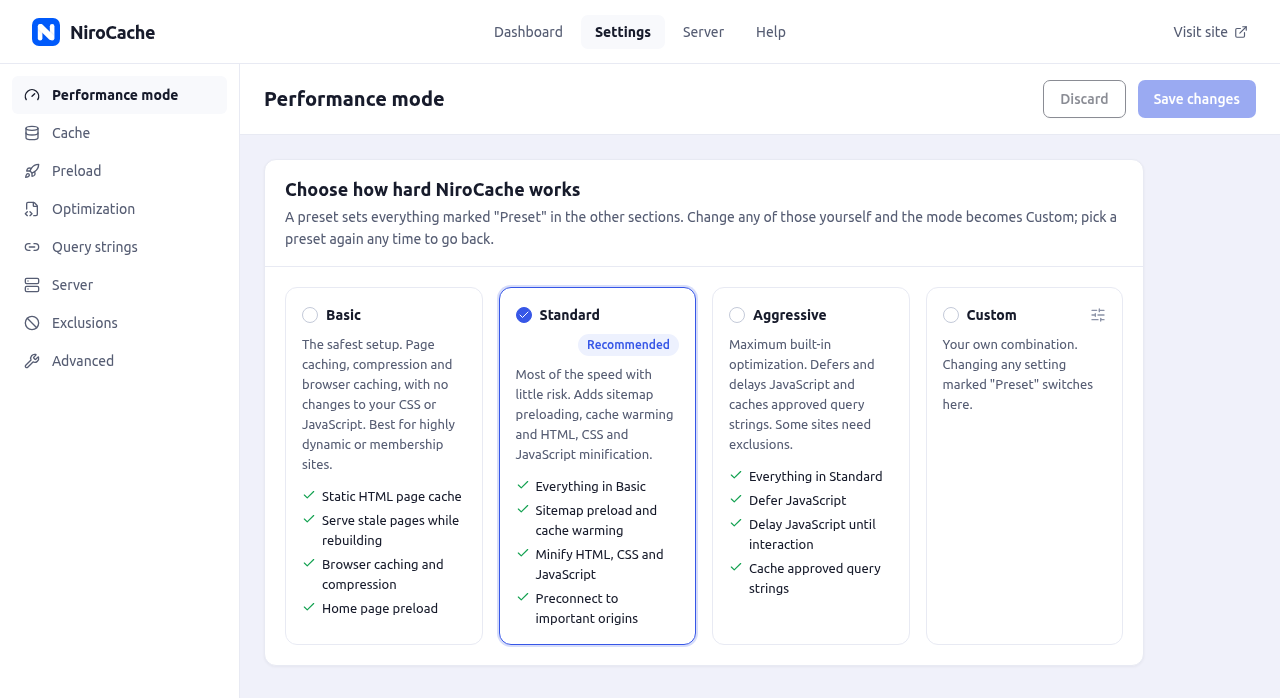
- Basic — the safest setup. Static HTML page cache, serve stale pages while rebuilding, browser caching, Gzip and Brotli compression (when your server supports them), home page preload and tracking-parameter handling. Your CSS and JavaScript are left untouched. For membership and highly dynamic sites.
- Standard (recommended, on by default) — everything in Basic, plus sitemap preload, cache warming, minified HTML, CSS and JavaScript, preconnect to important origins, and object cache recommendations on Automatic (NiroCache never installs an object cache; the Server screen tells you when Redis or Memcached could be connected).
- Aggressive — everything in Standard, plus deferred JavaScript, JavaScript delayed until the visitor interacts, and cached approved query strings. Some sites need exclusions in this mode, so check your key pages after choosing it.
- Custom — your own combination. Changing any setting a preset controls switches to Custom (NiroCache asks first), and your last Custom set is remembered. Combine CSS and JavaScript, inline CSS and JavaScript minification and a separate mobile cache are Custom-only.
- Static HTML pages served by the standard WordPress early cache (
advanced-cache.php), before themes, plugins and database queries load. - Optional direct delivery by Apache or LiteSpeed through a marked
.htaccessblock, and a ready-to-copy configuration snippet for Nginx. - Serve stale while rebuilding with cache stampede protection: when a page expires, one request rebuilds it while other visitors get the previous copy.
- Precompressed Gzip and Brotli copies of cached pages.
- Query strings handled safely: tracking parameters such as
utm_source,utm_campaign,gclidandfbclidshare the cached page, approved parameters such as a language or currency get their own copies, and unknown parameters bypass the cache so variants never multiply. - Optional separate cache for mobile devices, for themes that send different HTML to phones.
- Configurable lifespan, plus a daily cleanup of expired pages.
- Updating a post clears the post, the home page, its category, tag and author archives, its post type archive and their pagination.
- Approved comments, WooCommerce stock and price changes clear the affected product or post.
- Theme, menu, widget, Customizer, Site Editor, permalink and general settings changes clear the whole cache, and so do settings changes that affect how pages look.
- Clear the cache from the dashboard, the admin toolbar, the post editor or WP-CLI. Clear & Preload rebuilds it straight away.
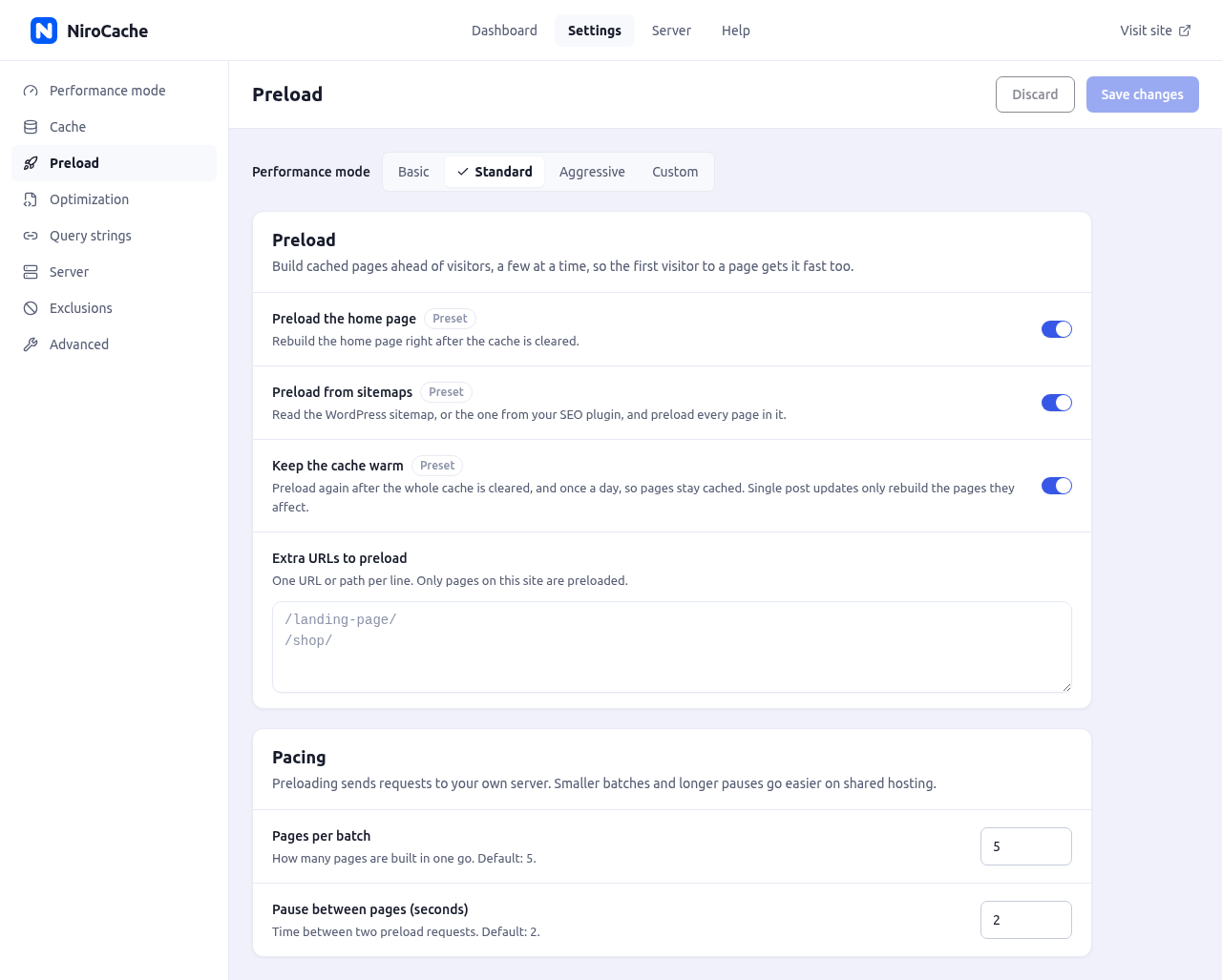
- Preloads your home page, the WordPress sitemap or your SEO plugin's (Yoast SEO, Rank Math, SEOPress, All in One SEO) and any extra URLs you list.
- Paced batches with a pause between pages, so shared hosting is not overwhelmed; preloading resumes after interruptions and can be cancelled.
- Keeps the cache warm after a full purge and once a day. A single post update only rebuilds the pages it affects.
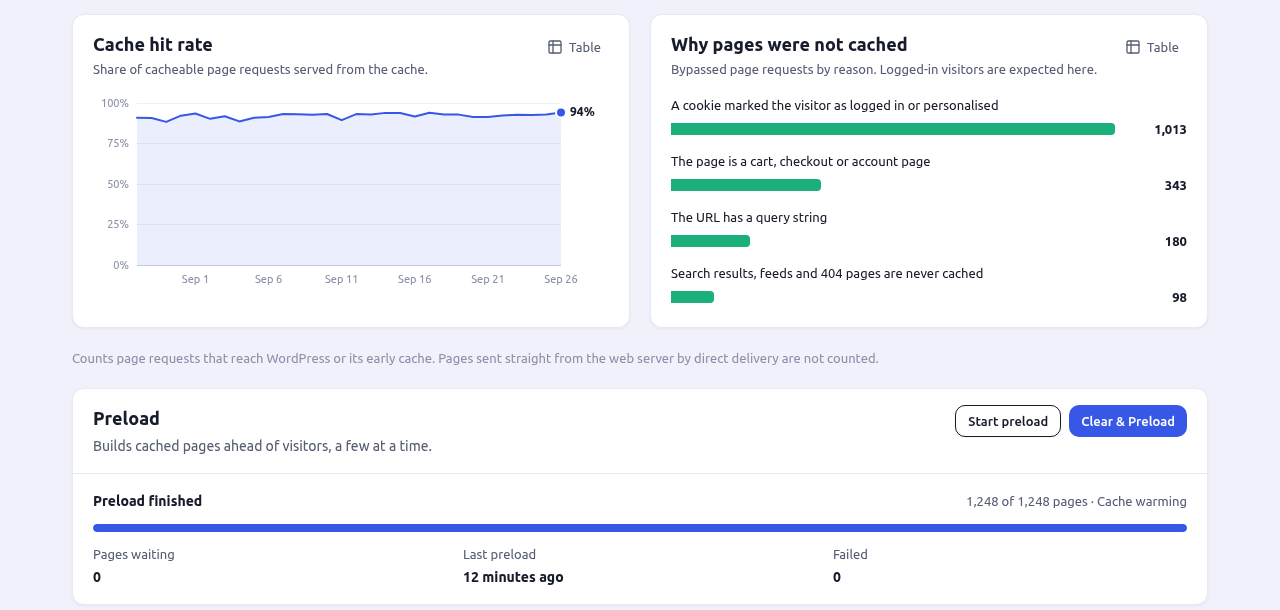
- Progress, pages waiting and the last preload on the dashboard.
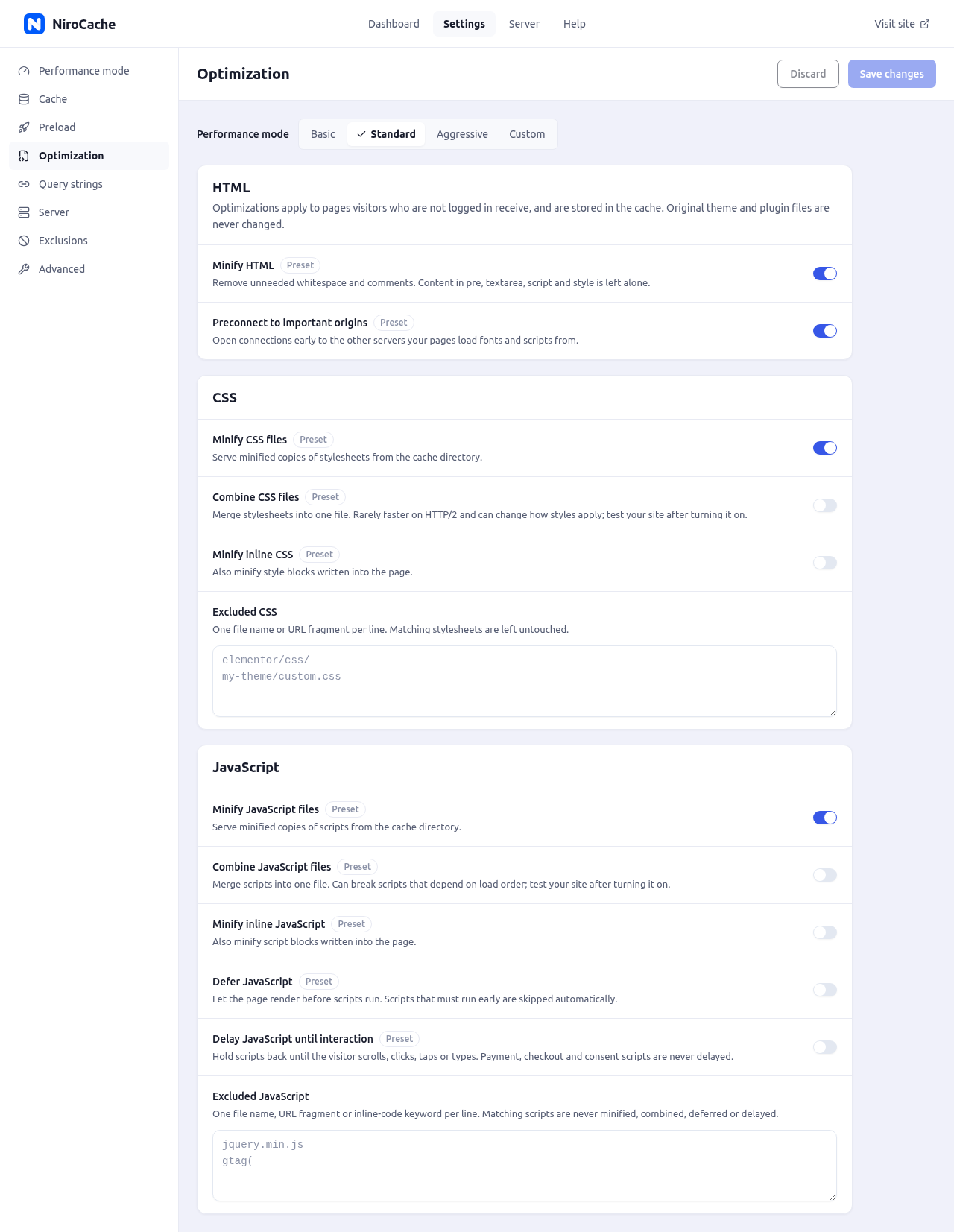
- Minify HTML, CSS and JavaScript. Minified copies live in the cache folder; your theme and plugin files are never modified.
- Defer JavaScript, and delay JavaScript until the visitor first moves the mouse, scrolls, taps, clicks or presses a key. Payment, checkout, consent and other sensitive scripts are never delayed.
- Preconnect to the other servers your pages load fonts and scripts from.
- Combine CSS and JavaScript, and minify inline CSS and JavaScript, in Custom mode.
- Exclusions for any file, URL fragment or inline-code keyword.
- Browser caching rules for images, fonts, CSS and JavaScript; pages themselves are never cached in the browser.
- An On/Off switch that pauses everything NiroCache does, with your settings kept.
- Pages served from cache, cache hit rate, pages cached and cache size.
- Charts for the last 7, 30 or 90 days: page requests by result (served from cache, generated and cached, bypassed), the hit-rate trend, and why pages were not cached. Every chart has a table view.
- One-click cache test: requests your home page twice and confirms a MISS then a HIT, or tells you exactly why not.
- Setup checks, with a Fix setup button when something is missing.
- Web server, PHP and memory limits, HTTPS and HTTP version, OPcache, Gzip, Brotli, persistent object cache (Redis or Memcached) and cache directory status at a glance.
- Detects hosting caches such as LiteSpeed, Varnish, Cloudflare and managed WordPress hosts, and other page cache or optimization plugins that would conflict.
- Recommendations that separate genuine problems from optional improvements.
DONOTCACHEPAGE or send Cache-Control: no-cache, no-store or private are respected.
You can also exclude URLs (with * wildcards), cookies, user agents, post types, and single pages with Don't cache this page in the editor.
Compatibility
- WooCommerce, Easy Digital Downloads, EasyCommerce and NiroCommerce: cart, checkout and account pages stay dynamic, shoppers with items in their cart always get fresh pages, and product changes clear the right pages.
- Elementor: editor and preview requests are never cached, and saving a page or regenerating Elementor's CSS clears the affected cache.
- Multisite: each site keeps its own cache, and super admins can clear every site at once.
- WP-CLI:
wp nirocache status,purge,preload,test,preset,enable,disableandsettings. - Works on Apache, Nginx, LiteSpeed and other servers.
wp-content/advanced-cache.php: the standard WordPress early-cache file, copied from the plugin. It is only created if no other plugin owns it.define( 'WP_CACHE', true );inwp-config.php: added only if WP_CACHE is not already defined. Ifwp-config.phpis not writable, NiroCache shows the line to add.- One block marked
# BEGIN NiroCachein.htaccess, on Apache and LiteSpeed only, for browser caching, compression and optional direct delivery. Other blocks are never touched.
wp-content/cache/nirocache/. NiroCache never overwrites another plugin's advanced-cache.php or object-cache.php.
Privacy
NiroCache does not collect or send any data, and has no account, API key or cloud service. The cache test, preloading and server checks only send requests from your server to your own site. Cached copies only ever contain pages as seen by visitors who are not logged in. Statistics are simple daily counts stored on your server.
For developers
Filters:
nirocache_should_cache— return false to keep a rendered page dynamic.nirocache_excluded_urls— URL path patterns that are never cached.nirocache_bypass_cookies— cookie name prefixes that make a visitor bypass the cache.nirocache_ignored_query_params— query parameters that share the cached copy.nirocache_allowed_query_params— query parameters that get their own cached copies, while Cache approved query strings is on.nirocache_max_query_copies— the most cached copies one page can have for approved query strings.nirocache_post_purge_urls— URLs cleared when a post changes.nirocache_site_wide_post_types— post types whose changes clear the whole cache.nirocache_commerce_paths— cart, checkout and account paths of other shops.nirocache_preload_urls— URLs to preload.nirocache_preload_spawn_cron— return false to stop NiroCache starting WP-Cron itself for preload batches.nirocache_optimize— return false to skip optimization for a page.nirocache_minify_html— return false to skip HTML minification.nirocache_html_keep_comments— HTML comments minification keeps.nirocache_excluded_cssandnirocache_excluded_js— assets optimization leaves alone.nirocache_defer_js_exclusionsandnirocache_delay_js_exclusions— scripts never deferred or delayed.nirocache_delay_js_timeout— how long delayed scripts wait before loading anyway.nirocache_preconnect_origins— origins to preconnect to.nirocache_conflicting_pluginsandnirocache_conflicting_optimizers— plugins to warn about.nirocache_dropin_path,nirocache_wp_config_pathandnirocache_htaccess_path— file locations NiroCache manages.
nirocache_cache_created— a page was stored.nirocache_url_purged— a URL's cached copies were cleared.nirocache_cache_purged— the whole cache was cleared.nirocache_network_purged— every site's cache was cleared on multisite.nirocache_exclusions_changed— a page was ticked or unticked "Don't cache this page".nirocache_preload_startedandnirocache_preload_completed— a preload run started or finished.
NIROCACHE_CACHE_DIR constant in wp-config.php to store cached pages somewhere else.
The admin screen is a React app. Its source is included in the plugin (spa/, package.json, webpack.config.js); build/ is compiled from it with yarn build.
安装:
- In your dashboard, go to Plugins > Add New Plugin, search for "NiroCache", then click Install Now. Or upload the
nirocachefolder to/wp-content/plugins/. - Activate the plugin. Caching starts immediately in Standard mode.
- Open NiroCache in the admin menu to see the dashboard, and click Run cache test to confirm pages are being served from the cache.
wp-config.php is not writable, add this line near the top of wp-config.php, above the line that says "That's all, stop editing!":
define( 'WP_CACHE', true );屏幕截图:
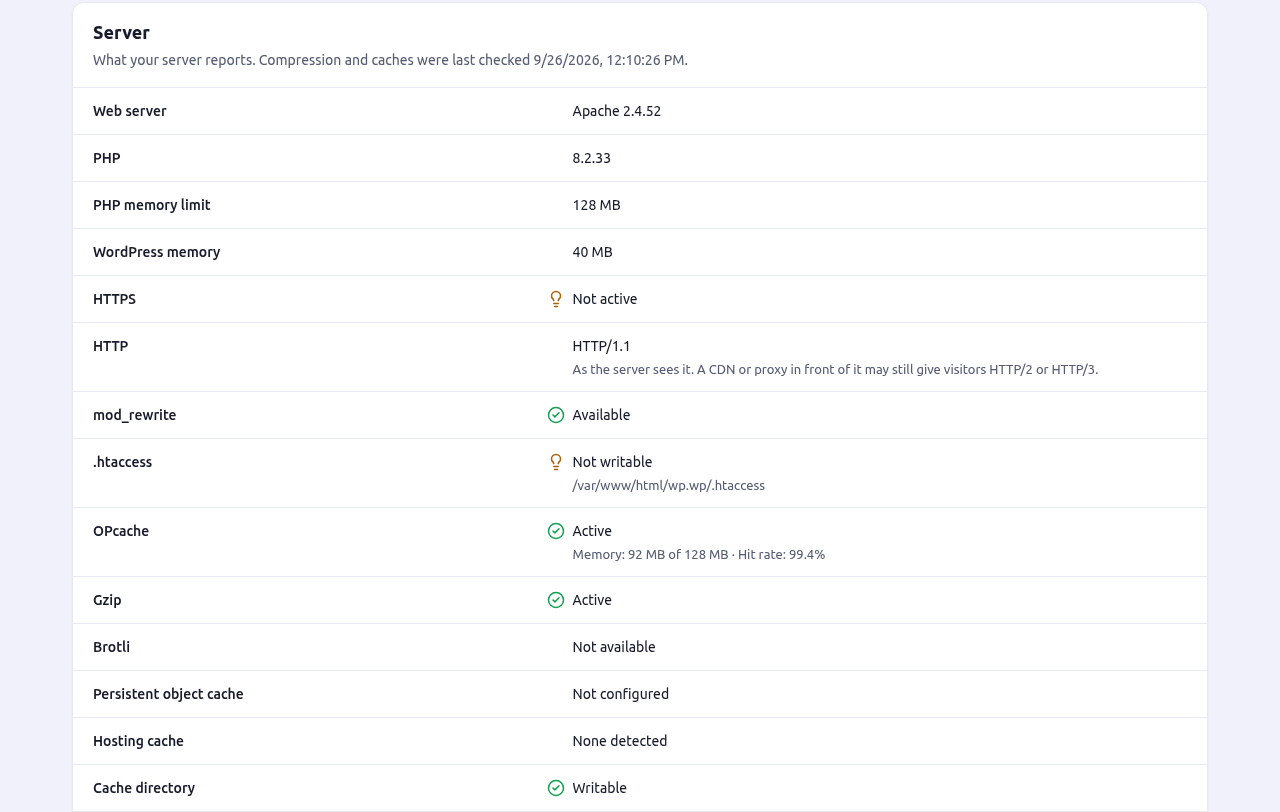
常见问题:
Which performance mode should I choose?
Keep Standard, which is already selected. It adds preloading and minification on top of safe page caching. Choose Basic for membership or highly dynamic sites, or if anything looks wrong after minification. Aggressive also defers and delays JavaScript and caches approved query strings; try it if you are happy to test your key pages afterwards, because some sites need exclusions.
Why did my mode change to Custom?
Changing any setting that a preset controls switches you to Custom, and NiroCache asks before it does. Nothing changes on your site until you save. Your last Custom combination is remembered, so you can go back to a preset and return to your own setup later.
Why don't I see cached pages while I'm logged in?
Logged-in users always get freshly generated pages, so nobody ever sees someone else's personal content. Click Run cache test on the dashboard, or open your site in a private browser window, to see what visitors get.
How do I know caching is working?
Click Run cache test on the dashboard. It requests your home page twice and reports whether the second request was served from the cache, or why it was not. You can also turn on debug headers under Settings, Advanced, and look for X-Niro-Cache: HIT in your browser's developer tools while logged out. The dashboard charts show how many pages are served from the cache each day.
How do I turn NiroCache off without deactivating it?
Use the On/Off switch next to the Dashboard title. Off pauses everything NiroCache does to your site and clears cached pages; your settings are kept, and turning it back on restores everything. It is the quickest way to check whether a problem comes from NiroCache.
Will minifying or delaying JavaScript break my site?
Minified files are copies kept in the cache folder; your theme and plugin files are never modified. Defer and delay are only on in Aggressive mode, and payment, checkout and consent scripts are never delayed. If something looks wrong, add the script to the JavaScript exclusions under Settings, Optimization, or switch back to Standard or Basic.
Does it work with WooCommerce?
Yes. Cart, checkout and account pages are never cached, shoppers with items in their cart always get fresh pages, and product pages are cleared when their stock or price changes. Easy Digital Downloads, EasyCommerce and NiroCommerce checkout and account pages are excluded too.
Which web servers are supported?
Any server that runs WordPress: Apache, Nginx, LiteSpeed and others. The early cache works everywhere with no server configuration. On Apache and LiteSpeed, NiroCache can also add browser caching, compression and direct delivery rules to .htaccess; on Nginx, the Server screen shows a configuration snippet you can add if you want Nginx to deliver cached pages itself.
Can I use it together with another caching plugin, or my host's cache?
Running two page caches at once causes unexpected behavior, so NiroCache warns you when it detects another page cache or optimization plugin. It never overwrites another plugin's advanced-cache.php or object-cache.php. The Server screen also detects hosting caches such as LiteSpeed, Varnish, Cloudflare and managed hosts, and recommends what to do.
How do I exclude a page from the cache?
Tick Don't cache this page in the NiroCache box of the page editor, or add its path under Settings > Exclusions > Never cache these URLs. Use /members/* to exclude a section and everything below it. You can also exclude cookies, user agents and post types there.
Forms on my site say the link has expired.
WordPress form security tokens expire after 12 to 24 hours. Keep the cache lifespan at 10 hours (the default) or lower on sites with forms.
Does preloading slow my server down?
Preloading requests your pages one at a time in small batches, with a pause between pages. You can lower the batch size or lengthen the pause under Settings > Preload, or turn sitemap preloading and cache warming off.
Does NiroCache work on multisite?
Yes. Each site keeps its own cache and settings. Super admins can clear every site's cache at once from the admin toolbar.
What happens when I deactivate or delete NiroCache?
Deactivating removes the early-cache file, the WP_CACHE line and the .htaccess block NiroCache added, and deletes cached pages; your settings are kept. Deleting the plugin also removes its settings, statistics and the whole cache directory.
更新日志:
- New: Performance modes. Choose Basic, Standard or Aggressive, or switch to Custom. Standard is selected on new installs.
- New: A redesigned admin screen with a dashboard, settings, server and help screens.
- New: Dashboard statistics and charts: pages served from cache, hit rate, requests by result and why pages were not cached, for 7, 30 or 90 days.
- New: On/Off switch that pauses NiroCache without deactivating it.
- New: Serve stale pages while rebuilding, with cache stampede protection.
- New: Preloading from the home page, sitemaps and extra URLs, with cache warming, progress and Clear & Preload.
- New: HTML, CSS and JavaScript minification, defer and delay JavaScript, preconnect, and Custom-only combine and inline minification.
- New: Browser caching, Gzip and Brotli rules for Apache and LiteSpeed, optional direct delivery, and an Nginx configuration snippet.
- New: Precompressed Gzip and Brotli copies of cached pages.
- New: Approved query strings with their own cached copies, a tracking-parameter switch, and an optional separate mobile cache.
- New: Exclusions for user agents and post types.
- New: Server screen with web server, PHP, OPcache, compression, object cache and hosting cache detection, conflicts and recommendations.
- New: Easy Digital Downloads, EasyCommerce, NiroCommerce, Elementor and Beaver Builder compatibility, WooCommerce price and stock purging, and a network-wide purge on multisite.
- New: WP-CLI commands.
- New: Optional debug log.
- Changed: Requires WordPress 6.2 or later.
- The early-cache file
wp-content/advanced-cache.phpis now copied from a file that ships with the plugin instead of being generated. NiroCache no longer writes PHP anywhere. - The settings screen now reports when the plugin folder has been renamed, which stops the early-cache file from finding NiroCache.
- The cache test token is now stored as a hash, so the runtime config file holds no secret.
- Initial release.