NWS Product Filter
| 开发者 |
neonus
shamotj |
|---|---|
| 更新时间 | 2026年3月3日 15:47 |
| PHP版本: | 7.4 及以上 |
| WordPress版本: | 6.9 |
| 版权: | GPLv2 or later |
| 版权网址: | 版权信息 |
详情介绍:
- Attribute Filtering - Filter by any WooCommerce product attribute
- Price Range Slider - Interactive price range filtering with visual slider
- Stock Status Filter - Filter products by availability
- Categories Navigation - Collapsible category tree for browsing product categories
- Responsive Design - Mobile-friendly interface
- Admin Configuration - Easy-to-use admin interface for setting up filters
- Drag & Drop Ordering - Reorder filter items in the admin
- Shortcode Support - Display filters anywhere using shortcodes
[nwsfilter_product_filter]and[nwsfilter_selected_filters] - Clean Code - Object-oriented PHP with proper WordPress coding standards
- AJAX Filtering - Fast filtering without page reloads
- Multiple Filter Types - Price range, attributes, stock status, and categories
- Selected Filters Display - Show active filters separately with remove buttons
- Auto-expand Categories - Optional automatic expansion of parent categories
[nwsfilter_product_filter]
Display only selected/active filters:
[nwsfilter_selected_filters]
Or use PHP in your template:
<?php echo do_shortcode('[nwsfilter_product_filter]'); ?>
<?php NWSFILTER_Frontend::get_instance()->display_filter_form(); ?>
Configuration
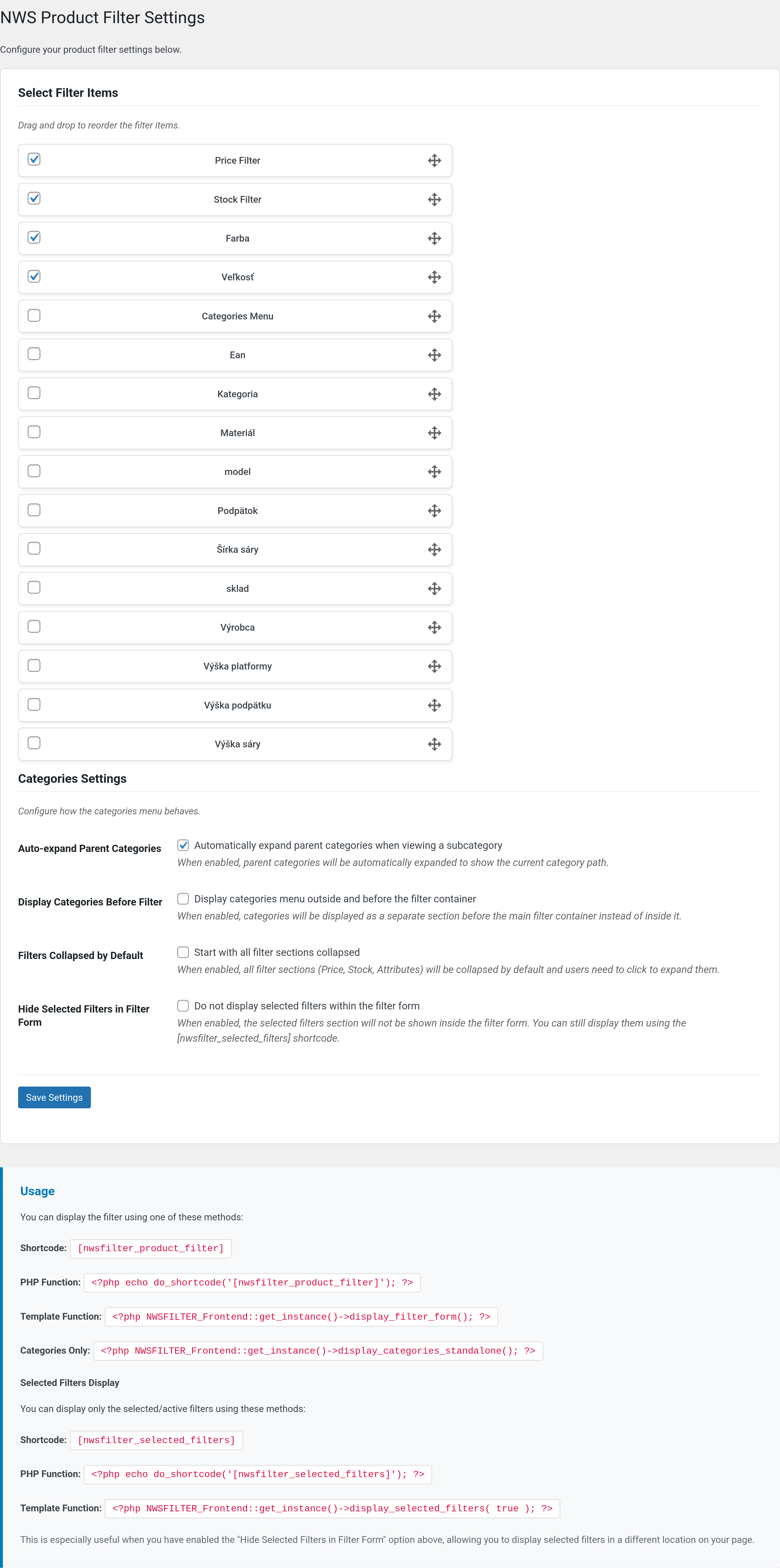
- Navigate to Settings > Product Filter in your WordPress admin
- Select which attributes and filters you want to display
- Drag and drop to reorder the filter items
- Configure categories settings (auto-expand, display location)
- Configure selected filters display options
- Save your settings
.nws-filter- Main container.filter-group- Individual filter sections.filter-group.is-active- Active filter sections.range-slider- Price range slider.selected-filters-section- Selected filters section.filter-chip- Individual filter chip.nws-clear-filters- Clear filters button
安装:
- Upload the plugin files to
/wp-content/plugins/nws-filter/ - Activate the plugin through the 'Plugins' menu in WordPress
- Go to Settings > Product Filter to configure
- Display the filter using shortcode
[nwsfilter_product_filter]or template functions
屏幕截图:
常见问题:
How do I display the filter?
Use the shortcode [nwsfilter_product_filter] in any page or post, or add it to your theme template using <?php echo do_shortcode('[nwsfilter_product_filter]'); ?>
Can I display selected filters separately?
Yes! Use the shortcode [nwsfilter_selected_filters] to display only the active/selected filters with remove buttons. This is useful when you want to show filters in a different location or when you've hidden them from the main filter form.
How do I change the order of filters?
In the admin settings (Settings > Product Filter), you can drag and drop the filter items to reorder them. The order you set will be reflected on the frontend.
Can I customize the appearance?
Yes! The plugin includes comprehensive CSS classes that you can override in your theme's CSS file. All main elements have specific classes like .nws-filter, .filter-group, .range-slider, etc.
Does it work with AJAX?
The filtering uses URL parameters and page reloads. The interface includes a loading indicator for better user experience.
Can I hide selected filters from the main filter form?
Yes! In the admin settings, enable "Hide Selected Filters in Filter Form" and use the [nwsfilter_selected_filters] shortcode to display them elsewhere.
How do I enable category auto-expand?
In Settings > Product Filter, check the "Auto-expand Parent Categories" option. This will automatically expand parent categories when viewing a subcategory.
What WooCommerce versions are supported?
The plugin requires WooCommerce 4.0 or higher and is tested up to WooCommerce 8.0.
更新日志:
- ADDED: Czech translation
- UPDATED: Added declaration about HPOS compatibility
- UPDATED: Added missing translations
- ADDED: Settings link in plugin action list for quick access to plugin settings
- UPDATED: Bumped WordPress tested up to version 6.9
- UPDATED: Enhanced readme.txt with comprehensive description and features
- UPDATED: Added detailed FAQ section with 8 practical questions and answers
- UPDATED: Improved installation instructions and usage examples
- ENHANCED: Better WordPress.org plugin directory presentation
- DOCUMENTATION: Complete feature list and filter type descriptions
- Fixed style enqueue in is_archive()
- Fixed plugin URL in main plugin file
- BREAKING CHANGE: Updated all prefixes from NWS_ to NWSFILTER_ for WordPress.org compliance (minimum 4 characters required)
- CHANGED: Shortcode names updated to [nwsfilter_product_filter] and [nwsfilter_selected_filters]
- CHANGED: Class names updated to NWSFILTER_Plugin, NWSFILTER_Frontend, NWSFILTER_Admin, NWSFILTER_Functions
- CHANGED: Option names updated to use nwsfilter_ prefix (e.g., nwsfilter_settings, nwsfilter_categories_auto_expand)
- CHANGED: Constants updated to NWSFILTER_VERSION, NWSFILTER_PLUGIN_DIR, NWSFILTER_PLUGIN_URL, NWSFILTER_PLUGIN_FILE
- CHANGED: Enqueue handles updated to nwsfilter-style, nwsfilter-script, nwsfilter-admin
- REMOVED: All inline and tags in favor of properly enqueued files
- ENHANCED: Full WordPress.org coding standards compliance
- ENHANCED: Proper use of wp_enqueue_script() and wp_enqueue_style()
- ENHANCED: Added wp_localize_script() for passing dynamic PHP data to JavaScript
- UPDATED: All documentation with new shortcode and class names
- Remove unused file, renmant of previous code
- Fixed URL handling
- Fixed filter on search results page, ie. support for "s" and "post_type" query params
- Optimize DB queries for retrieving max price in categories
- Stable release with all bug fixes and new features
- Enhanced filter performance and reliability
- Complete WordPress.org submission ready version
- All security and coding standard issues resolved
- Fixed categories displaying regardless of plugin settings
- Categories now only show when enabled in admin filter settings
- Improved filter setting validation
- Fixed database query security issues for WordPress.org compliance
- Improved code quality and WordPress coding standards
- Updated all version numbers consistently across plugin files
- Enhanced plugin check compatibility
- Fixed WordPress.DB.PreparedSQL.NotPrepared error in database queries
- Improved database query security by directly passing prepared statements
- Better WordPress Plugin Check compliance
- Added selected filters shortcode
- Added option to hide selected filters in main form
- Security improvements
- Complete Slovak translation
- Refactored code to eliminate duplication
- Enhanced filter functionality and stability improvements
- Bug fixes and performance optimizations
- Initial release