
Offair - Branded Error Pages
| 开发者 | nolidev |
|---|---|
| 更新时间 | 2026年10月30日 12:58 |
| PHP版本: | 7.4 及以上 |
| WordPress版本: | 7.1 |
| 版权: | GPLv2 or later |
| 版权网址: | 版权信息 |
详情介绍:
- Error establishing a database connection, when the database is unreachable.
- Briefly unavailable for scheduled maintenance, while WordPress installs updates.
- There has been a critical error on this website, after a fatal PHP error.
wp-content, called drop-ins: db-error.php, maintenance.php and php-error.php. It loads them itself, before any plugin, which is the only way to show something when the database is down.
The plugin copies one static file shipped in its own folder (dropins/drop-in.php) under these three names. No code is generated. The content of the pages (texts, colors, logo) is saved as a JSON file in wp-content/uploads/offair/, and the drop-in reads it when a page has to be shown. What visitors must not see, such as the alert recipient and the history, is kept next to it in a private folder whose name cannot be guessed, with an .htaccess file that refuses web access on Apache and LiteSpeed. On Nginx, see the FAQ.
What you get
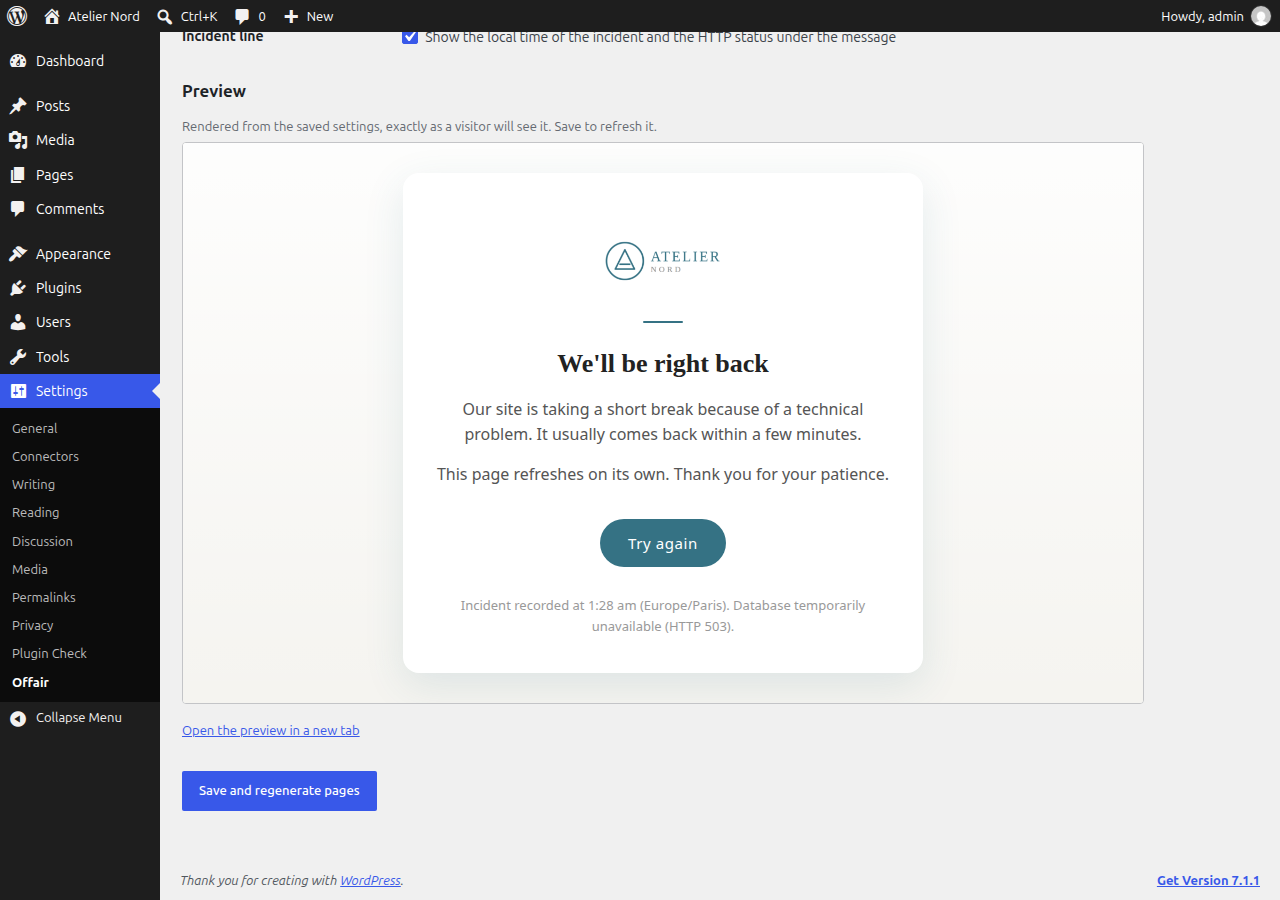
- Four layouts for the three screens: card, minimal, two columns or banner. Each shows the logo, the site name, the title, the message, a retry button and an incident line with the local time.
- Automatic dark mode: the pages follow the light or dark setting of the device of the visitor, with an optional logo for dark backgrounds. They can also stay always light or always dark.
- Your logo and colors, detected from the theme, the site icon and Elementor global colors when available, editable at any time.
- Texts in the language of the site until you customize them. Translations included: French, German, Spanish, Italian, Portuguese (Brazil), Dutch, Polish, Russian and Japanese.
- Correct HTTP answers: 503 with a Retry-After header for the database and update pages, 503 or 500 for PHP errors (your choice), plus no-cache headers so no cache ever keeps an error page.
- No external dependency: system fonts, logo embedded in the content file, nothing loaded from the network.
- A live preview beside the settings, rendered by the drop-in itself, exactly as visitors will see it. It follows what you type, and nothing is saved or written to your site until you save.
- An email alert when the database goes down, off by default. The page itself sends it while WordPress cannot run, and WordPress sends a report once the site is back, with the duration of the outage. A test button shows whether your host delivers it.
- A history of the outages, under Tools, Outage history: the date, the page and the HTTP status, recorded once a minute at most. For a PHP error, the error itself too: its message, file and line, which usually name the plugin or theme in cause. Nothing about your visitors is recorded.
- A dashboard widget with the outages of the last 30 days, off by default, shown only to the roles you choose. Without it, a notice on the dashboard tells administrators about a database outage they missed.
- Theme templates: a theme can design any of the three pages itself, with the texts, colors and logo from the settings.
- A status box, a Site Health test and WP-CLI commands.
- Clean removal: the drop-ins are removed when the plugin is deactivated, and everything is removed when it is uninstalled.
db-error.php, maintenance.php or php-error.php it did not add itself. If one already exists, it tells you and waits for your decision.
Works with MainWP
If you manage your sites with MainWP, the free Offair for MainWP extension shows in your MainWP Dashboard the outages your visitors ran into on all your sites, in one place. An uptime monitor checks your sites from the outside every few minutes. Offair sees the short database outages and the fatal errors on a single page that such checks miss.
Nothing else is needed on the sites: when MainWP Child is active, Offair adds its outages to the regular MainWP synchronization, and only when the dashboard asks for it. The state of the pages already reaches MainWP through the Site Health test.
Developers
offair_settingsfilters the settings before the page content is built.offair_datafilters the page content before it is saved for the drop-in.offair_incident_resolvedfires once a database outage is over, with the times of the first and last pages shown.- Theme templates:
offair/db-error.php,offair/maintenance.phpandoffair/php-error.phpin the active theme or its parent. The variable they receive is described in the FAQ, under Can my theme design the pages? - WP-CLI:
wp offair status,generate [--force],remove [--force],preview <db|maintenance|php>,history.
安装:
- Install and activate the plugin from Plugins, Add New.
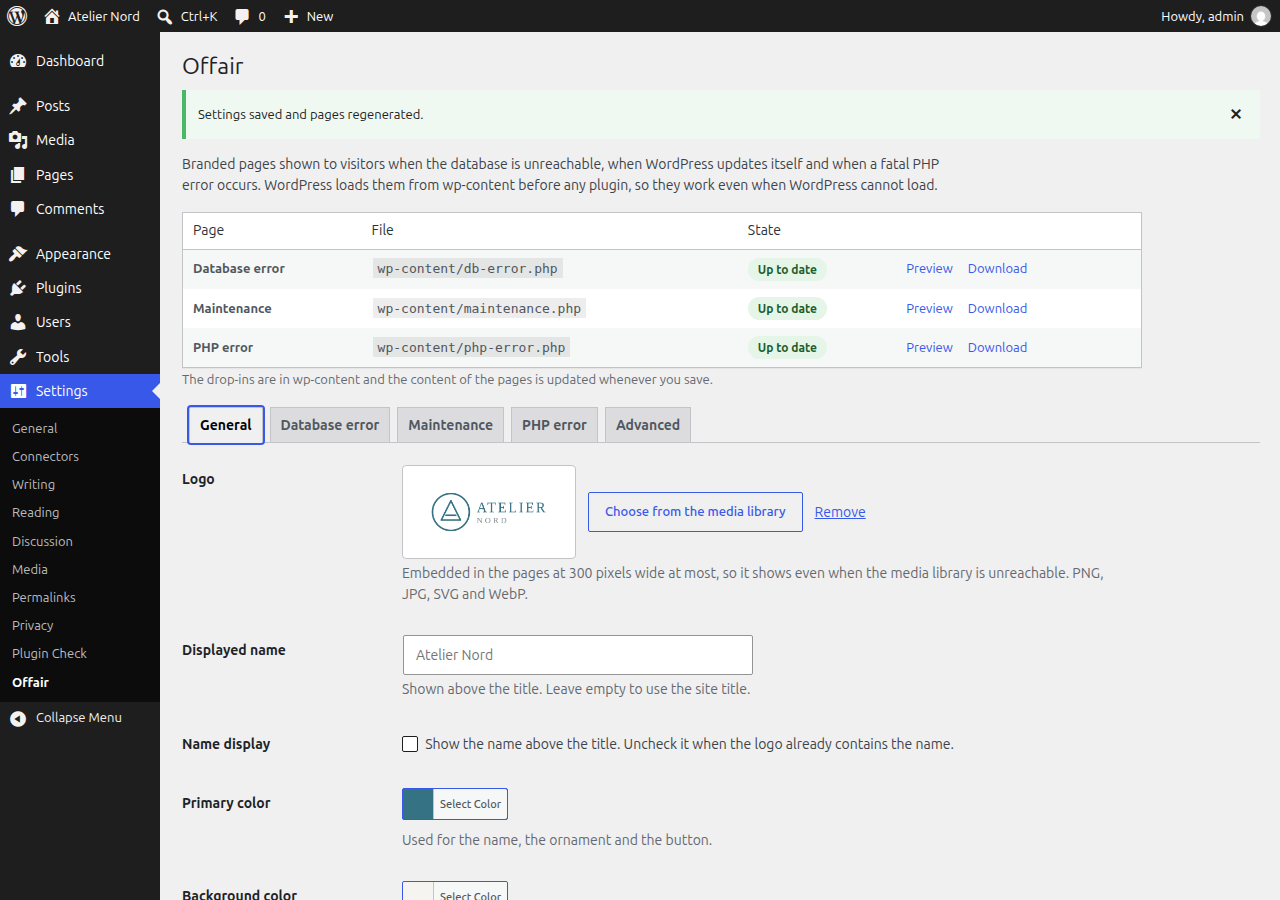
- Open Settings, Offair. The logo and primary color of your site are pre-filled when they can be detected.
- Adjust the texts and colors, save. The preview shows the result.
wp-content under the three names WordPress expects, and saves the page content in wp-content/uploads/offair/. If wp-content is not writable, download the drop-ins from the settings page and upload them yourself, once.屏幕截图:
常见问题:
Is this a maintenance mode plugin?
No. It does not let you put your site offline. It styles the screens WordPress shows on its own when the database is down, while updates are installed and after a fatal error. It works alongside any maintenance mode or coming soon plugin.
Why does the plugin add files to wp-content?
Because WordPress only looks for these drop-ins there, and loads them before any plugin. That is the only way to show a page when the database is down. The three files are identical copies of dropins/drop-in.php from the plugin folder. They are removed when the plugin is deactivated or uninstalled.
Why is the content saved as a file and not in the database?
The database is precisely what may be unreachable when the page is shown. The content is saved in the uploads folder, in offair/pages.json, and contains only what the visitors see on the page. The alert settings and the history are kept in a private folder next to it.
Does it work with page caching (LiteSpeed Cache, WP Rocket, Cloudflare)?
Yes. Pages already in the cache keep being served normally during an outage, which is what you want. Only requests that reach PHP see the outage page, and that page is sent with headers that prevent it from being cached.
Does it cover a web server or PHP outage?
No. If the web server or PHP itself is down, nothing on the site can run. Only your host can show a page in that case.
The status box says a file was not added by the plugin.
Another plugin or a person placed a file with the same name in wp-content. The plugin leaves it untouched. Open the Advanced tab to replace it if you want to.
Does the plugin need output buffering in PHP?
No. The database and update pages never depend on it, and the PHP error page works without it as long as PHP does not print errors on screen, which is the normal configuration of a live site. There is one combination WordPress cannot handle: errors printed on screen (usually because WP_DEBUG and WP_DEBUG_DISPLAY are enabled) together with output buffering off. PHP then sends the raw error and the headers before WordPress runs its handler, so no error page, branded or not, can be shown. The settings page and Site Health detect this combination and explain the two fixes: disable WP_DEBUG_DISPLAY on a live site, or set output_buffering to 4096 in the PHP configuration.
Does the plugin send emails or contact any service?
Only if you turn on the email alert, and only to the address you choose. The alert is sent by your own server. Nothing else leaves it: there is no tracking, no update check and no external asset.
Why does the alert sometimes not arrive?
While the database is down WordPress cannot run, so the alert is sent with the mail function of PHP, not through your email plugin. Some hosts block it and some inboxes file it as spam. Use the test button in the Database error tab: the test travels exactly the same way. The report sent once the site is back goes through WordPress, like your other emails. It leaves once the error page has not been shown for about ten minutes, at the next scheduled check or as soon as someone opens the admin.
What does the history record?
The date, the page and the HTTP status, once a minute at most, each time a visitor sees one of the pages. For a PHP error page, also the error behind it, as WordPress hands it over: its message, file and line, and the stack trace without the values passed to the functions. Paths start from the WordPress folder. Offair records nothing about the visitors themselves, but an error message may repeat what a request sent when the plugin in cause puts it there: control characters are removed and each errors file is limited to 1 MB. The full history, with the errors, is for administrators: Tools, Outage history, or wp offair history. The dashboard widget, off by default, shows the outages of the last 30 days to the roles you choose, without the errors. It is kept for 180 days and removed when the plugin is uninstalled. An outage while nobody visits the site cannot be seen.
My server runs Nginx. Is the private folder protected?
Its name cannot be guessed, and it holds an .htaccess file that refuses web access, which Apache and LiteSpeed apply. Nginx ignores .htaccess files: add location ~* /uploads/offair/private- { deny all; } to the server block of the site. Tools, Site Health warns you when the folder can be read from the web.
Can my theme design the pages?
Yes. Add offair/db-error.php, offair/maintenance.php or offair/php-error.php to your theme or child theme. The drop-in looks in the active theme, then in its parent theme, and uses your template instead of the built-in page. If a template throws an error, has a syntax error or prints nothing, the built-in page is shown instead.
WordPress is not loaded when these pages are shown, so a template can only use plain PHP. The drop-in has already sent the HTTP status and the no-cache headers. After a fatal error during a REST or admin-ajax.php request, the drop-in answers with JSON or plain text, as WordPress does, and the template is not used. The path is checked against wp-content/themes, so a theme stored elsewhere cannot provide templates. On a network, the templates come from the theme of the site asked for.
The template prints the whole HTML document and receives one array, $offair:
screen:db,maintenanceorphp.status: HTTP status sent, 503 or 500.lang: language of the site, for thelangattribute.site_name,show_name: displayed name and whether to show it.title,paragraphs,button: title, message split into paragraphs, label of the retry button (empty when hidden).contact: contact line, as parts with atextand, for links, anhref.meta: incident line, with the local time filled in (empty when hidden).notice,detail: recovery mode notice and technical details of a PHP error, when WordPress would show them.refresh: automatic refresh delay in seconds, 0 when off.logo,logo_dark,favicon: logo and logo for dark backgrounds (srcdata URI,width,height) or null, favicon data URI or empty. An SVG logo is embedded as it is: show it in an<img>element, where its scripts do not run, never in<object>or<iframe>.colors:primary,primary_hover,primary_text(readable on white),primary_dark(readable on the dark surface),on_primary,background.heading_font,ornament:seriforsans, andwave,lineornone.layout,color_scheme:card,minimal,splitorbanner, andauto,lightordark.head: built-in<head>content (meta tags, refresh, title, favicon and styles).main: built-in<main class="offair-page">markup, arranged by the styles for the chosen layout.body_class: classes the built-in page puts on<body>, which the styles rely on.css: built-in stylesheet.escape: function that escapes a value for HTML.
$offair['escape']. head and main are already escaped. A minimal template that keeps the built-in page and adds a line above it:
`<?php $e = $offair['escape']; ?>
`
Does it send data to MainWP?
Only if MainWP Child is active on the site and the MainWP Dashboard you connected yourself asks for it, which it does when the Offair for MainWP extension is installed there. The data travels in the synchronization MainWP already runs and authenticates. Offair makes no request of its own. It sends the version of the plugin and the outages of the last 90 days: the page, the start, the end and the HTTP status. The history holds nothing about your visitors.
Does it work on multisite?
Yes. The drop-ins are shared by every site of the network, so the settings live in the network admin under Settings, Offair. Each site still gets its own page, found from the address the visitor asked for: its title, its logo or site icon, its language, its timezone and the templates of its own theme. The design, the colors and the texts are shared by the network.
更新日志:
- Docs: the theme template reference now lives in the FAQ, and the plugin links to its page on nolidev.fr.
- Security: the alert sent during a database outage now takes only its sender from the private folder. A changed file can no longer add recipients or headers.
- Security: control characters are removed from the recorded PHP errors, so that a message cannot alter the terminal that shows
wp offair history. - Fix: the PHP errors kept in the history now take 2 MB at most. A larger file left by an earlier version is trimmed, so the history and the daily check no longer need much memory.
- New: Site Health warns when the private folder can be read from the web, as on Nginx, which ignores .htaccess files. The FAQ gives the rule to add.
- New look for the pages: a plain background instead of a gradient, and a card with a thin border, a short shadow and smaller corners.
- The default title of the database error page is now "This site is off air for a moment". A title you typed yourself is kept.
- New plugin icon and banner.
- Fix: a WP-CLI command that crashed was recorded as an outage seen by visitors, and printed the HTML page in the terminal.
- Fix: after a fatal error during a REST API or admin-ajax.php request, the block editor and other scripts received the HTML page. They now get JSON or plain text, as WordPress sends them.
- Fix: on a network, the list of the sites and the page of each site were readable by anyone in the uploads folder. They now sit in the private folder.
- Fix: on a network, the sites did not use the templates of their own theme, and the alert could carry the name of another site than the main one.
- Fix: on a network, changing the email address or the language of the network now updates the pages.
- Fix: the history files were only trimmed after a database outage. They are now trimmed every day.
- Fix: an outage that came back shortly after its report could be reported twice. The report now leaves once the error page has not been shown for about ten minutes.
- Uninstalling now also removes the scheduled tasks of a large network and the messages kept after saving.
- With Offair for MainWP 0.2.2: the link to the settings works on a network, and the updates no longer push the real outages out of the list sent to MainWP.
- The dashboard widget now appears at the top of the second column, where it is seen without scrolling. A position you chose yourself is kept.
- French translation reviewed: spelling and typography.
- New: the history has a page of its own, under Tools, Outage history. The History tab of the settings and the plugins screen lead there.
- New: optional dashboard widget with the outages of the last 30 days, off by default. Choose on the history page which roles see it.
- New: the History tab shows the error behind each PHP error incident, with its message, file and line, so you can tell which plugin or theme failed.
wp offair historyshows it too. - The private folder of Offair now refuses web access on Apache and LiteSpeed servers.
- New: works with MainWP. With the Offair for MainWP extension on the dashboard, the outages of all your sites appear in MainWP.
- New: the plugin and its pages are translated into German, Spanish, Italian, Portuguese (Brazil), Dutch, Polish, Russian and Japanese, on top of French.
- New: the preview sits beside the settings and follows what you type. Trying out colors, layouts or texts no longer means saving and writing the pages of the site.
- The preview shows the page as a computer screen sees it, or at phone width, and no longer reloads itself.
- New: email alert when the database goes down, and a report once the site is back. Off by default, with a test button.
- New: history of the pages shown to visitors, in a new History tab, and a dashboard notice after a database outage.
- New: theme templates. A theme can replace any of the three pages with its own design.
- New: four layouts: card, minimal, two columns and banner.
- New: automatic dark mode, with an optional logo for dark backgrounds. The pages can also stay always light or always dark.
- New: on a network, each site gets its own page, with its title, logo, language, timezone and theme templates.
- New:
offair_incident_resolvedaction andwp offair historycommand. - Fix: a site icon in a format the pages cannot show, such as AVIF, was left out of the pages. It is now embedded as PNG.
- Fix: a logo in a format the pages cannot show, such as AVIF, was left out without any warning. It is now embedded as PNG.
- The PHP error page no longer reloads itself every minute by default: a fatal error rarely clears on its own, and each reload runs into it again. Sites that kept the former default switch to no reload, a delay set by hand is kept.
- When the automatic refresh is turned off, the page no longer says that it refreshes on its own.
- After an update, the pages are brought up to date on the first request, without waiting for someone to open the admin.
- Fix: an SVG logo over 150 KB that only wraps one image, as design tools export them, was left out of the pages. The image is now taken out and resized like any other logo.
- New: optional button text color. Left empty, the choice stays automatic.
- The automatic button text is now white on mid-tone colors, with the button slightly darkened when needed, instead of dark text that was hard to read. The label always reaches a 4.5:1 contrast.
- The settings page warns when the chosen logo cannot be embedded.
- Initial release: branded pages for database connection errors, the update notice and fatal PHP errors.
- Settings page with status box, live preview, manual download and per-page options.
- Logo and color detection, texts in the language of the site, French translation.
- Site Health test and WP-CLI commands.