
OZY Custom Fields
| 开发者 | idanishrangaiz |
|---|---|
| 更新时间 | 2026年8月13日 20:03 |
| PHP版本: | 7.4 及以上 |
| WordPress版本: | 7.1 |
| 版权: | GPLv2 or later |
| 版权网址: | 版权信息 |
详情介绍:
get_field() and friends working so your theme needs no edits at all.
Beginner-first. A Quick Start wizard sets up your first fields in a few clicks — no need to know what a "custom post type" is. It can even create a matching content type for you, if you want one.
Developer friendly. A full template API, shortcodes, block editor blocks, a REST API, and dozens of action and filter hooks to extend everything.
Field types
Text, Textarea, Number, Email, URL, Password, Select, Multi-Select, Checkbox, Radio, Toggle, True/False, Image, File, Gallery, WYSIWYG, Date, Date & Time, Time, Color, Link, Post Object, Taxonomy, User — plus the advanced Repeater, Group, and Clone fields.
Where fields can appear
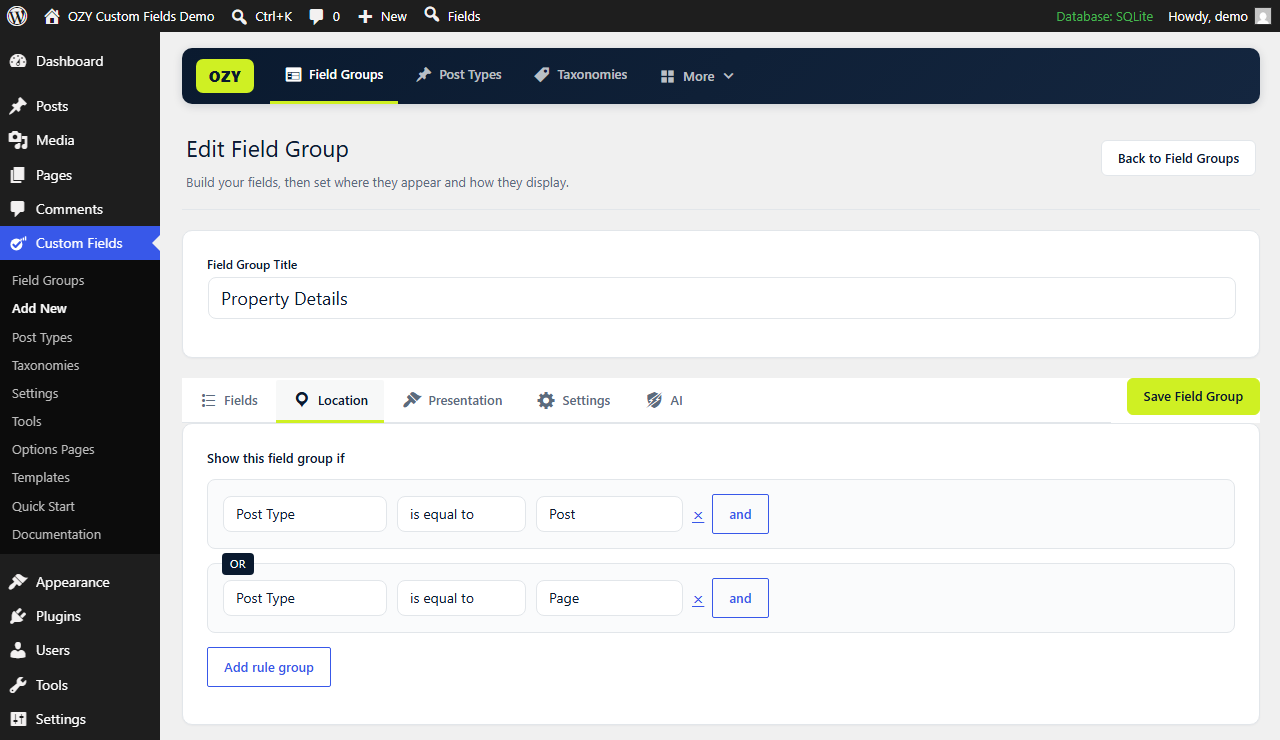
Attach field groups by post type, post status, post format, page template, or user role — with multiple rule groups combined using AND/OR logic. Fields render on post, term, and user edit screens and save to standard WordPress meta.
Template API
ozycf_get_field( 'price' ) returns a value, ozycf_the_field( 'price' ) prints it, and repeaters loop cleanly:
if ( ozycf_have_rows( 'slides' ) ) { while ( ozycf_have_rows( 'slides' ) ) { ozycf_the_row(); ozycf_the_sub_field( 'title' ); } }
Also available: ozycf_get_fields(), ozycf_has_field(), ozycf_get_sub_field(), the [ozycf_field] and [ozycf_repeater] shortcodes, and the "OZY Field" and "OZY Repeater" blocks.
Built by OZY Solutions
Learn more at ozysolutions.com.
安装:
- Upload the
ozy-custom-fieldsfolder to/wp-content/plugins/, or install through the Plugins screen in WordPress. - Activate the plugin.
- Follow the Quick Start wizard, or open Custom Fields → Add New to build a group by hand.
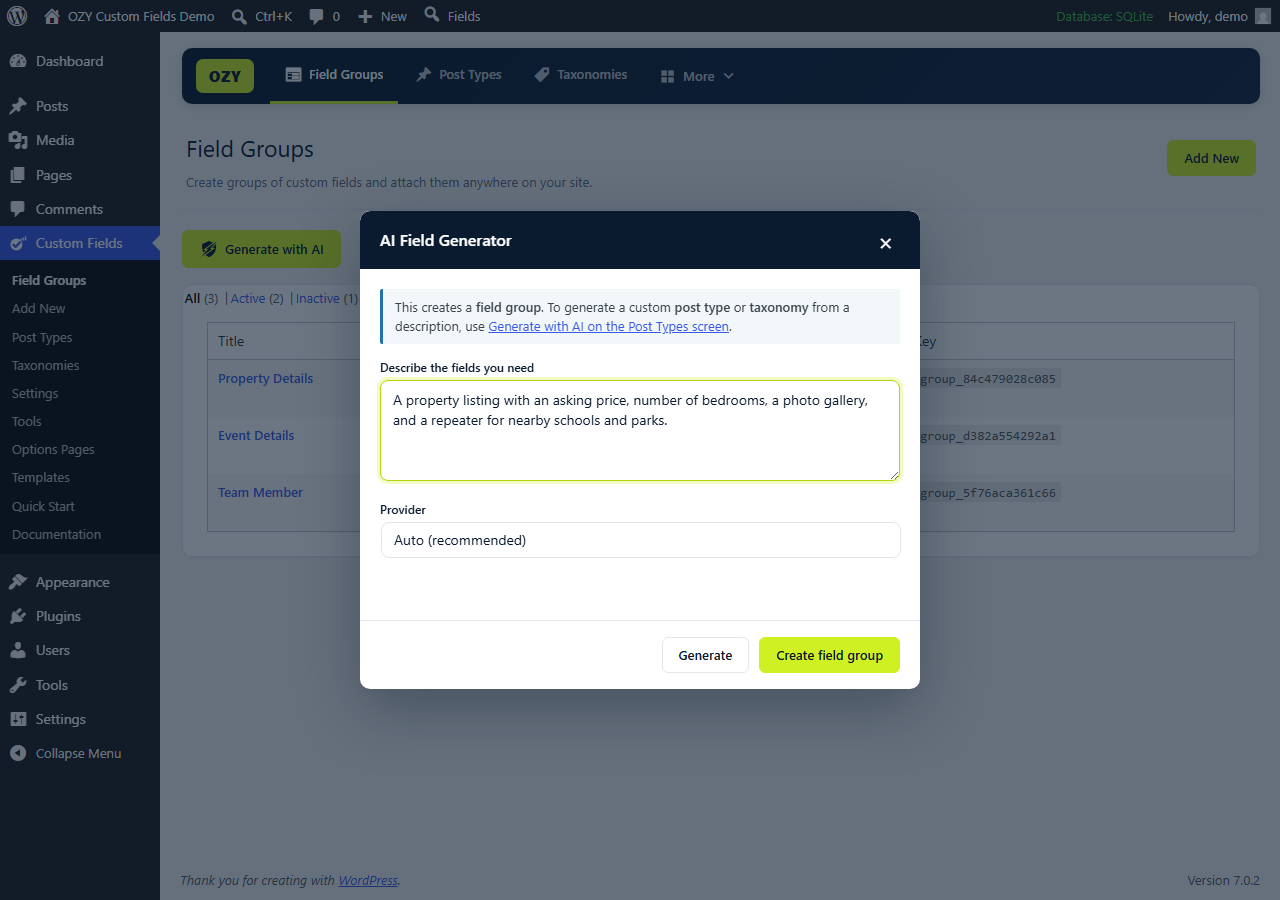
- (Optional) To use the AI Field Generator, add a provider key under Custom Fields → Settings.
屏幕截图:


常见问题:
Does this send my content to any external service?
Not on its own. The plugin makes no external request of any kind until you explicitly use the optional AI features, which call the AI provider you configured with your own API key. Nothing is sent in the background, and there is no telemetry, tracking, or update check. The External Services section documents precisely what is sent, when, and to whom.
Do I need to pay for AI?
No. The AI features are entirely optional — the plugin is fully functional without them. On WordPress 7.0+ they use whatever provider you have connected to WordPress itself, so there is nothing extra to configure here. Otherwise you can use free-tier providers such as Groq or Google Gemini with your own key. Paid providers (OpenAI, Anthropic, Mistral) are also supported if you prefer them.
I already use Advanced Custom Fields (or Secure Custom Fields). Can I switch?
Yes. Go to Custom Fields → Migrate. The plugin reads what ACF or SCF left in your database and converts your field groups, custom post types, taxonomies, options pages, and every saved field value — free and Pro data alike, including repeaters, groups, flexible content, and conditional logic. Nothing belonging to the other plugin is changed or deleted, so you can deactivate it afterwards and switch back at any time. If your theme calls get_field(), have_rows() or the_sub_field(), tick the compatibility option and those keep working unchanged. No ACF install? Upload the JSON file from its export screen instead.
Where are my field values stored?
In standard WordPress meta tables (post, term, and user meta) and in the options table for Options Pages, so they remain accessible via the REST API, WP-CLI, and normal backups. Field group definitions are stored in a dedicated plugin table.
Will my data be deleted if I uninstall?
No, unless you explicitly opt in. Deleting the plugin keeps your data by default; a setting under Settings lets you request full cleanup on uninstall.
Can I move field groups between sites?
Yes. Use Tools to export groups as JSON and import them elsewhere, or sync all groups with a local file for version control and staging workflows.
Is it translation ready?
Yes. All strings are translation-ready with the ozy-custom-fields text domain. Translations are contributed and delivered through translate.wordpress.org, so no translation files are bundled with the plugin.
更新日志:
- Tested with WordPress 7.1.
- The blocks now register against block API version 3, so they run natively in the always-iframed post editor WordPress 7.1 introduces.
- Fixed: the status filter links above the field group list (All | Active | Inactive | Trash) sat flush against the top and left edge of the screen.
- Fixed: the status filter links above the field group list (All | Active | Inactive | Trash) ran together without spacing.
- New: Migrate from ACF / SCF (Custom Fields → Migrate). Brings field groups, custom post types, taxonomies, options pages, and every saved field value across from Advanced Custom Fields or Secure Custom Fields — free and Pro data alike. Nothing in the other plugin is modified or deleted, so the move is fully reversible.
- Migration understands the whole structure: nested repeaters, groups, flexible content layouts, conditional logic, location rules, choices, return formats, and field-group presentation settings. Values stored in ACF's flat
field_0_subfieldlayout are rebuilt as proper nested rows. - Field values are converted in batches, so sites with tens of thousands of posts complete without a timeout. Terms, users, and options page values are covered too.
- No ACF install needed: a JSON file exported from ACF → Tools (or any file from an
acf-jsonfolder) can be converted directly. - Optional theme compatibility layer — leave
get_field(),the_field(),get_fields(),have_rows(),the_row(),get_row_layout(),get_sub_field()andthe_sub_field()working in your templates so nothing has to be rewritten. It stays dormant while ACF or SCF is still active, so the two never clash. - New WP-CLI command:
wp ozycf migrate(with--structure-onlyand--compat). - The admin menu now reads "OZY Custom Fields" instead of "Custom Fields", and its icon is a brand-coloured OCF mark, so it is unmistakable next to another field plugin.
- Fixed: a field added in the builder kept the machine name
new_field,new_field_2and so on, because the name stopped following the Field Label as soon as the row was created. New fields now take their name from the label until you edit the name yourself. - Fixed: the
wp ozycfWP-CLI commands were defined but never registered, sowp ozycf list,export,importandgeneratewere unavailable. They now work, and the Documentation screen shows the correct flags for them. - All rendered markup now passes through a shared wp_kses() allowlist at the point of output, including the values returned by shortcode and block render callbacks.
- Submitted arrays are unslashed and normalised on input before the per-field-type sanitisers run.
- JSON folder sync now defaults to a folder inside the uploads directory instead of wp-content.
- WP-CLI export writes through the WordPress filesystem API and validates the target path.
- AI now uses the AI Client built into WordPress 7.0 by default, so the provider and its credentials are managed by WordPress under Settings → Connectors. The existing bring-your-own-key providers remain available as a fallback on older versions.
- Shortcodes are now prefixed
ozycf_([ozycf_field],[ozycf_repeater],[ozycf_image],[ozycf_gallery],[ozycf_relationship]). - Translations are delivered through translate.wordpress.org; no translation files are bundled.
- Redesigned admin UI: a clean top navigation bar (Field Groups, Post Types, Taxonomies, More), a lighter page header with the primary action, and single-column, full-width field settings.
- Fixed: the "Add Field" button could do nothing on sites where another plugin had deregistered jQuery UI — the builder now loads independently, and drag-to-reorder degrades gracefully when jQuery UI Sortable is unavailable.
- Quick Start now builds complete setups: the matching post type, its taxonomies, and multiple field groups (with repeaters and galleries) for Real Estate, Portfolio, Hospital, Services, Agency, Events, Products, and more.
- New in-app Documentation screen (More → Documentation), organised into topic tabs instead of one long page — Getting started, Field types, Show a field, Repeater & Group, Images & galleries, Relationships, Post types & taxonomies, Options pages, Shortcodes, Page builders, AI helpers, and Import/export & sync.
- Documentation now also covers a full field-type reference (what every type gives you back), creating post types and taxonomies, and the import/export/JSON-sync workflow.
- Translations: the bundled
.pottemplate now covers all translatable strings, and the Urdu translation ships compiled so it actually loads.
- New field group edit experience: group-level tabs (Fields, Location, Presentation, Settings, AI) with full-width settings panels.
- Field rows now have their own tabs: General, Validation, Presentation, Conditional Logic, and Advanced.
- Group presentation controls: style, position, label and instruction placement, menu order, description, and "hide on screen" for standard editor panels.
- Field-level additions: placeholder, prepend/append text, min/max length, min/max value, pattern, custom error message, width, wrapper class/ID, REST visibility, and REST field name.
- Visual choices editor (value / label rows) for Select, Multi-Select, Radio, and Checkbox, with backward-compatible loading of the old text format.
- Expanded field-type options across text, number, choice, media, date, relationship, and structural field types.
- More location rules — Specific Post, Attachment, Taxonomy, Taxonomy Term, Current User, User Form, and Block — plus a natural-language rule builder.
- Field groups can now attach to taxonomy term screens (add and edit) and the add-new-user form, saving to term and user meta.
- Field-group blocks: enable "Show in block editor" on a group to insert it as a block, edit its fields in the sidebar with a live preview, and store the values in the block itself.
- Options Pages: register settings screens and read their values with ozycf_get_field( 'name', 'option' ).
- AI helpers on the new AI tab: improve a group, generate location rules, generate conditional logic, suggest better field types, bulk rename, design an options page, and convert a pasted field schema.
- Tools: export a group as a PHP registration file; register groups from code with ozycf_add_local_field_group().
- Optional JSON folder sync for version control and staging workflows.
- WP-CLI: wp ozycf list, export, import, and generate.
- Admin-bar field search that jumps straight to any field.
- Post Types: the full breadth of register_post_type() options — description, menu position, custom archive slug, visibility (publicly queryable, exclude from search, admin UI/menu/nav/admin bar, parent menu), permalinks (rewrite slug, with-front, feeds, pagination, query var), REST base & namespace, capabilities (capability type, map meta cap, export, delete with user), extra supports (trackbacks, post formats), and custom label overrides.
- Taxonomies: matching advanced options — description, visibility, permalinks, REST, sort, and custom label overrides.
- Advanced options are grouped into collapsible sections (Visibility, Permalinks, REST API, Capabilities, Custom labels).
- AI content-model generator now sets an appropriate menu icon and can emit the new post type / taxonomy options.
- Fixed the AI Field Generator modal not closing when clicking the close (×) button or the overlay.
- Added Escape-key support to close the AI Field Generator modal.
- Initial release.
- 24 field types plus Repeater, Group, and Clone.
- Visual field group builder with drag-and-drop reordering.
- Location rules (post type, status, format, template, user role) with AND/OR logic.
- Template API, shortcodes, and dynamic block editor blocks.
- REST API: field values on core endpoints and a field-group CRUD API.
- AI Field Generator with multi-provider support and automatic fallback.
- Quick Start wizard with optional custom post type creation.
- Import, export, and local file sync.