
Product Input Fields for WooCommerce
| 开发者 | tychesoftwares |
|---|---|
| 更新时间 | 2026年10月23日 18:42 |
| PHP版本: | 7.4 及以上 |
| WordPress版本: | 7.1.2 |
| 版权: | GNU General Public License v3.0 |
| 版权网址: | 版权信息 |
标签
下载
详情介绍:
Product Input Fields for WooCommerce lets you add custom input fields to your WooCommerce product pages, making it easy to collect these details before customers add products to their cart. Whether you need a text field for engraving instructions, a file upload for artwork, a date picker for scheduling, or a dropdown with predefined options, the plugin helps you gather the right information during checkout.
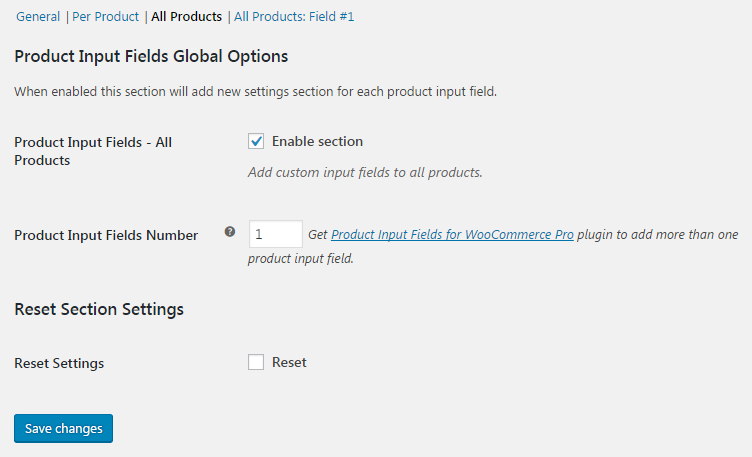
You can add unlimited input fields that apply across your entire store or create multiple product-specific input fields for individual products. Customize field labels, placeholders, default values, display positions, and validation settings to match your store’s requirements.
Key Features
Choose from 19 Different Field Types
Add custom fields to gather additional information from customers before they purchase. The plugin includes 19 field types, including Text, Textarea, Number, Checkbox, Radio Buttons, Select, File Upload, Date Picker, Time Picker, Week Picker, Color Picker, Email, Phone, URL, Password, Country, Search, and Range.
Add Custom Fields to WooCommerce Products
Collect additional information from customers before they purchase. Add unlimited global input fields across your store or create multiple input fields for individual products, depending on your requirements.
Customize Product Fields to Match Your Store
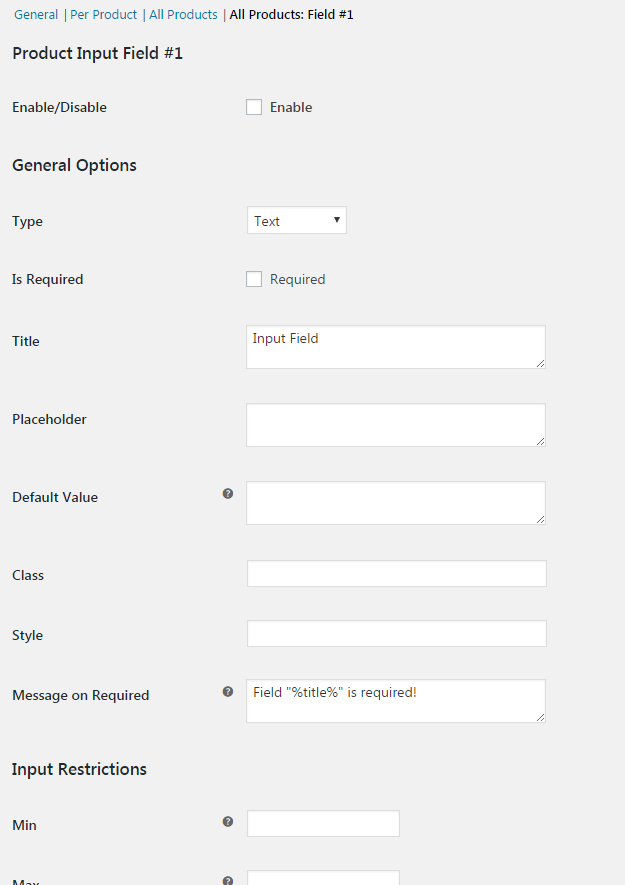
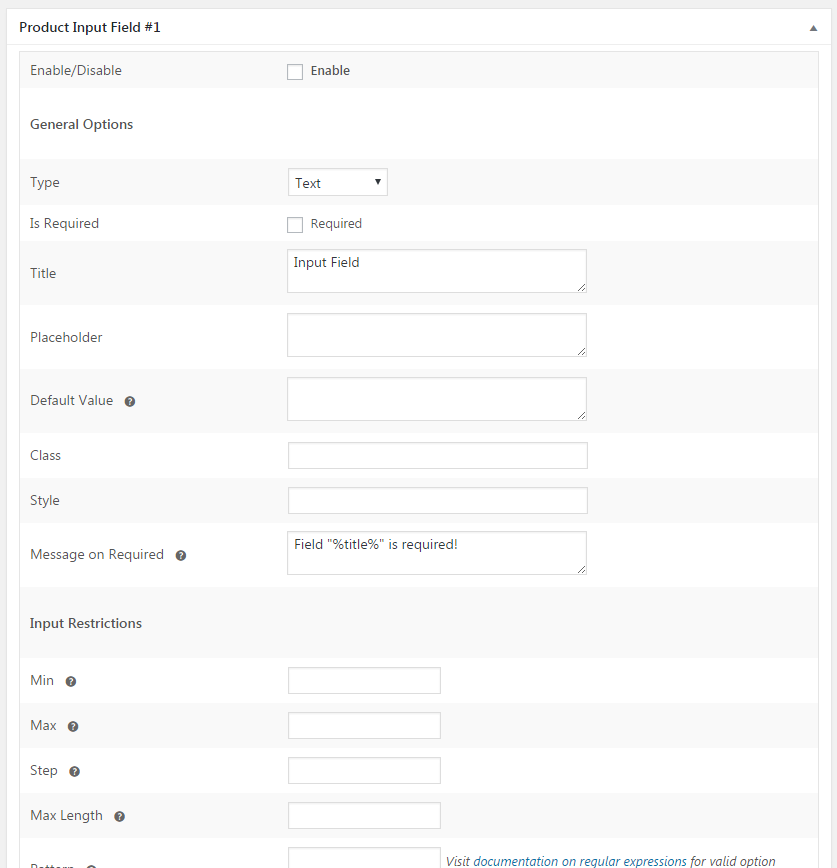
Configure field titles, placeholders, default values, display position, priority, and custom CSS classes so your input fields match the design of your WooCommerce store.
Make Customer Input Mandatory
Mark fields as required to ensure customers provide essential details before adding products to their cart. You can also customize the validation message shown when a required field is left empty.
Keep Customer Customization Details with Every Order
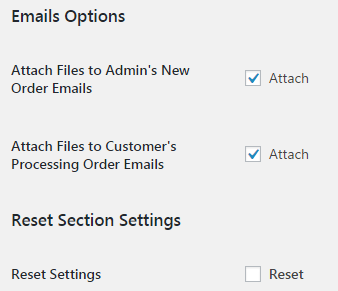
Customer information collected through product input fields is saved with the WooCommerce order, making it easy to review customization requests during order processing. Uploaded files can also be attached to order emails for quick access.
Common Use Cases
Product Input Fields for WooCommerce is ideal for stores selling:
- Personalized gifts
- Engraved jewellery and accessories
- Printed T-shirts and promotional products
- Custom cakes and bakery items
- Business cards and printed stationery
- Photo printing services
- Made-to-order furniture
- Signage and printing products
- Products that require customer notes or special instructions
- Visit the WordPress support forums
- Check the documentation for common answers
- Try the live demo to see how the plugin works on the storefront.
- Flexi BOGO for WooCommerce
- Abandoned Cart Pro for WooCommerce
- Booking & Appointment Plugin for WooCommerce
- Order Delivery Date Pro for WooCommerce
- Product Delivery Date Pro for WooCommerce
- Deposits For WooCommerce
- Payment Gateway Based Fees and Discounts for WooCommerce - Pro
- Custom Order Status for WooCommerce - Pro
- Custom Order Numbers for WooCommerce - Pro
- Call for Price for WooCommerce - Pro
- Price based on User Role for WooCommerce - Pro
- Currency per Product for WooCommerce - Pro
- Abandoned Cart for WooCommerce
- Order Delivery Date for WooCommerce - Lite
- Product Delivery Date for WooCommerce - Lite
- Payment Gateway Based Fees and Discounts for WooCommerce
- Custom Order Status for WooCommerce
- Custom Order Numbers for WooCommerce
- Call for Price for WooCommerce
- Price based on User Role for WooCommerce
- Currency per Product for WooCommerce
安装:
- Upload the entire plugin folder to the
/wp-content/plugins/directory. - Activate the plugin through the "Plugins" menu in WordPress.
- Start by visiting plugin settings at "WooCommerce > Settings > Product Input Fields".
屏幕截图:


常见问题:
What types of input fields are available?
The plugin includes 19 field types, including Text, Textarea, Number, Checkbox, Radio Buttons, Select, File Upload, Date Picker, Time Picker, Week Picker, Color Picker, Email, Phone, URL, Password, Country, Search, and Range.
Can customers upload files with their orders?
Yes. You can add a File Upload field to a product page so customers can submit files with their product orders. Uploaded files can also be attached to order emails for quick access during order processing.
Can I add multiple input fields to WooCommerce products?
Yes. The Lite version lets you add unlimited global input fields across your store and multiple input fields for individual products. You can configure the fields to collect details such as engraving instructions, personalization text, or other product-specific information.
更新日志:
2.1.0 - 28/09/2026
- Enhancement - Removed the one-field limit in the free version. You can now add unlimited global input fields and unlimited product-level input fields.
- Fix - Resolved a deployment issue that caused the admin interface to not load correctly after updating to 2.0.2.
- Fix - Security vulnerability that allowed unauthenticated file uploads due to insufficient file type validation, preventing the upload of unauthorized files.
- Fix - Console error occurs when using the Time Picker input field on the product page.
- Fix - Resolved a deployment issue that caused the admin interface to not load correctly after updating to 2.0.0.
- New - React-based admin interface for Settings, Prefix/Suffix rules, and FAQs pages.
- Dev - Introduced a REST API layer (pif/v1) for all admin data operations, with per-endpoint capability checks.
- Dev - Plugin settings migrated from individual
alg_wc_pif_*options to consolidatedpif_general_settingsandpif_field_settingsoptions. - Dev - Removed dead WooCommerce < 3.0 functions.
- Tweak - Updated for compatibility with WordPress 7.0.
- Tweak - Updated for compatibility with WooCommerce 10.8.1.
- Fix - Product Input Field data is now carried forward when Stripe Express Checkout is used directly from the product page.
- Fix - PHP 8.2+ deprecation warning caused by dynamic property creation in Alg_WC_Settings_PIF.
- Fix - On the product page, if a date was selected twice using the week picker input and the product was added to the cart, the end week date appeared repeatedly in the cart input field.
- Tweak - Updated for compatibility with WordPress 6.9.
- Tweak - Updated for compatibility with WooCommerce 10.4.3.
- Fix - Uncaught fatal error when an order is marked "On Hold" from the admin panel.
- Fix - Files uploaded by guest users via file-type input fields were not downloadable from the Edit Order page.
- Tweak - Updated for compatibility with WordPress 6.8.1.
- Tweak - Updated for compatibility with WooCommerce 9.9.5.
- Fix - Security vulnerability: Implemented sanitize_file_name to prevent double extension attacks on file names.
- Fix - Security vulnerability that allowed unauthenticated file uploads due to insufficient file type validation, preventing the upload of unauthorized files.
- Fix - Issue where the "Reset Settings" button was not working on the settings page.
- Fix - Undefined warning for the $name variable on the cart and checkout pages.
- Fix - Resolved all PHPCS warnings and aligned the code with WordPress Coding Standards to enhance quality and maintainability.
- Fix - Directory traversal vulnerability in the
handle_downloads()function by adding proper file path sanitization. - Fix - Translation loading was triggered too early, causing errors when changing the site language in WordPress 6.7.
- Tweak - Started loading the external resources(js, css) from the plugin itself instead of external URLs.
- Tweak - Removed the call to our tracking server to fetch the deactivation reasons and added them in the plugin itself.
- Fix - Deactivation survey request was being sent even though 'Skip & deactivate' was selected while deactivating the plugin.
- Tweak :- Update compatibility with WordPress 6.5.
- Tweak :- Update compatibility with WooCommerce 8.7.
- Fix - Input fields data were not getting passed to the order after v1.8.0 update.
- Fix - PHP deprecated error is coming in the log file.
- Fix - Change plugin description.
- Fix - F j, Y text is appears in the Date picker/ Weekpicker input field.
- Fix - Cross Site Request Forgery (CSRF) vulnerability.
- Fix - Input fields data are not appear on woocommerce emails.
- Fix - Warnings errors from cart & checkout page.
- Fix - The selected Input field value does not appear on the Cart and Checkout block page.
- Fix - Slow load time issue on the admin dashboard panel.
- Fix - Wrong text appear on product frontend when Date picker/ Weekpicker input field selected.
- Enhancement - Introduced Deactivation survey feature.
- Enhancement - Introduced tracking plugin data feature.
- Fix - Weekpicker and Timepicker were not working on the product page due to a conflict with the Storefront theme.
- Fix - Using a quote inside the input field on the product page was displaying broken input HTML.
- Fix - The file upload field was not working when the Astra Pro plugin was active due to a hook from the plugin.
- Fix - With WC 7.8.0 or above input field values were displayed twice on the cart page.
- Fix - Issue with displaying the date inside the Date field when the format was saved as dd/mm/yy.
- Enhancement - Introduced compatibility with WooCommerce High Performance Order Storage.
- Fix - Input field data was not show in the XML file exported from Tools -> Export -> Orders.
- Fix - Date Picker and Time Picker JavaScript loads when not in use.
- Fix - Formatting is not proper for the input field when using Elementor and Astra theme.
- Fix - Fatal error was coming with PHP 8. This is fixed now.
- Fix - Product input fields were getting displayed on the frontend even if the plugin setting was kept disabled and shortcode was added. This is fixed now.
- Fix - Numbers were not coming on the product page when the 'Range' type was selected. This is fixed now.
- Fix - Duplicate fields were coming on the frontend when the product input fields were shown using the shortcode and the input fields values were not getting passed to the cart. This is fixed now.
- Fixed an issue of after clicking on the Order again button on My Account page, it shows the error of required fields.
- Fixed an issue of additional description is shown on all the products even after disabling the All products setting.
- Added restrictions to a function from where files were being downloaded for input type File fields. We now check user roles & permissions before downloading the file.
- Fixed an issue related to Creta Theme.
- Update compatibility changes with WooCommerce 4.0.0.
- Changes in code to make the plugin compliant as per WPCS rules.
- Enhancement - Plugin is made compatible with WPML. wpml-config.xml file is added to translate the All Products field labels using WPML.
- Plugin URL updated due to handover of the plugins.
- Author name updated due to handover of the plugin.
- Dev - Plugin URI updated.
- Dev - Admin settings restyled and descriptions updated.
- Dev - Code clean up.
- Add compatibility with Advanced Order Export For WooCommerce plugin
- Display fields on PDF Invoices & Packing Slips plugin
- Add 'Load Datepicker Style' option
- Add 'Load Timepicker Style' option
- Update Timepicker JS
- Turn off autocomplete on timepicker, datepicker and weekpicker
- Fix Datepicker, Timepicker and Weekpicker style
- Add color input compatibility with Opera and Safari
- Add color section on admin input fields options
- Add option to allow typing or pasting the color manually
- Update WC tested up to
- Fix maxlength attribute on textarea
- Check if order and input fields exist before trying to delete file uploads
- Improve help link for pattern attribute
- Improve input sanitizing
- Display multiple array value as comma separated string
- Fix PHP warnings
- Fix file uploading when using multiple file inputs
- Add "Smart Textarea" option, showing only the textarea excerpt on frontend and hovering it will make it display the full content
- Add 'Textarea Auto Height' option, making the textarea auto increase its height as users type
- Add composer
- Add filter 'alg_product_input_fields_options' allowing changes on field options
- Add filter 'alg_wc_pif_field_html' allowing changes the field html
- Remove check for pro version
- Remove slashes from the values
- Dev - "WC tested up to" added to plugin header.
- Dev - WooCommerce v3.2 compatibility - Admin settings -
selecttype options fixed. - Dev - WooCommerce v3.0 compatibility - "woocommerce_add_order_item_meta hook uses out of date data structures and function is deprecated..." notice fixed.
- Fix -
add_product_input_fields_to_order_item_meta()- Checking if product input fields values exist (fixes notice in log). - Dev - Saving settings array as main class property.
- Dev - WooCommerce 3.x.x compatibility -
output_custom_input_fields_in_admin_order()- Usingmeta_exists()andget_meta()functions to access order items meta data. - Dev - WooCommerce 3.x.x compatibility -
alg_get_frontend_product_input_fields()- Product ID (usingget_id()function instead of accessingidobject property directly). - Dev - Core -
add_files_to_email_attachments()- Additional validation added. - Tweak - Plugin link updated from https://coder.fm to https://wpcodefactory.com.
- Dev - Language (POT) file added.
- Dev - readme.txt updated (screenshots added etc.).
- Tweak - http replaced with https in links to coder.fm.
- Initial Release.