Promasterweb – Sommaire automatique
| 开发者 | promasterweb |
|---|---|
| 更新时间 | 2026年2月24日 09:37 |
| PHP版本: | 7.4 及以上 |
| WordPress版本: | 6.9.1 |
| 版权: | GPLv2 or later |
| 版权网址: | 版权信息 |
详情介绍:
- Automatic TOC generation — no shortcodes, no manual work
- Scans H2 headings only (best SEO practice)
- Generates clean, short, readable anchor links
- Removes stop words and accents from anchors for better URLs
- Anchor length limited to 4 meaningful words
- Guaranteed unique anchors — no ID conflicts
- Only displays when the post has at least 2 H2 headings
- CSS loaded only on single post pages — zero performance impact on the rest of the site
- Fully accessible with ARIA label on the nav element
- Compatible with Gutenberg, Classic Editor, and any standard HTML editor
- No options page — nothing to configure
- You write your post with H2 headings as section titles
- The plugin scans the content, extracts each H2
- A clean anchor ID is generated and injected into each heading
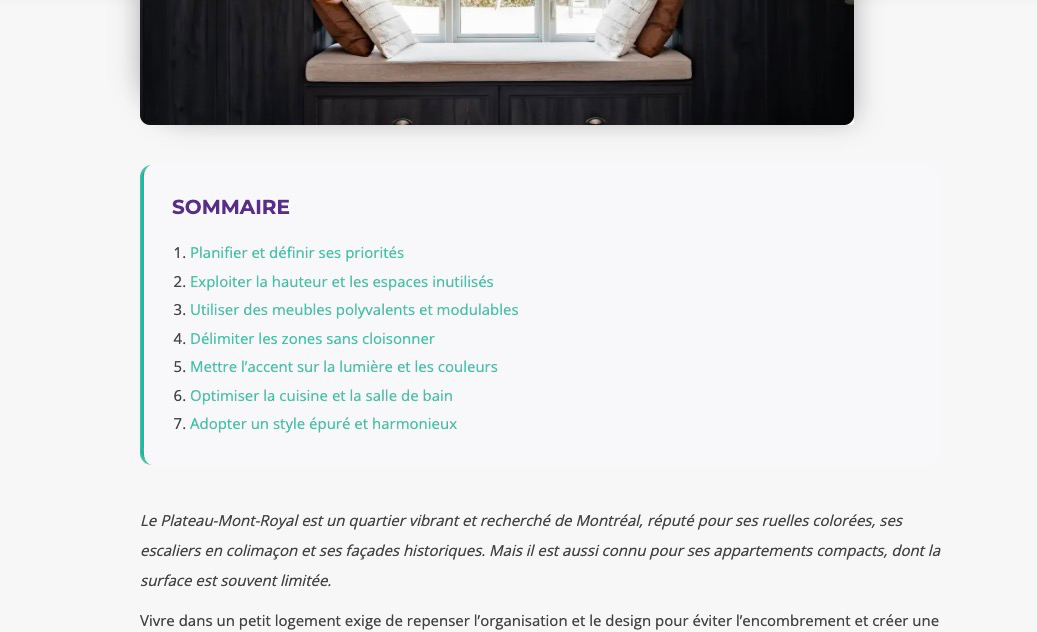
- A numbered table of contents is inserted at the top of the post
- Visitors can click any item to jump directly to that section
- Blog posts and long-form articles
- Tutorials and how-to guides
- News and editorial content
- Any content-heavy WordPress site
安装:
- Upload the plugin folder to
/wp-content/plugins/ - Activate the plugin from the Plugins menu in WordPress
- Open any post that contains at least 2 H2 headings
- The table of contents will appear automatically at the top of the post
屏幕截图:
常见问题:
Does it work with the Gutenberg block editor?
Yes. It works with Gutenberg, the Classic Editor, and any editor that outputs standard HTML content.
Does it work with page builders like Elementor or Divi?
It depends on how the page builder outputs content. If the builder uses the standard the_content filter and renders H2 tags in the post body, the plugin will work. Some builders bypass this filter, in which case the TOC may not appear.
Can I use it on pages or custom post types?
No. The plugin is intentionally limited to standard WordPress posts (blog posts). This keeps it lightweight and focused.
Why only H2 headings?
H2 is considered the correct heading level for main sections in a blog post (H1 being the post title). Using H2 for your section titles is a widely recommended SEO practice, and limiting the TOC to H2 keeps the structure clean and relevant.
Can I disable the TOC on a specific post?
Not yet. The TOC automatically appears on any post with at least 2 H2 headings. A per-post disable option may be added in a future version.
Does the plugin slow down my site?
No. The plugin is extremely lightweight. It processes content only on single post pages, and the CSS file is enqueued only where needed. There is no database query, no JavaScript, and no external resource loaded.
Will it conflict with other TOC plugins?
It may if another TOC plugin is also active and modifying the same content. We recommend using only one table of contents plugin at a time.
Does it support multilingual content?
Yes. The plugin support others languages.
Is the output accessible?
Yes. The table of contents is wrapped in a <nav> element with an aria-label="Table of Contents" attribute for screen reader compatibility.
更新日志:
- Added WPML compatibility with multilingual stop words (French, English, Spanish, German)
- The table of contents title is automatically translated based on the site language settings.
- SEO and performance improvements for long posts
- Optimized SEO anchor generation
- Anchor length limited to 4 meaningful words
- Duplicate ID handling added
- Improved H2 parsing reliability
- Initial release