
Protect My Infos
| 开发者 |
yugaweb
kaichi |
|---|---|
| 更新时间 | 2026年9月4日 01:51 |
| PHP版本: | 7.4 及以上 |
| WordPress版本: | 7.1 |
| 版权: | GPLv2 or later |
| 版权网址: | 版权信息 |
详情介绍:
- Obfuscate contact information with placeholders, blur effects, and Base64 encoding.
- Use the
[protect_my_infos]shortcode for integration in posts or pages. - Fully customizable settings for icons, colors, and reveal texts.
- Easy-to-use admin interface.
安装:
- Upload the plugin files to
/wp-content/plugins/protect-my-infosor install it via the WordPress admin. - Activate the plugin in the 'Plugins' menu.
- Configure the settings in
Settings > Protect My Infos.
屏幕截图:


常见问题:
How does the obfuscation work?
The plugin uses Base64 encoding combined with JavaScript to discourage basic address-harvesting bots. Base64 is encoding, not encryption, and sophisticated crawlers may still recover the original value.
Can I customize the icons and colors?
Yes, the plugin allows you to change the icon style and colors for both text and icons directly from the settings page.
Can I customize the reveal text?
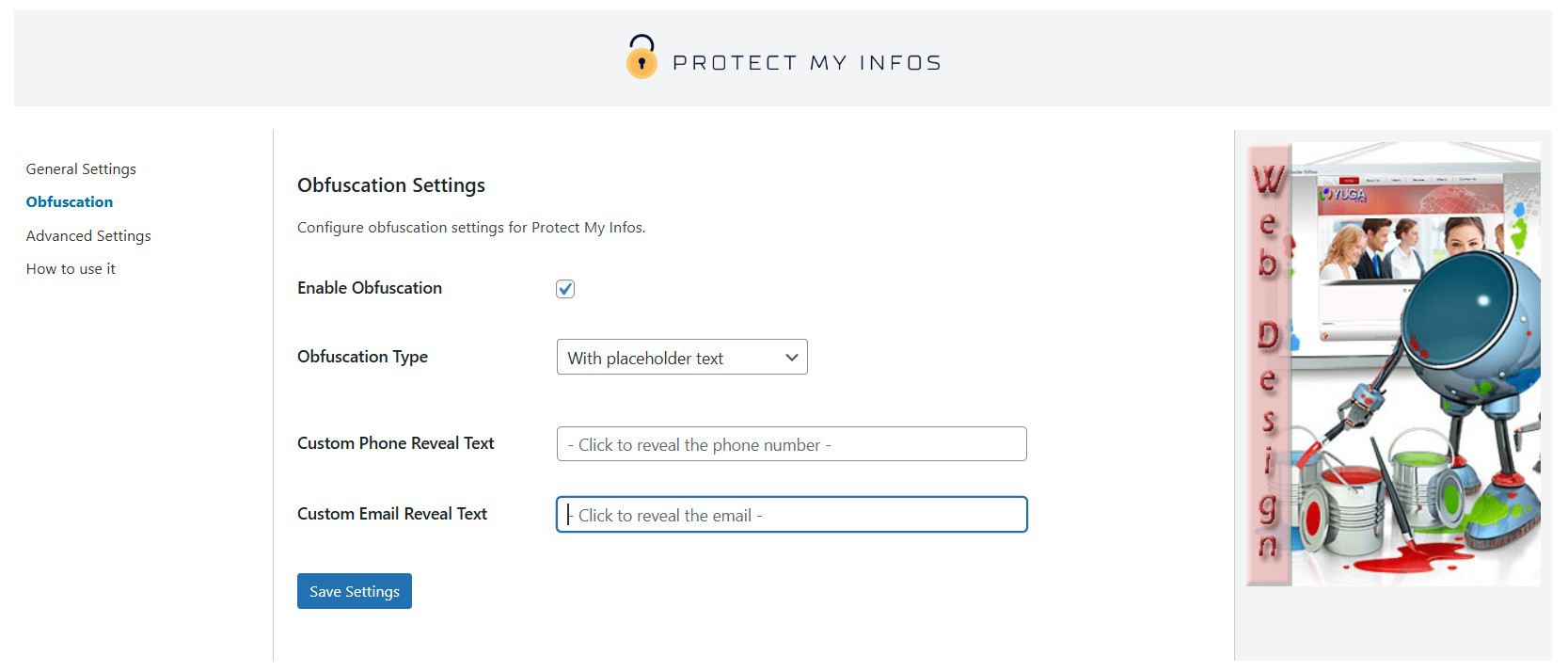
Yes, you can set custom reveal texts for both emails and phone numbers.
Is the plugin compatible with all themes?
It works with most WordPress themes. Theme-specific CSS can occasionally require small styling adjustments.
Is the plugin compatible with caching plugins?
Yes, the plugin works with most caching plugins. If you encounter any issues, try clearing your cache after activating Protect My Infos.
Does this plugin slow down my website?
The frontend assets are small and are loaded only on pages where the shortcode is detected or rendered. Actual performance depends on the site, theme, and other plugins.
Can I protect other types of sensitive data?
Currently, the plugin is designed to protect email addresses and phone numbers. Future updates may include support for additional types of data.
How do I use the shortcode?
You can use the shortcode [protect_my_infos type="email" value="youremail@example.com"] to protect an email, or [protect_my_infos type="phone" value="+1234567890"] to protect a phone number.
Can I disable the obfuscation?
Yes, you can disable the obfuscation in the plugin settings. However, this may expose your data to bots.
Does the plugin work with all WordPress themes?
Protect My Infos is compatible with most WordPress themes. If you experience layout issues, check your theme's custom styles or contact support.
What happens if JavaScript is disabled in the browser?
If JavaScript is disabled, the obfuscated data will not be revealed to users. Ensure your audience has JavaScript enabled for the best experience.
Can I translate this plugin?
Yes, Protect My Infos is translation-ready. You can use tools like Loco Translate or Poedit to translate the plugin into your desired language.
Is there a Pro version of this plugin?
Not yet, but we are working on additional premium features. Stay tuned for updates!
Does the plugin comply with GDPR?
The plugin stores its configuration in the WordPress database and does not transmit protected email addresses or phone numbers to Yuga Web. Clicking the PayPal donation button loads PayPal resources and is subject to PayPal's privacy terms. Compliance depends on how the site owner configures and uses the website.
更新日志:
- Add allowlist validation and accessible keyboard reveal controls.
- Load frontend assets only when needed and enqueue Dashicons when enabled.
- Load PayPal resources only after explicit administrator interaction.
- Scope administrative notices and update messages to the plugin.
- Correct security and privacy claims in the documentation.
- Add automated PHP, JavaScript, WordPress compatibility, and Plugin Check workflows.
- Add consistent Git line-ending rules and remove duplicate generic Italian catalogs.
- Preserve keyboard focus after reveal and support late-rendered shortcodes.
- Improve settings accessibility, option validation, translations, and uninstall cleanup.
- Fix secure rendering of revealed email addresses and phone numbers.
- Fix fatal errors for one-character values in center blur mode.
- Add UTF-8 support for international email addresses and protected values.
- Declare compatibility with WordPress 7.1 and require PHP 7.4 or later.
- Declare compatibility with WordPress 6.9 and update documentation.
- Fix: two-tap reveal behavior on mobile for obfuscated emails/phones (first tap reveals, second tap opens link).
- Serve images locally from /assets (removed external CDN).
- Settings saved via AJAX with nonce; sanitization through the Settings API.
- Standardized option keys with fallbacks for prior versions.
- Refactored asset structure (css/js/img) and minor optimizations.
- Performance and localization updates
- Refactoring and security updates
- Performance and localization updates
- Security updates
- Added How to use section
- Added customizable settings for obfuscation type, reveal texts, and colors.
- Added obfuscation functionality.
- Added different types of obfuscation.
- Added icons.
- Added shortcode support.
- Initial release with email and phone number protection.