
Query All The Post Types
| 开发者 | GeekStreetWP |
|---|---|
| 更新时间 | 2026年4月10日 22:48 |
| PHP版本: | 7.4 及以上 |
| WordPress版本: | 6.9 |
| 版权: | GPLv2 |
| 版权网址: | 版权信息 |
详情介绍:
- Auto-Detection - Discovers all post types registered by WordPress core, plugins, and themes
- Tabbed Interface - Post types organized into logical groups for easy navigation.
- Comprehensive Data - View all registration settings, REST API config, supports, taxonomies, and labels
- REST API Links - Clickable endpoint URLs for post types exposed to the REST API
- WooCommerce Tab - Dedicated purple tab groups all your WooCommerce post types (products, orders, coupons, and more)
- Quick Actions - View All and Add New buttons for post types with admin UI
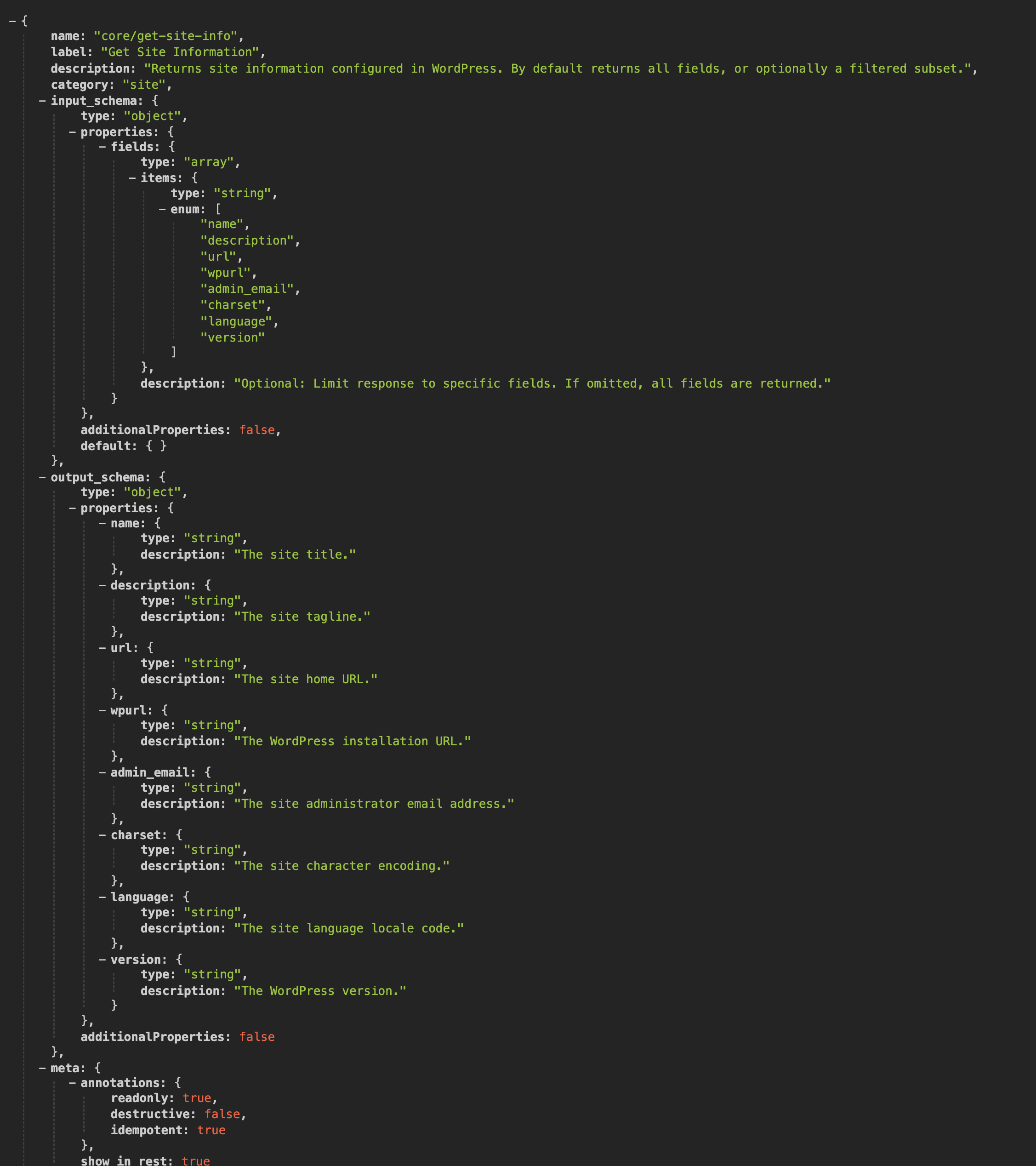
- WordPress Abilities API - Every post type registered as a machine-readable ability (WordPress 6.9+)
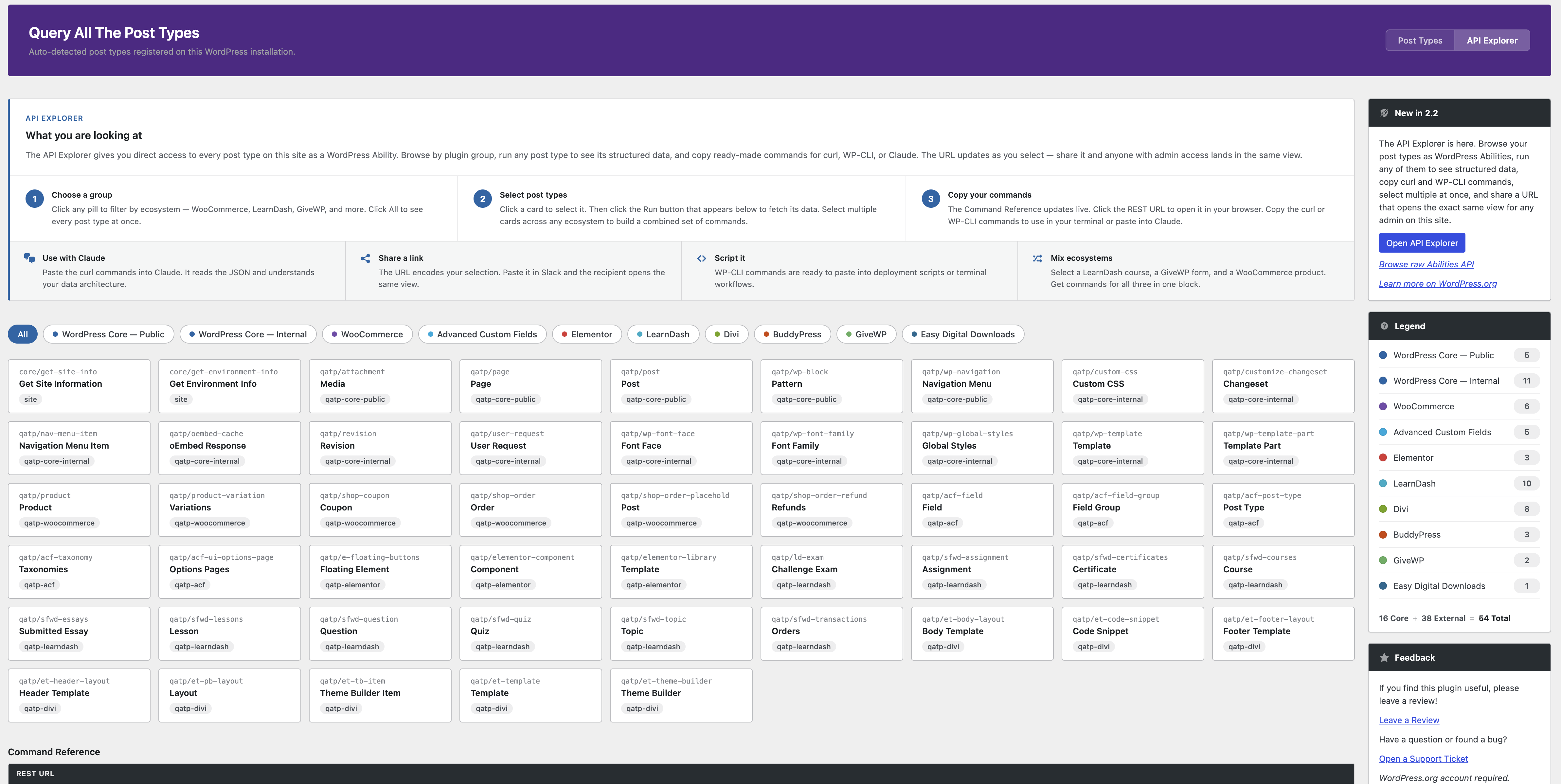
- API Explorer - Browse, query, and copy commands for any post type directly from the admin (version 2.2+)
- WordPress Core - Public - Built-in types with a UI (post, page, attachment)
- WordPress Core - Internal - Built-in types without a UI (revision, nav_menu_item, wp_template, etc.)
- WooCommerce - Products, orders, coupons, subscriptions, and more (when active)
- Advanced Custom Fields / ACF Pro - Field groups, post types, taxonomies, and options pages (when active)
- Elementor - Elementor library, floating buttons, and component types (when active)
- LearnDash - Courses, lessons, topics, quizzes, assignments, and more (when active)
- BuddyPress - Groups, member types, and email types (when active)
- GiveWP - Donation forms and payment types (when active)
- Easy Digital Downloads - Downloads and EDD-registered types (when active)
- AppPresser - Push notification and log types (when active)
- Plugin/Theme - Public - Custom post types from any other plugin or theme, with a public UI
- Plugin/Theme - Internal - Custom post types from any other plugin or theme, without a public UI
- Slug, description, and all boolean settings
- Public, publicly queryable, show UI, show in nav menus, show in admin bar
- REST API: show in REST, REST base, REST namespace, REST controller class
- Has archive, exclude from search, capability type, map meta cap
- Hierarchical, rewrite rules, query var, menu position, menu icon
- Can export, delete with user
- Supported features (title, editor, thumbnail, excerpt, comments, etc.)
- Associated taxonomies with admin links
- All registered labels (expandable section)
- REST API endpoint URL (clickable)
安装:
- Upload the
query-all-the-post-typesfolder to/wp-content/plugins/ - Activate the plugin through the Plugins menu
- Navigate to Tools > Query Post Types
屏幕截图:


常见问题:
How does the plugin detect post types?
It uses the WordPress core function get_post_types() to retrieve all registered post types at runtime. Nothing is hardcoded. Any post type registered by any plugin, theme, or WordPress core will appear automatically.
Where do I find the plugin page?
Go to Tools > Query Post Types in your WordPress admin dashboard.
I updated and can't find the plugin anymore!
In version 2.0, the plugin moved from its own top-level admin menu to the Tools menu. Look for Tools > Query Post Types.
Why don't I see View All / Add New buttons on some post types?
These buttons only appear for post types that have show_ui set to true. Internal post types without an admin interface won't have these action buttons.
Where are my WooCommerce post types?
Look for the WooCommerce tab. All WooCommerce-related post types (products, orders, coupons, subscriptions, etc.) are grouped there for easy access. The tab only appears when WooCommerce is active.
Can I use this on a production site?
Yes. The plugin is read-only and does not modify any data. It only displays information about registered post types.
Does this plugin work with multisite?
Yes. Each site in a multisite network will display its own registered post types.
What is the WordPress Abilities API?
The Abilities API is a feature introduced in WordPress 6.9 that lets plugins register machine-readable declarations about what a site can do. QATP uses it to expose your post type architecture to AI tools, MCP clients, and authenticated admin dashboards without any additional configuration.
Do I need WordPress 6.9 for the Abilities API feature?
Yes. The Abilities API integration requires WordPress 6.9 or later. On earlier versions, everything else in QATP works normally. The Abilities API registration is silently skipped.
Is the Abilities API data public?
No. The endpoint requires administrator-level authentication (manage_options). Anyone who requests the URL without being logged in as an admin will receive a 401 error. This is by design. Post type data can reveal details about your site's plugin stack.
What is the API Explorer?
The API Explorer is a built-in interface added in version 2.2 that lets you browse, run, and copy commands for any WordPress Ability registered by QATP, directly from your WordPress admin. No code required. See the API Explorer section above for full details.
Can I share an API Explorer link with someone?
Yes. When you are in the Explorer with abilities selected, the URL updates to reflect your current state. Paste that URL in Slack or send it to a teammate and they will open the same view with the same selections already loaded.
Why does the REST URL require a nonce?
WordPress uses nonces to verify that REST API requests made from a browser are intentional and authenticated. The nonce is tied to your current login session. The REST URL links in the Command Reference include a nonce automatically so they work when you click them in the browser. For curl and other external clients, use Application Passwords instead.
The curl command in the Command Reference says "application_password" -- what do I replace it with?
Generate an Application Password from your WordPress profile under Users > Your Profile > Application Passwords. Use the generated password in place of application_password. Your WordPress username is already pre-filled in the command.
How does the shareable URL work?
When you are in the Explorer, the URL in your browser updates automatically using a hash fragment to encode your current mode and selected abilities. No data is sent to any server. The hash is parsed locally in your browser when the page loads, restoring your exact view. Anyone with admin access on the same WordPress site can open the URL and land in the same state.
更新日志:
- New: API Explorer mode added to the admin page. Toggle between the existing Post Types view and the new API Explorer using the mode selector at the top of the page.
- New: Ecosystem pills row shows one pill per detected plugin group (All, WooCommerce, LearnDash, GiveWP, EDD, BuddyPress, ACF, Elementor, Divi, AppPresser, Core Public, Core Internal, Plugin/Theme). Click a pill to filter cards to that group.
- New: Ability cards display every registered QATP post type as a selectable card showing the ability name, plural label, and ecosystem badge. Cards are filtered live as you change pills.
- New: Click a card to select it. A Run button appears below the card grid. Click Run to fetch the live JSON response from the Abilities API and display it in the drilldown panel below.
- New: Drilldown panel renders the full structured JSON response returned by the ability's
/runendpoint, including slug, labels, boolean flags, REST base, supports, and taxonomies. - New: Tab overflow handling. When the ecosystem tab row is too wide for the screen, tabs that do not fit collapse into a "More" dropdown button. The dropdown closes when you click outside it or press Escape.
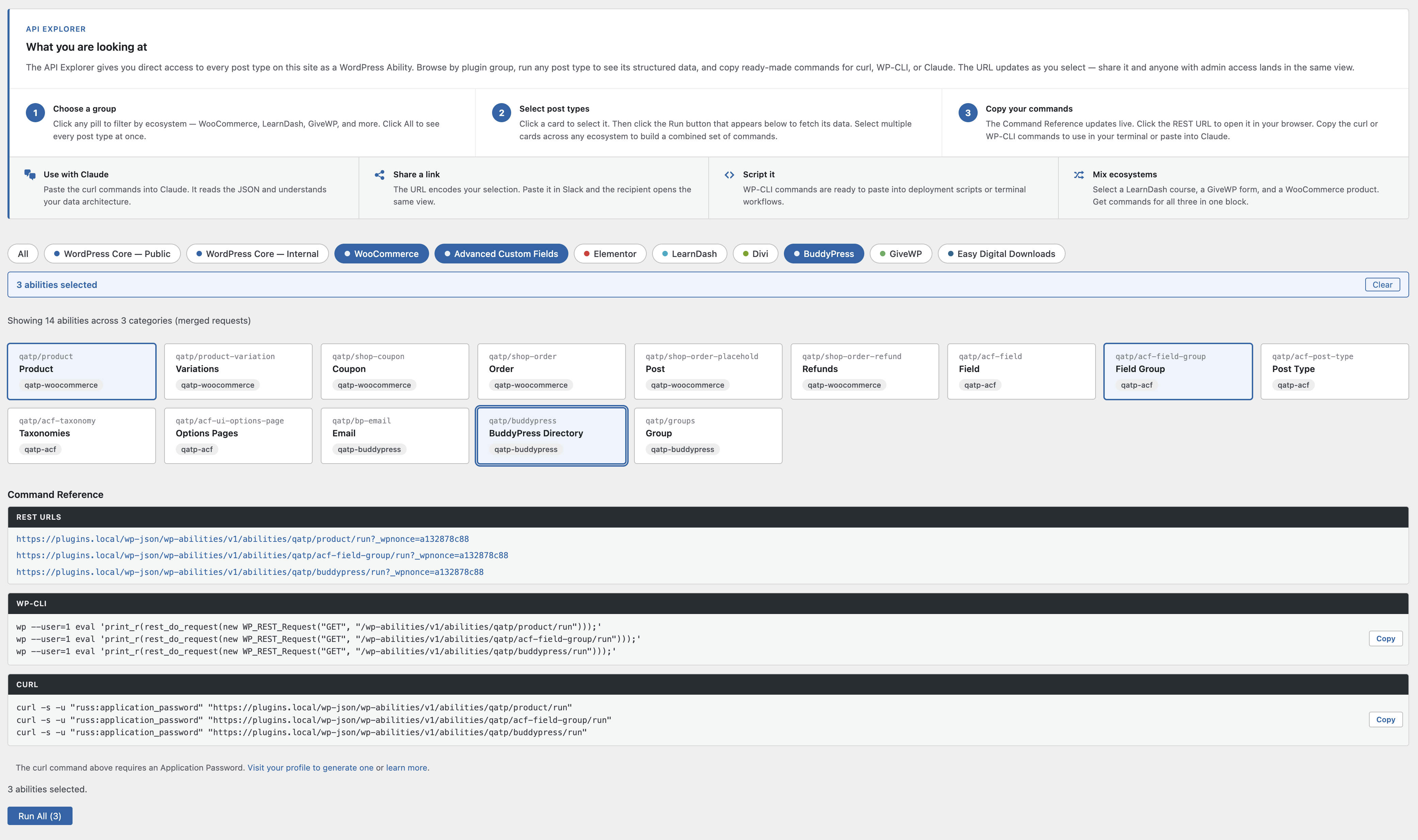
- New: Multi-select mode. Click additional cards to add them to an active selection. You are not limited to one card at a time.
- New: Selection bar appears above the card grid when one or more cards are selected, showing the count of selected abilities and a Clear button to reset the selection.
- New: Run All button appears in the drilldown area when two or more abilities are selected. Clicking it fetches all selected abilities in parallel and appends each response to the drilldown panel, stacked in order.
- New: Selecting cards across different ecosystem pills is fully supported. Filter to LearnDash, select a card, switch to GiveWP, select another card. Both remain selected.
- New: Command Reference panel appears alongside or below the drilldown and updates every time you run an ability or change your selection.
- New: REST URL is displayed as a clickable link that opens the endpoint in a new browser tab. The current user's authentication nonce is appended automatically as a
_wpnoncequery parameter so the link works immediately when clicked. - New: WP-CLI command uses
wp --user=with the current logged-in administrator's user ID. You do not need to know your user ID or modify the command before running it. - New: curl command uses Application Password authentication format (
-u "username:application_password"). Your WordPress username is pre-filled. An inline link below the curl block points directly to your profile's Application Passwords section and to the WordPress developer documentation. - New: Multi-select Command Reference shows one curl command per selected ability, stacked in a single copyable block. WP-CLI commands are similarly stacked. This gives you a complete set of commands for your entire selection in one copy-paste.
- Changed: curl authentication changed from
X-WP-Nonceheader to Application Password (-u) format. The nonce approach requires a browser session cookie and fails when run from a standalone terminal. Application Passwords work from any HTTP client on any machine.
- New: The browser URL updates automatically as you navigate the Explorer using
history.replaceState. No new history entries are created on every card toggle. - New: The URL hash encodes the current mode and selected abilities. Example:
#mode=explorer&abilities=qatp/product,qatp/course. Copy the URL from your browser address bar to share your exact view. - New: On page load, the hash is parsed and the Explorer restores the encoded mode and ability selection automatically. Shared links open in the correct state with the Command Reference already populated.
- New: The browser back and forward buttons work as expected. Navigating back restores the previous selection state.
- New: Legend in the sidebar now shows a Core + External = Total equation so you can see at a glance how many post types come from WordPress core versus plugins and themes.
- Changed: Stats block removed from the page header. The count information is now in the sidebar legend only.
- Changed: "New in 2.1" sidebar box updated to "New in 2.2" with a description of the API Explorer and a link to open it.
- Changed: Explorer guide panel redesigned with an eyebrow label, a white card with a blue left accent border, three numbered step columns, and a four-column use-case row with dashicons. The guide explains the Explorer workflow and links to relevant documentation.
- Fixed: Step 2 of the Explorer guide now correctly explains that clicking a card selects it and that you must click the Run button to fetch and display data. The previous text incorrectly implied clicking a card alone would run the ability.
- Improved: PHPStan static analysis raised from level 8 to level 9 (maximum strictness). All 36 cascading type errors resolved by tightening PHPDoc array shape annotations on
get_grouped_post_types(). - Improved: PHPStan added to the npm lint gate.
npm run lintnow runs ESLint, Stylelint, PHPCS, and PHPStan in sequence. All four must pass with zero violations before any commit. - Improved:
--memory-limit=512Mflag added to the PHPStan script to prevent out-of-memory failures on large codebases.
- New: WordPress Abilities API integration (requires WordPress 6.9+). Every post type on your site is now registered as a machine-readable ability
- New: Abilities grouped by origin: Core Public, Core Internal, WooCommerce, and plugin-specific categories
- New: Each ability exposes slug, labels, boolean flags, REST base, supported features, and associated taxonomies
- New: AppPresser ecosystem tab. AppPresser post types grouped automatically when the plugin is active
- New: Developer-facing label when a post type is registered without a singular name
- Improved: Post type classifier is instantiated once per request (performance)
- Requires WordPress 6.9+ for Abilities API. All other features work on WordPress 5.0+
- Accessibility: Added aria-hidden to decorative sidebar icons
- Accessibility: Settings tables now use proper th scope="row" for screen readers
- Accessibility: Added prefers-reduced-motion support for users who prefer reduced animations
- Tested up to WordPress 6.9
- Breaking: Plugin page moved to Tools > Query Post Types (was its own top-level menu)
- Complete rewrite with modern OOP architecture
- New tabbed interface for better organization
- Auto-detection of all post types (zero hardcoded slugs)
- Intelligent grouping based on _builtin, public, and show_ui properties
- WooCommerce ecosystem tab with custom styling (when WooCommerce is active)
- Comprehensive settings display for each post type
- REST API endpoint links
- Feature support badges
- Taxonomy links to admin pages
- Expandable labels section
- Page header with post type statistics
- Sidebar with about info and legend
- Responsive card-based layout
- WordPress 5.7 admin color palette
- All output properly escaped per WordPress coding standards
- Tested with WP 5.0
- Added post type counter details
- Fixed SVN sync issues from 1.9.1
- Fixed changelog link in admin panel
- Fixed unlinked taxonomies in newer WooCommerce versions
- Fixed taxonomies not showing for hierarchical post types
- Added link to custom post type register page
- Added active post type count display
- Major UI overhaul with color-coded post type categories
- Added WooCommerce core post type support
- Security improvements
- Refactored page layout
- Added sidebar, CPT details, action buttons
- Initial release