Really Simple Featured Audio - Sell Music, Samples & Audio Products with WooCommerce
| 开发者 |
jetixwp
lushkant |
|---|---|
| 更新时间 | 2026年10月16日 00:19 |
| PHP版本: | 8.0 及以上 |
| WordPress版本: | 7.1 |
| 版权: | GPL v2 or later |
| 版权网址: | 版权信息 |
详情介绍:
- 🎹 Producers and beat makers selling beats, loops and stems
- 🥁 Sample pack creators showing off drum kits and sound libraries
- 🎸 Musicians selling tracks, instrumentals and backing tracks
- 📚 Audiobook publishers sharing a sample chapter
- 🎙️ Podcasters adding an episode player to posts and pages
- 🔊 Sound designers selling sound effects and audio assets
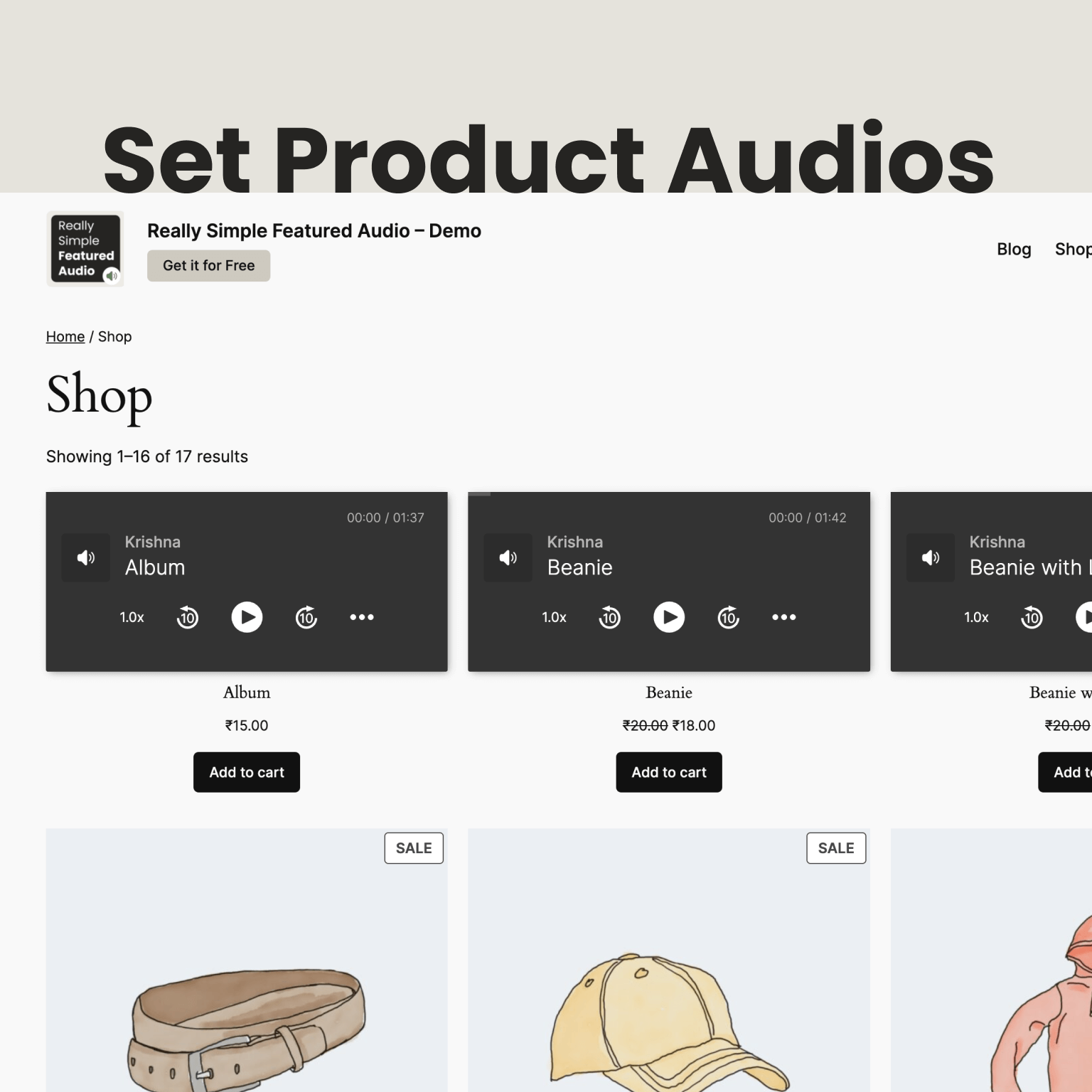
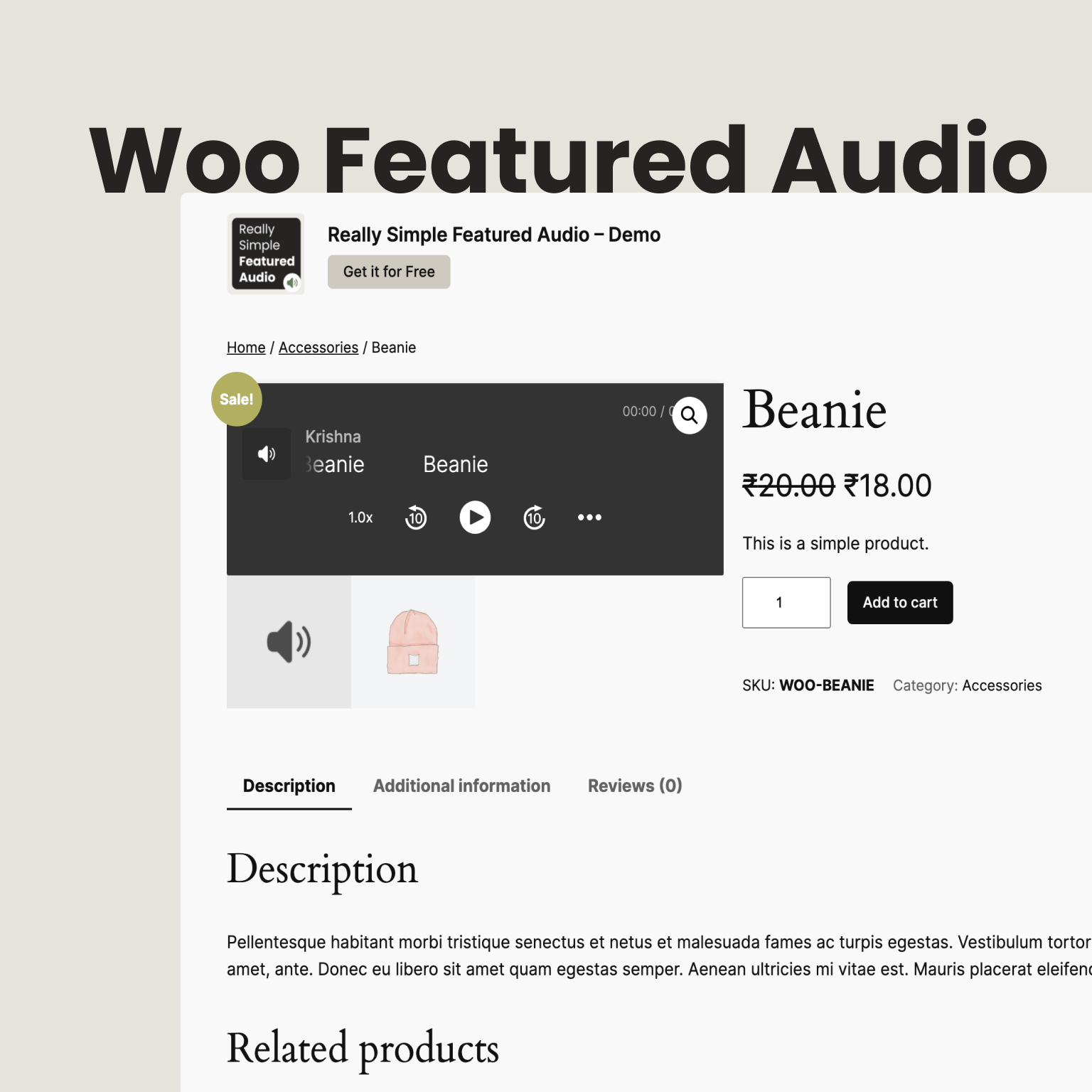
- The player appears in the product gallery, next to your product images
- Show audio on shop, category and tag pages too, or turn it off there
- Play on hover: shoppers hear a preview by hovering over the player in your shop
- Use audio links from External/Affiliate products as their preview
- Works with product gallery plugins such as Codeixer Product Gallery Slider and TP Product Image Flipper
- Clean player with title, artist and cover art
- Play and pause, seek bar, skip back and forward, playback speed and volume
- Switches between light and dark to match the visitor's device
- Optional autoplay, loop, mute and download button
- Touch-friendly controls that fit any screen size
- Add featured audio to posts, pages and any custom post type
- Choose whether audio shows on your blog home, archives and single posts
- Place audio anywhere with the
[rsfa]and[rsfa_by_postid]shortcodes - Elementor widget, Bricks element, and support for Salient and Astra Pro
- Audio Tools puts every post and product on one screen, where you can set the audio, cover image and featured image without opening each one
- Bulk upload assigns many audio files, audio links or a CSV sheet to posts or products in one go, and checks every row before anything is saved
- See views and plays for every featured audio over the last 14 days
- Anonymous and stored on your own site: no cookies, no IP addresses, nothing sent elsewhere
- Your own visits as an editor are left out
- 📈 Full analytics: history beyond 14 days, listen time, completion rate, date range and compare, CSV export, plus optional country, device and referrer counts
- 🛍️ WooCommerce gallery control: choose where the audio sits in the gallery and set your own gallery thumbnail
- 🎨 Player appearance: your own accent color, or a player that always stays light or dark
- 🖱️ Play on hover extras: screen sizes, hover delay, larger hover areas such as whole product cards, and accessibility options
- 🧩 More themes: OceanWP, Jupiter X, Avada, Uncode, Divi Builder, Lodestar, Konte and more
- 💬 Priority support from the developer
安装:
- Go to Plugins > Add New in your WordPress admin, search for "Really Simple Featured Audio", then install and activate it.
- Open a product, post or page and find the Featured Audio box in the sidebar.
- Upload an audio file or paste an audio link, and optionally add a cover image.
- Update the post. The player now shows where your featured image appears, and in the product gallery for WooCommerce products.
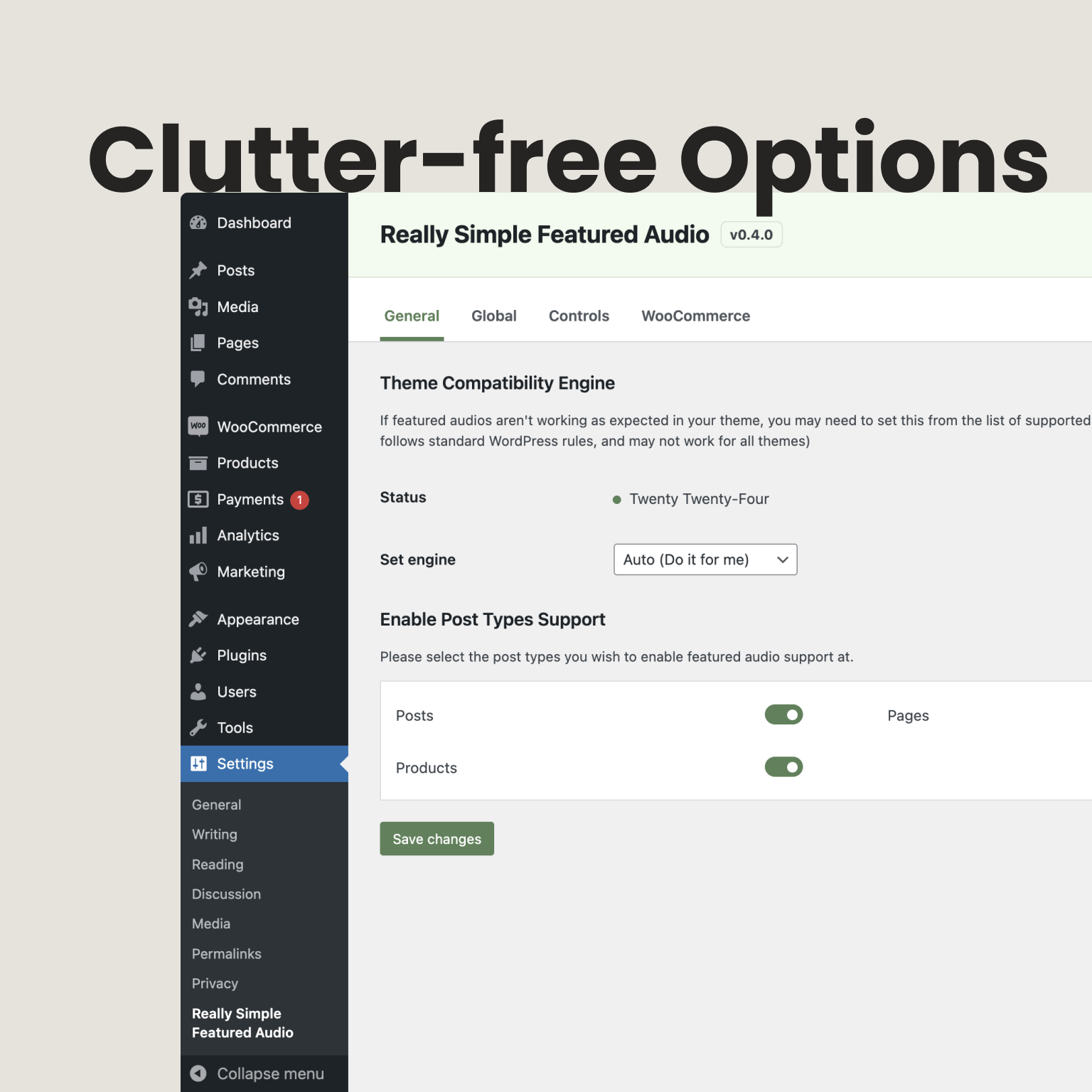
- Adjust where and how audio shows at JetixWP > Featured Audio. To add audio to many posts at once, use JetixWP > Audio Tools.
屏幕截图:
常见问题:
Will this work with my theme?
Most themes work out of the box. The plugin has built-in support for many popular themes (see the list above), and you can pick a matching theme engine at JetixWP > Featured Audio > General. If your theme still does not show audio correctly, open a thread in the support forum or send a request on GitHub and we will look at adding support.
Which audio formats can I use?
Any audio file your WordPress media library accepts, such as MP3, M4A, OGG and WAV. You can also paste a direct link to an audio file hosted elsewhere.
How do I create a preview instead of sharing the full track?
Upload a short version of the track, for example 30 to 60 seconds, as the featured audio and keep the full file for the purchase. Customers hear the preview; buyers get the full download through WooCommerce as usual.
Does it work on phones and tablets?
Yes. The player adapts to the screen size and has touch-friendly controls.
Why doesn't autoplay or Play on hover start right away?
Browsers block audio with sound until the visitor has interacted with the page. Autoplay starts on the visitor's first click, and Play on hover works once they have clicked anywhere on the page.
How do I show audio somewhere else on a page?
Use [rsfa] inside a post to show that post's featured audio anywhere in its content, or [rsfa_by_postid post_id="281"] to show the featured audio of any post by its ID.
Will this slow down my website?
No. The player's files only load on pages that show audio, and the plugin works with caching and CDN plugins.
Does the analytics feature track my visitors?
It counts views and plays per audio only. Counts are anonymous, no cookies are set, IP addresses are not stored, and nothing is sent to another service. You can turn it off at JetixWP > Featured Audio > Analytics.
Where can I get help or request a feature?
Open a thread in the support forum here, email support@jetixwp.com, or send a request on GitHub.
Where is the source code of the scripts?
The Audio Tools app and the audio player ship as built files. Their full sources are in the plugin's public repository at github.com/JetixWP/really-simple-featured-audio under src/tools and src/player. The audio player is based on Shikwasa (MIT), see assets/js/jwp-audio-player-LICENSE.txt.
更新日志:
- New: Woodmart theme engine
- Fix: Featured audio did not show in the Woodmart single product gallery; it now shows as the first slide with its own gallery thumbnail
- Fix: Woodmart product loops showed the product image and the audio together; they now show the audio only
- New: Audio Tools page to manage audio, covers and featured images for every post and product
- New: Bulk upload audio files, audio links or a CSV/TXT sheet
- New: Audio analytics with views and plays per audio. Existing sites start with it turned off, turn it on at JetixWP > Featured Audio > Analytics
- New: Cover image for each featured audio, shown in the player
- New: Play on Hover option in Controls
- New: Download button option for self-hosted audios
- New: Elementor widget and Bricks element for featured audio
- New: Salient, Astra Pro, Codeixer Product Gallery Slider and TP Product Image Flipper support
- New: Theme engines for Storefront, Divi, Astra, Go, Kadence, Savoy, Hestia, Flatsome, The7, Electro and Woostify
- New: Use audio links from WooCommerce External/Affiliate products
- New: Help tab and a reworked Upgrade tab in settings
- Improvement: Freemius SDK updated to 2.13.4
- Improvement: Version Control settings tab renamed to Rollbacks
- Improvement: Updated translation file
- Improvement: Auto theme engine now detects child themes and themes with capitalised folder names
- Improvement: Autoplay, loop and mute settings now apply to WooCommerce product audio
- Improvement: Player assets only load on pages that show audio, and players work in AJAX-loaded content
- Improvement: Links with query strings (such as signed URLs) now play correctly
- Improvement: Theme thumbnails of other posts (next/previous, related) now show their own audio
- Fix: Security hardening for saving audio, settings and the theme engine status check
- Fix: Settings page notices are hidden as intended
- Fix: Titles with quotes or ampersands now show correctly in the player
- Removed: Old Settings > Really Simple Featured Audio (Old) menu item; the old URL still redirects
- Removed: Discount request form in the settings sidebar
- Fix: Patch for wp.org svn release
- New: Updated PROMO settings page
- Improvement: Update settings labels
- Improvement: Remove manual languages file loader
- Improvement: Update incorrect translation text domain
- Improvement: Update translation files
- Improvement: Other minor changes
- New: Re-written Rollback feature
- Fix: Early translation calls throwing warnings
- Improvement: Removed old plugin settings menu for good
- Improvement: Hide all notices and other things at plugin settings page
- Improvement: Theme compatibility engine status auto-refresh at settings
- Improvement: Rename option labels for better discovery at settings
- Improvement: Updated promo form at settings sidebar
- Improvement: Removed Get Pro tab from settings
- Improvement: Remove dormant/unused code
- Improvement: Update translation files
- Improvement: Other minor changes
- New: Brand update
- Improvement: Other minor improvements
- Fix: Duplicate settings filter call
- Improvement: Other minor improvements
- Improvement: Update translations
- Improvement: Minor changes
- New: Plugin Version Rollback feature
- New: Settings menu and structure
- Fix: Missing translation strings
- Improvement: Upgrade Freemius SDK
- Improvement: Other minor improvements
- Improvement: Update translations
- New: Support for Ollie, Neve and GeneratePress themes and respective compat engines
- Improvement: Upgrade Freemius SDK to v2.11.0
- Improvement: Other minor improvements
- Improvement: Update translations
- Improvement: Patch release
- New: Settings toggle for Blog Single
- Fix: Settings toggle for Blog Archives not working
- Improvement: Updated Twenty-Twenty Five theme compatibility engine
- Improvement: Other minor improvements
- Improvement: Update translations
- New: Pro Addon support
- Fix: Missing dynamic CSS at theme engines
- Improvement: Other minor improvements
- Improvement: Update translations
- Fix: In some cases installing/activating other Freemius based plugins causes a fatal error
- New: Support for TwentyTwent-Five theme
- Fix: Missing generate_dynamic_css method at Frontend class
- Fix: Deprecated use of self callable for PHP 8.2+ support
- Improvement: Upgrade Freemius SDK v2.10.0 the Composer way
- Improvement: Other minor improvements
- Improvement: Update translations
- New: All new JWP Audio Player
- Improvement: Upgrade Freemius SDK to v2.9.0
- Improvement: Other major improvements
- Improvement: Update translations
- Minor improvements
- Upgrade Freemius SDK to v2.8.1
- Fix an issue with wp_kses filter overriding existing allowed_html tags
- Other minor changes
- Add Freemius SDK
- Other minor changes
- Wp.org release
- Fixes issue at Woo Shop pages with new block themes
- Other minor changes
- Wp.org review update
- Wp.org review update
- Initial release