
Rowvana
| 开发者 | mujahidwp |
|---|---|
| 更新时间 | 2026年11月24日 01:03 |
| PHP版本: | 7.4 及以上 |
| WordPress版本: | 7.1 |
| 版权: | GPLv2 or later |
| 版权网址: | 版权信息 |
详情介绍:
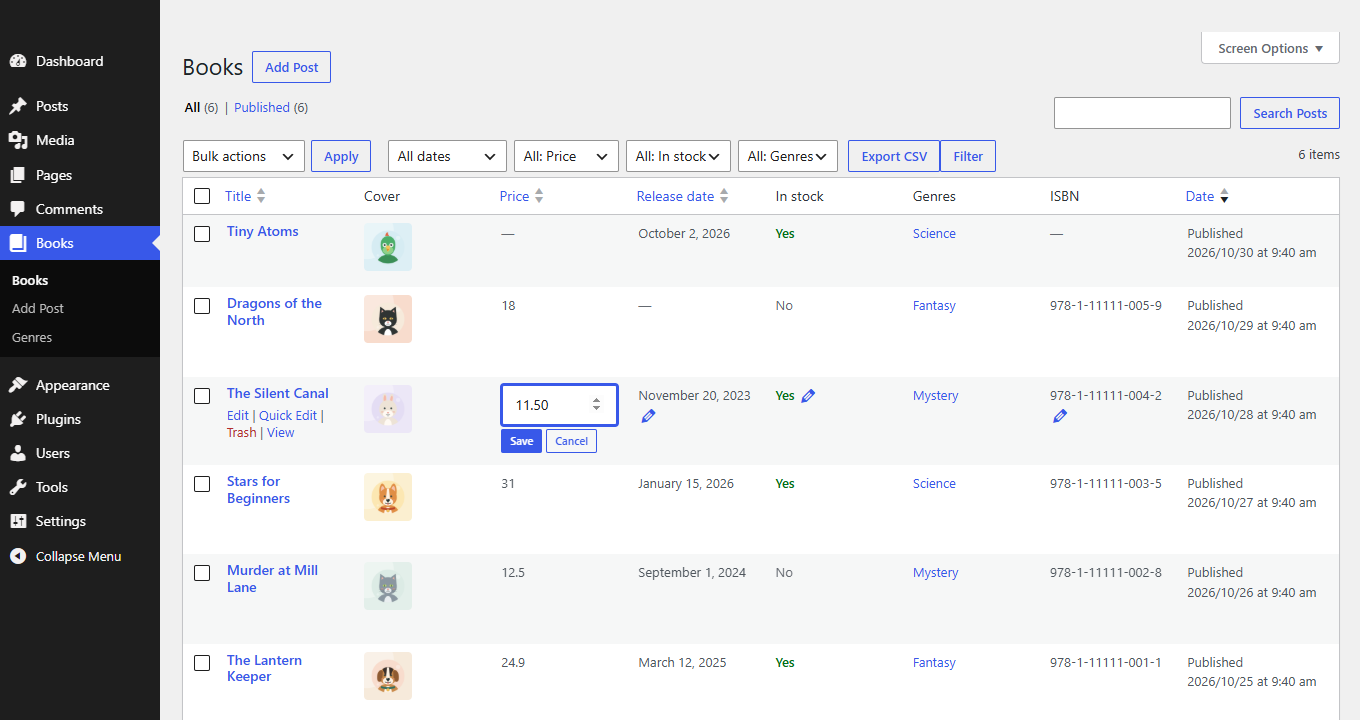
- Custom field — any field your content uses, including fields made with ACF, Pods, Meta Box or WooCommerce. Show it as text, number, date, yes/no, image or link.
- Taxonomy — categories, tags, product categories or any custom taxonomy, with links that filter the list.
- Featured image, ID, slug, word count, last modified (with the last editor), parent, template, order and excerpt.
- Sort by custom fields as numbers, text or dates. Posts without a value stay in the list instead of disappearing.
- Filter by custom field values, "has a value" or "empty", by taxonomy terms, by featured image or by template. Fields with many values get a search box instead of a long dropdown.
- Edit inline: click the pencil next to a value, change it and save — no page reload. Works for text, number, date, yes/no and link fields, and for slug, order and excerpt. Dates keep the format your site already stores, such as ACF's Ymd.
- Export to CSV exactly what you see: the current filters, search, status and sorting are kept, with your columns included. Safe for spreadsheets.
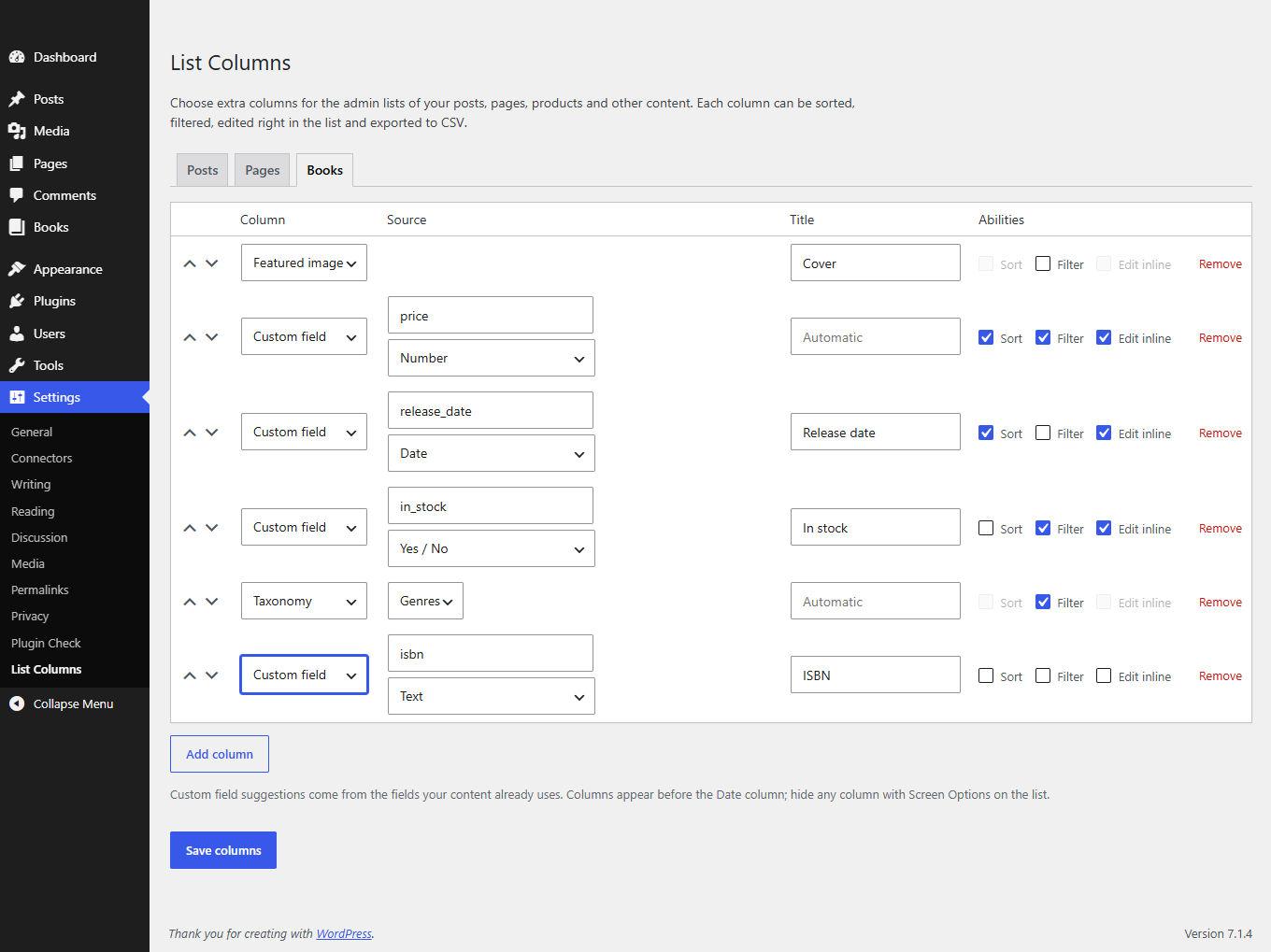
- Each column is set up per post type under Settings > List Columns, with suggestions from the custom fields your content already uses.
- Inline editing checks the user's permission for every post and field. Hidden fields that start with an underscore, which plugins use internally, are read-only.
- Built for keyboard and screen reader users: every control has a label, edits are announced and Escape cancels.
- No external requests, no tracking and no data stored outside your column settings.
安装:
- Install and activate Rowvana from Plugins > Add New.
- Go to Settings > List Columns and pick a content type.
- Click "Add column", choose what to show and tick Sort, Filter or Edit inline.
- Save and open the list. Hide or show columns any time with Screen Options.
屏幕截图:
常见问题:
Does it work with WooCommerce products?
Yes. Choose the Products tab under Settings > List Columns. You can show, sort and filter product fields such as _price or _sku. Because WooCommerce keeps related data in sync itself, its hidden fields are read-only in the list; edit them on the product screen.
Does it work with Advanced Custom Fields?
Yes. ACF stores values as normal custom fields, so they are suggested automatically. Date fields saved as Ymd are shown, sorted and edited correctly.
Why can I not edit some fields inline?
Hidden fields (keys starting with an underscore), fields that store lists or structured data, and image fields can only be changed on the edit screen. This protects data that other plugins depend on.
How many rows can I export?
Up to 5,000 rows at a time. Filter the list first to export a smaller set.
Who can see and use the columns?
Columns are set up by administrators. Everyone who can edit posts of a type sees its columns; inline editing follows the normal WordPress permissions for each post.
What happens when I delete the plugin?
The column settings are removed. Your content and custom fields are never changed.
更新日志:
- Packaging: standard plugin zip with folder entries and Unix file permissions.
- Tested: clean activation with WP_DEBUG on PHP 7.4 to 8.5 and WordPress 6.6 to 7.1.
- Fix: The CSV export no longer loads a WordPress core file directly.
- Fix: No PHP deprecation notice in exported CSV files on newer PHP versions.
- Initial release.