
Order Departments for WooCommerce
| 开发者 | runthingsdev |
|---|---|
| 更新时间 | 2026年1月7日 21:29 |
| PHP版本: | 7.4 及以上 |
| WordPress版本: | 6.8 |
| 版权: | GPLv3 or later |
| 版权网址: | 版权信息 |
详情介绍:
- Automatic Department Assignment: Orders are automatically assigned to departments based on products/categories
- Email Routing: Route order emails to department-specific email addresses
- Admin Filtering: Filter orders by department in WooCommerce admin
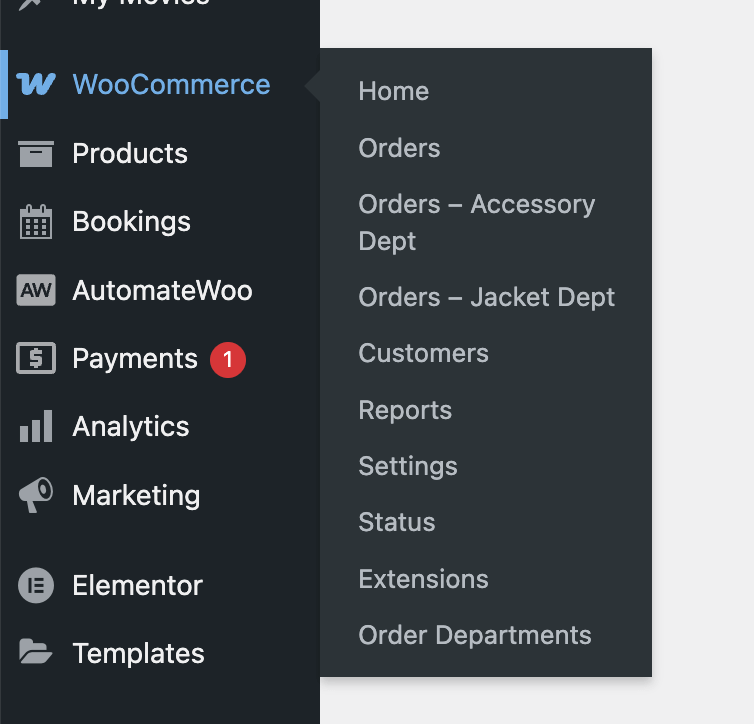
- Quick Access Menus: Direct links to orders for each department
- AutomateWoo Integration: Complete set of actions, triggers, rules, and variables for workflow automation
- Department Variables: Access department data in AutomateWoo workflows (names, emails, counts)
- HPOS Compatible: Full support for WooCommerce High-Performance Order Storage
- Disable WooCommerce's default admin emails
- Use AutomateWoo's email actions with department triggers for full control
- Set Order Department: Replace all existing departments with one department
- Add Order Department: Add a department while keeping existing ones
- Remove Order Department: Remove a specific department from an order
- Clear Order Departments: Remove all departments from an order
- Order Department Added: Fires when a department is added to an order
- Order Department Removed: Fires when a department is removed from an order
- Order Department Changed: Fires when departments are modified in any way
- Order Has Department: Check if order has specific department(s)
- Order Department Count: Check the number of departments assigned
- Order Department Is: Check if order's departments exactly match a set
{{ order.departments_names }}: List of all department names assigned to the order-
{{ order.departments_emails }}: List of all department email addresses (automatically deduplicated) Per-Department Variables (flexible access): -
{{ order.department_names }}: Department names with index/all/count options {{ order.department_emails }}: Department emails with index/all/count options{{ order.department_count }}: Number of departments assigned to the order
separator, prefix, and suffix parameters:
{{ order.departments_names | separator: ';' }}→ "Sales;Technical;Support"{{ order.departments_names | prefix: 'Dept: ', suffix: ' Team' }}→ "Dept: Sales Team, Dept: Technical Team"{{ order.departments_emails | separator: '; ' }}→ "sales@example.com; tech@example.com" Per-Department Variables supportmode,index,separator,prefix, andsuffixparameters:
{{ order.department_names }}→ First department name (default mode: index){{ order.department_names | mode: 'all' }}→ All department names-
{{ order.department_names | mode: 'count' }}→ Number of departments Index Access: -
{{ order.department_names | index: '1' }}→ First department name {{ order.department_names | index: '2' }}→ Second department name-
{{ order.department_emails | index: '1' }}→ All emails from first department Formatting: -
{{ order.department_names | prefix: 'Team: ', suffix: ' Dept' }}→ "Team: Sales Dept" {{ order.department_emails | separator: '; ' }}→ Multiple emails separated by semicolon
- Sales & Technical Support: Route orders containing software to Technical, hardware to Sales
- Use
{{ order.departments_emails }}to automatically send order notifications to the right team - Create conditional workflows based on
{{ order.department_count }}for mixed orders - Multi-location Fulfillment: Route orders to appropriate warehouses/locations
- Include
{{ order.departments_names }}in fulfillment emails to specify handling location - Use department variables in webhook payloads to external fulfillment systems
- Specialized Teams: Route complex products to specialist departments
- Send detailed instructions using
{{ order.department_names }}for single-department orders - Create escalation workflows when
{{ order.department_names | mode: 'count' }}exceeds normal thresholds - CRM Integration: Trigger department-specific workflows in external systems
- Pass
{{ order.departments_names }}to CRM systems for proper lead assignment - Use
{{ order.departments_emails }}for automated follow-up sequences
安装:
- Upload the plugin files to
/wp-content/plugins/runthings-wc-order-departments/ - Activate the plugin through the 'Plugins' menu in WordPress
- Go to
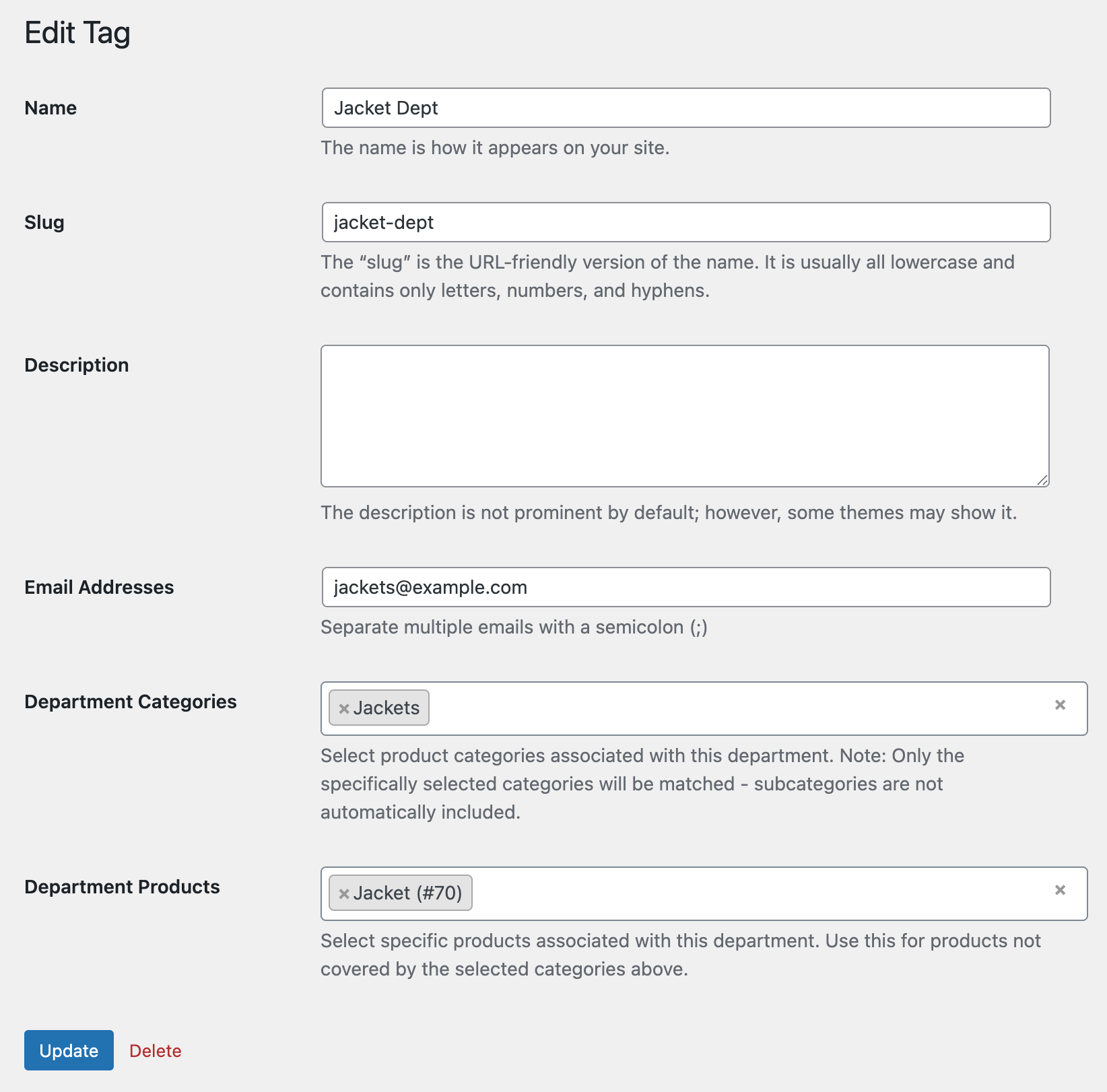
WooCommerce>Order Departmentsto configure departments - Assign products/categories to departments
- Set up email addresses for each department (optional)
屏幕截图:
常见问题:
How does automatic department assignment work?
Orders are automatically assigned to departments based on the products and categories in the order. The plugin checks each order item against the configured department rules and assigns the appropriate departments.
Can an order be assigned to multiple departments?
Yes, orders can be assigned to multiple departments if they contain products from different department categories or have specific products assigned to different departments.
Do I need AutomateWoo for this plugin to work?
No, AutomateWoo is optional. The core functionality (automatic assignment, email routing, admin filtering) works without AutomateWoo. The AutomateWoo integration provides additional workflow automation capabilities.
Is this compatible with WooCommerce HPOS?
Yes, this plugin is fully compatible with WooCommerce High-Performance Order Storage (HPOS) and will work with both traditional and HPOS order storage methods.
Can I manually assign departments to orders?
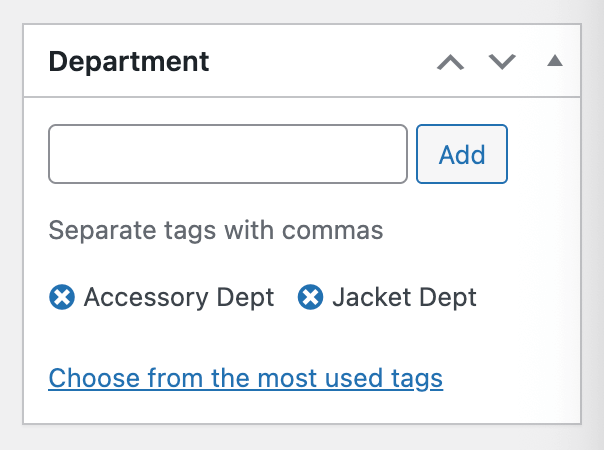
Yes, you can manually assign or modify department assignments from the order edit screen in WooCommerce admin.
What happens to existing orders when I install the plugin?
Existing orders will not be automatically assigned to departments. Only new orders (or manually updated existing orders) will have department assignments based on your configuration. You can set up a manual workflow in AutomateWoo to backfill department assignments for existing orders if needed.
更新日志:
- Bump tested up to 6.9
- New Feature: Customer email reply-to override system
- Configure reply-to behavior for customer emails based on department assignments
- Settings page at Settings > Order Departments with override toggle and multi-department handling options
- Single department orders always use department email for reply-to
- Multi-department orders can use all department emails or fall back to WooCommerce default
- New Feature: Email customization filters
runthings_wc_order_departments_customer_email_idsfilter to customize which customer emails are modifiedrunthings_wc_order_departments_admin_email_idsfilter to customize which admin emails are modified- Improvement: Refactored email system with separate CustomerEmailInterceptor and AdminEmailInterceptor classes
- Improvement: Enhanced email address validation and cleaning using PHP's filter_var()
- Improvement: Robust email header manipulation with proper newline handling
- WordPress Plugin Directory release
- Update contributors meta in readme.txt to match username
- Initial release
- Automatic department assignment
- Email routing
- Admin filtering and quick access
- Complete AutomateWoo integration with actions, triggers, rules, and variables
- AutomateWoo variables for accessing department data in workflows
- HPOS compatibility