
Sovay Secure Identity/Login
| 开发者 | veritrix |
|---|---|
| 更新时间 | 2015年3月18日 05:53 |
| PHP版本: | 2.8 及以上 |
| WordPress版本: | 4.0 |
| 版权: | GPLv2 or later |
| 版权网址: | 版权信息 |
标签
security
login
admin
2FA
2-step verification
mobile
authentication
ssl
signin
iphone
android
password
sso
2 step authentication
wp-admin
phone
log in
passwords
oauth
mfa
multi-factor
encryption
OpenID
single sign-on
two-factor
two-factor authentication
2-Factor
sign-in
logins
biometric
OAuth
2-step
Sovay
sovayid
signon
step-up authentication
two-step
Identity Provider
Relying party
下载
详情介绍:
WordPress Logins Aren't Secure
WordPress sends usernames and passwords in plain text over the Internet, where they are intercepted and stolen by hackers. It’s no surprise that 30,000 WordPress sites are compromised daily, most commonly via stolen passwords.
Once hackers break into a WordPress site, they steal user identities, misappropriate information, send spam, distribute malware, host phishing pages and redirect users to other sites — long before site owners are even aware that their site has been hacked.
To stop hackers from taking over your WordPress sites, use Sovay for WordPress to secure your personal identity and your site logins.
Secure Your Identity with Sovay
Sovay lets you create and manage your secure WordPress identity, and then choose the level of security you want to use to protect it — the stronger, the better.
- Register with Sovay to create your secure identity
- Use your email or phone to receive one-time login codes
- Store login secrets that hackers can’t guess
- Record your voice and face to stop others from masquerading as you
- List your favorite sites and auto-add new sites as you visit them
- Login once at Sovay.press and access all your sites automatically
- Avoid the cost and hassle of obtaining and managing SSL certificates for your sites
- Put password hassles behind you forever
- To learn more about Sovay for WordPress, visit sovay.press
- To register your secure identity with Sovay, click here
- To secure your Wordpress sites with Sovay, download and install this Sovay plugin
安装:
Secure Your Identity with Sovay
- Register with Sovay.
- You need to provide a username, password and email address. Your email address is used for password recovery and protecting your secure information.
- To login using One Time Passcodes, you can register your mobile phone number with Sovay.
- You can also to make a few video recordings if you want to enable high security authentication.
- Upload the Sovay folder to the /wp-content/plugins/ directory
- Activate the plugin through the Plugins menu in WordPress
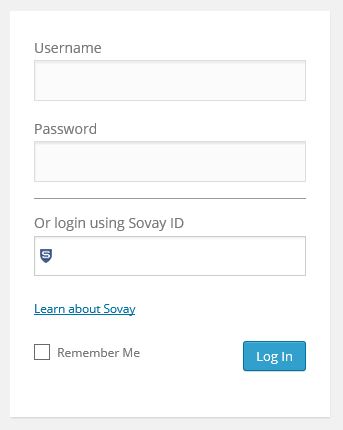
屏幕截图:
更新日志:
0.75-beta (Nov 10, 2014)
0.76-beta (Nov 22, 2014)
- Fixed Registration link