
Statify Widget
| 开发者 | bitnulleins |
|---|---|
| 更新时间 | 2026年10月12日 04:24 |
| PHP版本: | 5.2.4 及以上 |
| WordPress版本: | 6.9 |
| 版权: | GPLv2 or later |
| 版权网址: | 版权信息 |
详情介绍:
- Popular Posts: Sum up all view from Statify and put it together in a widget
- Shortcodes: The counter for each post/page can be put everywhere
- Custom Post Types: Statify Widget supports custom post types, that can be displayed
- Intelligent summary: Once there are different paths to a content, the widget adds them together
- Period Selectable: It is possible to choose an individual daily period for the post popular content
- Custom Widget Template: You can add individual post/page paramater to widget template (see FAQ)
- New: Customize cache time: Change default 4 minutes cache time to another value! (see FAQ)
[statify-count] can be used to display calls to the current post or page. With the options "prefix" and "suffix" displayed texts can be checked before (prefix) and after (suffix) the calls:
[statify-count prefix="Total " suffix=" calls." days="8"]
Parameter:
prefixSentence before viewssuffixSentence after viewsdaysInteval for view statistics
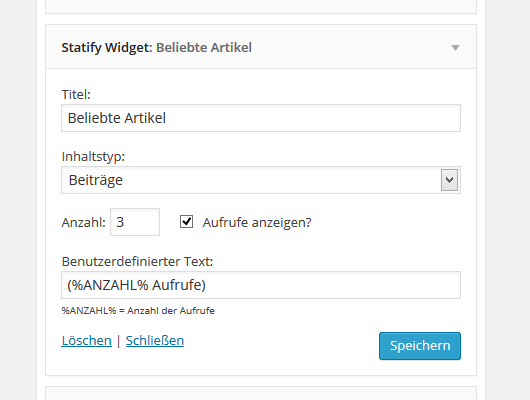
- Title
- Content Type (Default: post )
- Category (when content type post is select)
- Amount of entries (default: 5)
- Show views (default: No)
- Custom text (Replace variable for views: %VIEWS%)
- Number of past days (0 days = all statistics)
- Finn Dohrn
- Homepage
安装:
- Install the "Statify" by pluginkollektiv.
- Install this Plugin "Statify Widget" and activate it.
- Activate the Popular Post Widget under widgets.
屏幕截图:
常见问题:
Error: The widget does not find any entries
Statify has not added statistics yet. Wait some days to collect some statistics by Statify.
Can I change the default cache expiry time?
Yes! Since 1.4.1 you can add the following filter to change the default 4 minute cache (60 * 4) to another value in seconds:
add_filter( 'statify_targets_cache_expiry', fn() => 60*4 );
If you do not set a numerical value greater than zero (>0), the standard cache expiry time is automatically used.
I set the cache too high (remove cache)
If you deactivate the plugin, all existing cache will be delete. After that you can activate Statify Widget again. Everything continues to work as usual.
Show pages and posts together
Yes! Since 1.1.4 that works. Just in the content type widget: select Pages and posts. He then displays the default content types "post" and "page" together.
Show views in pages and posts
This is possible with shortcodes. Specifying a prefix and suffix is not mandatory: Properties:
days= Amount of daysprefix= Text before the view countsuffix= Text after the view count
[statify-count prefix ="Total" suffix ="calls." days="8"]
The total view counter for the whole webpage:
[statify-count-sum prefix="Total" suffix="calls."]
I do not have static page as homepage
No problem. A pseudo "Frontpage" (with views) entry appears.
I changed the permalink structure
This changes nothing. The plugin takes every Statify entry and adds it together.
Change design (CSS)
Just use these CSS classes:
- List:
.statify-widget-list {...} - List item:
.statify-widget-element {...} - List item view counter:
.statify-widget-element span {...} - List item link:
.statify-widget-link {...}
Change list from numeric to points
If you want to change the list of contents (1st, 2nd, 3rd, ...) to bullets, just add the following to your CSS:
.statify-widget-element { list-style-type: circle; }
ADVANCED: Change Widget Template
Since 1.3.8 it is possible to customize the Widget Template by adding code to your Template functions.php. You can use the WP Post Object in the template.
There exists two hooks:
statify_widget_before_linkstatify_widget_after_link
ADVANCED: Return all posts as WP Query
For example put this in your theme: ` have_posts() ) { $ wp_query->the_post(); } } ?> ` Properties
$days= Range of days for statictics (0 = all days)$amount= Amount of posts$post_type= Post type ("post", "page", ...)$post_category= Category of the post, if post type is choosen
更新日志:
- Fix missing translation output, if required plugin "Statify" is missing.
- Add missing js script
- Remove possible XSS vulnerabilities (More information)
- Fix print statement for missing posts in widget
- Accept only filter minute values >0 (not smaller than zero)
- Reactivate category selection for "post" type in widget (without extra jQuery)
- Reduce number of queries. That boost performance for websites with many pages.
- Conversion of the interval calculation from PHP UTC to the selected WordPress time zone
- Add again filter for "frontpage" fallback if 'posts' in widget.
- Fix bug that crashes the whole plugin.
- Fix small bug, that displayed "frontpage" (if blog view is activated) in 'posts' widgets.
- Add filter for customize cache expiry time (new FAQ section!)
- If you now deactivate plugin, all existing cache will be removed (new FAQ section!)
- Remove permitted tags and reduce number of tags to five
- New major version.
- Correction of the totals of views from Statify data (if a page is selected as the start page, the views of the start page and the selected page are combined). The “Blog” page is now recorded independently
- Support for up to PHP 8.4 enabled
- Text display if no posts exist yet included in translation
- Correction of the total sum in the shortcode (was always one too few)
- Change of the relation in the SQL statement from “greater than or equal to” to “really greater”
- Hot-Fix: Update problem, that hide any popular post widget content.
- Remove unnecessary JQuery.
- Add missing PHP Class File.
- Feature Request: Add custom template option for widget (See: https://wordpress.org/support/topic/add-thumbnails-and-disable-jquery/)
- Fix problem with Widget settings in Elementor (See: https://wordpress.org/support/topic/anzahl-der-aufrufe-anzeigen/)
- New way to return list of popular posts as WP_Query
- Correct the way how pseudo frontpage is generate
- Fix for non existing views in "Frontpage" alias
- Fix bug in [statify-count-sum]. Remove unnecessary post_id.
- Add shortcode parameter "days" for limit interval days.
- Bugfix: Hide duplicate frontpage item in widget.
- Now comtaible with PHP8
- Fix two bugs occured in PHP8 version.
- Remove "frontpage" label, now the frontpage list with its original page name
- Fix bugs
- Add some description and tested up to WordPress v5.6
- Fixed bug in backend for category select
- Fixed ressourcen bug. Add required java script folder.
- Add feature to filter for post category in widget.
- Fixed another bug for unpublished posts
- Translate whole plugin into English.
- Fixed "show views" translation bug.
- English and German language
- Fixed a link bug in the widget
- Shortcode for total number of views
- Correction of a translation error.
- List type setting has been removed.
- The plugin is now ready for translation.
- You can now choose between the list type (
<ol>or<ul>) per widget. - Now the classes
statify-widget-list,statify-widget-elementandstatify-widget-linkhave been added as class to make a more flexible design possible.
- List type ordered (
<ol>) changed to unordered (<ul>) for higher theme compatibility. - Outdated create_function () method swapped.
- Bug with shotcode usage removed (statify_count edited in Statify_Posts.class.php)
- The functionality of restricting a time period for the content has been added.
- Fixed a bug that caused the homepage to ignore when choosing "Posts + Pages".
- An error has been removed. He had always shown the number of views at the end of a page.
- Content Type: "Posts and Pages" added to show together
- Views for article shortcode and theme function
- Recording the evolution and tested for WordPress 4.7.6
- Corrections in the validation
- Custom text for the number of views
- Unused require_once () removes
- span element added by the number of views
- Limitation of records canceled
- added title attribute to the links
- Release of the first version