
Structure Audit for LearnDash
| 开发者 | rajaamanullah |
|---|---|
| 更新时间 | 2026年10月15日 20:15 |
| PHP版本: | 7.4 及以上 |
| WordPress版本: | 7.1 |
| 版权: | GPLv2 or later |
| 版权网址: | 版权信息 |
详情介绍:
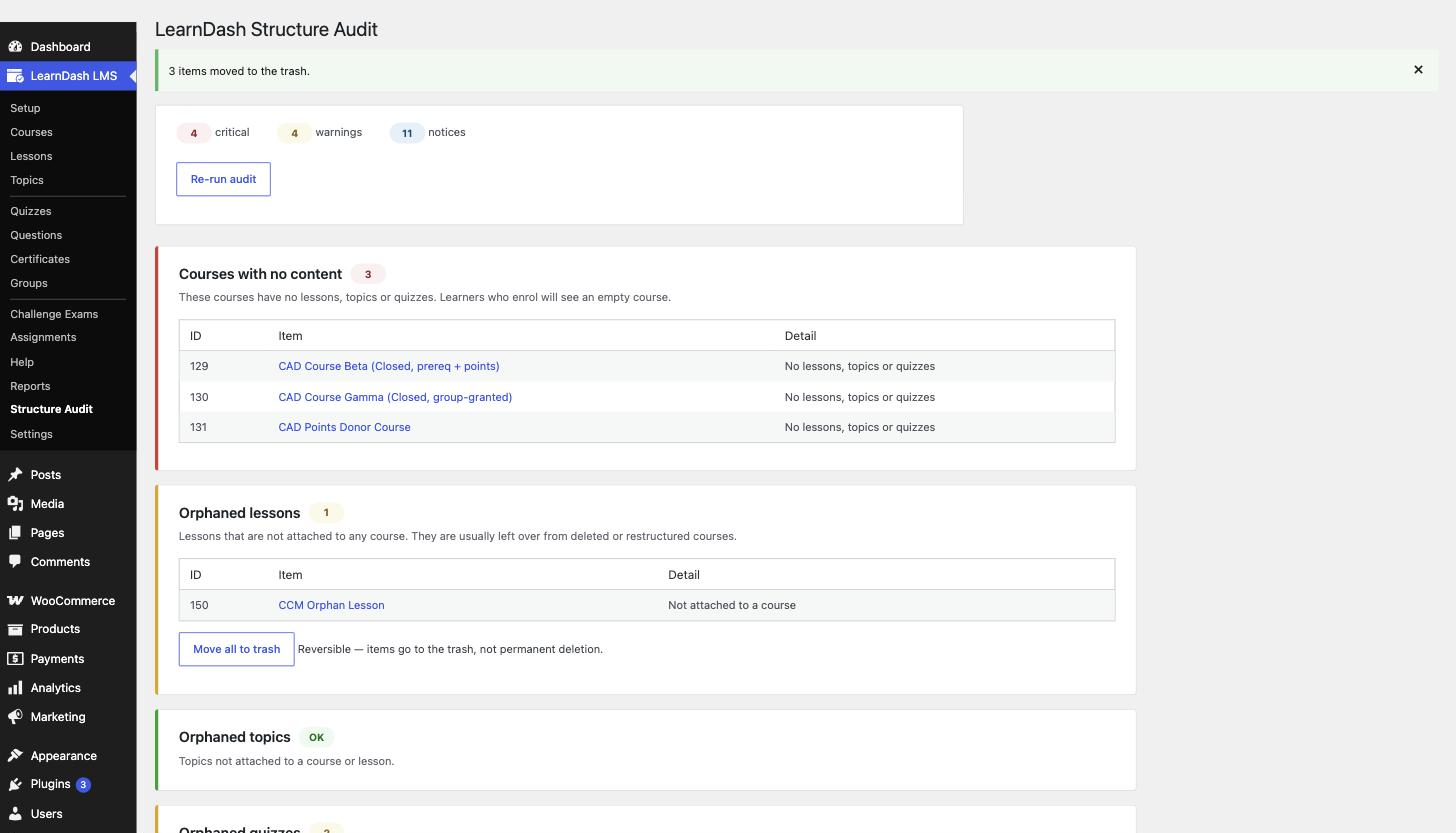
- Courses with no content — enrolled learners see an empty course
- Orphaned lessons — not attached to any course
- Orphaned topics — not attached to a course or lesson
- Orphaned quizzes — attached to nothing
- Quizzes with no questions — breaks the learner flow
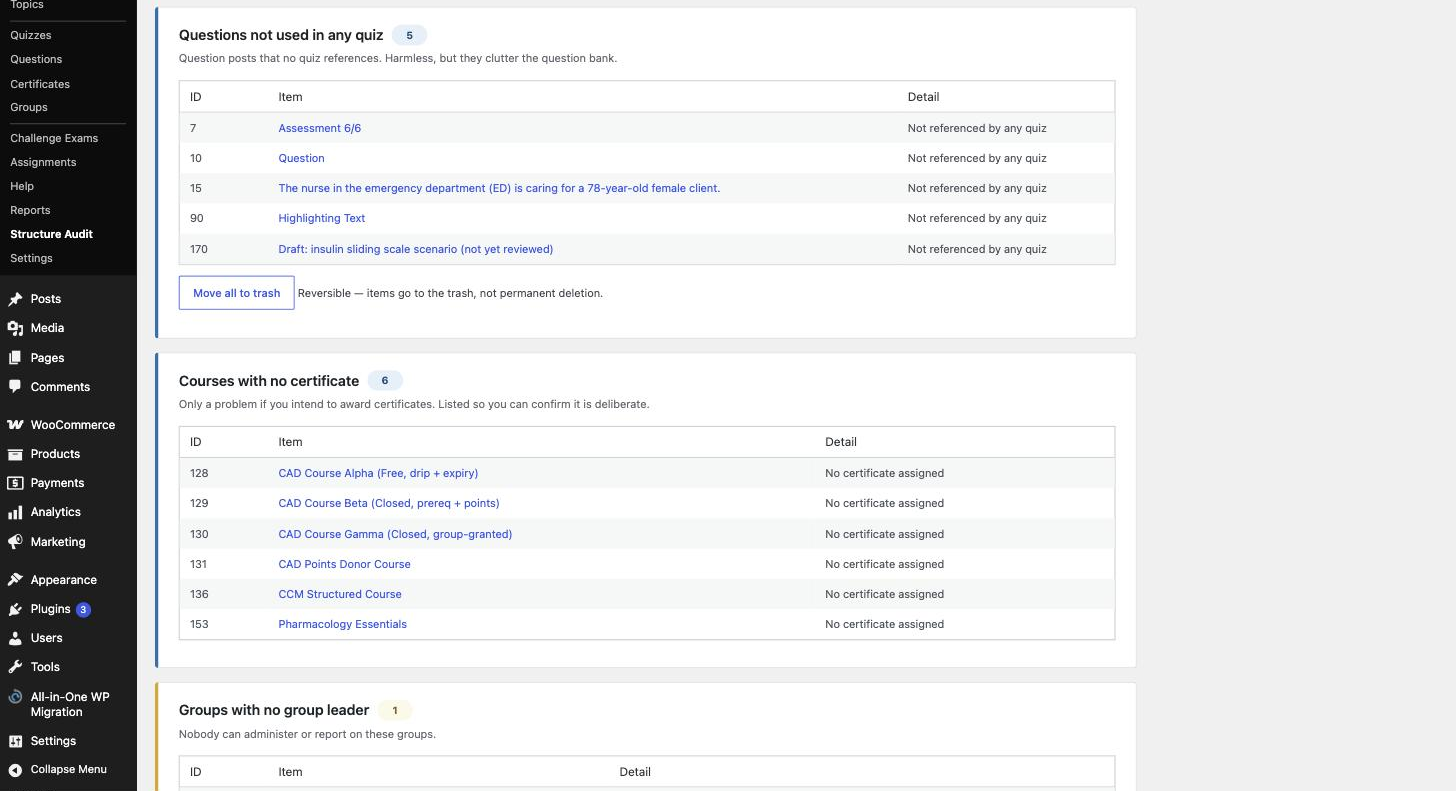
- Questions not used in any quiz — question-bank clutter
- Courses with no certificate — listed so you can confirm it's deliberate
- Groups with no group leader — nobody can administer or report on them
- Groups with no courses — membership grants no access
- Steps pointing at a missing course — broken associations
- Unpublished courses with enrolled users — learners locked out
- Broken course prerequisites — can lock learners out permanently
- The scan is read-only. Running it never changes anything.
- Cleanup is opt-in and reversible. Where a cleanup action is offered, items are moved to the trash — never permanently deleted — so you can restore them from the WordPress UI.
- Nothing is stored. No options, no custom tables, no cron jobs, no cached report.
- Version-tolerant. Each check uses LearnDash's own API where available and is skipped gracefully — never fatally — if a function is unavailable in your LearnDash version.
- Results are grouped by severity so you can triage: critical, warning, notice.
- Site owners doing a spring clean before a launch
- Agencies and freelancers auditing an inherited LearnDash site, where nobody remembers how the courses were built
- Course creators who have restructured a curriculum and want to know what got left behind
- Support and ops teams diagnosing "I can't access my course" tickets without trawling the database
- Install and activate. The plugin appears under LearnDash LMS → Structure Audit.
- Click Run structure audit. The scan is read-only and takes seconds on a typical site.
- Work down the report, worst first. Expand any check to see exactly which courses, lessons, quizzes or groups are affected, each linked straight to its edit screen.
rausa_checks filter, so agencies running the same audit across many client sites can add their own house rules alongside the built-in twelve.
Documentation and support
Documentation, setup guides and support are available on the developer's website: rajaamanullah.com. For questions about this plugin, visit the plugin page or use the wordpress.org support forum.
Disclaimer
This is an independent add-on. It is not affiliated with, endorsed by or sponsored by LearnDash or its owners. "LearnDash" is used here only to describe the software this plugin works with.
安装:
- Install and activate the plugin. LearnDash LMS must be active.
- Go to LearnDash LMS → Structure Audit (or Tools → Structure Audit).
- Click Run structure audit.
屏幕截图:
常见问题:
How do I find orphaned lessons in LearnDash?
Run the audit — orphaned lessons are one of the twelve checks. A lesson is orphaned when it exists as a post but is not attached to any course, which normally happens when a course is restructured or a lesson is removed from the builder rather than deleted. The report lists every one with a link to its edit screen, and offers an opt-in cleanup that moves them to the trash.
How do I find LearnDash courses with no lessons?
The "Courses with no content" check finds them. This is flagged as critical because a published course with no steps still accepts enrolments — learners land on it, see nothing, and open a support ticket.
Why is a learner locked out of a course they are enrolled in?
Usually one of three structural causes, and the audit checks all of them: the course is unpublished while enrolments still exist, a prerequisite course has been unpublished or deleted, or a step in the course points at a course that no longer exists. Each has its own check in the report.
How do I find quizzes with no questions?
It is one of the critical checks. An empty quiz still appears in the course outline and still has to be passed, so it stops learner progression completely while looking perfectly normal in the admin.
How do I clean up unused quiz questions?
The "Questions not used in any quiz" check lists every question in the question bank that no quiz references. It is a notice rather than an error, because a deliberately maintained question bank is a legitimate setup — the point is to show you the size of it so you can decide.
Can I delete orphaned content safely?
Cleanup moves items to the WordPress trash, so nothing is destroyed and everything is restorable from the normal Trash view until you empty it. The scan itself never removes anything; cleanup only runs when you click it.
Will this change or delete anything on my site?
Not on its own. The scan is entirely read-only. Cleanup actions only appear for orphaned content, are never automatic, and move items to the trash rather than deleting them.
Does it work with LearnDash groups?
Yes. Three of the checks cover groups — groups with no group leader (nobody can administer or report on them), groups with no courses (membership grants no access), and enrolment problems that surface through group course assignments.
Which LearnDash versions are supported?
LearnDash 3.x and 4.x. Every check calls LearnDash's own API behind a function check, so a version that doesn't provide a given function reports that check as skipped rather than failing.
Why was a check skipped?
Each check depends on a LearnDash function. If your LearnDash version doesn't provide it, the check is skipped and reported rather than causing an error. This keeps the plugin safe across LearnDash releases.
Does it store anything in my database?
No. No options, no custom tables, no transients and no scheduled tasks. The report is generated on demand and nothing is written, so removing the plugin leaves your database exactly as it was.
I have a very large site. Will this time out?
The scan examines up to 2,000 items per content type per run, which keeps it within normal PHP limits. Larger-site handling with background scanning is planned.
"Courses with no certificate" is flagged but I don't use certificates.
That check is a notice, not an error. It's listed so you can confirm the omission is intentional rather than an oversight.
Does it conflict with other LearnDash add-ons?
No. It only reads data — it doesn't modify LearnDash behaviour, register front-end output or alter course access, so it sits alongside other add-ons without conflict.
Can I add my own checks?
Yes. Register them with the rausa_checks filter and they appear in the report alongside the built-in checks, with the same severity grouping and item listing.
更新日志:
- Initial release: 12 structural checks, severity grouping, safe reversible cleanup for orphaned content, extensible check registry.