
SubmitRelay – Form & Chat
| 开发者 | muzaffarpakhtoon |
|---|---|
| 更新时间 | 2026年10月9日 22:01 |
| PHP版本: | 7.2 及以上 |
| WordPress版本: | 7.1 |
| 版权: | GPLv2 or later |
| 版权网址: | 版权信息 |
详情介绍:
[submitrelay_form] shortcode to display a standalone form.
SubmitRelay is useful for hotels, houseboats, travel businesses, tours, booking enquiries, local services, agencies, freelancers, support requests, quotation forms, and small businesses.
Contact Form + WhatsApp Chat
Connect your WordPress contact form with WhatsApp chat using a customizable pre-filled message template.
After a successful form submission, SubmitRelay can open WhatsApp with a pre-filled message containing information submitted by the visitor.
Use built-in placeholders such as:
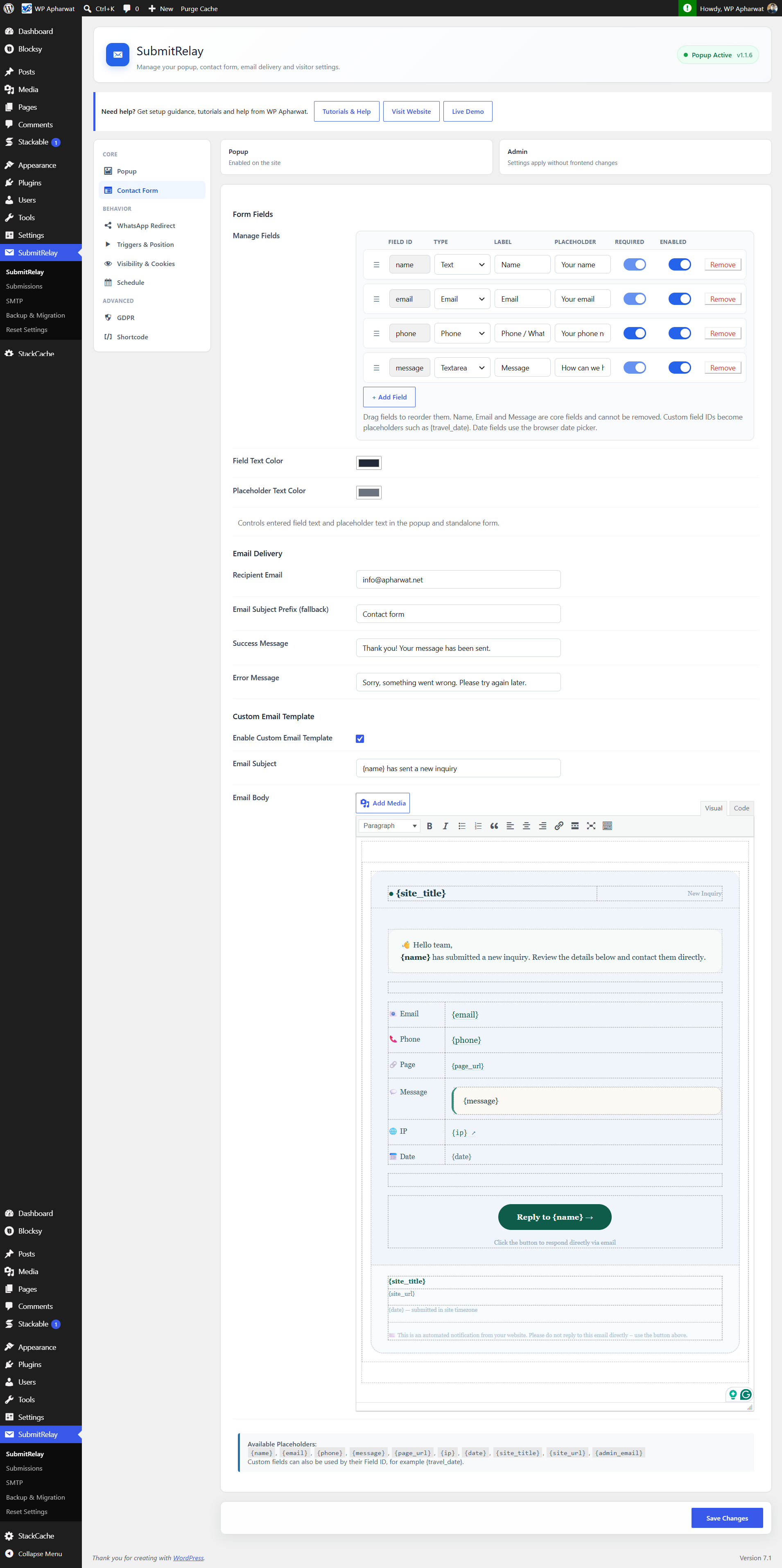
{name}— Customer name{email}— Customer email{phone}— Customer phone number{message}— Customer message{page_url}— Page where the form was submitted{site_title}— Website title{site_url}— Website URL
travel_date, you can use {travel_date} in the WhatsApp message template.
This lets site owners create messages tailored to their business, such as booking dates, guest details, travel requirements, service requests, or other custom enquiry information.
Save Customer Enquiries
SubmitRelay can save form submissions directly inside WordPress.
Administrators can view, search, export, and delete saved submissions. Stored information can include:
- Name
- Phone number
- Message
- Custom form fields
- Submission date and time
- IP address when IP storage is explicitly enabled
wp_mail() by default.
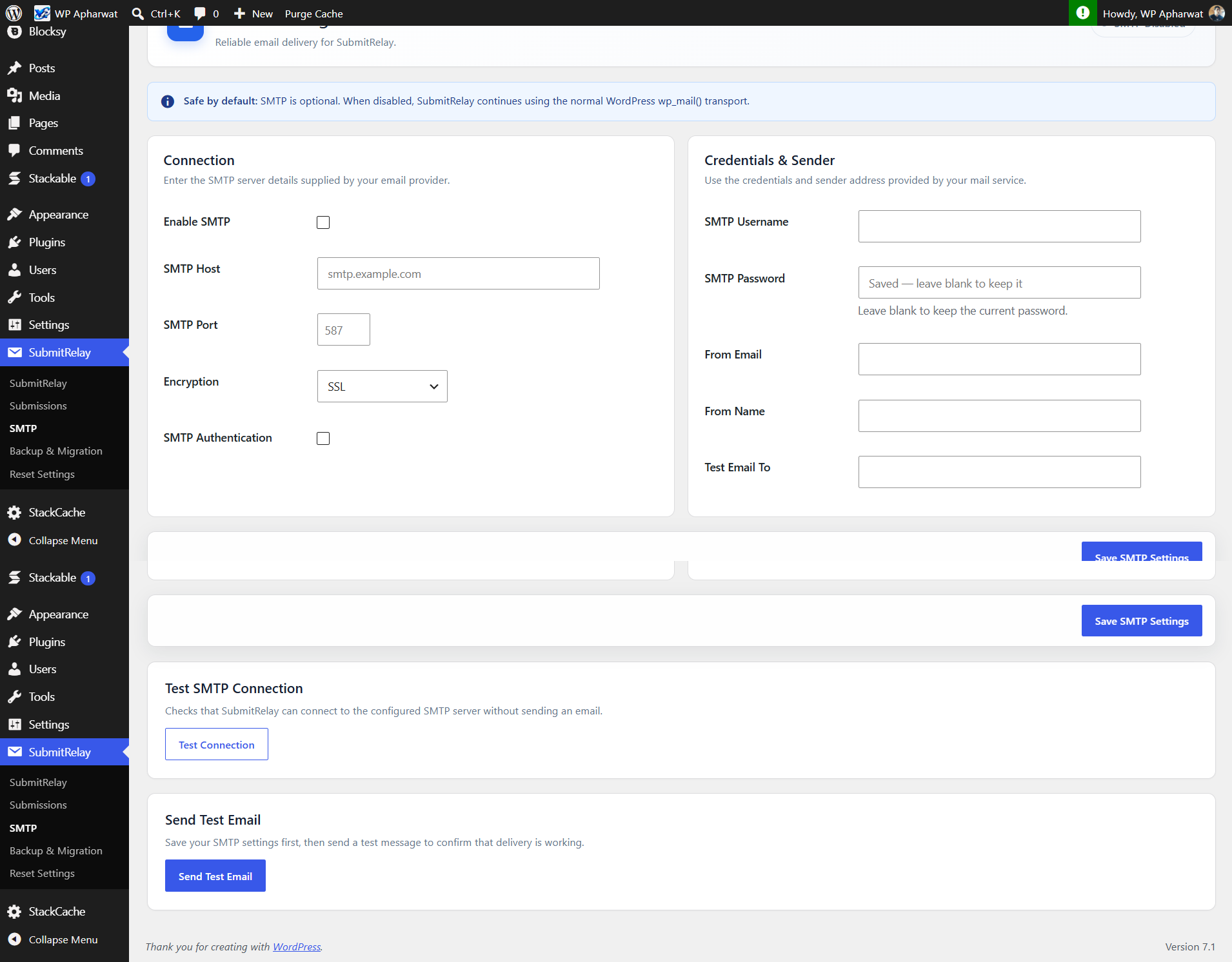
For websites that require SMTP delivery, SubmitRelay also provides optional SMTP configuration using WordPress's bundled PHPMailer.
Floating Popup or Shortcode Form
Display your form as:
- A floating popup
- A standalone form using
[submitrelay_form]
- Floating popup contact form with configurable position, animation, visibility, and schedule.
- Standalone
[submitrelay_form]shortcode. - Configurable Name, Email, Phone/WhatsApp, Message, and custom fields.
- Customizable pre-filled WhatsApp message templates.
- Built-in placeholders for submitted form information.
- Custom form field placeholders for WhatsApp messages.
- Email notifications through WordPress
wp_mail(). - Optional SMTP configuration.
- Optional WhatsApp chat after successful submission with a pre-filled message.
- Submission storage inside WordPress.
- Administrator screen for viewing, searching, exporting, and deleting submissions.
- WordPress personal-data exporter and eraser integration.
- Optional GDPR consent checkbox and configurable privacy-policy URL.
- IP address storage disabled by default.
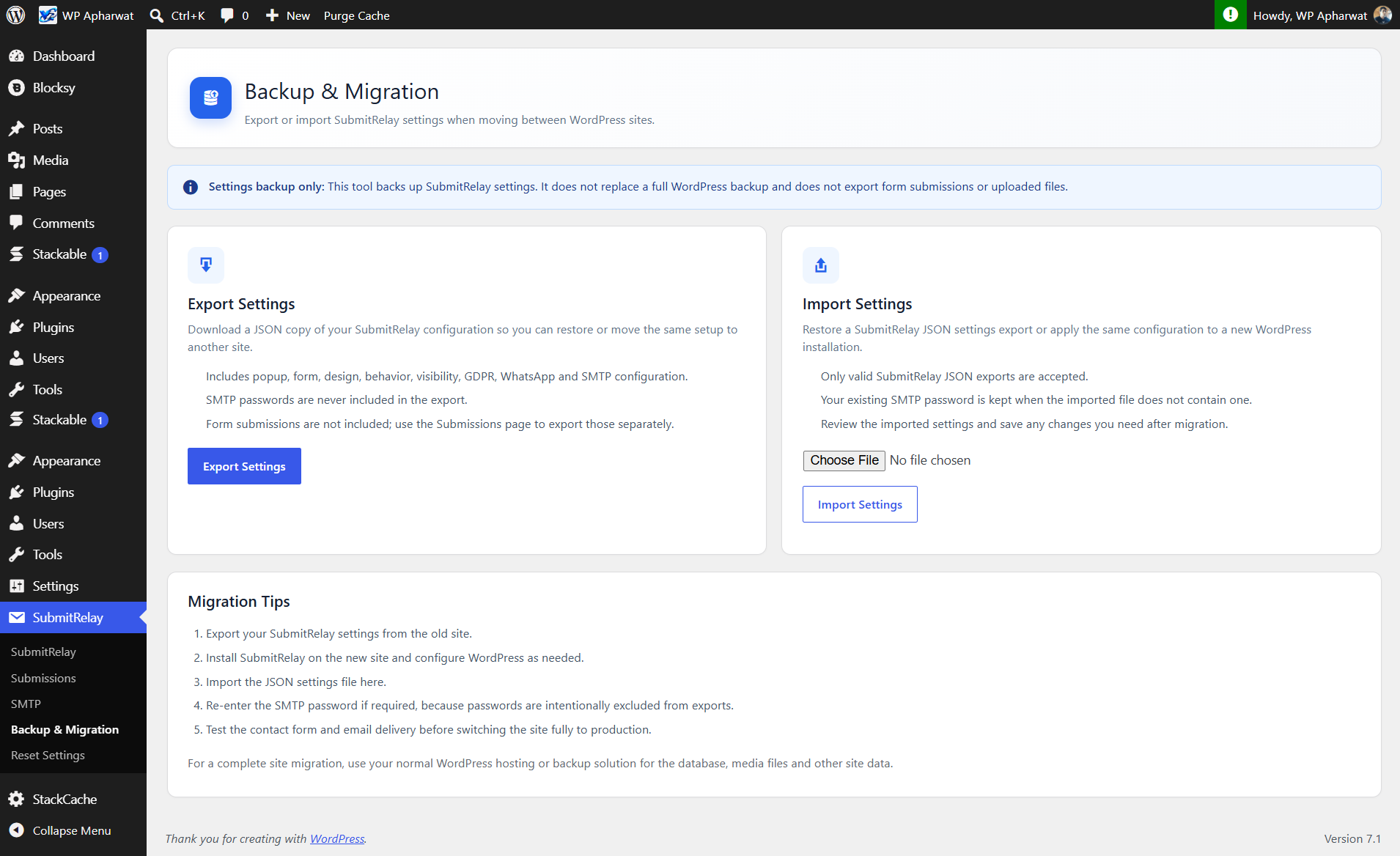
- Settings export/import with SMTP passwords excluded from exports.
- Basic anti-spam honeypot and short-term request rate limiting.
- Unified Floating Button appearance controls.
- No advertising, analytics, telemetry, or remote tracking.
安装:
- Upload the
submitrelayfolder to/wp-content/plugins/, or install the plugin ZIP from Plugins > Add New Plugin > Upload Plugin. - Activate SubmitRelay from the Plugins screen.
- Open the SubmitRelay settings page and configure the form, popup, email, privacy, and optional WhatsApp/SMTP settings.
- The floating popup can be enabled from the plugin settings.
- To display a standalone form, add
[submitrelay_form]to a page, post, widget, or supported template location.
屏幕截图:
常见问题:
Does SubmitRelay require an external service?
No. Email delivery uses WordPress wp_mail() by default. SMTP and WhatsApp are optional.
Can I use SubmitRelay without WhatsApp?
Yes. WhatsApp integration is optional and can be enabled or disabled from the plugin settings.
Can I customize the WhatsApp message?
Yes. You can configure a WhatsApp message template and use supported placeholders to insert submitted information.
Can custom form fields be included in the WhatsApp message?
Yes. Custom form fields can be referenced using their field IDs as placeholders in the WhatsApp message template.
For example, a custom field with the ID travel_date can be inserted using:
{travel_date}
Does SubmitRelay save form submissions?
Yes. When submission storage is enabled, submissions can be viewed, searched, exported, and deleted from the WordPress administration area.
Does the plugin store IP addresses?
Not by default. IP address storage is disabled by default and can be enabled in the GDPR/privacy settings. A visitor IP may still be used temporarily for rate limiting, but it is not stored unless IP storage is enabled.
How does WhatsApp redirect work on mobile?
After a successful form submission, SubmitRelay shows the success/redirect message briefly and then opens the configured wa.me link. On phones and tablets, it uses the current page so supported devices can hand the link off to the installed WhatsApp app instead of opening a new browser tab. On desktop, the New Tab option keeps the website open.
Does the plugin send data to WhatsApp?
Only when the site administrator enables the WhatsApp redirect feature. The browser is redirected to WhatsApp with the configured message content after submission.
Are SMTP passwords included in settings exports?
No. SMTP passwords are deliberately excluded from exported settings.
How are stored submissions removed?
Administrators can delete submissions from the SubmitRelay submissions screen. WordPress's Privacy Tools can also use the plugin's personal-data eraser integration.
Does SubmitRelay include analytics or tracking?
No. The plugin does not include advertising, analytics, telemetry, or background tracking requests.
更新日志:
- Set the default Bottom Text to “We will get back to you soon.” and enable Show Bottom Text by default.
- Set WhatsApp Redirect ON by default.
- Set Show in Popup ON by default and Show in Form OFF by default.
- Use 919876543210 as the sample WhatsApp number.
- Add the example format 919876543210 to the WhatsApp number hint and explain that site owners should replace it with their own number.
- Keep WordPress compatibility metadata at 7.1, covering the WordPress 7.1.x release line including 7.1.3.
- Added per-field database storage controls for form submissions.
- Email and WhatsApp notifications continue to receive the full submitted form data even when fields are excluded from database storage.
- Added safer handling when email storage is disabled so submissions are not overwritten by an empty email value.
- Change the default floating button text to "Quick chat".
- Change the default floating button icon to "ᯓ➤".
- Change the default floating button position to Bottom Left.
- Remove obsolete legacy migration compatibility for the pre-SubmitRelay FSP/ChatMail data format.
- Preserve current SubmitRelay settings and submissions during normal upgrades.
- Update the plugin name to "SubmitRelay – Form & Chat" for clearer positioning.
- Improve the WordPress.org short description, tags, and opening description for clearer discoverability.
- No functional changes.
- Add independent WhatsApp Redirect visibility toggles for the Popup and Form.
- Keep the existing Enable WhatsApp Redirect setting as the master switch.
- Preserve existing WhatsApp behavior when both new visibility settings are enabled.
- Replace the single field Enabled setting with independent Required, Popup and Form controls.
- Fix saving of Required, Popup and Form toggle states so OFF values persist.
- Preserve existing field visibility during upgrade from older versions.
- Changed Floating Button vertical control to a simple non-negative Bottom Offset (0–200 px).
- Positive values move bottom-positioned floating buttons higher; negative values are no longer supported.
- Hardened settings sanitization and runtime validation for all user-configurable values.
- Removed HTML handling from the floating button icon setting; icons are stored as text/emoji.
- Added strict bounds and allowlists for numeric, color, position, date/time, URL, and other settings used in generated output.
- Ensured settings are normalized before generating CSS, JavaScript, and HTML.
- No arbitrary custom CSS, JavaScript, or PHP insertion is supported.
- Added a controlled Vertical Offset setting for the floating button.
- Allows site owners to move the floating button up or down within a safe 200-pixel range.
- The adjustment is implemented as a sanitized numeric setting and generated by the plugin; no arbitrary CSS is accepted.
- Added strict phone-number validation on both the browser and server.
- Phone fields accept 7-15 digits with common formatting characters (spaces, +, -, parentheses and periods) and reject letters or arbitrary text.
- Added
inputmode=tel, a length limit, and a validation pattern to phone inputs.
- Unified the floating button appearance settings into one Floating Button section.
- Renamed Button Color to Floating Button Color.
- Floating Button Color now controls both the floating button and submit button backgrounds.
- Text/Icon Color now controls floating button text/icon, submit button text, and the popup close icon.
- The popup close button is always available when the popup is open.
- Added strict phone-number validation to reject arbitrary text and accept common phone formatting characters.
- Removed unrestricted custom CSS input and unrestricted CSS design-value fields.
- Fixed popup and button sizing, padding, border radius, and close-button size to controlled plugin defaults.
- Removed legacy storage of unrestricted CSS design values from active settings.
- Removed the arbitrary Additional CSS setting to comply with WordPress.org plugin review requirements.
- Preserved controlled design options such as popup, button, field, placeholder, overlay, and mobile button colors/positions.
- Updated the settings export version to 1.0.9.
- Improved WordPress.org compatibility by using WordPress enqueue APIs for JavaScript and CSS output.
- Prefixed plugin runtime hooks, storage identifiers, and names to reduce collisions.
- Preserved existing settings, submissions, popup, standalone form, email, SMTP, GDPR, scheduling, and WhatsApp behavior.