
SysRadar
| 开发者 | aporcebr |
|---|---|
| 更新时间 | 2026年5月28日 07:13 |
| PHP版本: | 7.4 及以上 |
| WordPress版本: | 7.0 |
| 版权: | GPLv2 or later |
| 版权网址: | 版权信息 |
详情介绍:
- 30 to 60% of your traffic is bots. You never knew — because GA4 and Plausible filter bots automatically. But it's your server serving those bots, your bandwidth, your cost.
- AI crawlers (Claude, GPT, Perplexity) are indexing your content right now. If you don't know what they are reading, you can't optimize. The first sites to appear in AI answers will win the next decade of SEO.
- Attackers are continuously scanning
/wp-admin/,/xmlrpc.php,/.env. Wordfence Free does not block them. Cloudflare lets them through. You don't even know they exist. - Web Vitals (LCP, CLS, INP) — Google ranks search results by them. Lighthouse on your machine ≠ real user. SysRadar measures with RUM (Real User Monitoring) data.
- Injects the tracker (one line of JS, ~2KB minified, async) into the
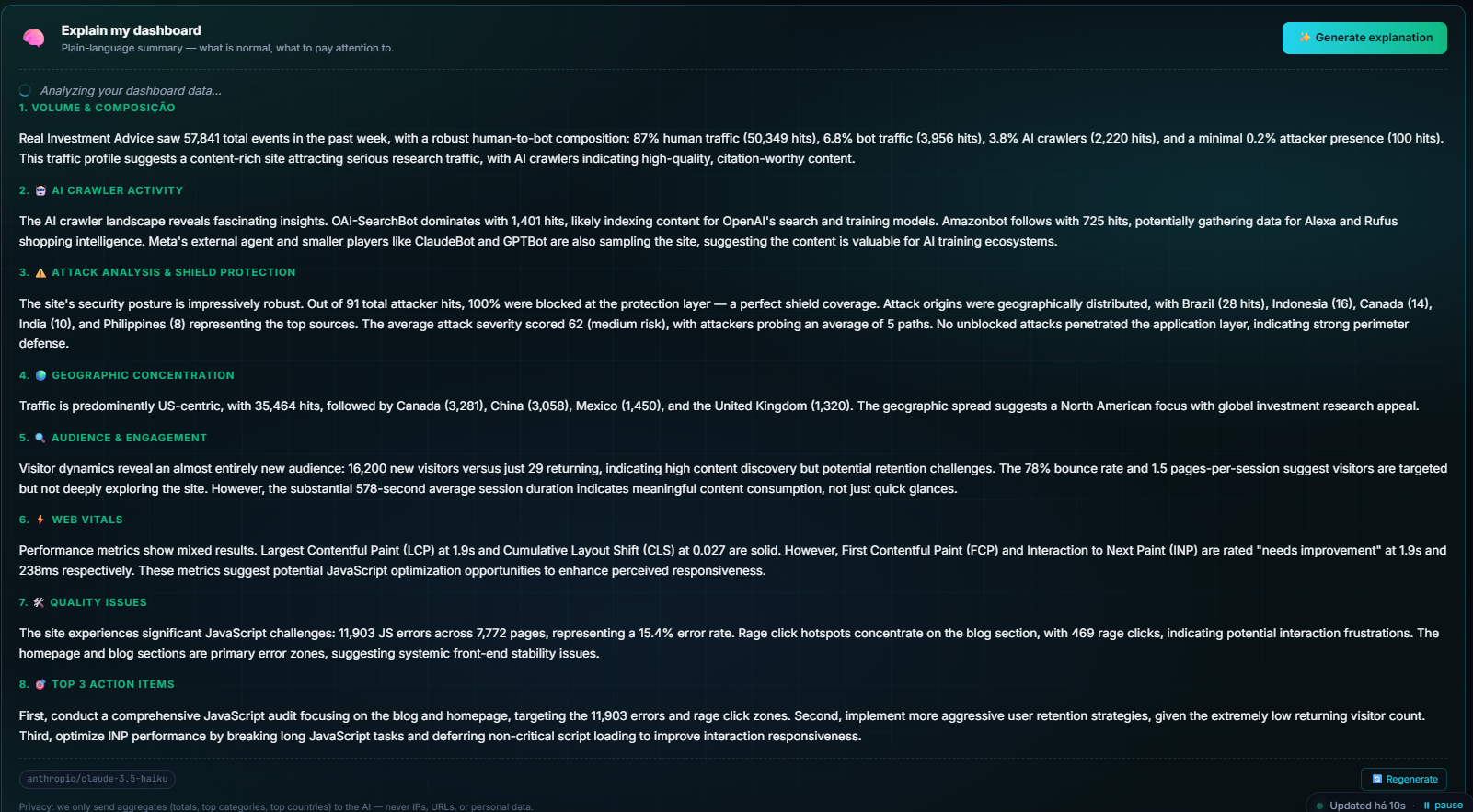
<head>of all front-end pages via thewp_headhook - Live Dashboard inside WordPress (since v1.2.0): your last 24h of traffic, AI crawlers, suspected attacks and a real-time live counter — all visible without leaving wp-admin. Cached locally for 5 min; the fetch fires ONLY when an administrator opens the SysRadar page (zero impact on visitor load times)
- Auto-detects WooCommerce, Elementor, Yoast SEO, Rank Math, Contact Form 7, BuddyPress, LearnDash, bbPress, All-in-One SEO
- Auto-excludes: admin pages, AJAX, REST API, cron jobs, and logged-in users with edit-posts capability (admins/editors)
- Honors
DNT: 1(Do Not Track) optionally - Compatible with cache plugins (WP Rocket, W3 Total Cache, LiteSpeed Cache, Cloudflare APO)
- Custom domain support (Pro+ plan): use
analytics.yoursite.comto bypass aggressive ad-blockers - Zero queries to the WordPress database (settings stored in
wp_options)
- Bloggers and content creators — discover which AI crawlers are indexing your content (ChatGPT, Claude, Perplexity)
- E-commerce (WooCommerce) — real channel attribution, price-scraper detection, per-product Web Vitals
- Agencies — manage analytics for multiple client sites in a single dashboard (Agency plan)
- Developers — Web Vitals degradation alerts, automatic JS error capture, REST API access
- IP anonymization runs in the plugin, before transmission — last octet zeroed (IPv4) / last 80 bits zeroed (IPv6) inside your WordPress install, so SysRadar never receives identifiable IP addresses
- First-party cookies only (
_rdid,_rds) — no cross-site tracking, no fingerprinting. Cookieless mode is available as a one-click toggle - Split tracking toggles (since v1.1.1) — disable the front-end pixel and the server-side beacon independently
- GDPR/LGPD-friendly: no data brokers, no impression auctions, no persona-building
- Optional Honor DNT (Do Not Track) support
- Servers located in Brazil; data processed under LGPD
- No dependency on Google, Facebook, or any ad-tech vendor
Analytics — SysRadar. We use SysRadar (operated by SysWP, Brazil) for privacy-first server-side analytics. SysRadar receives the page URL you visit, the referrer URL, your user-agent, anonymized IP (last octet zeroed before it leaves our server), Web Vitals metrics (LCP / FCP / TTFB / CLS / INP), and security telemetry on suspicious requests. SysRadar never sets third-party cookies and is configured here in [cookieless mode / standard mode]. We process this data under [legitimate interest in security monitoring / your consent for analytics], depending on the feature. SysRadar privacy policy: https://radar.syswp.com.br/privacy/. To exercise your LGPD/GDPR rights, contact us at [your email].If you enable cookieless mode in the plugin settings, the
_rdid and _rds first-party cookies are not set and you typically do not need a cookie consent banner for SysRadar.
Data subject rights walkthrough
Under LGPD (Brazil) Art. 18 and GDPR (EU) Art. 15–17, your visitors can request access to, correction of, deletion of, and portability of their personal data. Because SysRadar minimizes data at source (anonymized IPs, no names, no emails, no persistent cross-site identifier), most data subject requests are quick to answer:
- Access: show the visitor the categories of data collected — see the table in the plugin's Settings → SysRadar page and the SysRadar privacy policy at https://radar.syswp.com.br/privacy/.
- Correction: SysRadar does not collect identifiable data that can be "corrected" in the LGPD/GDPR sense. If a visitor still requests correction, document the request and respond confirming the data is anonymized.
- Deletion: events are automatically purged after your plan retention window (7 to 180 days). For earlier deletion of events tied to a specific anonymized IP, the site owner can email contato@syswp.com.br with the timeframe and the IP prefix.
- Portability: the site owner can export all events for their site via the dashboard → Account → Export Data.
- Objection / withdrawal of consent: if the visitor enabled DNT in their browser and you have "Honor DNT" turned on in the plugin, they are automatically not tracked. They can also block first-party cookies in their browser.
安装:
- Upload the
syswp-radarfolder to/wp-content/plugins/or install via WP Admin → Plugins → Add New → Upload Plugin (use the.zip) - Activate the plugin in WP Admin → Plugins
- Go to Settings → SysRadar
- Paste your Site ID (12 characters) — find it at radar.syswp.com.br/sites
- Save. Done. The pixel is now injected on all front-end pages automatically.
- WP Admin → Plugins → Add New → search "SysRadar"
- Install → Activate
- Settings → SysRadar → paste your Site ID
屏幕截图:


常见问题:
Will the plugin slow down my site?
No. The JS is asynchronous (<script async>), under 2KB minified, and the server responds in sub-millisecond. Nothing blocks rendering. We honor the "zero impact on LCP/FCP" contract — you can verify on the Web Vitals panels in the SysRadar dashboard after installing.
Does it work with WP Rocket / LiteSpeed Cache / Cloudflare?
Yes. The snippet is static and works inside any page cache. Tested in production with WP Rocket and LiteSpeed.
Can I use it with ad-blockers?
Most ad-blockers allow it because the traffic is interpreted as a simple image request (.gif). If you need maximum accuracy and have the Pro+ plan, configure a custom domain (e.g., analytics.yoursite.com) and ad-blockers become completely blind to the tracking.
Is there a free tier?
Yes. Permanent Free plan with 1 site, 50K events/month, 7-day retention. Automatic 7-day Pro trial on signup.
What happens if I uninstall the plugin?
Events already collected stay in SysRadar (subject to your plan retention policy). New visitors will not be tracked. The plugin's settings (Site ID, etc.) remain in wp_options until you delete the plugin via "Plugins → Delete" — at that point the included uninstall.php cleans them up automatically.
Does it collect personal data (LGPD/GDPR)?
No. The plugin collects only: User-Agent, visited URL, referrer, and browser performance metrics (LCP/FCP/TTFB/CLS/INP). IPs are anonymized inside the plugin, before transmission (last octet zeroed for IPv4, last 80 bits zeroed for IPv6). No name, email, cross-site tracking cookies, or any personally identifiable information ever leaves your WordPress install.
Do I need a cookie banner to use SysRadar?
It depends on your configuration and your jurisdiction:
- Cookieless mode ON (Settings → SysRadar → Cookies): SysRadar does not set any cookies. You typically do not need a cookie consent banner for SysRadar specifically. (You may still need one for other cookie-setting code on your site.)
- Cookieless mode OFF (default): SysRadar sets two first-party cookies (
_rdid,_rds) for unique-visitor counting. Under strict LGPD/ePrivacy interpretation you should ask visitors for consent before setting these. A consent banner that gates the SysRadar pixel until the visitor accepts analytics cookies is the safest path. Major consent management plugins (CookieYes, Complianz, Iubenda, Cookiebot, etc.) can gate scripts by handle — blocksyswp-radar-pixeluntil consent is granted. - Server-side beacon: does not set cookies and runs under "legitimate interest in security monitoring" — consent is not required, only disclosure in your privacy policy.
What does "Honor DNT" actually do?
DNT stands for Do Not Track — it is a header (DNT: 1) that the visitor's browser sends to tell websites "please do not track me". The header is sent automatically when the visitor has enabled the DNT setting in their browser preferences (Firefox: Settings → Privacy → "Send websites a Do Not Track signal"; equivalent in older versions of other browsers). When you enable "Honor DNT" in SysRadar, the plugin checks for this header on every request and skips tracking entirely (both pixel and beacon) for visitors that send it. LGPD does not require honoring DNT, but it is a strong privacy signal and best practice — recommended if you have EU traffic.
How do I know it's working?
After pasting the Site ID and saving, visit your site in an incognito tab. The dashboard at radar.syswp.com.br/dashboard shows the event in real time (5-10 second delay).
Does the plugin auto-update?
Yes, via standard WordPress auto-update when we publish a new version. You are notified at WP Admin → Updates.
Does it support multisite?
Yes. Install on the network and configure each subsite with its own Site ID in local settings. Each subsite has its own separate dashboard in SysRadar.
Can I block AI crawlers via the plugin?
No — SysRadar detects AI crawlers, it does not block them. To block, use robots.txt or a dedicated security plugin focused on bot blocking.
Why "SysRadar" and not "SysWP Radar"?
The plugin's display name was changed from "SysWP Radar" to "SysRadar" because the WordPress.org Plugin Review Team does not allow the "WP" abbreviation in user-facing plugin names (it could imply affiliation with WordPress itself). The slug — syswp-radar — is a technical URL identifier and is exempt from this restriction, similar to how Yoast SEO's slug is wordpress-seo. The SaaS service is still branded "SysWP Radar" at radar.syswp.com.br — only the plugin's display name changed.
更新日志:
- New: anonymous install telemetry. On activation the plugin generates a random install ID (UUID v4) and pings the SysRadar service once with: install ID, site domain, plugin version, WordPress version, PHP version, multisite flag. No admin email, no user data, no visitor data, no PII. Used to size the install base and improve compatibility with hosting/PHP combinations seen in the wild. The same identifier is sent on deactivation so we know the install is no longer active. Legal basis: legitimate interest (LGPD Art. 7 IX / GDPR Art. 6(1)(f)).
- New: telemetry opt-out toggle. Settings → SysRadar → "Plugin telemetry" — one click and the activation/deactivation pings stop. No telemetry beyond those two pings is ever sent (the plugin does not phone home periodically).
- Privacy disclosure: readme.txt "External services" section updated to document the new install/deactivation pings and how to disable them.
- New feature: Live Dashboard panel inside the plugin admin page. Shows the last 24h of request totals (humans, AI crawlers, suspected attacks) plus a real-time live counter and 24h hourly sparkline — pulled from your Radar SaaS account so you don't have to switch tabs to check traffic health. Includes a one-click "Refresh" button. Cached locally for 5 minutes via WP transients so it doesn't add load to your site, and the fetch fires ONLY when an administrator opens the SysRadar page (zero impact on visitor load times).
- Sidebar promotion: SysRadar now lives as its own top-level entry in the WordPress admin sidebar (previously nested under Settings). With its own brand icon for one-click access from any admin screen.
- UI polish: The header brand mark on the SysRadar page now has a subtle rotating radar sweep + ping animation (respects
prefers-reduced-motionfor accessibility). - Compatibility: Tested up to WordPress 7.0.
- Performance note: the new Live Dashboard fetch fires ONLY when an administrator opens the SysRadar page — never on front-end requests, never on other admin pages. Zero impact on visitor load times.
- Privacy: IP anonymization now runs inside the plugin, before transmission (last octet zeroed for IPv4, last 80 bits for IPv6). Previously anonymization happened server-side at radar.syswp.com.br — now the data leaves your WordPress install already anonymized, satisfying LGPD/GDPR minimization-at-source requirements.
- Settings split: the single "Tracking enabled" toggle is now two independent toggles — Front-end pixel and Server-side beacon — so you can disable either independently. Legacy
enabledsetting is auto-migrated 1→1 to both on first load. - Cookieless mode: new one-click toggle that disables the
_rdid/_rdsfirst-party cookies. When enabled you typically do not need a cookie consent banner for SysRadar. - Settings reference table: the admin page now shows a clear table explaining the technical effect AND the legal implication of each setting, so you know what to update in your privacy policy when toggling.
- Privacy policy snippet: the readme now includes a copy-paste-ready paragraph that site owners can adapt for their own privacy policies.
- Data subject rights walkthrough: new section in readme covering LGPD Art. 18 / GDPR Art. 15–17 — what to do when a visitor asks for access, deletion, portability.
- External services disclosure expanded to cover both the JS pixel AND the server-side beacon (when each fires, exact data sent, legal basis).
- Admin onboarding redesigned — new visitors see a clear 3-step welcome card with a prominent "Sign up free" CTA toward radar.syswp.com.br.
- Brand: admin header now uses the official SysRadar mark instead of a placeholder gradient square.
- FAQ additions: "Do I need a cookie banner?" and "What does Honor DNT actually do?".
- Base URL field removed from the settings page — the analytics endpoint is now pinned to the canonical SysRadar service (radar.syswp.com.br). Custom-domain routing will return later via an authenticated API. Existing custom-domain installs are migrated to the canonical endpoint automatically on first load.
- Readme cleanup: removed promotional pricing details from the description (kept on the SaaS site); donate link removed; tags revised for compliance.
- Display name changed to "SysRadar" (per WordPress.org Plugin Review Team guidance — "WP" cannot appear in plugin display names). Plugin slug remains
syswp-radar(slugs are URL identifiers, not user-facing branding, and are exempt from the "WP" restriction). - All UI strings translated from Portuguese to English with full i18n support — translations welcome via translate.wordpress.org
- Added server-side beacon (captures attacks the JS pixel cannot see: /wp-json/, xmlrpc.php, admin-ajax.php unauth, wp-admin probes, wp-login.php). Fired on
shutdownaction; usesfastcgi_finish_request()+blocking=falsefor zero added latency. - Pixel injection switched from direct
echotowp_enqueue_script()+script_loader_tagfilter forasyncattribute (matching WP.org Plugin Review best practices). - All
$_SERVERreads now properly sanitized withsanitize_text_field(wp_unslash())/esc_url_raw(wp_unslash()). - Class renamed to
Syswp_Radar_Pluginto match the slug-derived prefix convention. - Removed call to
load_plugin_textdomain()— no longer needed since WordPress 4.6 for plugins hosted on WordPress.org.
- Initial release on WordPress.org
- Pixel injection via wp_head (priority 99)
- Auto-detection of platforms (WooCommerce, Elementor, Yoast, Rank Math, etc.)
- Settings page with privacy controls
- Compatibility tested with WP Rocket, LiteSpeed Cache, W3 Total Cache
- Multisite support
- Optional Honor DNT
- Auto-exclusion of admins/editors