
TrackFormPro – Lead Form Tracking for Meta Conversions API & Pixel
| 开发者 |
trackformpro
freemius |
|---|---|
| 更新时间 | 2026年10月25日 14:11 |
| PHP版本: | 7.4 及以上 |
| WordPress版本: | 7.1 |
| 版权: | GPLv2 or later |
| 版权网址: | 版权信息 |
详情介绍:
- Works with Gravity Forms, WPForms, Contact Form 7, Fluent Forms, Formidable Forms and Elementor Forms, free and paid versions.
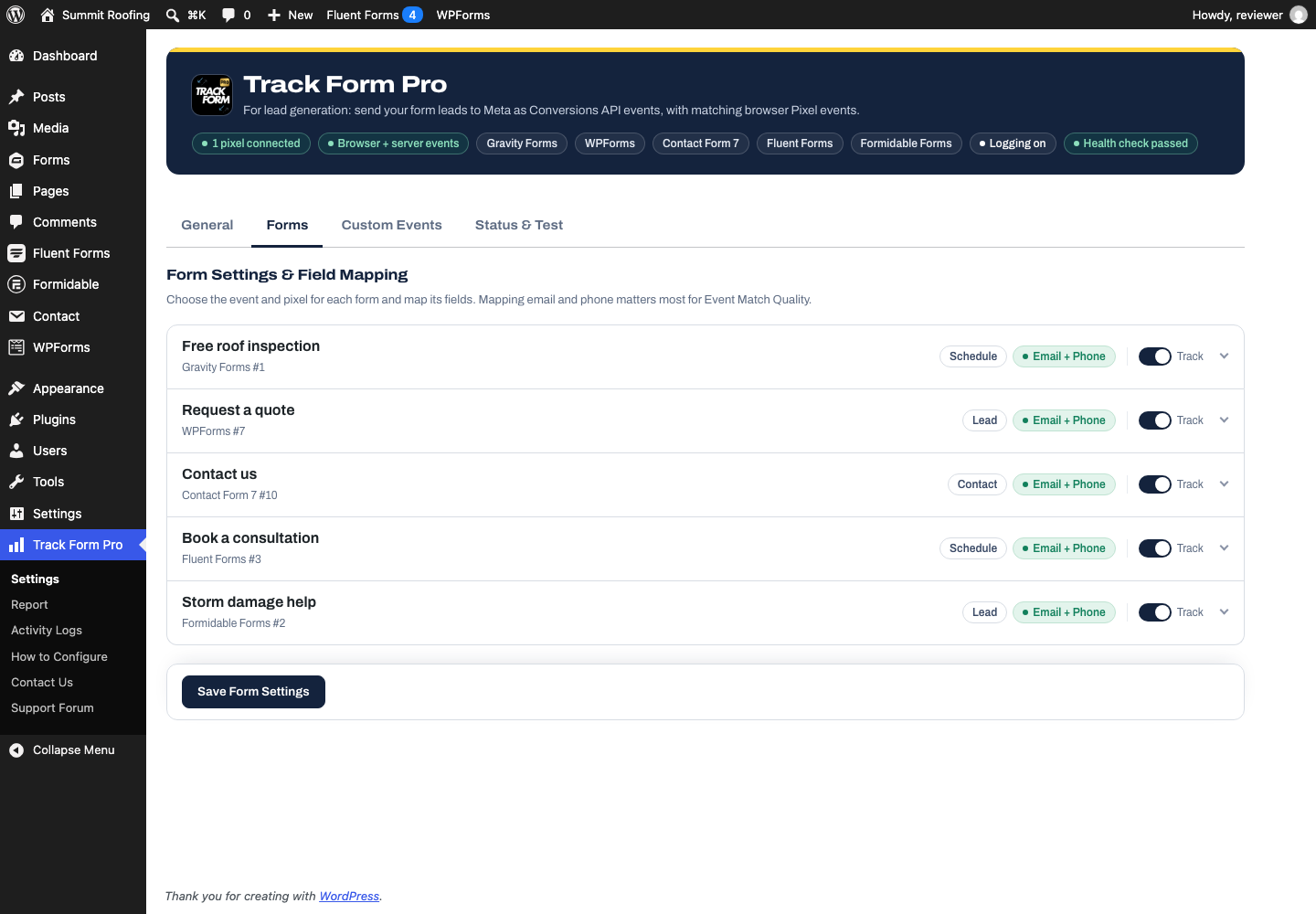
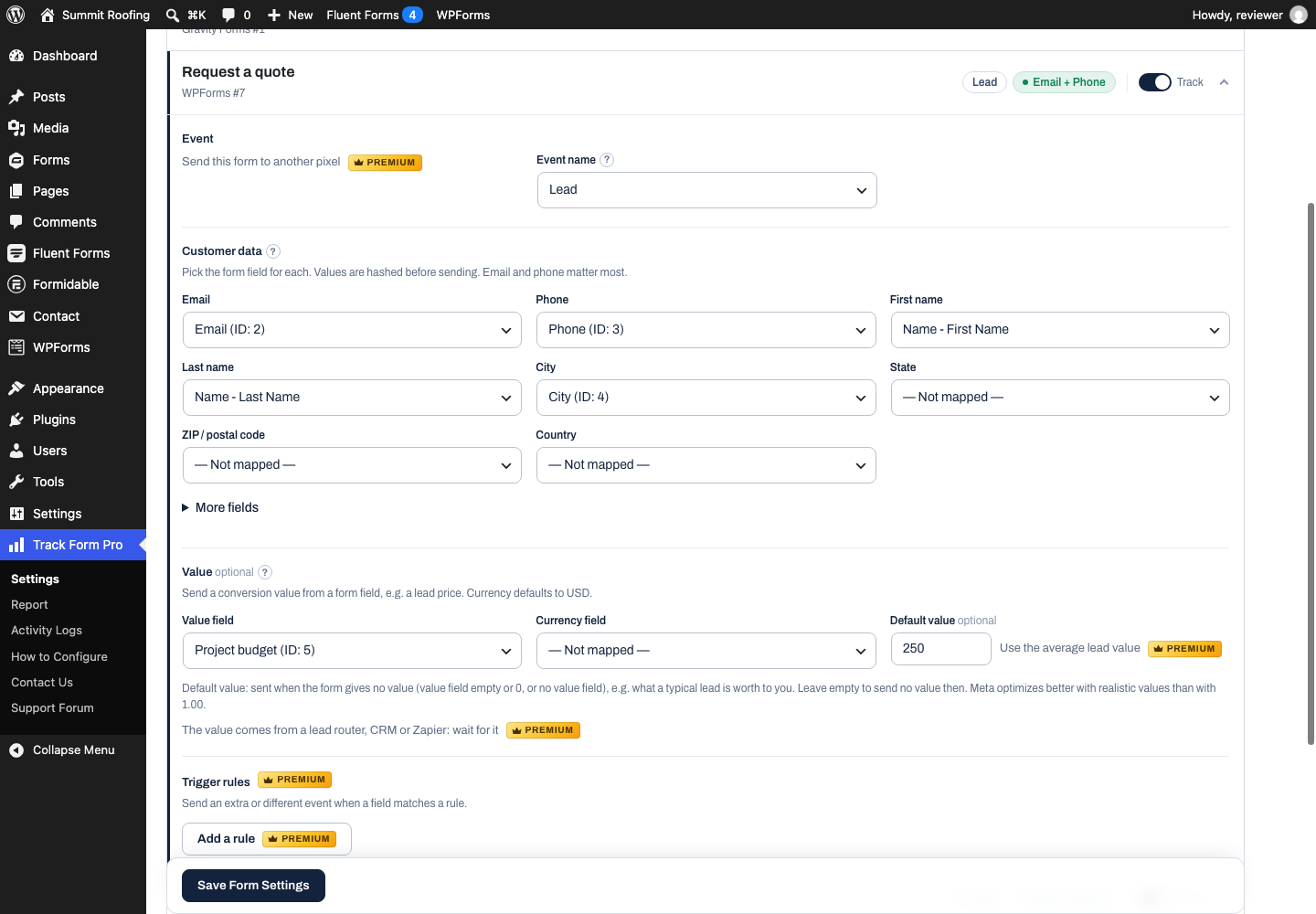
- Every form found and filled in for you: forms from all six form plugins are listed on their own, and the email, phone, name and address fields are filled in from each form's field types. Change any of them from dropdowns: email, phone, first/last name, city, state, ZIP, country, gender, date of birth, external ID.
- Normalization and SHA-256 hashing of customer data on your server, following Meta's formatting rules (e.g. phone numbers with country code, 2-letter state and country codes).
- Browser + server deduplication with a shared
event_id. - Meta click and browser IDs (
_fbc,_fbp, andfbclidfrom the landing page URL) forwarded with server events. - Event per form (Lead, Contact, Schedule, Purchase…) and a Track switch for forms you don't advertise for.
- Value and currency from form fields, with a per-form default value.
- Ad click and UTM tracking: the fbclid and UTMs from the landing page are kept and sent with the lead.
- Privacy: a consent option that works with the WP Consent API (Complianz, CookieYes, Cookiebot and other banners) or a consent cookie, and starts tracking as soon as the visitor accepts; Limited Data Use for US state privacy laws, following Global Privacy Control and Do Not Track.
- Bot filtering: search engines, crawlers, uptime monitors and automated browsers don't load the Pixel and their form submissions aren't sent, keeping fake leads out of your ad results.
- Setup checklist, health check with plain-language fixes, help tips and a guide.
- Activity log, automatic retries and a test-event button in the admin. Track Form Pro Premium (paid plans with a 14-day free trial, available from the plugin's Upgrade menu or trackformpro.com) adds an attribution report (leads, conversion rate and lead value per campaign, ad set and ad), form abandonment (which forms visitors start but don't finish, and the field where they leave), a weekly email report, URL triggers, duplicate-lead blocking, direct CookieYes / Complianz / Cookiebot consent, waiting for values from lead routers, CRMs or Zapier, average lead values, trigger rules and custom events, several pixels, funnel events, Event Match Quality from Meta, email alerts and double-counting detection. The free plugin is complete without it.
安装:
- Upload the plugin files to
/wp-content/plugins/track-form-proor install via the Plugins screen, then activate it. - In Meta Events Manager, generate a Conversions API access token for your dataset (pixel).
- Go to Track Form Pro → Settings → General and add the pixel ID and access token. Recommended settings (browser events, deduplication, advanced matching) are already on; the Get started checklist guides you through the rest.
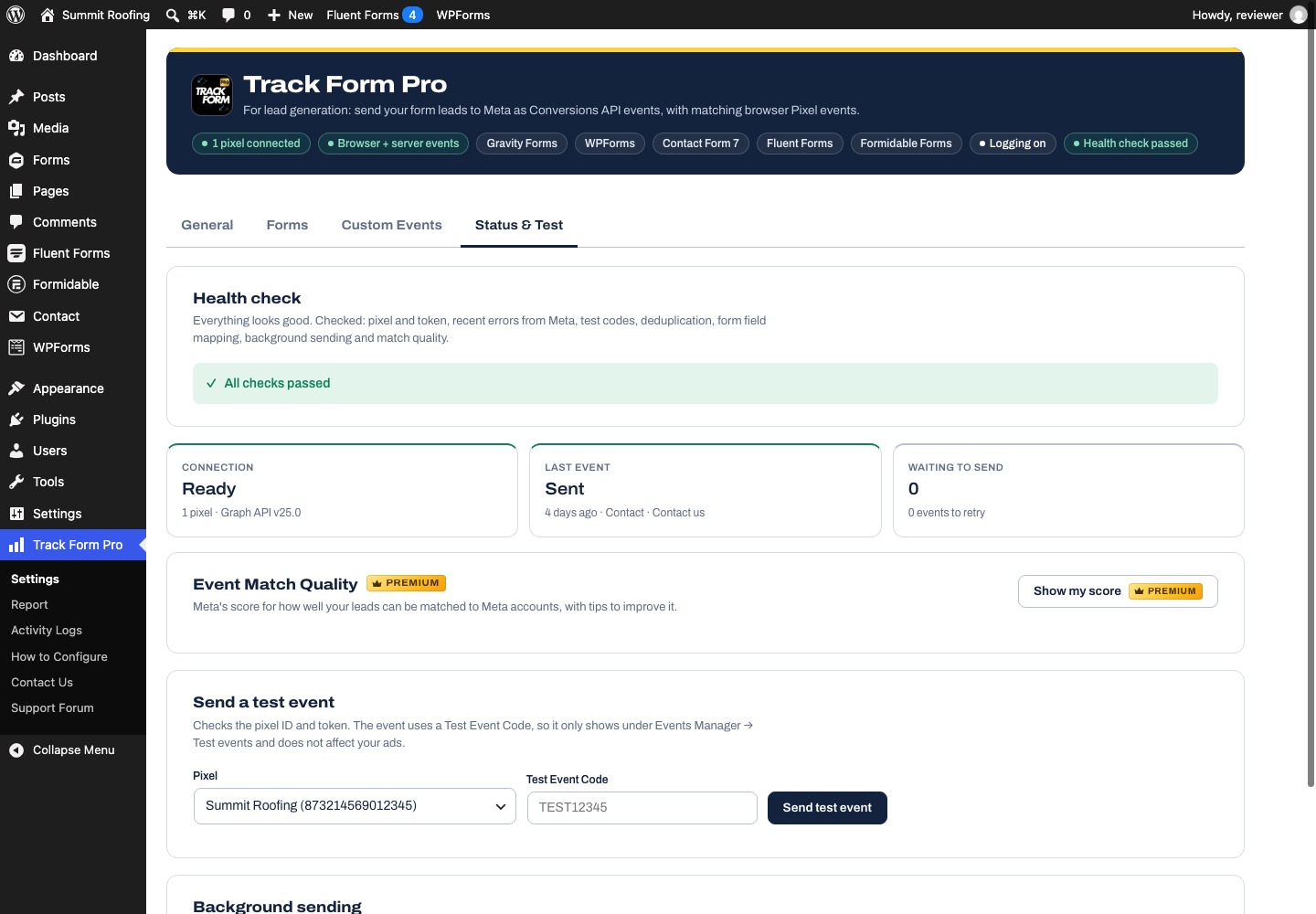
- In Status & Test, send a test event with a Test Event Code from Events Manager to confirm the connection.
- In Forms, choose the event for each form and map at least the email and phone fields. Switch off Track on forms you don't advertise for.
- Check Status & Test → Health check for anything that still needs attention.
屏幕截图:


常见问题:
Does this plugin add the Meta Pixel code?
Yes. It adds the Meta Pixel base code and a PageView in the page <head> for the pixels you configure. Remove any other copy of the same pixel (theme, tag manager or another plugin) to avoid double counting.
Which form plugins are supported?
Gravity Forms, WPForms, Contact Form 7, Fluent Forms, Formidable Forms and Elementor Forms (Elementor Pro), free and paid versions. Server events work with AJAX and non-AJAX forms, and browser events use the same event ID. Premium's "wait for the value" needs a form plugin that saves entries on your site; when entries aren't saved (Contact Form 7, Elementor, WPForms without entries), leads are sent right away.
Does it work with caching plugins?
Yes. Leads are sent from your server when the form is submitted, so page caching (WP Rocket, LiteSpeed Cache, W3 Total Cache, Cloudflare and others) doesn't stop them. The browser event uses a token created in each visitor's browser, so cached pages don't mix visitors up. Don't combine or delay the Track Form Pro script if your optimization plugin lets you exclude scripts, so the browser event fires right away.
Does data go through a third-party server?
No. Events go straight from your site to Meta's Conversions API. Your access token and customer data are not sent anywhere else.
Is customer data hashed?
Mapped customer fields are normalized and SHA-256 hashed on your server before they leave it. IP address, user agent and Meta cookie values are sent unhashed because Meta requires them that way.
What happens if Meta is unreachable?
The event is retried automatically after 1, 5 and 15 minutes, 1 hour and 6 hours, with the same event ID, so it is never counted twice. Network errors, timeouts and "Meta is busy" answers are retried; an invalid token or event is reported instead, because it would fail the same way again. Track Form Pro → Activity Logs shows what is waiting, with a Retry now button, and whether each failed event was delivered later. Events older than 6 days are dropped because Meta rejects them.
How do I test the connection?
Open Track Form Pro → Settings → Status & Test, enter the Test Event Code from Meta Events Manager → Test events, and click "Send test event". Meta's response is shown immediately.
Can I use more than one pixel?
The free plugin sends to one pixel. Track Form Pro Premium adds more pixels and a pixel per form.
Meta shows double or missing leads, or a low Event Match Quality?
See the troubleshooting guides: double or missing leads (deduplication), Event Match Quality for lead forms and Pixel not firing on form submit.
What does Premium add?
Waiting for values filled in by lead routers, CRMs or Zapier; average lead values; trigger rules and custom events; a pixel per form; funnel events; Event Match Quality from Meta; email alerts; and double-counting detection. You can start a 14-day free trial from Track Form Pro → Upgrade; the free plugin works fully on its own.
更新日志:
- New TrackFormPro logo: the yellow arrow on the plugin's pages and Freemius screens, and as the admin menu icon.
- New "Default phone country" setting (General → Customer data). Phone numbers typed without a country code, like 98765 43210 or 07700 900123, now get the right country calling code before they're hashed, so Meta can match them. "Automatic" uses your site's timezone and language. Before, every 10-digit number was treated as a US or Canada number.
- ZIP codes follow the same country: only US ZIP codes are shortened to 5 digits, so 6-digit postcodes such as Indian PIN codes are sent whole.
- A form's Country field still takes priority, and numbers typed with + or 00 are left as they are.
- Elementor Forms is no longer labelled beta: tested with Elementor 4.3.2 and Elementor Pro 3.24.4 on a live site sending events to Meta.
- The plugin's FAQ and readme now say plainly that the free and paid versions of every supported form plugin work.
- The "Support Forum" link in the plugin menu now opens the TrackFormPro forum on WordPress.org.
- No more trial notice on every admin screen: the Premium trial is offered on the plugin's own pages only.
- After 10 leads sent to Meta, TrackFormPro asks once for a WordPress.org review on its own pages ("Maybe later" asks again in 30 days; "Don't ask again" stops it).
- Forms tab: when a form plugin is active but has no forms yet, it now says so instead of "No supported form plugin is active".
- The plugin is now listed as "TrackFormPro – Lead Form Tracking for Meta Conversions API & Pixel" (WordPress.org naming rules). Nothing changes in how it works.
- Several Meta pixels in the free version: add as many pixels as you need, and every lead is sent to each of them. Premium adds choosing a pixel per form.
- Premium, sites that already have several pixels: your existing forms keep sending to the first pixel, as before. New forms send to all pixels until you choose one.
- The plugin is now called "Track Form Pro – Lead Form Tracking for Meta Conversions API & Pixel". Track Form Pro is not affiliated with Meta.
- Plugin header: the author address is no longer a copy of the plugin address (a WordPress.org requirement). No change in how the plugin works.
- Security hardening: request data is read together with its nonce check, a signed-in user's browser-events request needs a valid nonce, and the hidden form fields are escaped where they are printed.
- Internal names (transients, query arguments) all use the track_form_pro_ prefix.
- Free version: fewer upgrade prompts on the General tab. Premium features are listed once, in the summary at the bottom of the page.
- Multisite: every site of a network gets the recommended settings and its own tables, also sites added later; deleting the plugin cleans up every site.
- Deactivating the plugin removes its scheduled jobs (they are scheduled again when it is activated).
- Premium: Meta's Event Match Quality is shown in the header of the settings page (for example "Match quality 9.3/10") and kept up to date in the background.
- Report (Premium): new Placement and Platform breakdowns. Add placement={{placement}} and site_source_name={{site_source_name}} to your ad URL parameters to see leads per Feed, Reels, Stories, and per Facebook or Instagram.
- Report: campaign_id, adset_id and ad_id are read too, and are shown when no name is passed. All campaign parameters are now remembered when the visitor moves to another page before submitting.
- Report: "ig", "an", "msg" and "th" as utm_source are counted as Meta traffic.
- Form abandonment is easier to read on phones.
- Fixed: Contact Form 7 forms were shown as "#cf7_10" instead of "#10" in the activity log; the Status tab shows the form's name for the last event.
- Activity Logs: events from older versions that failed and were then delivered are now shown as retried (not failed), with the right attempt numbers.
- Premium report: sources written as facebook_ad, fb, meta_ads and similar are reported as "facebook", and placeholders Meta didn't fill in (such as {{ad.id}}) as "(none)". Earlier report data is renamed on update.
- Premium report: lead values show their currency, and the conversion rate says "new" when there is no earlier period to compare with.
- Premium form abandonment: multi-step forms (e.g. Gravity Forms pages) and forms with validation errors now report the field where visitors left on later steps too.
- Customer data is filled in for you: the email, phone, name and address fields of each form are found from the form plugin's field types (and their labels), and used until you change them. A field with the whole name is sent as first and last name. Forms whose fields were saved as "Not mapped" earlier show "Email/phone fields found" and a "Use the fields found" button.
- Premium: Form abandonment in the report: which forms visitors start but don't submit, how many, and the field they were in when they left. Only the field is recorded, never what visitors type; consent and bot filtering apply as for the rest of the report.
- Premium: Weekly email report: leads and lead value, what reached Meta, top forms and campaigns, forms visitors give up on and anything in your setup that needs a look, on the day you choose. "Send one now" shows you the email.
- Premium: the Double-counting check is now shown under General → Lead quality & reports, with what it found.
- New look for the admin pages, matching trackformpro.com: a navy header, clearer type (Archivo, bundled), a white canvas, and the forms as one list.
- Report counters only accept forms that exist on the site.
- Activity Logs redesigned: results by day, filters (sent, retried, failed), customer data at a glance, a 7-day chart, and details with what was sent, Meta's answer and every delivery attempt. Works on phones.
- Failed events that are being retried now show as "Retrying" instead of "Failed", and a failed event shows "Delivered later" once a retry gets through.
- New "Waiting to retry" panel with a Retry now button.
- Failure alert emails redesigned: they explain what is wrong and how to fix it, name the form, and come from "Track Form Pro".
- Tested with Elementor 4.3.2 (Elementor Forms are still labelled beta), and with Autoptimize, LiteSpeed Cache (combine, defer and delay JavaScript), Complianz, CookieYes and WP Consent API.
- Fix: with "Require consent" on, a visitor who accepts the consent banner and then submits a form on the same page now also gets the browser event. Before, browser tracking only started on the next page.
- Fix: WP Consent API with consent banners that only tell the browser their consent model (e.g. CookieYes): server events now wait for the visitor's explicit consent, like browser events.
- Retries keep the time of the first failure, so an event is never sent after Meta's 7-day limit.
- Report: same header as the other pages, fits on phones, and conversion rates are hidden when fewer form views than leads were recorded (instead of showing more than 100%). In the free version, the Report page now previews the real report with example numbers.
- Clearer Premium badge (gold, with a crown) on locked features in the free version.
- Removed "Send only when paid" for Gravity Forms payment forms, so every form plugin works the same way: the event is sent when the form is submitted. Events still waiting for a payment when you update are sent right away.
- Under the hood: the code is reorganised for easier maintenance (every function now uses the plugin's own prefix, and lead sending and the settings and log pages are classes). Nothing changes in how the plugin works or what it sends.
- Fix: a PHP 8.4 notice in the Premium report's CSV export.
- First release on WordPress.org.
- Form plugins: Gravity Forms, WPForms (Lite and Pro), Contact Form 7, Fluent Forms, Formidable Forms and Elementor Forms (beta), all on one shared engine.
- Meta Conversions API server events (Graph API v25.0) sent directly from your site, with the matching browser Pixel event and a shared event ID for deduplication.
- Customer data normalized to Meta's format and SHA-256 hashed on your server; fbclid, _fbc, _fbp and UTMs kept from the landing page.
- Event, value, currency and default value per form, and a Track switch for forms you don't advertise for.
- Privacy: WP Consent API or consent cookie, Limited Data Use following Global Privacy Control and Do Not Track, and bot filtering.
- Get started checklist, health check with plain-language fixes, test-event button, activity log and automatic retries.
- Works with page caching (WP Rocket, LiteSpeed Cache, W3 Total Cache, Cloudflare and others): every visitor gets their own submission token, and leads from cached pages are still counted once.
- Forms that redirect to a thank-you page also fire the browser event, on the thank-you page, with the server's event ID.
- Optional Track Form Pro Premium with a 14-day free trial from the Upgrade menu.