Cloud Maestro - WAF Security Suite for Cloudflare
| 开发者 | 5starplugins |
|---|---|
| 更新时间 | 2026年5月2日 12:36 |
| PHP版本: | 7.4 及以上 |
| WordPress版本: | 6.9.1 |
| 版权: | GPLv3 or later |
| 版权网址: | 版权信息 |
详情介绍:
- Their own sites and client sites
- Multiple businesses
- Separate Cloudflare accounts People like using Cloud Maestro because configuring security rules one domain at a time is inefficient and error-prone. It allows you to configure WAF rules once and deploy them consistently across all domains in your Cloudflare account — instantly.
- Deploy in One Click - Apply comprehensive WAF rules to multiple domains simultaneously
- Save Time - No more manually configuring rules on each domain, one at a time
- Enterprise Security - Protect against bots, aggressive crawlers, malicious IPs, and common threats
- Reduce Mistakes - Maintain consistent security rules across domains
- One Cloudflare account
- Multiple domains
- One-click WAF rule deployment
- Centralized Cloudflare controls
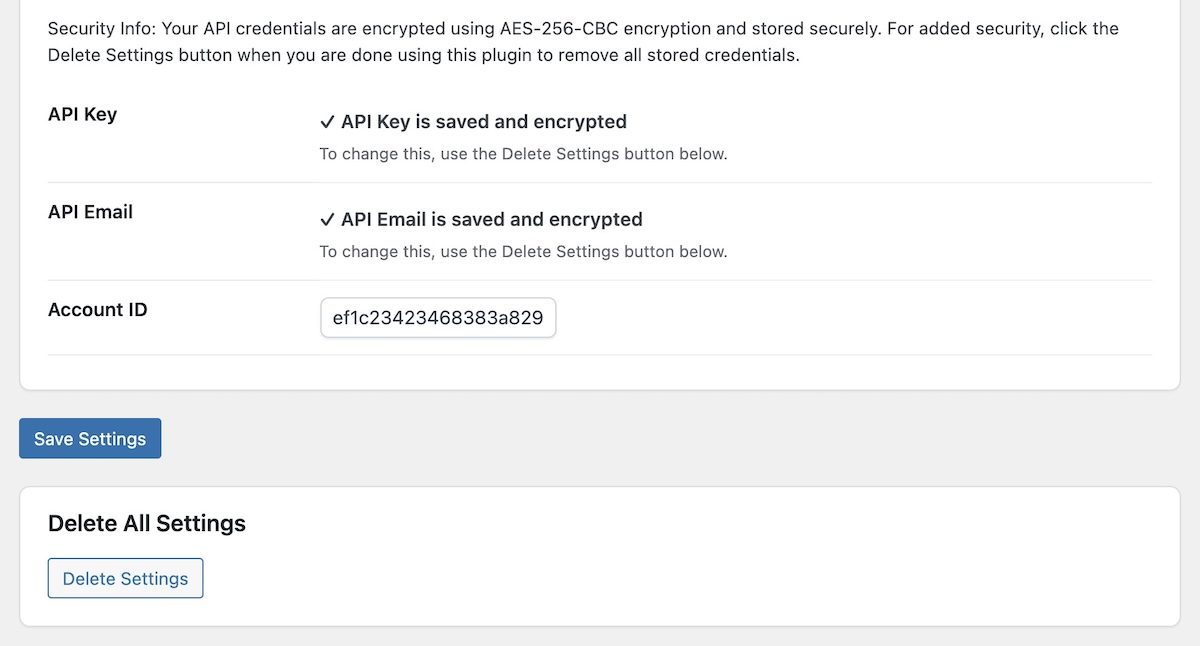
- Secure API credential storage (AES-256-CBC encryption)
- Plugin updates The free plugin does not require an upgrade.
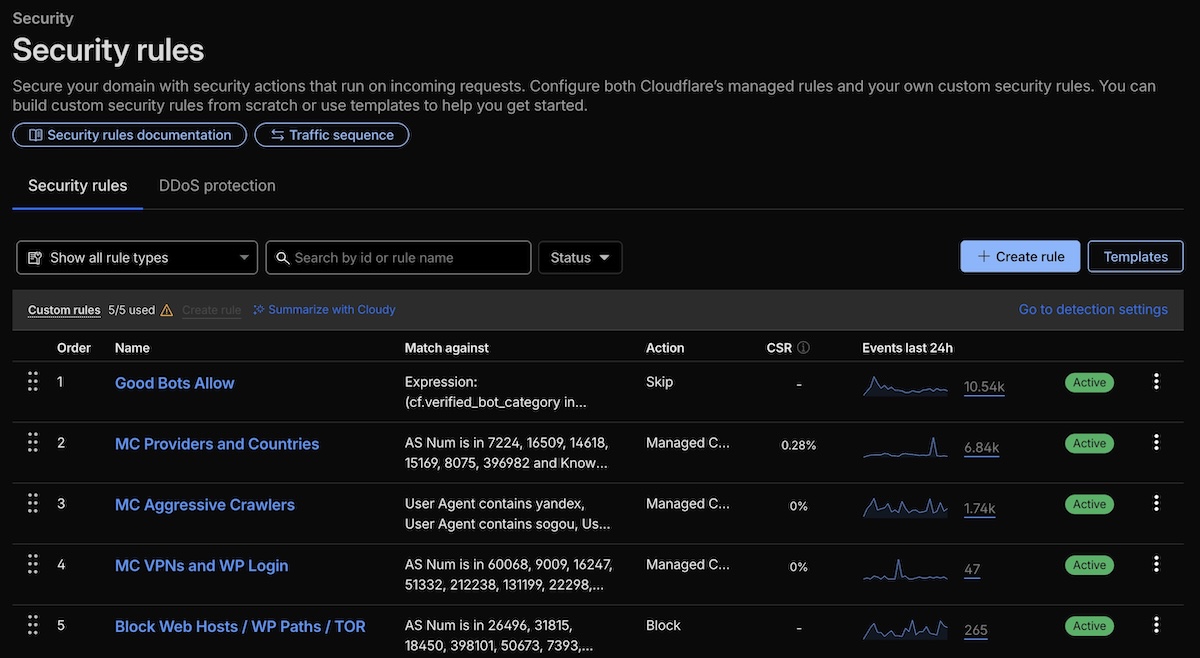
- Good Bot Allowlist - Ensures legitimate bots (Google, Bing, monitoring tools) can access your site
- Managed Challenges for Suspicious Traffic - Automatically challenges requests from certain ASNs and non-US traffic
- Aggressive Crawler Protection - Blocks unauthorized crawlers and bots (Yandex, Semrush, Ahrefs, etc.)
- VPN & Login Protection - Adds extra challenges for VPN traffic and WordPress login attempts
- Block Known Threats - Automatically blocks web hosts, malicious IPs, TOR nodes, and attack vectors
- Multi-Account Management - Automatically manage domains across ALL your Cloudflare accounts
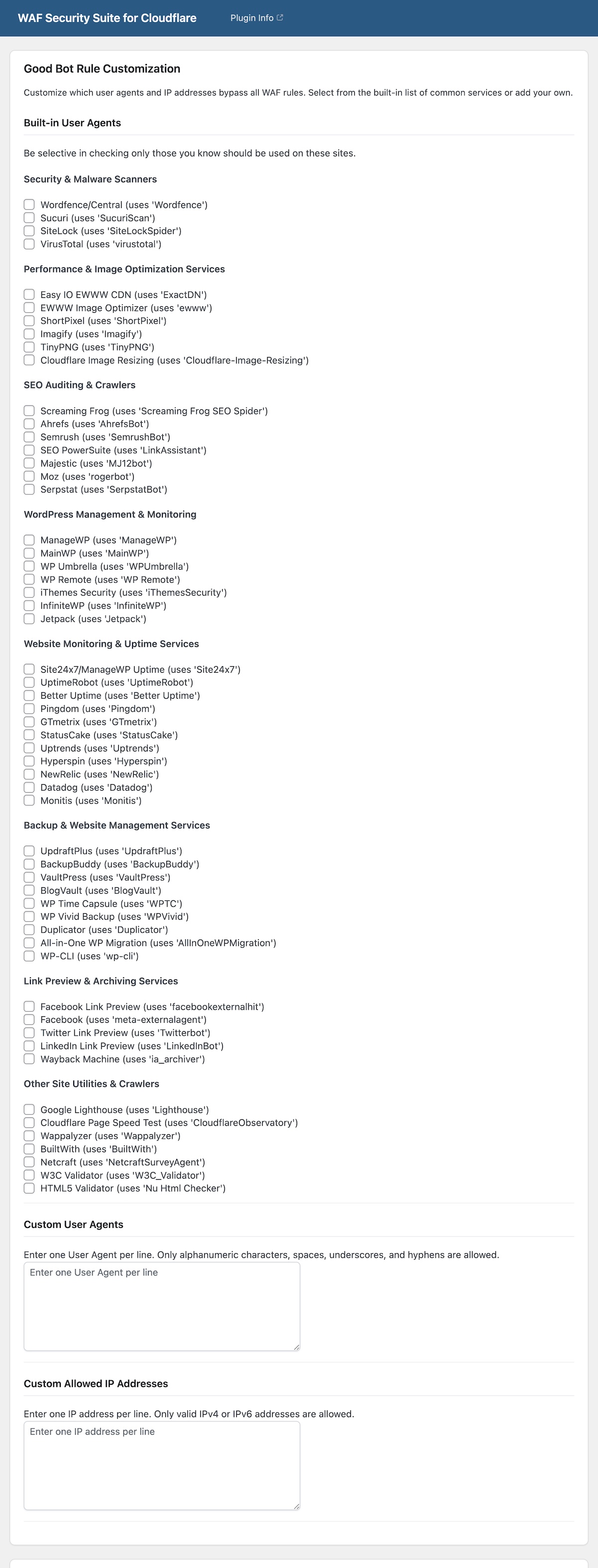
- Easy Bot Whitelisting - Built-in checkboxes for 50+ trusted services across 8 categories
- Custom User Agents - Add your own user agent strings to the Good Bot Rule
- Custom IP Whitelisting - Add trusted IP addresses to the Goot Bot Rule
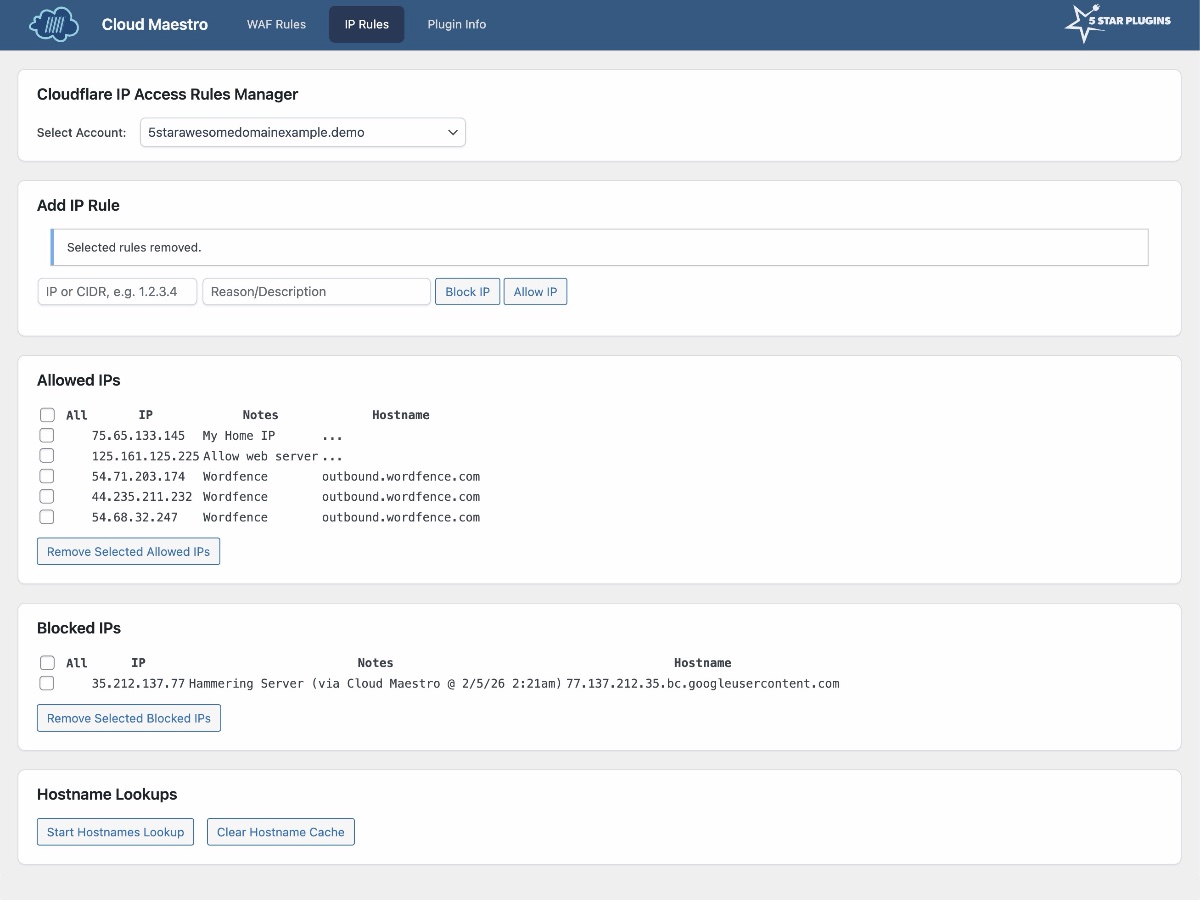
- IP Rules management - View and edit Cloudflare's IP Rules that block or allow access even before hitting WAF rules (and we are working on connecting to fail2ban and Wordfence blocks)
- Bulk DNS Manager - Search and manage DNS records across all domains, bulk migrate IP addresses, CNAME targets, and convert A records to CNAME with a single action
- Priority Support - Get expert help when you need it
- Advanced Customization - Fine-tune rules to match your exact requirements
- Multi-Account Management – Centrally manage unlimited domains across all your Cloudflare accounts
安装:
- Log in to your WordPress admin panel
- Navigate to Plugins → Add New
- Search for "Cloud Maestro"
- Click Install Now and then Activate
- Download the plugin ZIP file
- Log in to your WordPress admin panel
- Navigate to Plugins → Add New → Upload Plugin
- Choose the ZIP file and click Install Now
- Click Activate Plugin
- After activation, navigate to Cloud Maestro in your WordPress admin menu
- Enter your Cloudflare API details:
- API Token - Paste in your existing API Token, or click the Generate New Token button.
- Account ID - Choose your account ID from the drop-down.
- Global API Key is also supported but NOT recommended.
- Click Save Settings to retrieve your domains
- Select the domains you want to protect
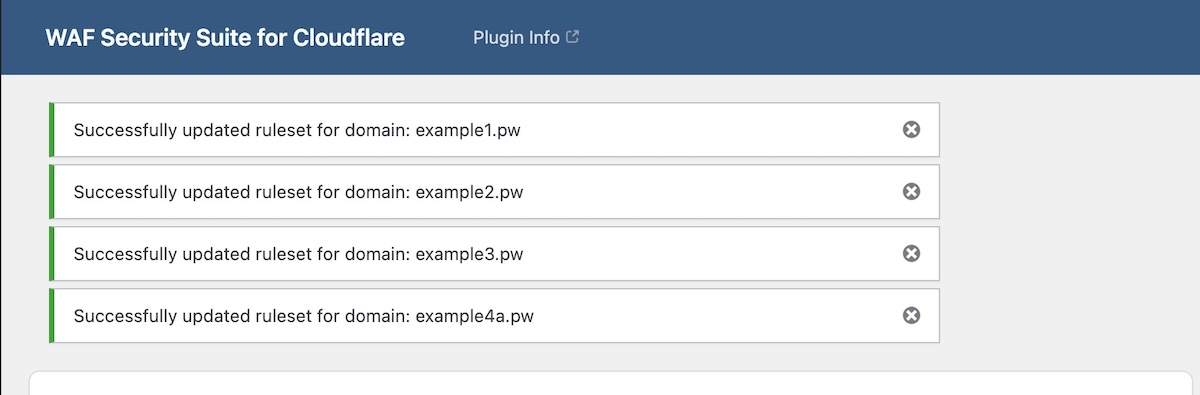
- Click Create/Overwrite All WAF Rules
- Verify the rules in your Cloudflare account to ensure it's working as it should the first time.
屏幕截图:
常见问题:
How It Works
1. Install Once - You only need to install the plugin to one site to manage all of your Cloudflare-connected domains 2. Connect Your Cloudflare Account – Securely enter your API credentials (encrypted and stored safely) 3. Select Your Domains – View all domains in your account with convenient checkboxes 4. Deploy Rules – Click once to apply proven security rules across all selected domains 5. Stay Protected – Your sites are now shielded from thousands of common threats and malicious or resource-hungry traffic
Will this affect my existing Cloudflare rules?
Yes, this plugin replaces the custom WAF rules in your Cloudflare configuration. Any existing custom rules will be overwritten. The plugin does not affect Cloudflare's managed rulesets or other settings—only custom WAF rules.
Are my Cloudflare API credentials secure?
Yes. It uses API Tokens that are stored encrypted using AES-256-CBC (bank-level encryption) securely within WordPress. For additional security, it has a Settings Expiration timer that automatically deletes the API settings, or manually using the "Delete Settings" button when you're not actively managing rules.
Does the free version require a Premium upgrade?
No. The free version works independently and includes centralized WAF rule deployment for one Cloudflare account with multiple domains. The free version is ideal for managing up to 25 domains under one Cloudflare account. Premium expands this to multiple Cloudflare accounts and unlimited domains for agencies and professionals. Additionally, powerful customization options are available, including built-in bot whitelisting, custom user agents, custom IP addresses, and the IP Rules Manager.
Will this work with any Cloudflare plan?
This plugin is designed for Cloudflare Free, Pro, and Business plans. WAF features depend on Cloudflare’s plan limitations. Enterprise plans typically have different WAF rule management and may be controlled by your hosting provider, so this plugin may not be compatible.
Will this block legitimate bots like Google?
No. The first rule explicitly allows verified bots from major search engines (Google, Bing), monitoring services, and other legitimate services. The Premium version offers even more control with 50+ built-in trusted services you can whitelist.
What happens if a monitoring service gets blocked?
If you notice a service can't connect after applying rules, check Cloudflare's Events log to see what was blocked. You can then add that service's user agent or IP to the allowlist. Premium users can do this directly in the plugin with custom user agents and IP fields.
Can I customize or override the rule expressions with code?
Yes! Developers can use WordPress filter hooks to customize or completely replace each rule expression. The plugin provides three filters: fivestar_cfwaf_good_bot_expression, fivestar_cfwaf_managed_challenge_expression, and fivestar_cfwaf_block_expression. Add your custom code to your theme's functions.php, a code snippet, or a custom plugin. For documentation and examples, visit our support site.
You can also more easily add 50+ pre-configured service user agents across 8 categories via the Premium version, which offers simple checkbox selection, and custom text fields to add your own user agents or IPs as desired, and saves those settings for repeated use.
Fair Use Disclaimer:
This plugin is independent and not affiliated, endorsed, or sponsored by Cloudflare®. Trademarks are used under fair use for compatibility and functionality only. No endorsement is implied. This plugin was inspired in part by Troy Glancy’s WAF Rules v3.
更新日志:
- 🐛 Fixed: WAF Rules page no longer requires an Account ID when using API Token authentication — domain checkboxes, user agent checkboxes, and custom IP/user agent fields now display correctly with a token-only setup.
- 🛡️ Fixed: Guarded all plugin functions to prevent redeclare fatals during free-to-premium activation.
- 🔧 i18n: Moved textdomain loading to an
inithook to avoid activation-time conflicts.
- 🔧 Freemius SDK updated.
- ⚡ WAF Rules now use JS to submit and track API calls in parallel to avoid timeouts and faster progress.
- ✅ Premium: Added Managed Challenge country customization with live preview.
- ✅ Premium: Added Block Rule custom URI path strings with live preview.
- 🔄 Premium: Append action now updates Managed Challenge countries and appends missing Block URI clauses.
- 🐛 Fixed: Zones loading logic optimized to avoid iterating accounts (reduces API calls and speeds up domain listing).
- 🔧 UI: Account selection now reloads the settings page on change for immediate domain refresh.
- ⚙️ Internal: Minor refactor to zone retrieval to better respect account scope.
- ✅ Premium: Added switchable Account dropdown (no encrypted save) so premium users can quickly switch accounts without re-saving API credentials.
- ✅ Premium: "All Accounts" option now correctly fetches domains across all accounts only when selected; changing account selection now reloads to show only that account's domains.
- 🌟 Premium: Added Bulk DNS Manager for viewing, searching, and bulk migrating DNS records across domains
- 🔄 Support for bulk IP migrations, CNAME migrations, and A-record to CNAME conversions with parallel processing
- ⚡ Intelligent cache management with 1-hour TTL, concurrent warmup (10 parallel requests), and per-domain cache purge controls
- 🐛 Cache sync fix ensuring per-account transients update after all mutations (bulk migrations, edits, deletes)
- 🐛 Fixed CNAME validation to support underscores in hostnames (required for DKIM, DMARC, SPF records)
- 💬 i18n: Updated all language files via custom potomatic script
- 🌟 Premium: Added "Append To Existing Good Bot Rule" action to append only missing Good Bot criteria instead of overwriting existing custom rule expressions
- ✅ The append option validates the first custom rule action is "skip" before attempting updates
- 🌟 Premium: Added PatchStack IP range to list of services
- 🔧 Premium: Updated ManageWP Uptime Monitoring User Agent
- 🐛 Fixed Good Bot preview so PatchStack selection renders as IP expression criteria instead of a literal
http.user_agent contains "patchstack-ips"clause - 🔧 Updated custom allowed IP expression formatting to grouped
ip.src in { ... }style in preview and applied rules
- 🎨 Expanded allowed characters in custom user agent field, now allows ./;:+()_-@= characters
- 🌟 Premium: Added Accessibility and AI service user agent categories and choices
- 🔧 Updated ManageWP uptime user agent to match their new value, resolves false downtime alerts
- 🐛 Fixed Cloudflare ruleset updates when rule filters are enabled
- 🐛 Removed local-only rule metadata from API payload to prevent JSON errors
- 🔧 Improved API error messaging for faster troubleshooting
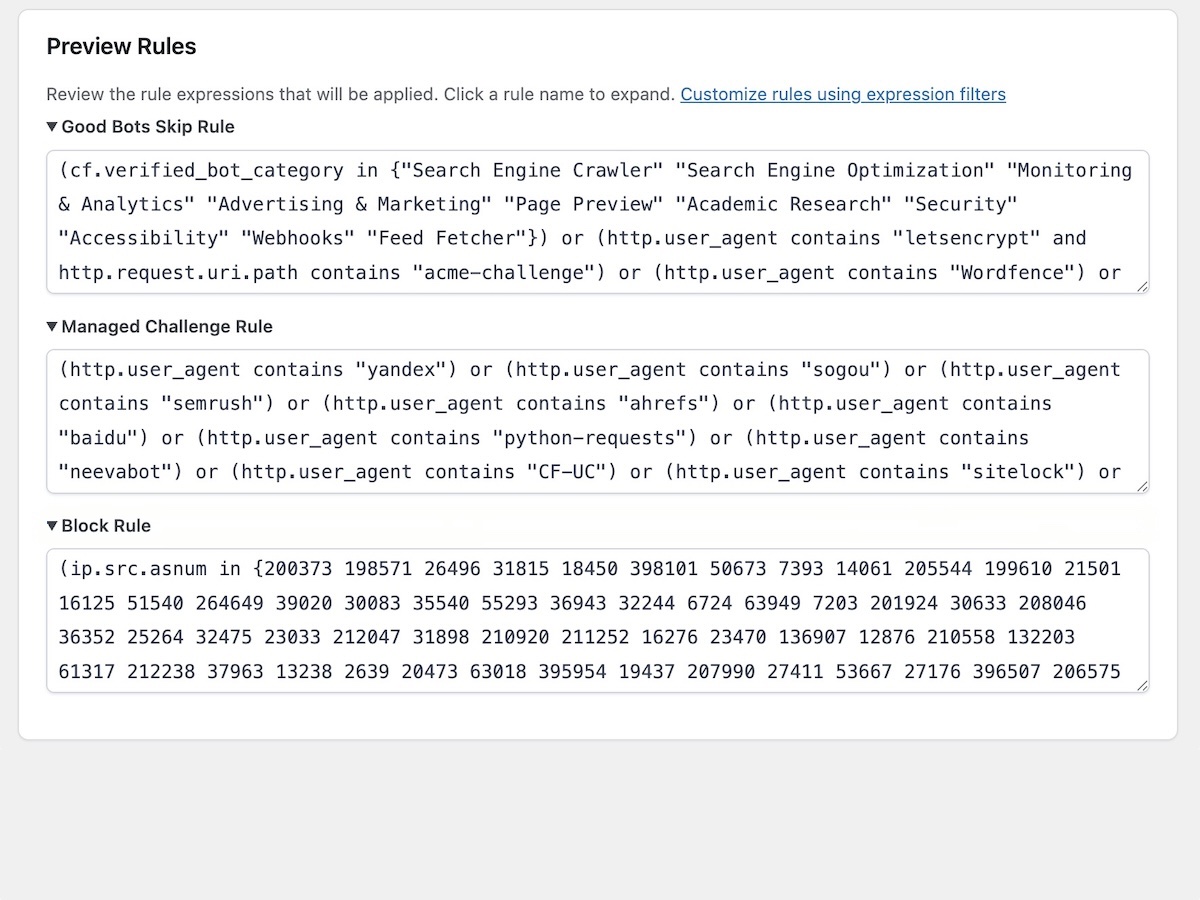
- 🌟 Added Preview Rules section showing expandable rule expressions on WAF Rules page
- ✨ Premium: Live preview updates when customizing Good Bot rules via checkboxes/textareas
- 🔧 Added 3 developer filter hooks for customizing rule expressions via code snippets
- 🐛 Fixed FreeScout support widget loading and initialization
- 📚 Added code documentation and KB article link for filter hooks with usage examples
- 🌟 Boosted security with API Token authentication flow and a convenient Generate Token button (hat tip to Jordan Trask)
- ✅ Auto-fetch and encrypt Cloudflare account ID for API Token users
- ✅ Added API settings expiration timer with WP timezone display
- 🎨 Updated authentication UI and Good Bot gating behavior
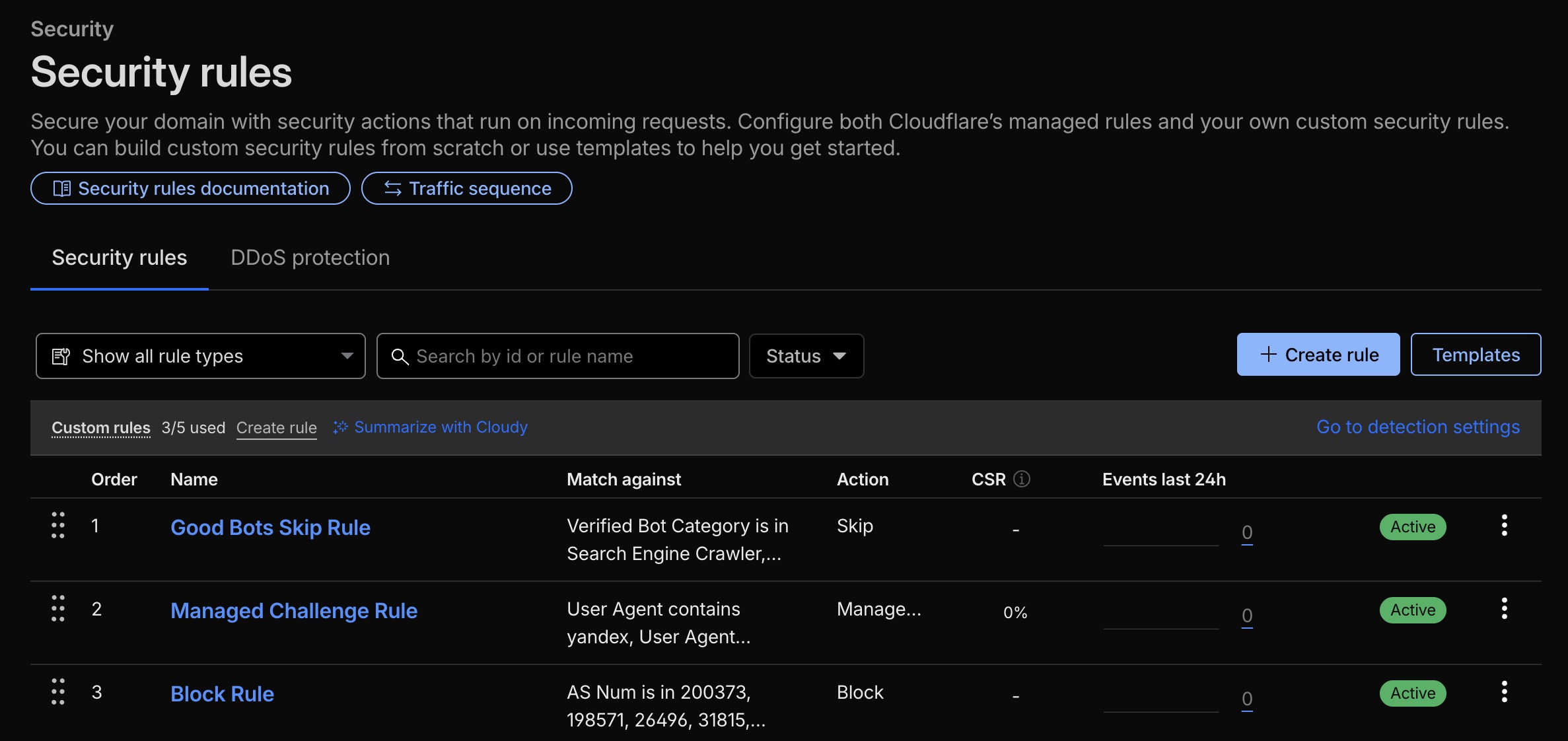
- 🌟 Now optimized to 3 pre-configured security rules (Skip, Challenge, Block)
- ✅ Fixed pagination of IP Rules to display more than 1,000 rules
- 🎨 Tweak the IP Rules Manager page and sections display
- 🌟 Premium: Added IP allow/block Rules management
- ✅ New header design and UX refinements
- 🎨 Add logo to plugin header
- 🐛 Fixed display issue with literal characters appearing in section headings
- ✅ Added confirmation dialog for Delete Settings button to prevent accidental deletion
- 🔒 Enhanced security with additional escaping and code compliance improvements
- 🎨 Minor UI refinements for better user experience
- 🎉 Initial release
- ✅ Bulk WAF rule deployment across multiple domains
- 🔐 AES-256-CBC encryption for API credentials
- 🌟 5 pre-configured security rules
- 🚀 Premium version with multi-account support
- ✨ Premium: 50+ built-in trusted bot checkboxes
- 🎯 Premium: Custom user agent whitelisting
- 🌍 Premium: Custom IP address whitelisting
- 💬 Premium: Priority support
- 📱 Responsive admin interface
- 🎨 Modern UI with dark header design