Advanced Shipment Tracking for WooCommerce
| 开发者 |
zorem
gaurav1092 eranzorem gehorsam satishzorem |
|---|---|
| 更新时间 | 2026年10月22日 13:30 |
| PHP版本: | 7.2 及以上 |
| WordPress版本: | 7.1.3 |
| 版权: | GPLv2 or later |
| 版权网址: | 版权信息 |
标签
下载
详情介绍:
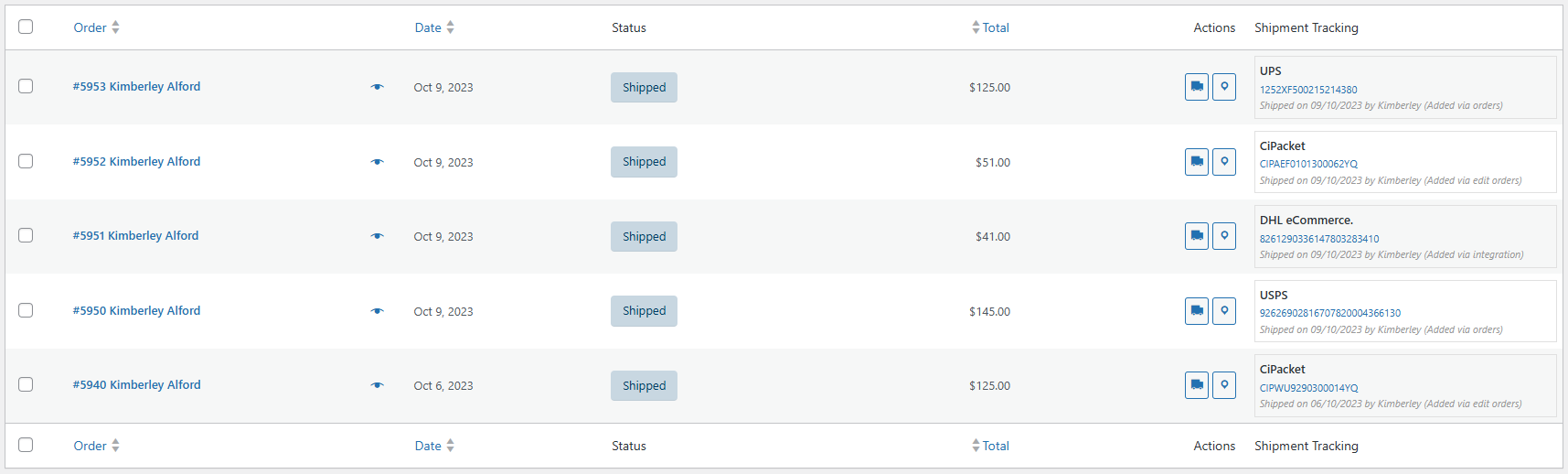
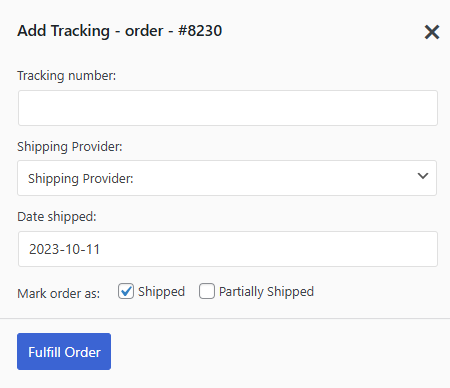
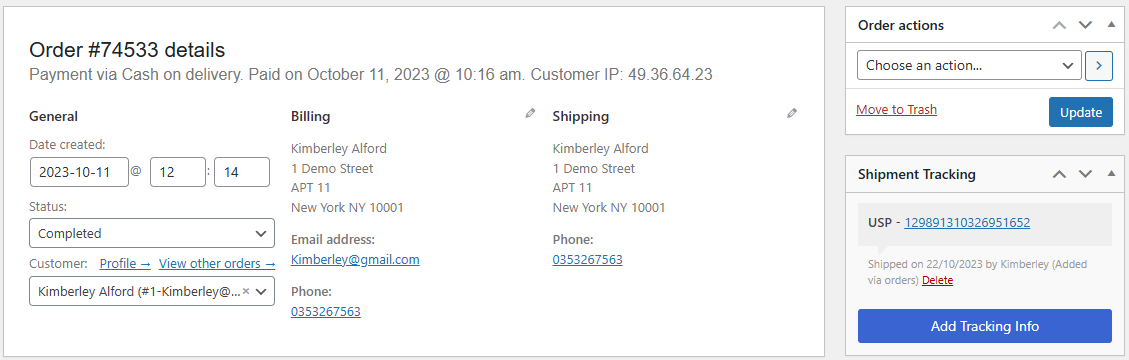
- Add Tracking Numbers Instantly — Add one or multiple tracking numbers per order from the Edit Order page or the order list. Takes seconds.
- "Shipped" & "Partially Shipped" Statuses — Replace the default "Completed" status with "Shipped" and use "Partially Shipped" for split shipments, so customers always know the status of their order.
- Customizable Tracking Widget — A responsive tracking widget appears in order emails and on My Account > Orders. Customize colors, layout, and content with a live preview customizer — no code required.
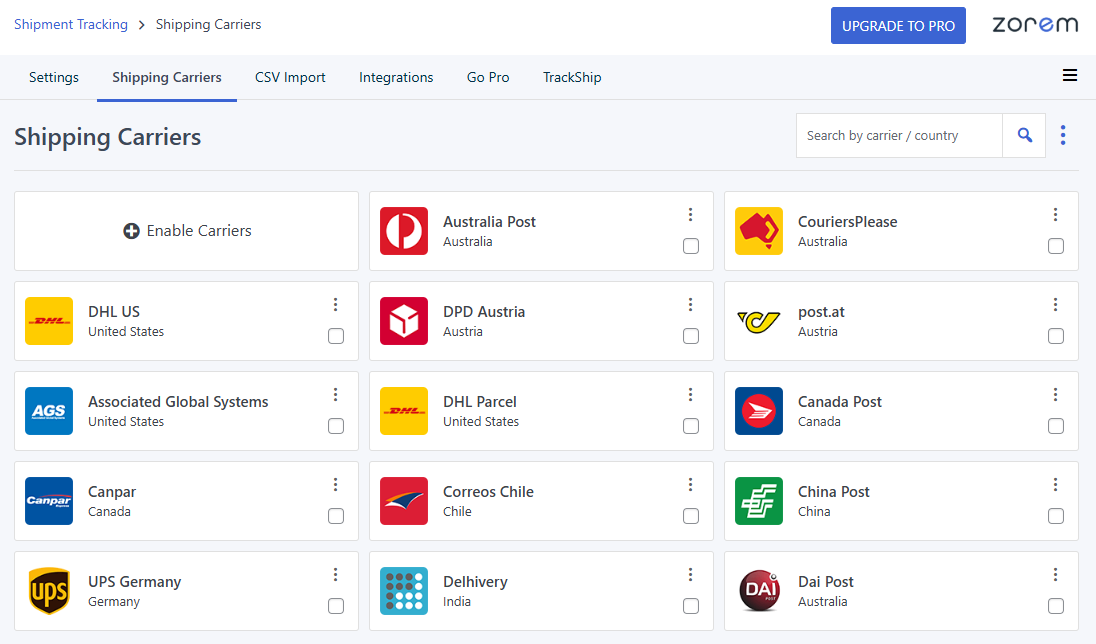
- 1010+ Shipping Carriers Worldwide — Pre-configured tracking links for USPS, UPS, FedEx, DHL, Royal Mail, Australia Post, Canada Post, Delhivery, ePacket, La Poste, Correos, Japan Post, China Post, and hundreds more. View the full carrier list.
- Shipment Tracking REST API — Let third-party shipping services, ERPs, and label generators push tracking data directly to your orders via the WooCommerce REST API. API documentation.
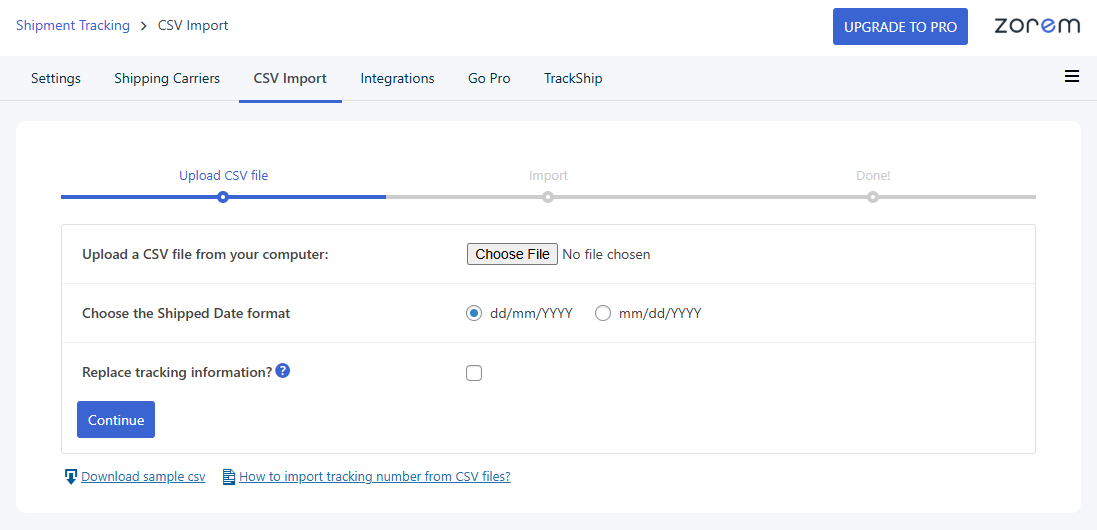
- Bulk CSV Import — Upload a CSV to add tracking numbers to hundreds of orders at once. Perfect for high-volume stores and dropshippers. CSV import guide.
- Works With Your Existing Shipping Tools — Compatible with ShipStation, WooCommerce Shipping, Ordoro, Royal Mail Click & Drop, Sendcloud, Printful, AliExpress dropshipping, and all major label generators.
- HPOS & Block Checkout Ready — Fully compatible with WooCommerce High-Performance Order Storage (custom order tables) and the WooCommerce Cart and Checkout blocks.
- PayPal Tracking Ready — AST stores tracking data in the correct structure for PayPal syncing. Automated PayPal tracking sync (to release holds and reduce disputes) is available in AST PRO.
- Built for Performance — Lightweight, optimized code. Zero measurable impact on page load speed, Core Web Vitals, or checkout performance.
- Install and activate AST — it takes under 2 minutes.
- Select your default shipping carriers from the settings page.
- Add a tracking number to an order — manually, via CSV, or through the REST API.
- AST automatically includes the tracking info and a clickable "Track" link in the customer's order email and My Account page.
- Add tracking numbers manually per order
- Bulk CSV import
- Shipment Tracking REST API
- 1010+ pre-configured shipping carriers
- "Shipped" and "Partially Shipped" order statuses
- Customizable tracking widget (emails + My Account)
- HPOS & Block Checkout compatible
- PayPal tracking data structure (manual sync)
- Migration from WooCommerce Shipment Tracking plugin
- Shipping Service Integrations — ShipStation, WooCommerce Shipping, Ordoro, Royal Mail Click & Drop, Sendcloud, Pirate Ship, Stamps.com, Printful, and more — tracking auto-imports from your shipping label tool.
- PayPal Tracking Sync — Automatically export tracking to PayPal to release payment holds and reduce "Item Not Received" disputes.
- Stripe Tracking Sync — Automatically sync tracking data to Stripe transactions.
- Auto-Detect Carriers — Automatically identify the shipping carrier from the tracking number format — no manual selection needed.
- Item-Level Tracking — Assign tracking numbers to specific line items and quantities within an order.
- Custom & White-Labeled Carriers — Define your own carriers with custom names, logos, and tracking URLs.
- Fulfillment Dashboard — Manage all shipments from one centralized view.
- Automated CSV Import via FTP/SFTP — Schedule recurring bulk tracking imports.
- Custom Email Templates — Enhanced, branded shipping notification emails.
- Priority Support — Faster, dedicated assistance from the Zorem team.
- Automatically update order status based on real carrier events.
- Send branded delivery notifications by email and SMS — without any manual work.
- Offer a branded tracking page on your store instead of sending customers to carrier websites.
- Reduce WISMO ("Where is my order?") tickets with proactive updates.
- Analyze shipping performance and delivery times across carriers.
- Shipping label tools — ShipStation, WooCommerce Shipping, Ordoro, Sendcloud, Pirate Ship, Printful, Royal Mail Click & Drop
- Email customizers — Kadence WooMail, YayMail, WP HTML Mail, Woo Email Customizer
- Multi-vendor — Dokan, WCFM Marketplace, Product Vendors
- Dropshipping — AliExpress, CJ Dropshipping, DSers, Spocket, Zendrop
- PDF invoices — PDF Invoices & Packing Slips for WooCommerce, WooCommerce PDF Invoices
- SMS notifications — SMS for WooCommerce, YITH WooCommerce SMS Notifications
- Custom order numbers — Sequential Order Number, WooCommerce Custom Order Numbers
- SMS for WooCommerce — Automated SMS order and shipping notifications via Twilio, WhatsApp, and 18 other providers.
- Local Pickup PRO — Advanced local pickup with multiple locations, appointment scheduling, and ready-for-pickup notifications.
- Zorem Returns — Self-service returns, exchanges, and store credit management for WooCommerce.
- Customer Email Verification PRO — Block fake accounts and spam orders with OTP-based email verification.
- Country Based Restrictions PRO — Restrict products and payment gateways by customer country using WooCommerce geolocation.
安装:
- Go to Plugins > Add New in your WordPress admin and search for "Advanced Shipment Tracking".
- Click Install Now, then Activate.
- Navigate to WooCommerce > Shipment Tracking to select your default shipping carriers and configure settings.
- Open any order, add a tracking number and shipping carrier — the tracking info will appear in the customer's order email and My Account page automatically.
woo-advanced-shipment-tracking folder to /wp-content/plugins/ and activate through the Plugins menu.
Migrating from WooCommerce Shipment Tracking (official)?
AST automatically detects and migrates all existing tracking data when you activate it. No manual work needed.屏幕截图:
常见问题:
How is AST different from the official WooCommerce Shipment Tracking extension?
AST is built for store owners who want a real fulfillment workflow, not just a basic tracking link. Compared to the official WooCommerce Shipment Tracking extension, AST adds: 1010+ pre-configured shipping carriers (vs ~50), a customizable tracking widget with live preview, a complete Shipped / Partially Shipped fulfillment workflow, bulk CSV import, a Shipment Tracking REST API, and automatic data migration. AST is free, open source, and trusted by 80,000+ active WooCommerce stores.
I'm migrating from WooCommerce Shipment Tracking (by WooCommerce). Will my data carry over?
Yes. When you activate AST, it automatically detects and migrates existing shipment tracking data from the official WooCommerce Shipment Tracking extension. Your customers won't lose access to any tracking information.
How do I add a tracking number to a WooCommerce order?
Open any order from WooCommerce > Orders. You'll see a Shipment Tracking panel. Select your shipping carrier, enter the tracking number, and save. The tracking info and a clickable "Track" link will appear in the customer's order confirmation email and on their My Account > Orders page immediately.
Where do my customers see their tracking information?
Tracking details appear in two places: in the order status email (when the order is marked as Shipped or Completed) and on the customer's My Account > View Order page. Guest customers can also view tracking by entering their email and order ID on the WooCommerce order tracking page.
Can I add multiple tracking numbers to one order?
Yes. You can add as many tracking numbers as needed to a single order — for example, when an order ships in multiple packages. All tracking entries will be displayed to your customer in their order email and on My Account.
Does AST work with ShipStation?
Yes. AST integrates with ShipStation. In AST PRO, tracking numbers from ShipStation shipments are automatically imported to the matching WooCommerce order as soon as the label is created — no manual copy-paste needed. In AST Free, you can import ShipStation tracking numbers using the built-in CSV import tool.
Does AST work with WooCommerce Shipping (the official WooCommerce label tool)?
Yes. AST PRO integrates directly with WooCommerce Shipping so tracking numbers from printed labels are automatically added to the order. In AST Free, you can add the tracking number manually or via CSV.
Does AST integrate with PayPal tracking?
The free version stores tracking data in the correct WooCommerce metadata structure so it's PayPal-ready. Automatic synchronization of tracking to PayPal transactions — which releases payment holds faster and reduces "Item Not Received" disputes — is available in AST PRO.
Can I use AST for dropshipping (AliExpress, CJ Dropshipping, Spocket, etc.)?
Yes. AST is widely used by WooCommerce dropshipping stores. Import tracking numbers from your supplier's CSV file, or use the REST API to push tracking from third-party fulfillment platforms. The 1010+ supported carriers include all major dropshipping logistics providers — ePacket, Yanwen, Yun Express, China Post, 4PX, and others.
Is AST compatible with HPOS (High-Performance Order Storage)?
Yes. AST has fully declared HPOS compatibility and works with WooCommerce's High-Performance Order Storage (custom order tables) for fast performance on high-volume stores.
Does AST work with WooCommerce's Block Checkout?
Yes. AST is compatible with the WooCommerce Block Checkout. Tracking information displays correctly in block-based email templates and on the My Account page regardless of whether you use the classic shortcode checkout or the block checkout.
Can I customize how the tracking widget looks in emails?
Yes. AST includes a built-in live preview customizer where you can control the design, layout, colors, and content of the tracking widget in emails and on the My Account page — no coding required. See the tracking widget customization guide.
Can I assign tracking numbers to specific products in an order?
Item-level tracking (assigning tracking numbers to specific line items and quantities) is available in AST PRO.
My shipping carrier isn't on the list. Can I add a custom carrier?
AST includes 1010+ predefined carriers. If yours is missing, you can suggest it on the feature request board or the support forum. Adding custom carriers with your own name, logo, and tracking URL is available in AST PRO.
Can I import tracking numbers in bulk?
Yes. Use the built-in CSV import tool to add tracking numbers to multiple orders at once. Each row in the CSV corresponds to one tracking entry. AST PRO also supports automated scheduled imports via FTP/SFTP.
Does AST send automatic delivery notifications to customers?
AST sends a tracking notification when the order status changes to Shipped or Completed. For automatic real-time delivery updates at every carrier milestone (in transit, out for delivery, delivered), install TrackShip for WooCommerce.
Does AST work with multi-vendor marketplaces like Dokan or WCFM?
Yes. AST is compatible with Dokan, WCFM Marketplace, and Product Vendors. Vendors can add their own tracking numbers to their orders, and customers receive tracking information through the standard WooCommerce email and My Account flows.
Is there a REST API to add tracking numbers programmatically?
Yes. External shipping services, ERPs, and fulfillment tools can use the AST Shipment Tracking API endpoint to create, update, and delete tracking entries on WooCommerce orders.
Will AST slow down my WooCommerce store?
No. AST is built for performance. It loads tracking assets only on admin order pages and on the customer-facing tracking widget. There is no measurable impact on page load speed, Core Web Vitals, or checkout performance.
Does AST support custom order numbers?
Yes. AST is compatible with popular custom order number plugins. You can use custom order numbers in the CSV import. See the compatibility list for supported plugins.
更新日志:
- Dev – Tested with WooCommerce 11.2.1 and WordPress 7.1.3
- Fix – Date shipped field showed stray “Y-m-d” text and could use the wrong date format on translated sites.
- Dev – Tested with WooCommerce 11.1.2 and WordPress 7.1.2
- Security – The email customizer preview is now limited to store administrators
- Dev – Tested with WooCommerce 11.1.0 and WordPress 7.1
- Dev – Tested with WooCommerce 11.0.1 and WordPress 7.0.4
- Fix – Updated version header in customer-completed-order.php email template for WooCommerce 11.0 compatibility
- Dev – Tested with WooCommerce 10.9.3
- Fix – Hardened the CSV import against a SQL injection vulnerability (CVE-2026-57773).
- Dev – Tested with WooCommerce 10.8.1 and WordPress 7.0
- New – Completely redesigned the AST FREE admin interface with a modern, cleaner look.
- Dev - Tested with WooCommerce 10.7.0
- Fix – Replaced deprecated wc_enqueue_js with wp_add_inline_script for WooCommerce 10.4.0+ compatibility
- Fix - Updated version header in customer-completed-order.php email template for WooCommerce 10.4.0 compatibility
- Dev - Tested with WooCommerce 10.6.1 and WordPress 6.9.4
- Dev - Added support for %phone_number% variable in shipping carrier tracking URLs for dynamic replacement
- Fix - Corrected German translation for "Track" button from "Spur" to "Verfolgen"
- Security - Fixed a vulnerability reported via Patchstack affecting Advanced Shipment Tracking for WooCommerce.
- Dev - Tested with WooCommerce 10.5.0 and WordPress 6.9.1
- Dev - Tested with WooCommerce 10.4.2 and WordPress 6.9
- Fix - Added compatibility handling for RouteApp plugin to prevent conflicts with tracking metadata updates that caused infinite loading when adding tracking.
- Dev - Tested with WooCommerce 10.3.5
- Enhancement – Updated "Shipping Carrier Not Found!" message with a suggestion to sync carriers for the latest list.
- Fix – Updated deprecated WooCommerce script handles (jquery-blockui, jquery-tiptip, serializejson) to new handles (wc-jquery-blockui, wc-jquery-tiptip, wc-serializejson) for compatibility with WooCommerce 10.3+.
- Dev - Tested with WooCommerce 10.2.2 and WordPress 6.8.3
- Improvement - Responsive Design of Tracking Widget on My Account Order Details Page.
- Dev - Tested with WooCommerce 10.1.2
- Fix – Prevented duplicate tracking numbers and incorrect order status changes when pressing Enter in Add Tracking sidebar.
- Fix – Resolved fatal error when tracking numbers contain a percent symbol (%).
- Dev - Tested with WooCommerce 10.0.4 and WordPress 6.8.2
- Improvement – Improved email preview to show tracking widget only for selected statuses.
- Fix - Tooltip Not Working with WooCommerce 10
- Dev - Tested with WooCommerce 9.9.4
- Dev - Updated shipped date format to use hyphens (e.g., dd-mm-YYYY) for clarity.
- Fix - Resolved issue where "Enable Carriers" button did not open the sidebar on the Shipping Carriers page.
- Dev - Tested with WooCommerce 9.9.3
- Fix - Undefined array key "wc-delivered", "wc-partial-shipped" warning in
wc_orders_count()usage.
- Dev - Tested with WooCommerce 9.8.5
- Dev - Update Spanish language translation file
- Dev - Tested with WooCommerce 9.8.4 and WordPress 6.8.1
- Dev - Re-add Option to Add Tracking on Order Update Hook
- Fix – Resolved issue with dismissing notices.
- Dev - Tested with WooCommerce 9.8.1 and WordPress 6.8
- Dev - Added option to log Shipment Tracking API requests in WooCommerce logs.
- Enhancement - Show tracking source (e.g., "Manual", "CSV", "API") in the Shipment Tracking meta box.
- Enhancement - Redesigned the AST settings page.
- Fix - Corrected translation loading timing for the WooCommerce text domain.
- Fix - Fixed preg_replace parameter handling to ensure proper functionality.
- Fix - Resolved incorrect usage of wpdb::prepare, ensuring the correct number of placeholders match the passed arguments.
- Fix - Fixed the Datepicker initialization issue.
- Dev - Tested with WooCommerce 9.7.1
- Fix - Fixed an issue where refund orders were not handled correctly, preventing potential errors.
- Fix - Fixed incorrect function call _load_textdomain_just_in_time, ensuring translation loading for the WooCommerce domain occurs at the correct stage
- Dev - Tested with WooCommerce 9.6.2 and WordPress 6.7.2
- Fix - Resolved CSS override issue with WooCommerce Orders Activity Panel
- Fix - Fixed incorrect function call _load_textdomain_just_in_time, ensuring translation loading for the WooCommerce domain occurs at the correct stage
- Dev - Tested with WooCommerce 9.6.0
- Dev - Added Version Parameter to Shipping Carrier Image URL to Prevent Caching
- Fix - Partially Shipped and Shipped order status email not disabling from Order status & Notification panel
- Fix - Resolved a design compatibility issue with WooCommerce version 9.6.0
- Enhancement – Use custom tracking provider name if exist
- Dev - Tested with WooCommerce 9.5.1
- Dev - Tested with WooCommerce 9.4.3 and WordPress 6.7.1
- Fix - Warning - _load_textdomain_just_in_time was called incorrectly. Translation loading for the ast-pro domain was triggered too early.
- Fix - Warning - Undefined array key tracking_id
- Dev - Added an admin notice for Black Friday Sale
- Fix - PHP Deprecated: preg_replace(): Passing null to parameter #3
- Fix - Translation issue with WordPress 6.7
- Dev - Tested plugin with WordPress 6.7
- Dev - Tested with WooCommerce 9.4.1
- Enhancement – Move Usage Tracking panel from settings to license tab
- Dev - added 'manage_woocommerce' permission through filter
- Dev - Tested with WPML 4.7 and update the documentation
- Dev - Tested plugin with WordPress 6.6.2
- Dev - Tested with WooCommerce 9.3.3
- Fix - Updated tracking order status email doesn't work
- Dev - Tested plugin with WordPress 6.6.1
- Dev - Tested with WooCommerce 9.2.3
- Fix - Resolved an issue where the Tracking Info email template was not being overridden in the theme/child-theme
- Improvement – Updated the string "selected" to use a non-translatable function for better compatibility.
- Dev - Tested plugin with WordPress 6.5.5
- Dev - Tested with WooCommerce 9.0.2
- Fix - Fixed the issue where custom email content was not being saved properly.
- Enhancement – Improved the tracking info template design for responsive
- Dev - Tested plugin with WordPress 6.5.4
- Dev - Tested with WooCommerce 9.0.0
- Add – UTM link for all the external links to zorem.com
- Dev - Tested plugin with WordPress 6.5.2
- Dev - Tested with WooCommerce 8.8.2
- Dev - Add nonce in all the admin message dismissable URL
- Dev - updated the Synch providers API call URL
- Fix - translation issue on Add Tracking slideout
- Fix - Deprecated warnings
- Fix - "Creation of dynamic property WC_Advanced_Shipment_Tracking_Actions::$providers is deprecated"
- Dev - Test plugin with WordPress 6.4.2
- Dev - change date format to 'Y-m-d' in the shipment tracking API response
- Fix - Undefined variable $src
- Fix - $ is not a function while add Tracking
- Enhancement – Update the settings page design
- Enhancement – Updated the Shipping Carriers design
- Dev - Test plugin with WordPress 6.4
- Dev - Compatibility with PHP 8.2
- Improve – the add tracking in edit order details page
- Fix - Undefined property: stdClass::$custom_tracking_url
- Fix - Undefined variable $fluid_hide_shipping_date
- Fix - Remove Mark as Shipped from actions column when the order status is Shipped
- Fix - Shipping carrier not showing on add tracking sidebar
- Fix - Shipping carrier not found in Shipping Carriers list
- Dev - added a filter "wc_ast_default_mark_shipped" to unchecked the uncheck the Mark order as: Shipped checkbox
- Enhancement – Update the design of the Add tracking popup
- Enhancement – Updated the design of Shipping Carriers list
- Enhancement – Change the terminology "Shipping providers" to "Shipping Carriers"
- Dev - Add script in footer for Open the Track Button link in a new tab option
- Dev - Tested plugin with WordPress 6.3.1
- Dev - Tested with WooCommerce 8.2
- Improve - Duplicate Queries on orders list
- Fix - search by country name not working in shipping providers list
- Fix - Undefined variable $tracking_number on woo-advanced-shipment-tracking/includes/class-wc-advanced-shipment-tracking.php on line 1076
- Enhancement – Improve the Shipping providers list page header design
- Enhancement – Add an option in the settings for Usage Tracking
- Enhancement – Update the Usage data sign-up box content
- Dev - Remove the trackship tracking page functionality and add a filter on ast_tracking_link for TrackShip to use
- Fix - Vulnerable to Cross Site Request Forgery (CSRF)
- Enhancement – Added admin message for Survey
- Dev - Add validation in CSV Import when added short tracking number
- Dev - Remove the TrackShip message for TrackShip connected but TrackShip For WooCommerce is not installed
- Dev - Add Plain Fluid Tracking Info template
- Dev - Delete old tracking from TrackShip while Replace tracking information in CSV Import
- Dev - Change tracking info email template structure from Div to Table
- Fix - Customizer save issue in Firefox
- Fix - Fatal Error - Error message: Uncaught Automaic\WooCommerce\Vendor\League\Container\Exception\NotFoundException: Alias is not being managed by the container
- Add - Declared HPOS compatibility.
- Dev - Change TrackShip tracking page link
- Dev - In Shipment tracking REST API response use store date format for shipped date
- Enhancement - Upgrade the settings page design
- Enhancement - Open tracking link on new tab in My Account page
- Fix - Order status Email content formatting issue
- Fix - "syntax error, unexpected ')' in class-wc-advanced-shipment-tracking.php on line 916" with PHP 7.2
- Enhancement - Move the fulfillment workflow panel on top in the settings page and updated the design of it
- Enhancement - Added "Display shipped/tracker section" option in the Tracking Widget customizer
- Fix - Translation issue in Tracking Widget
- Dev - tested with WooCommerce 6.8.0
- Enhancement - Added completed email in the AST customizer so you can customize Completed email subject, heading and content
- Enhancement - Implement the new customizer for tracking widget and custom order status
- Enhancement - Re-design Tracking info widget
- Enhancement - Improve the Go Pro popup design
- Enhancement - Remove the Integrations tab from Shipment Tracking settings page
- Dev - tested with WooCommerce 6.7.0 and WordPress 6.0.1
- Dev - tested with WooCommerce 6.6.1
- Fix - Updated tracking email not sent
- Fix - Change esc_html__ to esc_html for dynamic variable in plain tracking info email template
- Dev - Change CURL to wp_remote_get to get the shipping provider image
- Dev - Remove text-domain from all the dynamic variables
- Dev - Improved the CSV Import functionality to work with shipping provider slug
- Dev - tested with WooCommerce 6.6
- Enhancement - Added AST PRO promotion message box in shipment tracking settings page
- Enhancement - Improved the design of TrackShip promotion page
- Dev - Removed the shipping providers zip file from plugin
- Dev - Improved code security
- Fix - Shipped date issue in spanish
- Enhancement - When sync providers, provider is disabled by default
- Dev - Update Greek translation files
- Dev - Test plugin with WooCommerce 6.5.1 and WordPress 6.0
- Dev - Test plugin with WooCommerce Multilingual 5.0.0
- Dev - Added compatibility with the Weglot Translation plugin
- Fix - Sync providers issue on plugin activation
- Fix - Date issue when adding tracking from CSV/API/Manually
- Enhancement - Make Shipped and Partially Shipped unremovable from Order Emails Display option
- Enhancement - Add Docs, Support and Review link on plugins page
- Enhancement - Added Sync providers Message on Shipping Providers list settings page
- Dev - Updated Croatian Translation Files
- Dev - Updated Deprecated jQuery code for jQuery keyup function
- Dev - Improve the synch providers functionality based on provider_slug
- Dev - Tested with WP 5.9.2 and WC 6.3.1
- Fix - Fixed error when add tracking information to order for PHP 8
- Fix - Fixed synch providers issue for J&T provider
- Dev - Added back the Delivered order status
- Dev - Added ParcelForce Integration
- Dev - Added admin message for database synch
- Dev - Removed TrackShip functionality
- Enhancement - Add line break for tracking # - orders list page
- Enhancement - Change uninstall > deactivate when deactivating the plugin
- Enhancement - Updated the design of settings page
- Enhancement - Updated the design of Go Pro page
- Enhancement - Remove clickable link from shipment tracking column in orders list page
- Enhancement - Updated addons page design
- Enhancement - Remove preview order option from tracking info and order status email customizer and set default dummy data
- Fix - Warning: Invalid argument supplied for foreach() in plugins/woo-advanced-shipment-tracking/includes/class-wc-advanced-shipment-tracking-admin.php on line 1801
- Dev - Removed the 'manage_woocommerce' capability when add tracking to orders
- Dev - Improve code security
- Fix - Fixed shipping provider search issue in Shipping provider settings page
- Dev - Improve code quality and security
- Enhancement - Added go pro lightbox in shipping provider page and integration page
- Dev - Added condition for standalone pro version
- Enhancement - Updated settings page design
- Dev - Removed Add custom provider functionality from shipping provider list
- Dev - Removed Edit custom provider functionality from shipping provider list
- Dev - Improved the security
- Enhancement - Added TrackShip menu inside Shipment Tracking if TrackShip not connected
- Dev - Tested with WordPress 5.7.2 and WooCommerce 5.3
- Dev - Added admin notice for the TrackShip For WooCommerce plugin
- Dev - Added WPML compatibility with TrackShip connection
- Fix - Fixed warning - Undefined array key "wc_ast_tracking_page_customize_btn"
- Dev - Tracking page on carriers website in Orders which are not tracked by TrackShip
- Dev - Tested with WooCommerce 5.2.0
- Fix - Fixed issue with default shipping provider not automatically select on Add Tracking form
- Dev - When user migrates from WooCommerce Shipment Tracking (official) to Advanced Shipment Tracking for WooCommerce plugin it will automatically migrate shipment tracking data
- Fix - Fix search providers design issue for small screen on shipping providers list page
- Dev - Improve TrackShip Tracking page design and make Estimate delivery date multilingual compatible
- Fix - Fixed - Failed Attempt filter not working on orders page
- Enhancement - Added datepicker on Add tracking lightbox on orders page
- Enhancement - Removed the multiple API name option
- Dev - Updated Admin html function
- Enhancement - Update order details, Shipping address and billing address email template
- Enhancement - Added admin notice and WooCommerce inbox message for Advanced Shipment Tracking PRO
- Enhancement - Split Shipment Tracking customizer and TrackShip customizer
- Fix - Fixed issue with the "Reset providers database" option in Synch providers
- Enhancement - Updated Settings page header design
- Enhancement - Updated TrackShip Settings page header design
- Enhancement - Updated Email order details template for shipment status emails
- Fix - Fixed Trackship shipment status customizer issue
- Fix - Fixed database warnings on plugin installation