
WP-jTweets
详情介绍:
A widget that shows a user's recent posts from X (formerly Twitter). It can fade the posts in and out one at a time using the jQuery that ships with WordPress, or simply list them. You choose how many posts to show and how long each stays. It is simple, but if you know CSS you can make it look very nice.
Important: reading posts requires an X developer account and an X API plan that allows reading posts. X controls which plans include this and what they cost. See https://docs.x.com/ for current details.
安装:
- Upload the plugin to the
/wp-content/plugins/directory and activate it. - Go to Appearance > Widgets and add the "WP jTweets" widget to a sidebar.
- Enter the X username to display.
- Enter your X API Bearer Token (see "Getting a Bearer Token" below).
屏幕截图:
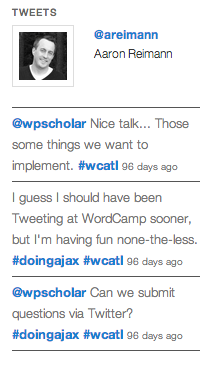
常见问题:
Why do I need a Bearer Token now?
X retired the old v1.1 API that earlier versions of this plugin used. Version 2.0 uses the X API v2, which needs only a Bearer Token. The old API key, secret and access token fields are no longer used.
The widget says "No tweets to display"
If you are logged in as an administrator, the widget also shows the reason (for example a bad token, or an API plan that does not allow reading posts). Failed requests are cached for 5 minutes.
更新日志:
2.0.0
- Uses the X API v2 with a Bearer Token (the v1.1 API no longer works). The old key/secret/token fields are removed.
- Replaced the bundled TwitterOAuth library with the WordPress HTTP API. cURL is no longer required, and SSL certificates are now verified.
- Output is escaped. Tweet text, usernames and links are sanitized.
- Widget settings are sanitized when saved.
- "Show retweets" and "Open links in new window" now work.
- The stylesheet and script only load on pages that show the widget.
- Fixed duplicate class attribute and misspelled avatar CSS classes.
- Documented the external service. Declared the license in the readme.
- Compatible with PHP 7.2 to 8.5.
- Changed some of the naming to match what Twitter now calls the fields.
- Standardizes the code to be more "The WP Way"
- Added classes (in addition to IDs for backwards compatibility) to display multiple Twitter IDs on the same page
- Styling and JS now run off of classes
- Added option to allow resizing on fading tweets
- Adds option to display or not to retweets
- Adds an option to show "header" section to show the user's name and avatar
- Adds linking for @usernames, #hashtags and URLs
- Adds basic theming options
- Adds transient for "caching" of the feed
- Uses the Twitter API version 1.1
- Wraps the LI's into a UL for better HTML validation
- Adds the ability to disable the fade in/out and just display the feed without jQuery
- Calls in a style.css within the plugin so you don't have to drop in the CSS in a theme
- Uses jQuery 'data' method to pass time rotation instead of showing in the HTML
- Adds some error checking in case the Twitter user doesn't exist or the feed doesn't pull
- Changes to use the new Twitter API which caused an "array_slice" error
- Removed redundant Javascript in the front end
- Readme and notes changes
- Initial release