
Better RSS Widget
| 开发者 | grandslambert |
|---|---|
| 更新时间 | 2026年10月21日 08:16 |
| 捐献地址: | 去捐款 |
| PHP版本: | 7.4 及以上 |
| WordPress版本: | 7.1 |
| 版权: | GPLv2 or later |
| 版权网址: | 版权信息 |
详情介绍:
- Add title or post tags to the feed URL in the shortcode.
- Excerpt length can be set in both the widget and the shortcode.
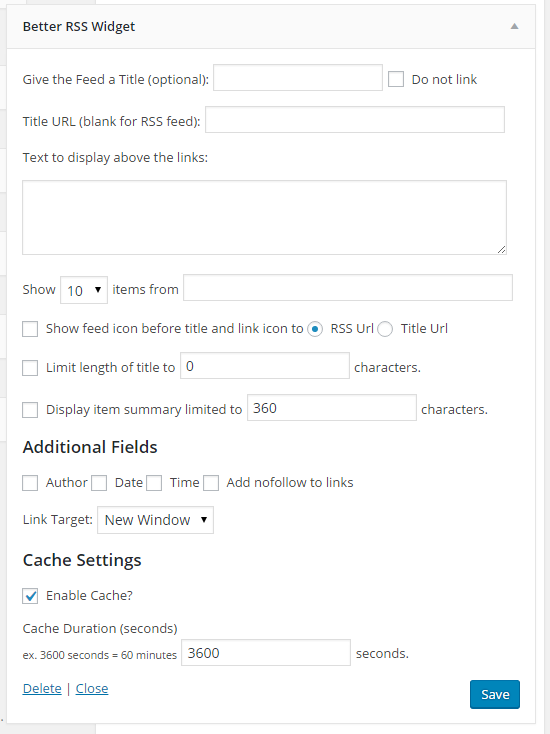
- Limit the number of characters to display for the title of the post.
- Add text or html before the list of posts on widgets.
- Shortcode to allow embedding RSS feeds into posts and pages.
- Elementor RSS List and RSS Grid widgets, with style controls for the feed, items, and text. The list places the image above, left, or right. The grid places the image above the text and sets the columns.
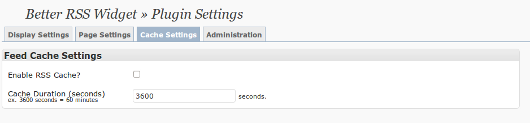
- Choose whether to cache the RSS feed and set the cache duration per feed, defaults to 3600 seconds (1 hour).
- Option to display the post time.
- Allows multiple widgets each with different settings.
- Adds the link target to both the RSS Title and all articles.
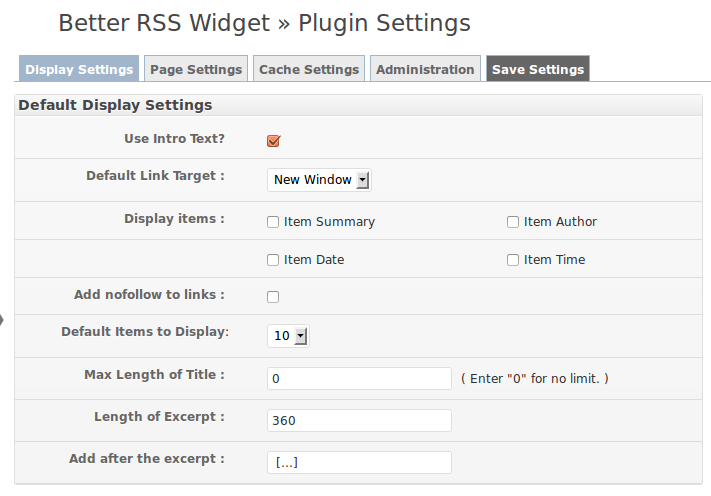
- Default settings screen allows you to decide what defaults will appear when adding a new widget.
- 英文
- Spanish
- Italian
- German
- French
安装:
- Upload
better-rss-widgetfolder to the/wp-content/plugins/directory - 通过 WordPress 的“插件”菜单激活插件
- Configure the defaults on the options menu screen.
- Add new "Better RSS Widgets" or replace existing "RSS" widgets to use the new settings.
屏幕截图:

常见问题:
Why this plugin when there is already an RSS Widget?
At the time this plugin was created (Wordpress version 2.8.4), the built in widget did not have an option to force RSS links to open in a new window. The only way to do this was to hack into the core code of Wordpress, which is not recommended. It is hoped that eventually Wordpress will simply add this option to their widget, but until then, this becomes a quick and easy solution.
Does this replace the built-in RSS widget?
No. Activating Better RSS Widget does not remove or change the built-in RSS widget. Add a Better RSS Widget, use the better-rss shortcode, or add RSS List or RSS Grid in Elementor. Leave older RSS widgets in place until you are ready to switch them.
Do I need Elementor?
No. The classic widget, the settings screen, and the better-rss shortcode work without Elementor. Install Elementor when you want RSS List or RSS Grid. If Elementor is active, its automatic copy of the classic widget is hidden so those two widgets are the ones you add.
What is the difference between RSS List and RSS Grid?
RSS List stacks feed items in one column. The image can sit above the text, to the left, or to the right. RSS Grid lays the same feed out as cards. You choose the number of columns, and the image sits above the text. Both widgets use the same feed URL, item count, excerpt, author, date, time, link target, and cache.
Can the Elementor widgets show the image from the feed?
Yes. Turn on Display item image. RSS List can place that image above, left, or right, and you can set its width. RSS Grid places it above the text. Set one height and an object fit (cover, contain, fill, none, or scale down) so the card images line up.
Can the widget title come from the feed?
Yes, in Elementor. Title source can be your own text, the feed title, or the feed description. On the classic widget, leave the title blank to use the feed title.
How do date, time, and author display?
In Elementor they sit in one group. That group can be a stacked list or a single inline line. Show or hide the date, the time, and the author on their own. The classic widget and the shortcode still print those fields in the original order.
Can I color the title, excerpt, and meta?
Yes. In the Style tab, the item title, the excerpt, and the meta group each have a background color and padding. Each of those areas, and the image, can also grow or shrink so they share the space in the item.
Where can I get support?
更新日志:
- The Feed URL on the Elementor RSS List and RSS Grid widgets can use a dynamic tag.
- Plugin header, readme, and license now meet current WordPress.org requirements (GPL-2.0-or-later, Requires PHP 7.4, Tested up to 7.1, text domain better-rss-widget).
- Settings are sanitized and saved through the Settings API.
- Output is escaped. The feed icon link target is now written correctly (it was previously literal text). The default excerpt suffix renders as an ellipsis instead of a double-encoded entity. Intro text may contain post HTML again. Shortcode list tags are limited to a safe set.
- Bundled translations still load. The old load_plugin_textdomain() call passed an extra argument that is fatal on PHP 8.
- Existing widget id better_rss_widget, shortcode better-rss, and option name better-rss-widget-options are unchanged.
- Both Elementor widgets include a title HTML tag and style controls for the feed box, title, icon, intro, items, excerpt, date, time, and author. The classic widget and shortcode remain.
- Elementor RSS List and RSS Grid widgets, so each layout only shows the controls it uses. The list places the image above, left, or right. The grid places the image above the text, with a column count plus a shared image height and object fit.
- The Elementor widget title can be custom text, the feed title, or the feed description.
- RSS Grid images have a height plus object fit (cover, contain, fill, none, or scale down) and object position, so the cards can share one frame.
- Date, time, and author sit in one group that can be a stacked list or a single inline line.
- Item title, excerpt, and meta each have a background color and padding.
- Image, title, meta, and excerpt can grow or shrink so each area takes or gives space in the item.
- Donate links in the readme and on the settings screen open the plugin page, where donations are handled by Stripe.
- Settings screen uses a padded two-column layout. Field labels, checkboxes, and the side panels no longer sit against the box edges.
- The empty-feed message is escaped with the same allowed list tags as the rest of the feed markup.
- The readme FAQ explains RSS List, RSS Grid, feed images, the title source, and item styling.
- Removed the unused admin css and js as they were no longer needed.
- Updated the code to remove deprecated functions.
- Updated the widget call to use current WordPress functionality.
- Tested int 6.1.1 and it works again!
- Emergency release to fix missing widgets.
- Tested and made enhancements to work with the latest version of WordPress (4.4.1)
- Added option to change the HTML tags used for the list.
- Fixed link to support to use the WordPress support area.
- Removed the "Display this widget on" feature. Please use JetPack's Widget Visibility feature for this.
- Quick fix to properly display the list of contributors.
- Updated links in preparation for new features.
- Fixed errors in language file so all text can be translated.
- Added the ability to include a short description before the list.
- Changed the language on the widget form to make the page selection more clear.
- Defaulted all display settings to checked for easier installs.
- Fixed a bug that did not keep all settings set when saving widget settings.
- Changed the plugin options to use an object for cleaner code.
- Turned on the RSS Cache by default. Can be turned off in settings.
- Added default options in settings to the shortcode display - now follows your settings.
- Fixed an error where the link target setting was not used in the shortcode.
- Shortcode now uses the cache if it is enable in the plugin settings.
- Added an option on the administration tab to search for instances of shortcode in all post types.
- Added language translations for Spanish, French, German, and Italian.
- Changed some code to work with the newly released WordPress 3.1 version.
- Removed some error code during the plugin activation sequence.
- Fixed a couple errors in the langauge settings.
- Fixed the reset and save settings tabs so they do not conflict with other plugins.
- Fixed an issue where the link target setting was not working.
- Fixed an issue on the widget form that prevented some settings from being unset.
- Fixed an issue where the feed title was not used with the form title was left blank.
- Cleaned up code to remove extra stuff and reduce load.
- Updated the settings screen to use my standard tabs.
- Fixed a bug that would not allow you to set the target of links to none.
- Fixed a bug that would force default settings over widget settings.
- Added an option to link the RSS Icon to either the RSS URL or the URL entered for the title of the widget.
- Added an option to not link the title of the widget.
- Adjusted the widget form to reduce the height.
- Fixed a bug that caused IE8 to display all text after a feed as a link.
- Fixed broken links on the settings page.
- Fixed a few text entries to allow full language translation.
- Added the ability to set the number of words for item descriptions.
- Added option to set the link URL for the feed title.
- Added option in sidebar widget to hide the feed icon.
- Fixing a bug created by adding the features in 1.8.
- Added option for shortcode to use title or tags in the feed URL.
- Fixed some code issues that were causing problems in 2.9.2.
- Added fields to make it easier to translate the plugin.
- Fixed a bug where the widget defaults were overridding the instance settings.
- Added two new global options, excerpt length and exerpt prefix.
- I really SHOULD look at all the suggestions when doing upgrades. :)
- Added option to add a nofollow tag to all links.
- Converted the options to save in one record instead of multiple records.
- Code cleanup and optimization.
- Removed a line of debug code that displayed with the shortcode.
- Removed code that caused the plugin to cause fatal errors on PHP4 servers.
- Fixed a bug so the plugin works in Wordpress MU.
- Added an option to the shortcode to display only the content, or the title if the content is blank.
- Added conditionals to the widget to limit display to certain page types.
- Added a shortcode to allow embedding RSS feeds into posts and pages.
- Removed some debugging code left during the 0.8 upgrade.
- Added option to disable the feed cache (enabled by default).
- Change the default cache duration from 12 hours, set by Wordpress, to 1 hour.
- Added option to set the cache duration globally and per widget.
- Added option to display the time for items.
- Fixed a bug where the default settings were not being used in the widget form.
- Fixed an error that prevent the widget form appearing on servers running PHP4.
- Cleaned up the code and fixed a security issue.
- Added a screenshot of the new screen.
- Fixed a bug that caused a problem on older versions of RSS feeds.
- First release