
Code Engine - PHP Snippets, AI Functions & Automation for WordPress
| 开发者 | TigrouMeow |
|---|---|
| 更新时间 | 2026年10月25日 15:02 |
| 捐献地址: | 去捐款 |
| PHP版本: | 8.1 及以上 |
| WordPress版本: | 7.1 |
| 版权: | GPLv2 or later |
| 版权网址: | 版权信息 |
详情介绍:
安装:
- Upload
code-engineto the/wp-content/plugins/directory (or install it from the Plugins screen). - Activate the plugin through the 'Plugins' menu in WordPress.
- Head to Meow Apps → Code Engine and create your first snippet.
- (Optional) Install AI Engine to write snippets with AI and expose your functions as chatbot tools.
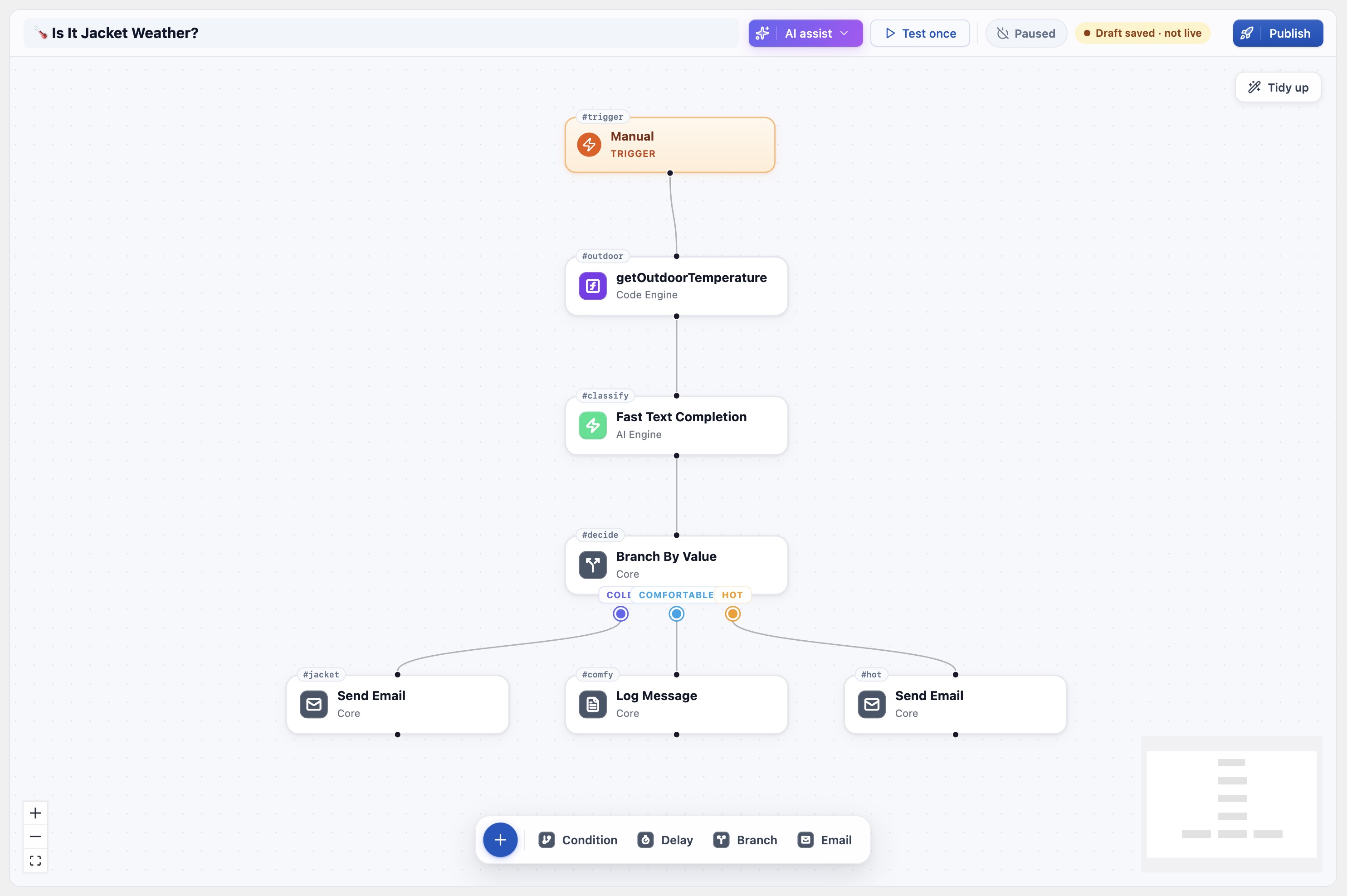
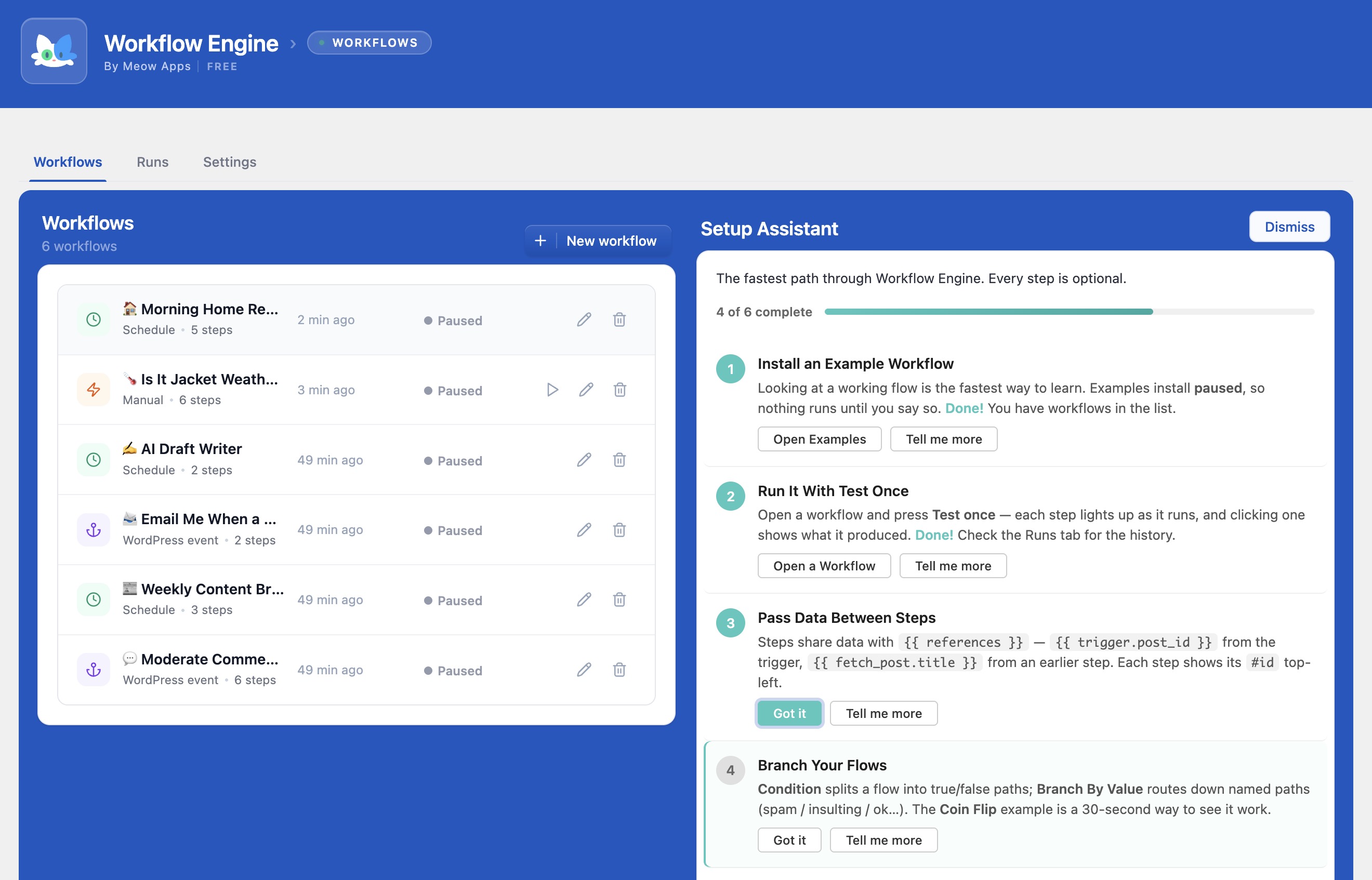
- (Optional) Install Workflow Engine to use your functions as visual workflow steps.
屏幕截图:
常见问题:
What's the difference between a snippet and a Function?
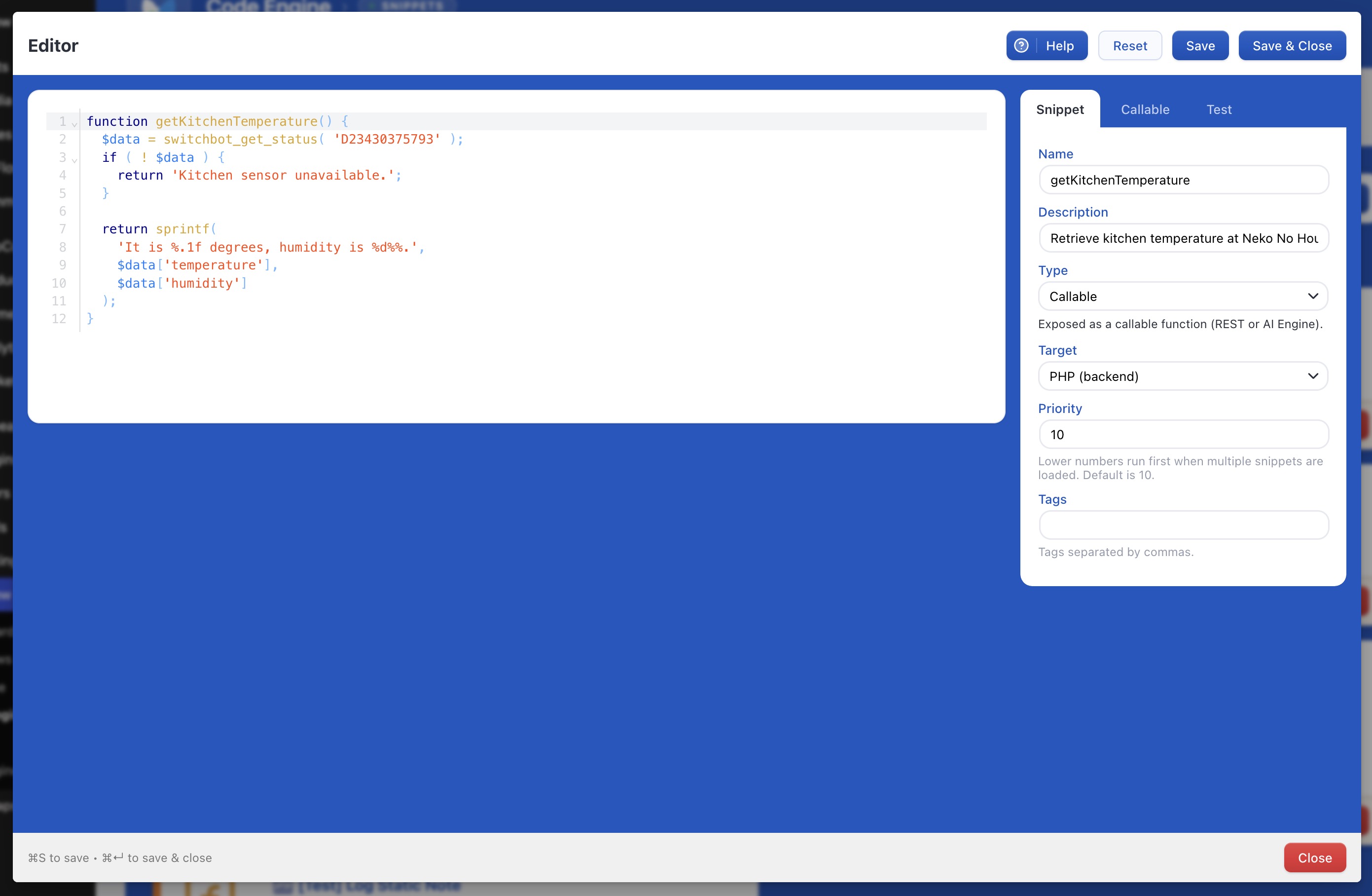
A regular snippet (Persistent, Frontend, Backend, Scheduled, Content) runs automatically based on its scope. A Function is a named, callable snippet with arguments. It runs on demand, and that's exactly what makes it reusable as an AI tool, a workflow step, or a REST endpoint.
Do I need AI Engine or Workflow Engine to use Code Engine?
No. Code Engine is a fully capable snippets manager on its own. AI Engine unlocks AI-assisted writing and exposes your functions as AI tools; Workflow Engine turns your functions into visual steps. Each is optional, but together they're where the fun begins. 😊
How do my functions become AI tools?
With AI Engine active, Code Engine registers your functions through function calling and MCP. Your on-site chatbots can call them, and external AI agents (Claude, Claude Code, ChatGPT, OpenClaw) can too. Each argument you declare becomes a parameter the AI can fill in.
How do I call a snippet from Make.com, n8n, or a webhook?
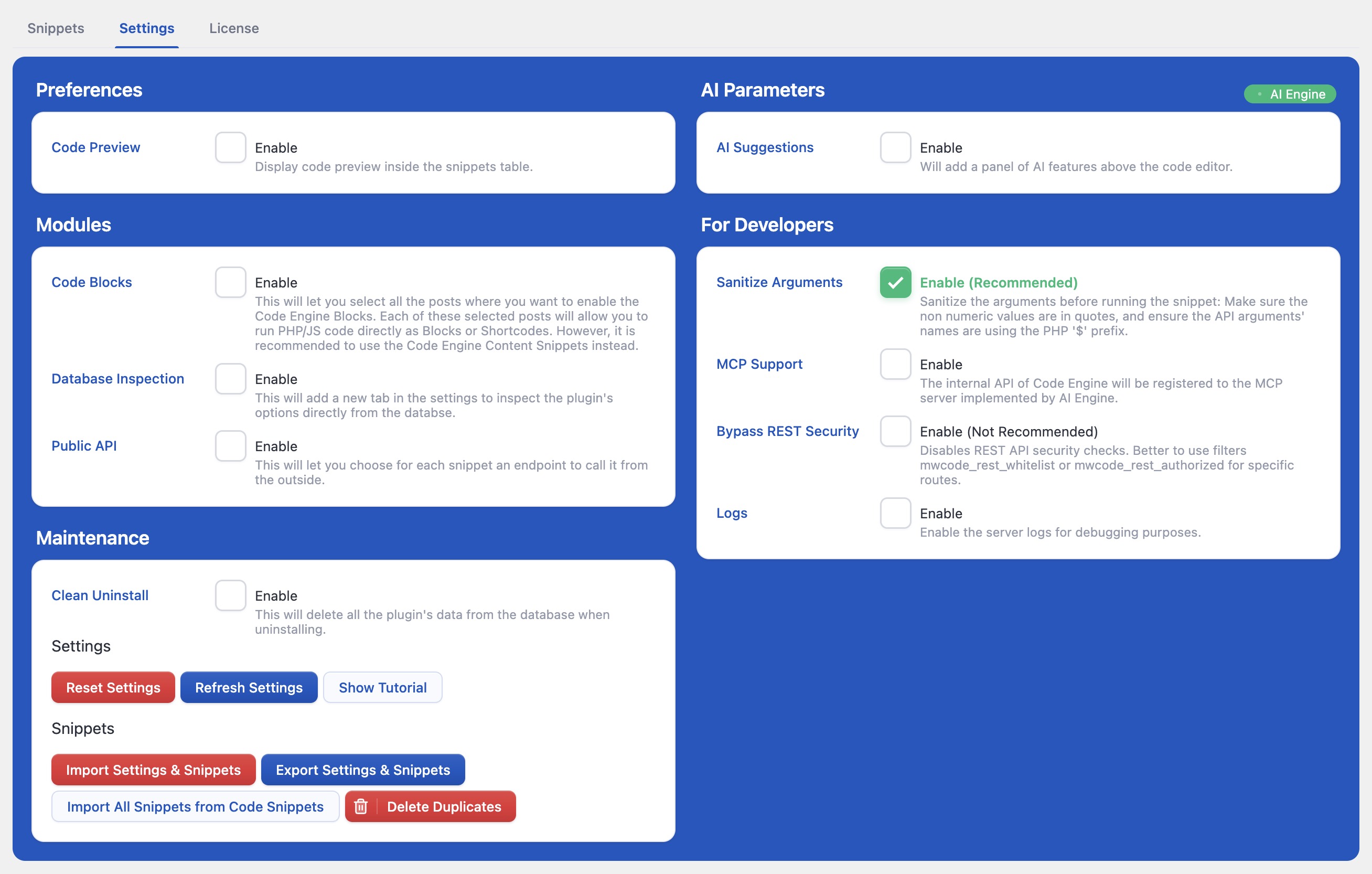
Give the snippet a custom endpoint name and a token, then send a request to /wp-json/code-engine/v1/snippets-endpoint/your-endpoint with your arguments as JSON. By default, global snippets only run on whitelisted REST routes for safety. You can adjust this in Settings or with the mwcode_rest_whitelist and mwcode_rest_authorized filters.
Is it safe to run code like this?
Code Engine includes Safe Mode, which catches fatal errors and automatically disables the snippet that caused them, so a mistake won't bring your site down. PHP is also validated with a real parser before it's saved. As always, only run code you understand and trust.
Can I schedule a snippet to run automatically?
Yes. Use the Scheduled scope and pick an hour and minute; Code Engine runs it daily via WP-Cron, great for reports, cleanups, and syncs.
Can I move my snippets between sites?
Yes. Code Engine supports importing and exporting your snippets and settings, so you can back them up or move them to another site.
更新日志:
- Update: PHP code blocks are now only run for administrators (Pro feature).
- Update: Shortcode attributes are now passed to snippets as data instead of code.
- Add: Run status shown per snippet in the snippets table.
- Add: Header displays your current version and the latest available version, and expired licenses are told when an update is out.
- Update: Settings are now opened from the wrench icon in the header.
- Update: Noisy run logs were replaced by the per snippet run status.
- Fix: Large logs no longer freeze the settings screen.
- 🎵 Discuss with others about Code Engine on the Discord.
- 🌴 Keep us motivated with a little review here. Thank you!
- 🥰 If you want to help us, check our Patreon. Thank you!
- Fix: Avoid a PHP warning caused by a null value in an in_array check.
- Add: Plugins board in the Meow Apps dashboard.
- Add: AI site analysis in the Meow Apps dashboard.
- 🎵 Discuss with others about Code Engine on the Discord.
- 🌴 Keep us motivated with a little review here. Thank you!
- 🥰 If you want to help us, check our Patreon. Thank you!
- Fix: Callable snippets losing arguments when parameter names contained a dollar sign prefix or had empty/zero values.
- Fix: Callable snippets losing their arguments and throwing syntax errors when invoked.
- Fix: Hotfix — MCP snippet updates now correctly update in place instead of creating a new row, resolving "Could not insert the snippet" errors on SQLite backends.
- Update: MCP tools are now protected against snippet fatal errors.
- Update: Clarified MCP tool scope and option descriptions.
- Add: Content (PHP/JS) snippets are now accessible through the MCP management API.
- Update: MCP toggles now enable when AI Engine is active, instead of requiring a configured API key.
- Add: MCP support for Callable snippets, with a master switch in Settings (disabled by default) and per-snippet opt-in required.
- Add: per-function "Expose via MCP" toggle to register a Callable snippet as its own tool on AI Engine's MCP server, with status badge and list filter
- Update: redesigned snippet Type selector to four simplified choices (Global, Callable, Scheduled, Content) with a contextual sub-option
- Update: reworked Callable Destinations into a compact expandable list with clear on/off status
- Update: moved Clone and Delete actions on snippet cards into a More menu
- Update: code editor now fills the full modal height and no longer shows a dotted focus outline
- Add: Callable tab panel showing where a function can be used (AI Engine, Workflow Engine, REST) with copy buttons.
- Fix: No longer sends a blank argument name for callable functions with no parameters.
- Update: Rewrote the readme with a new description and added screenshots.
- Fix: Meow Apps menu icon now stays colored and visible when the sidebar is collapsed.
- Update: Common REST and license endpoints now honour the
{prefix}_allow_setupfilter, allowing other roles to be granted access. - Fix: Function snippets now correctly call other function snippets and global helpers when run on demand.
- Add: Scope filter to the Snippets toolbar, with grouped Content (PHP/JS) options and Disabled at the end.
- 🎵 Discuss with others about Code Engine on the Discord.
- 🌴 Keep us motivated with a little review here. Thank you!
- 🥰 If you want to help us, check our Patreon. Thank you!
- Update: Reworked the Editor UI modal with improved spacing.
- Add: Help Toggle in the Editor UI modal.
- Fix: Removed unwanted log output.
- Add: Ability to delete duplicate snippets.
- Update: Snippet import now includes 'content' in scope conversion.
- Update: Better UI/UX.
- Fix: Resolved potential error when using older versions of AI Engine by adding a compatibility check.
- Update: Switch to AI Engine's new hasAI() helper for more reliable detection of AI availability.
- Fix: Improve the AI suggestion UI/UX.
- Add: Tooltips to help the users better.
- Update: Simplified and refreshed the UIs.
- 🎵 Discuss with others about Code Engine on the Discord.
- 🌴 Keep us motivated with a little review here. Thank you!
- 🥰 If you want to help us, check our Patreon. Thank you!
- Add: Added shortcode attributes.
- Fix: Improved DB checks with an early return to reduce unnecessary queries.
- Fix: Ensure blocks keep the correct context when focused by improving how block properties are handled.
- Fix: Restore proper behavior of the Code Blocks option and its settings tab.
- Add: Allow usage of PHP tags to create HTML line breaks in content.
- 🎵 Discuss with others about Code Engine on the Discord.
- 🌴 Keep us motivated with a little review here. Thank you!
- 🥰 If you want to help us, check our Patreon. Thank you!
- Add: Enhanced the overall UI/UX for better user experience.
- Add: Keyboard shortcuts (Cmd+S, Cmd+Enter).
- Add: Included a "Clean Uninstall" option for easier plugin removal.
- Update: Reorganized plugin interface into tab-only layout.
- Fix: Hotfix to prevent other actions during code validation.
- Fix: Export of snippets.
- Add: Implemented CMD+S as a shortcut to save snippets.
- Fix: Resolved an undefined array key warning related to 'target'.
- Update: Ignore _mwai arguments in the editor for cleaner operation.
- Update: Enhanced the UI/UX.
- Update: Improved the entire UI for a better user experience.
- Fix: Ensure mwai_query parameter is correctly passed and accessible within function calls.
- Update: Code Engine Pro.
- Update: There is now a Pro version for Code Blocks and Shortcodes.
- Update: Minor improvements and bug fixes.
- Fix: Resolved React rendering issue caused by empty tags and undefined map calls.
- Update: Refreshed common functionalities for improved stability.
- Update: Disallow PHP execution in code blocks by default, with an option to enable it.
- Update: Refactored the getSnippets method for improved stability.
- Update: Changed snippet name filtering to use 'functionName' instead of 'name'.
- Fix: Allowed global snippets to execute on the Settings page to prevent blocking nonce filters.
- Add: Support for "content" scope in dashboard and tags.
- Fix: Editor modal not displaying correctly.
- Fix: Columns and empty message now display as expected.
- Update: Renamed MCP tool prefix from code_engine_ to mwcode_ for better consistency.
- Update: Check DISALLOW_UNFILTERED_HTML for JavaScript content type snippets to enhance security.
- Update: Replaced error_log with core logging in API for improved reliability.
- Fix: Dashboard disables Quick Start if AI Engine is missing.
- Fix: Added missing dependencies to mwcode_snippet_vault script registration.
- Add: API now matches the functionality of AI Engine and includes optional MCP support.
- Add: Security bypass option and reorganized plugin settings for easier management.
- Update: Shortened filter names to mwcode_rest_whitelist and mwcode_rest_authorized for clarity.
- Fix: Hotfix—adjusted to use 'size' parameter instead of 'fullSize', resolving compatibility issues.
- Fix: Resolved error_log spam, clarified REST route blocking messages, corrected typos, and improved code readability.
- Fix: Prevent errors when processing snippets by removing an unnecessary argument from the sanitize function.
- Update: Improve the code editor's appearance by adjusting how content overflows, ensuring the border radius displays correctly.
- Add: Introduced API functions to create, update, and delete snippets via PHP Callables.
- Fix: Ensured PHP Callables avoid typed arguments to prevent InvalidArgumentException.
- Update: Refactored ContentBlock to use the CodeEditor component and removed unnecessary ID handling.
- Fix: Sanitized arrays and converted strings to arrays for safer callable argument handling.
- Fix: Corrected a return statement that was blocking the PHP Callable test tab.
- Add: Added a proof of concept for a Gutenberg block.
- Fix: Corrected split function to handle null arguments properly.
- Add: Enabled the "Test" tab for all snippet types for better testing.
- Update: Refactored Quick Start snippet generation and introduced AI-powered snippet creation.
- Update: Removed Shortcode.js and cleaned up debug logs to improve code clarity.
- Update: Improved snippet execution by adding load.php and enhancing error handling.
- 💕 Discuss with others about it on Discord.
- 🌴 Keep us motivated with a little review here. Thank you!
- Update: Refactored core class for better performance.
- Fix: Insertion of the code generated by AI.
- Update: Visual enhancements.
- Update: Clean uninstall.
- Update: Better editor, cleaner and more efficient.
- Add: Little tutorial, to help you get started.
- Fix: Avoid useless re-renders.
- Update: Better code editor. Decoration for tags.
- Update: Added "Function Calling" next to Callable.
- Fix: Whitelist for REST to avoid issues.
- Fix: Many fixed and enhancements for AI Suggestions.
- Fix: Minor issues.
- Fix: Jumpy cursor and functions not available via API (0.2.3 specific issues).
- Add: Check the function name, and Sanitize.
- Fix: Lot of minor issues.
- Update: Better error handling.
- Update: Better logger.
- Update: Better AI suggestions and improved UI.
- Fix: Avoid the Code Editor to be suddently updated by external factors.
- Fix: Settings display.
- Update: JS functions are now also available in the admin.
- Update: A bunch of improvements to make Code Engine even more awesome! Basically, the UI became slighlty better to use, and the features are more stable.
- Update: UI overhaul, with a new design, icons, and more.
- Add: Types for arguments.
- Fix: Got rid of some warnings and errors.
- Add: Scheduling via WP events.
- Fix: Exclude disabled functions from functions list in the API.
- Update: Disabled Safe Mode for frontend snippets.
- Update: Various fixes and optimizations.
- Update: Lots of little UI improvements.
- Fix: Escape value in sanitize function and correct import snippet primary key and tag validation.
- Fix: Ensure arrays are displayed in test logs and sanitize functions when saving.
- Fix: If functions already exist, to avoid conflicts, the snippet will be disabled.
- Update: Scopes are now Backend, Frontend, Function, Persistent, and Scheduled.
- Update: Improved the styles.
- Fix: Resolved issue with Common Dashboard visibility when only Code Engine is used.
- Update: Enhanced UI with multiple component refactors and minor changes.
- Fix: Improved API functionality with secure query args decoding and request body support.
- Update: Disable Safe Mode for Admin (which is enabled by default).
- Update: Improved flow with AI Engine.
- Add: Import/Export Snippets & Settings.
- Update: Implemented version control for database updates with optimized queries.
- Update: Simplified database column declarations and improved compatibility by removing default values from 'created' and 'updated' fields.
- Update: Many enhancements around error handling and UI.
- Fix: Secondary way of checking the database if needed.
- Fix: Automatically disable snippets if they trigger a fatal error.
- Fix: Corrected UI behaviors including Test window size and wrapping, default tab selection in Edit modal, and default snippet name setting for Functions.
- Update: Enhanced error handling in "Test" mode to display errors instead of throwing them.
- Update: Eliminated "All" option from the Type Select dropdown.
- Add: Settings for developers.
- Fix: Minor issues.
- Update: Arguments with no default value are automatically marked as required.
- Info: Revamped release.
- Info: Old release.