
Cookie Compliance for WordPress – Cookie Consent, GDPR & CCPA
| 开发者 | humanityco |
|---|---|
| 更新时间 | 2026年10月15日 19:58 |
| PHP版本: | 7.4 及以上 |
| WordPress版本: | 7.1 |
| 版权: | MIT License |
| 版权网址: | 版权信息 |
标签
下载
详情介绍:
- Banner Only mode works on its own, with no account. You get the consent banner and its settings.
- Connected mode (free or paid) signs you in to Cookie Compliance from inside WordPress and adds automatic script blocking, purpose categories, consent records, Google Consent Mode, multilingual banners and multi-domain management.
- Customizable notice message
- Consent on click, scroll or close
- Multiple cookie expiry options
- Link to your Privacy Policy page, synchronized with the WordPress Privacy Policy page
- WPML and Polylang compatible
- SEO friendly
- WP Consent API integration registers Cookie Compliance as the active Consent Management Platform under the WP Consent API when that free companion plugin is active, so cooperative plugins such as WooCommerce, Google Site Kit, Burst Statistics, WP Statistics, AddToAny and Pixel Manager for WooCommerce follow the choice your visitors make in the banner — no account needed.
- Intentional Consent — three equal buttons that let visitors accept none, some or all cookies through packaged Data Access Levels. Supports the equal-choice principle in GDPR and other data protection laws.
- Cookie purpose categories — visitors choose by category, supporting opt-in consent.
- Consent duration selector — visitors control how long their consent lasts, in line with EU authority guidance of no more than 6 months.
- Consent metrics — the visitor's consent record and a list of blocked and allowed third parties, shown in the banner. Reflects guidance from authorities such as CNIL (France) and the ICO (UK).
- Customizable Privacy Paper and Privacy Contact — summarize your privacy notice and give visitors your privacy contact and links to data subject request forms, supporting the "informed" principle of valid consent.
- Automatic script blocking — holds non-essential scripts and iframes until the visitor chooses. To be compliant, your site must record consent before setting or sending cookies.
- Google Consent Mode v2 (every plan) — adjusts how Google services (ad_storage, analytics_storage, ad_user_data, ad_personalization) behave according to visitor consent.
- Facebook Consent Mode and Microsoft Consent Mode (Professional plan) — apply visitor choices to Meta and Microsoft advertising (UET) signals the same way.
- Global Privacy Control (GPC) and Do Not Track — a visitor's browser-level opt-out is applied to the Marketing category as soon as the banner can read it, with no extra click.
- Consent record storage — every consent is recorded and available for export, supporting proof-of-consent requirements.
- Consent analytics dashboard — visits, a "trust score" and a consent activity graph, so you can tune the banner and track your acceptance rate.
- Default configurations for GDPR, CCPA and more, ready to deploy and fully customizable to match your site.
- Multilingual support — banner text is translated automatically, and you can customize every string.
- Multidomain management — manage additional Free or Professional domains under one account, each with its own banner configuration and design.
安装:
- Install Cookie Compliance for WordPress either via the WordPress.org plugin directory, or by uploading the files to your server.
- Activate the plugin through the 'Plugins' menu in WordPress.
- Go to Settings > Compliance in your WordPress admin — the setup wizard will launch automatically on first activation.
- Choose your setup path in the welcome screen: sign in to Cookie Compliance (Free or Professional) for the full compliance features, or select Banner Only to run the plugin on its own.
- If connecting: create a Cookie Compliance account or sign in to an existing one directly from the wizard — no need to leave WordPress.
- Select your plan, configure your banner using the guided checklist, and you're live.
- Return to Settings > Compliance any time to adjust your configuration, review consent logs in the Audit Trail, or manage your Cookie Compliance connection.
屏幕截图:
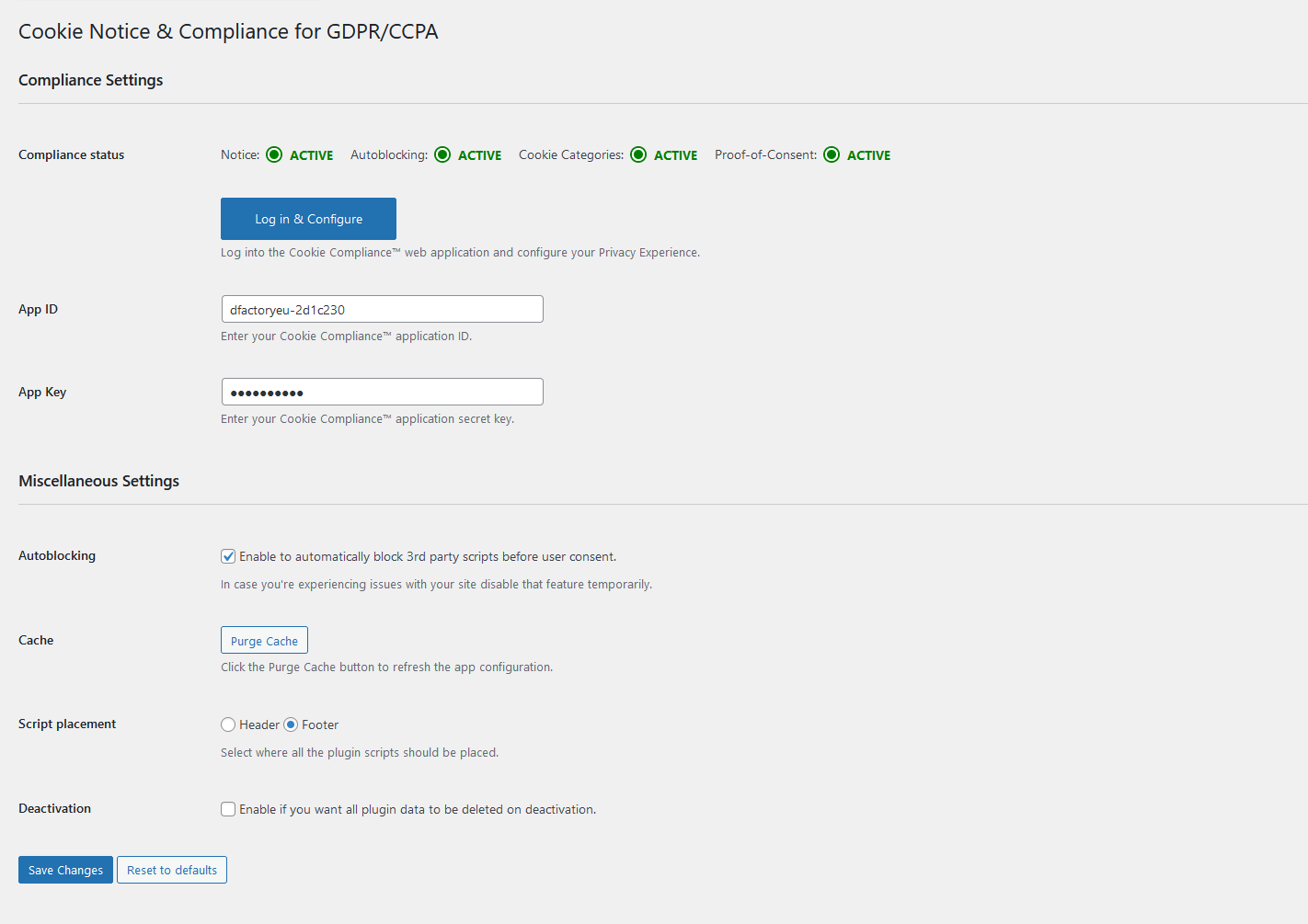
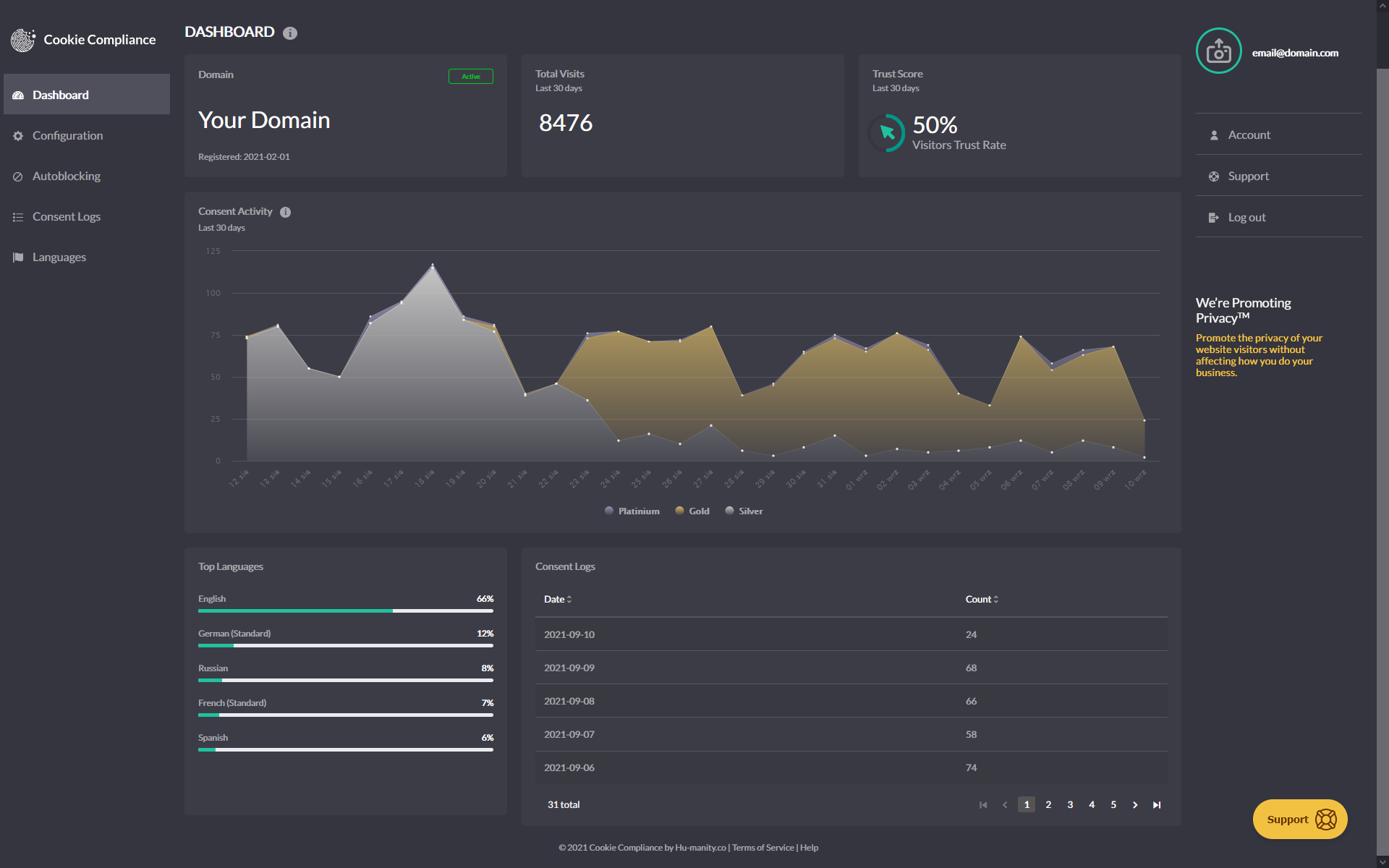
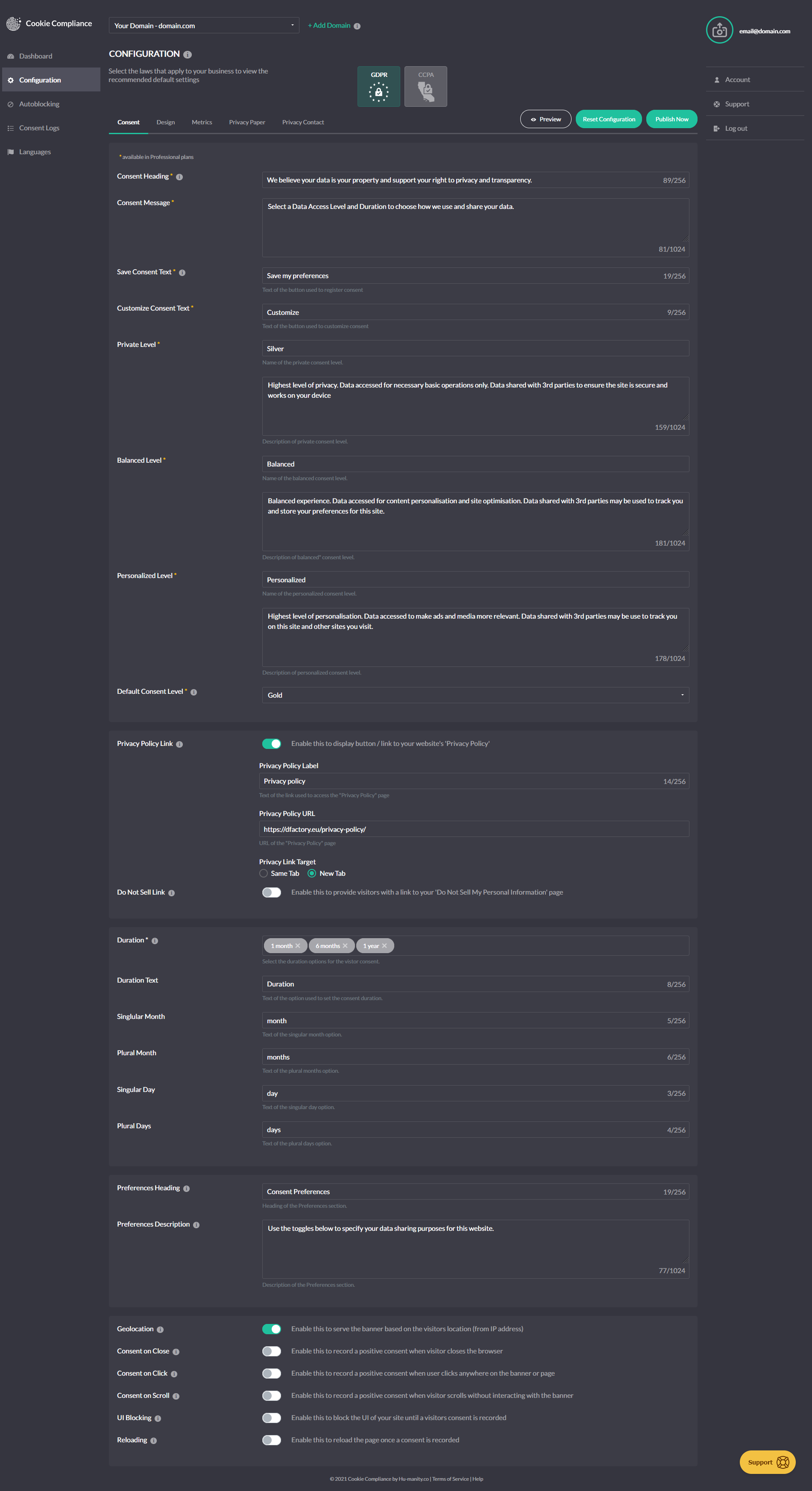
常见问题:
Is Cookie Compliance for WordPress free?
Yes! This plugin is free software, and Cookie Compliance has a free plan. There are paid plans too, depending on your needs and your website traffic.
Is this the same thing as Cookie Compliance?
Yes. Cookie Compliance is one product, and this plugin is its WordPress component — it runs the consent banner on your site. The Cookie Compliance dashboard is the other half, where you configure the banner, manage every domain you own and keep your consent records. It was previously published as "Compliance by Hu-manity.co", and before that "Cookie Notice"; the plugin, your settings and your updates are unaffected by the name.
Does Banner Only mode make my site fully compliant with GDPR or US Privacy Laws?
No. Banner Only mode DOES NOT include technical compliance features such as automatic script blocking, consent purpose categories, or consent record storage. Those need the plugin signed in to Cookie Compliance.
Does Connected mode make my site fully compliant with GDPR and US Privacy Laws?
Not by itself — it gives you what you need to configure it that way. Signed in to Cookie Compliance you get the technical compliance features — automatic script blocking, consent purpose categories and consent record storage — covering requirements for over 100 countries and legal jurisdictions. Whether your site is fully compliant depends on how you configure them and on how your site uses personal data.
Can I add Cookie Compliance with an AI assistant?
Yes. Point an MCP-capable assistant (Claude Code, Cursor, and others) at https://mcp.cookie-compliance.co/mcp — no account is required to start. On WordPress, keep using this plugin for placement rather than pasting a snippet. Details: https://cookie-compliance.co/mcp/
更新日志:
- New: The Overview tab now shows your last 30 days of consent activity, the same charts as the WordPress dashboard widget.
- New: On connected sites, Cookie Consent lets you set your company's country, saved to your Cookie Compliance account.
- Fix: On connected sites, a privacy law's suggested settings apply when you first select that law. Later saves keep the banner choices you have made.
- Fix: On the Overview tab, Meta, Microsoft, and Global Privacy Control show as optional when they are off. Global Privacy Control stays recommended for CCPA and other US state laws.
- Fix: Support now opens in the Admin Portal with this domain already selected.
- Improvement: Clearer banner and Privacy Consent screens. Standard and Compact appear with the New engine, "Can't see your banner?" sits with your banner, and Admin Portal links open this site.
- Improvement: Simpler, more reliable privacy policy link. On connected sites, choose your policy page and turn on Sync to use it on your banner; set the link text in the Admin Portal. In Banner Only mode, the policy button always opens your policy.
- Tested up to WordPress 7.1.
- Docs: Refreshed the plugin page. Older version history now lives in changelog.txt. No change to your banner or settings.
- New: An Overview tab shows your protection status in plain words, your last 7 days of consents, and a one-click fix for anything that needs attention.
- New: Preview shows your banner even when it would be hidden for you, and says why.
- Improvement: Tabs are now Overview, Cookie Consent, Privacy Consent and Consent Logs. Laws, languages and Consent Signals (formerly consent mode) sit together on the Cookie Consent tab.
- Improvement: Compliance evidence follows your live banner and blocking settings, with no scan to wait for. The tracker list is removed, as it only showed trackers added by hand. Blocking is unchanged.
- Fix: With page caching on, preview, page-builder and JSON requests are no longer cached, so visitors always get the banner. If your cache may hold such a page, purge it once.
- Security: Account messages, such as sign-in or payment errors, show as plain text, and debug logs no longer store full account replies.
- New: Sites on the classic interface can move to the new admin interface from a card in the sidebar. Your settings, connection and banner stay exactly as they are.
- New: The new admin interface opens with a "Your banner" panel showing the banner your site really runs — its engine and style — with a quick way to preview it on your site.
- New: On sites using the New banner engine, you can choose a Standard or Compact banner right from WordPress. Setup now starts with this choice.
- New: Sites you add from the plugin now start on the New banner engine, the same as sites added in your Cookie Compliance account.
- Improvement: The new admin interface now includes the Privacy Consent tab and form consent logs, and saves your settings just like the classic screens.
- Improvement: On multisite networks, Network Administrators can manage network-wide settings from the new admin interface, and each sub-site's consent records stay private to that site.
- Improvement: "Revoke consent" is now called "Update consent", matching your Cookie Compliance account.
- Improvement: Removed banner templates, so the plugin no longer changes colours set in the Admin Portal. Set colours and position in Admin Portal → Configuration → Design.
- Improvement: Clearer protection status that shows exactly when your banner is live.
- Improvement: When your banner engine changes in your Cookie Compliance account, the plugin tells you once and offers to purge your page cache so visitors get the new banner.
- Improvement: On the Privacy Consent tab, the status card shows one Connection row, and its "Open Admin Portal" button opens this site's app; a connected site whose last check did not come back shows "Not confirmed" instead of the sign-up offer. Where you enter your App ID and App Secret Key, and on sign-in, a hint tells Google sign-ups to copy them from the Admin Portal.
- Improvement: Connect, sign-in and key labels now use the same words as your Cookie Compliance account.
- Improvement: The status cards are shorter and "Pull latest settings" appears once per page.
- Improvement: When you sign in to an account that has apps but none for this site, the plugin now asks which app this site should use, or lets you create a new one, instead of creating a new app for you.
- Fix: In the new admin interface, clearing your App ID and App Secret Key now disconnects the site fully, the same as the classic screens.
- Fix: On sites with page caching, connecting from the new admin interface now refreshes cached pages after your banner settings arrive, not before.
- Fix: The Protection tab no longer shows the Threat Intelligence panel, whose news items never changed.
- Fix: On connected sites, Save WordPress Settings now saves your WordPress settings only. It no longer changes your live banner's colours, position, opacity or consent behaviour; it still updates the banner's privacy policy link from your WordPress privacy page.
- Fix: On sites using CCPA or Other U.S. State Laws, the Do Not Sell link you enter with your laws is now saved to your banner (its default language). An address that is not a full web link is refused and nothing is saved.
- Fix: In setup, Apply & Finish now applies the languages you selected.
- Fix: Plan, pricing and language screens now list the same features, limits and discount as the product.
- Fix: Signing in from a WordPress installed in a subfolder (for example example.com/blog) now connects the app already on that domain, instead of stopping with "Domain URL already exists".
- Fix: On new accounts with no app yet, signing in from the plugin now creates the app for your site, instead of stopping with "No apps found".
- Fix: On accounts with two-step verification, signing in from the plugin now asks for the verification code instead of connecting with the password alone.
- Improvement: Your site stays connected and protected through a brief network or server problem, rather than waiting for the next scheduled check to recover.
- Improvement: Banner settings from your account hold steady between checks.
- Improvement: On multisite networks where the plugin is network-activated but each site keeps its own account, the WP Consent API integration follows that site's own selected privacy laws.
- Improvement: On multisite networks, your privacy laws, banner design, visit figures and consent records show up consistently across every screen, and visit-limit warnings reach each site.
- Improvement: On the Consent Logs screen, records that cannot be loaded are now reported as such instead of appearing as an empty list, and the CSV export does the same — a log with no entries and a log that could not be reached no longer look alike.
- Improvement: Upgrading to a paid plan now waits for the payment to be confirmed before reporting it. A declined card, or a network problem during checkout, is reported plainly with the reason — previously the upgrade could appear to have gone through and then revert. Connecting a site and adding billing details confirm their result the same way.
- Improvement: Forms protected by Gravity Forms reCAPTCHA wait for reCAPTCHA to finish loading after a visitor accepts cookies, so the form submits without a reload.
- Improvement: The Compliance dashboard reports what it can see — which protections are switched on. Turning Autoblocking off is no longer flagged where your selected laws permit it, and a switched-off script blocking engine is called out clearly.
- Fix: Region-specific (geolocation) rules now apply from a visitor's very first pageview, not just after the plugin's next scheduled refresh — as long as your settings synced within the last 12 hours.
- Fix: Free-plan sites now show their real 1,000 visits/month allowance right away instead of 0 right after reconnecting an account or switching back from a paid plan.
- New: Two controls over script blocking on the Configuration tab, where there was one. "Autoblocking" keeps its existing job — holding third-party scripts until a visitor chooses. The new "Script blocking engine" switch turns Cookie Compliance's blocking off entirely, for every visitor and every region, if you'd rather handle it yourself or with another tool. Both are on by default, so nothing changes unless you want it to.
- Fix: On sites connected to a Cookie Compliance account, a second publish made within about two minutes of the first now reaches your site promptly — handy when you're adjusting settings and republishing to check the result. What you publish has always been saved correctly; this shortens the wait for the site to pick it up. Affects 3.1.3 through 3.1.9, and complements the more frequent scheduled check added in 3.1.9.
- Fix: On WordPress multisite networks, the settings every site shares — your Cookie Compliance account, banner and blocking list — are now protected, so only a Network Administrator can change them and the whole network stays on the right account. Sites with their own separate account keep full control, and single-site installs are unaffected.
- Fix: On Free-plan sites that reach their monthly visit limit, your Autoblocking choice is now remembered while blocking is paused, and applies again the moment the next cycle begins — including if you save other settings in the meantime.
- Fix: On Free-plan sites, the visit-limit alert now appears only once autoblocking has actually paused — so it no longer warns that scripts may be firing while your Autoblocking setting still reads "On".
- Fix: On sites that honour Global Privacy Control or Do Not Track, a visitor's opt-out is now applied as soon as the banner can act on it, instead of waiting for your settings to load.
- Fix: On sites using Gravity Forms with Google reCAPTCHA, visitors can page through a multi-page form before choosing cookies — only the final submit waits for consent. Since 3.1.5 Next and Previous waited too. Worth retesting if you run a multi-page form.
- Fix: On those same sites, a visitor who has already accepted cookies is no longer asked to accept again when submitting. They are now told that the form is still loading, or that reCAPTCHA did not load, whichever is the case.
- Tweak: On those same sites, a developer can switch this compatibility off site-wide with the
cookie_notice_gravity_forms_recaptcha_enabledfilter. Google reCAPTCHA is still held until a visitor accepts, either way. - Fix: On sites with page caching, your caching plugin is now told not to store pages viewed by anyone who can manage the banner. Script blocking is off on those pages, so a cached copy served to a visitor left them unprotected. Most caching plugins honour this; a CDN that ignores your site's caching rules needs its own exclusion for logged-in users. Purge your cache once after updating — copies already stored are not cleared automatically.
- Tweak: On sites connected to a Cookie Compliance account, the requests the plugin already makes now carry a little more about your setup — its version and which features are on, your site's language, basic diagnostics, which caching or optimisation plugins you use, and whether a Google, Meta or Microsoft tracking plugin is active. Nothing about your visitors, your content or your users is sent; the Privacy section lists it all.
- Tweak: On those same sites, publishing usually pushes your changes out within seconds; the scheduled check behind that now runs twice a day instead of once, halving the wait when a push cannot get through.
- Improvement: On sites running WordPress in a language other than English, the Compliance settings screens can now be translated. Their text was previously fixed in English no matter which language your site used. Translations are supplied by the translation community, so screens stay in English until a translation for your language is available.
- Fix: On sites using reCaptcha by BestWebSoft, the captcha now appears as soon as a visitor accepts cookies, rather than only when they accept within the first few seconds of the page loading. Until they accept, the form says that the captcha needs their consent, instead of reporting a connection problem.
- Tweak: On sites using Google, Facebook or Microsoft Consent Mode, your signal settings now travel with the page, so those platforms receive them from the first pageview of a visit.
- Rebrand: Plugin renamed from "Compliance by Hu-manity.co" to "Cookie Compliance for WordPress" — one product, of which this plugin is the WordPress half. The plugin's admin screens, and the name a screen reader announces for the banner, now read "Cookie Compliance" throughout. Your settings, connection, consent records and updates are unchanged; nothing to do. Renamed text may show in English until translations catch up.
- Fix: On sites using Google Consent Mode, the Advertising, Analytics and Functional group controls are replaced by one control per signal, still grouped under those headings. Each changes only its own signal, so Security Storage is no longer reset by another control and no longer reports itself as not applied. It can also be set to Basic Operations, for storage that is strictly necessary on your site.
- Fix: On sites connected to a Cookie Compliance account, opening Upgrade to Pro after being signed in a day or more now returns you to sign-in, instead of an error that refreshing could not clear.
- Fix: On sites whose domain was moved to a different Cookie Compliance app or plan, the visit limit now follows the current plan. It is enforced only from recent visit figures, and Sync Config is no longer switched off when the limit is reached — it is what clears it. Google Consent Mode and your consent records no longer depend on your visit allowance.
- Tweak: The Compliance settings screen now opens straight away and refreshes from the Admin Portal in the background, instead of showing nothing until that finished. If the refresh cannot complete, it says it is showing your last synced settings, and when they were synced.
- Tweak: If your consent mode settings change elsewhere while you have the Consent Modes panel open, your unsaved edits are kept and the panel tells you the stored settings have moved on.
- Tweak: Site Health now reports your plan, cycle visits against your limit, and how old the usage figures are — measured from when they were calculated, not from when this site last pulled them.
- Tweak: On sites managed from both the Admin Portal and the WordPress Protection screen, saving one consent mode setting now leaves the others exactly as you set them.
- Tweak: On sites using Google, Facebook, or Microsoft consent modes, each signal is now matched to a purpose category — Content Personalization, Site Optimization, or Ad Personalization — so the setting you pick is what the banner sends, and the category names match the Admin Portal. The earlier "Always" option has been retired; if you used it, open Protection and choose a category.
- Fix: On sites using Gravity Forms with Google reCAPTCHA, forms can now be submitted as soon as a visitor accepts cookies — on the same page, with no reload. Previously the submit button could stay in a loading state indefinitely. Visitors who have not chosen yet are now asked to accept cookies, instead of seeing a button that appears to do nothing. Sites that have already moved Google Recaptcha to Basic Operations are unaffected.
- Fix: On sites where visitors sign in — membership sites, online courses, shops — signed-in visitors now get cookie blocking and the correct consent signals to Google, Microsoft and Meta, the same as every other visitor. Previously any signed-in visitor was treated as someone working on the site: nothing was held back for them, and those services were told consent had been given before the visitor had answered the banner. Blocking is still switched off for users who can manage the banner, so you can keep working on your own site as before. If your site needs a wider exemption, a developer can adjust it with the
cn_manage_cookie_notice_capfilter.
- Fix: On sites protected by a security plugin or firewall (such as WordFence), saving your settings after adding Google Tag Manager or analytics code could fail with a "403" error. The plugin now sends that code in a form these tools don't mistake for an attack, so your settings save normally.
- Fix: The consent banner now displays and blocks cookies reliably on sites using a JavaScript optimizer — including WP Rocket, Autoptimize, LiteSpeed Cache, SiteGround Speed Optimizer, WP Fastest Cache, and WP Hummingbird's "Delay JavaScript". These tools could delay or combine the Cookie Compliance script, so the banner appeared late (or not at all) and cookies could load before a visitor consented; the plugin now signals them to leave its script alone, whether or not the plugin's "Caching Compatibility" option is enabled.
- Fix: On sites that use SiteGround Speed Optimizer, LiteSpeed Cache, or Breeze to combine, defer, or minify JavaScript, the plugin now reliably keeps the Cookie Compliance script out of those optimizations — so the banner displays and cookies stay blocked until a visitor consents. These tools could previously prevent the script from loading; this extends the compatibility added in 3.1.1.
- Tweak: The plugin's upgrade screen now links you to the Admin Portal to complete a subscription there, with the plan pre-filled. Use it when you need a multi-domain plan, an invoice/VAT receipt, or a payment method other than card — all long available in the Admin Portal; the in-plugin card checkout remains available as before.
- Tweak: Privacy-law settings now stay in sync with the Admin Portal. Per-region (geolocation) rules are configured in the Admin Portal and are respected when you save a law selection in the plugin, and each law's on-screen description reflects what the banner does on your plan.
- Tweak: Standardized wording across the plugin — the Hu-manity.co web application is now consistently referred to as the "Admin Portal".
- Compatibility: Verified and confirmed compatible with WordPress 7.0.
- Fix: Banner position and banner size now save correctly on sites without a Cookie Compliance subscription — since 3.0.1 these settings appeared to save but silently reverted on every reload.
- Fix: Reconnecting a domain to a different Cookie Compliance app now refreshes its plan status right away — the visit-limit notice and autoblocking allowance update on save instead of lagging until the next hourly sync.
- Fix: Account setup now confirms an explicit success response before activating a paid plan, so an incomplete or interrupted server reply can no longer leave an account on the wrong plan.
- Tweak: Banner-script delivery is now server-controlled, so future banner improvements can roll out gradually and safely without requiring a plugin update. Your current banner is unchanged.
- Tweak: Configuration and plan changes made in your Cookie Compliance dashboard now apply to your site faster. Previously a publish or plan upgrade could take until the next scheduled sync to take effect; your site now refreshes its settings right away via a secure server signal.
- Fix: The cookie compliance banner and per-form privacy consent prompts now render correctly on sites where Cloudflare Rocket Loader or a caching/optimizer plugin (WP Rocket, LiteSpeed Cache, Autoptimize, NitroPack, Jetpack Boost) defers script execution. The plugin's inline configuration and per-form helper scripts now signal these tools to skip them, extending the banner-script protection added in 3.0.3.
- Tweak: The WordPress dashboard widget now shows a protection scorecard — GPC signal, consent records, and visit quota — replacing the previous usage chart.
- New: WP Consent API integration — Compliance now registers as the active Consent Management Platform under the WP Consent API when that plugin is installed, so cooperative plugins like WooCommerce, Google Site Kit, Burst Statistics, WP Statistics, AddToAny, and Pixel Manager for WooCommerce automatically gate themselves on the consent state captured by your banner. Hu-manity's four consent levels map to the WP Consent API's five categories: Strictly Necessary → functional (always allowed), Functional → preferences, Analytics → statistics and statistics-anonymous, Marketing → marketing. Global Privacy Control automatically suppresses the marketing category. A new "WP Consent API" toggle on the Configuration tab lets you turn the integration off; it is on by default when both plugins are active.
- Tweak: The loading screen now reads "Hang tight — this may take a few seconds on slower connections" and the troubleshooting panel waits 15 seconds before appearing, giving slow connections more breathing room before setup suggestions surface.
- Tweak: The Consent Security Policy (CSP) warning on the Compliance settings page now clears immediately once a valid .htaccess is detected — reloading the page, clicking Purge Cache, or clicking Pull Configuration each re-evaluate in real time.
- Fix: Disabling Autoblocking via the legacy settings form on multisite sites now saves correctly.
- Fix: The Compliance settings page no longer breaks on sites where Cloudflare Rocket Loader or a caching/optimizer plugin (WP Rocket, LiteSpeed Cache, Autoptimize, NitroPack, SG Speed Optimizer, or Jetpack Boost) is configured to process WP admin scripts. The plugin's admin bundle now signals these tools to skip it, extending the same banner-script protection added in 3.0.3.
- Fix: If the Compliance settings page fails to load, you now see a "Loading Compliance dashboard…" message that reveals troubleshooting steps (caching plugin, browser extension, incognito mode) and a link to support — replacing the silent white screen some users hit when a CDN, optimizer, or browser extension blocked the admin bundle.
- Tweak: Send client type, plugin version, and admin UI mode (React or Legacy) as HTTP headers on platform API requests to support integration adoption analytics. No effect on banner behavior, site visitors, or consent data.
- Docs: Added a Privacy section to the readme describing, by service and data category, what the plugin sends to Hu-manity.co services and when. Placed after Installation per WordPress convention. Covers admin-side state stored on the WordPress site (options, transients, localStorage), the visitor IP visibility implied by the banner's direct browser-to-platform requests, retention of plugin-side caches and platform-side account/consent data, sub-processors (Braintree for plugin-initiated payments, additional payment gateway providers for webapp-managed subscriptions, and Hu-manity.co's email subscription service), data processing location (European Union, AWS Ireland), and concrete data-subject rights (deactivation, CSV export, account deletion, and GDPR Article 17 / CCPA erasure of visitor records within a 30-day SLA per GDPR Article 12).
- Fix: Added JS optimizer exclusion attributes to the banner script tags to prevent caching and performance plugins from delaying consent recording. Covers WP Rocket (data-nowprocket), Autoptimize (data-noptimize), LiteSpeed Cache (data-no-optimize), NitroPack (nitro-exclude), Jetpack Boost (data-jetpack-boost), and Cloudflare Rocket Loader (data-cfasync). Also adds stable IDs (hu-banner-options, hu-banner-js) so users of plugins without attribute support (W3 Total Cache, SG Optimizer, Swift Performance) can enter these as exclusion keywords in their plugin settings.
- New: GPC banner mode is now configurable directly from the plugin. The Protection tab's GPC panel exposes three options for what visitors see when their browser signals Global Privacy Control — "Show passive notice" (a brief auto-dismiss confirmation that the preference was honored), "Silent" (no on-screen indication), or "Show full banner" (the standard consent flow). When CCPA or other US privacy laws are selected, the plugin defaults to "Show passive notice" — improving transparency without re-displaying the banner on every page. The active mode is also surfaced on the GPC Support card under Compliance Behavior so site admins can see at a glance how GPC manifests for their visitors. The setting can still be changed at any time in the Cookie Compliance web application.
- Fix: Decouple Autoblocking from privacy law selection in React and legacy settings — the toggle now appears for connected users regardless of whether laws are configured, and is no longer mislabeled as a Pro-only feature in the legacy UI.
- Fix: Preserve boolean types when caching Designer, Account, and Analytics API responses — compliance flags such as gpcSupportMode, doNotTrackMode, onScroll, onClick, uiBlocking, revokeConsent and nested regulations were being silently coerced to strings, which risks breaking strict type checks downstream.
- Fix: Resolved missing file error preventing plugin activation for some users who updated during the initial 3.0.0 release
- Rebrand: Plugin renamed from "Cookie Notice & Compliance for GDPR / CCPA" to "Compliance by Hu-manity.co". WordPress admin sidebar now reads "Compliance" with Settings and Audit Trail submenus. All internal option keys and slugs remain unchanged — no action required for existing installs.
- New: Modern React-based admin dashboard replaces the legacy PHP settings pages. Three main tabs — Protection, Settings, and Audit Trail — with a polished, card-based interface.
- New: Guided setup wizard with banner template picker (6 presets), setup checklist, and quick-start configuration for new installs.
- New: Welcome Modal with in-plugin account creation, plan selection, and Braintree payment — complete the signup flow without leaving WordPress.
- New: Protection Chooser — redesigned tier selection (Basic, Professional, Business) with feature comparison cards.
- New: 5-position banner placement selector (top, bottom, floating left, floating right, floating center) with fixed/floating toggle. Dismiss animation controls added to Banner Design settings.
- New: Law Selector with geo-aware regulation display and compliance context for GDPR, CCPA, and 100+ jurisdictions.
- New: Consent Modes panel — configure Google Consent Mode v2, Facebook, and Microsoft consent toggles directly from the plugin.
- New: Audit Trail tab — view consent log records pulled live, with dynamic consent level labels.
- New: Conditional Display rule builder — control when and where the consent banner appears.
- New: Excluded Script Handles setting — exclude specific scripts from autoblocking by handle name.
- New: Centralized notification system with contextual calls-to-action based on your setup status and subscription tier.
- New: Portal deep links — jump directly from the plugin to the relevant page in the Cookie Compliance web application.
- New: Live configuration sync — admin pages pull fresh banner configuration from the platform on load.
- New: React ErrorBoundary prevents white-screen crashes — admin gracefully recovers from unexpected errors.
- Improvement: Pro feature indicators show locked features with upgrade prompts for free-tier users.
- Improvement: Usage dashboard shows near-limit nudge at 70%+ of cycle usage.
- Improvement: Email-exists recovery flow guides users who try to register with an existing account.
- Fix: Domain URL normalization on login prevents duplicate app registrations. Older versions: see changelog.txt in the plugin folder.