
CookieVJ – Cookie Notice & Consent Banner
| 开发者 | wpvishavjeet |
|---|---|
| 更新时间 | 2025年12月14日 22:20 |
| PHP版本: | 7.4 及以上 |
| WordPress版本: | 6.9 |
| 版权: | GPLv2 or later |
| 版权网址: | 版权信息 |
详情介绍:
- Zero Configuration Hassle - Works out of the box with sensible defaults
- Privacy First - GDPR and CCPA compliant by design
- Lightweight & Fast - Minimal JavaScript, no jQuery dependency
- Developer Friendly - Extensive hooks, filters, and clean code
- Translation Ready - Fully compatible with WPML, Polylang, and translation plugins
- Easy Setup - Configure in minutes from Settings → CookieVJ
- GDPR & CCPA Compliant - Meet privacy regulations without legal headaches
- Google Tag Manager Integration - Add your GTM container ID and manage tags based on consent
- Customizable Design - Choose colors, position, and button text to match your brand
- Multiple Positions - Display banner at bottom (full width), bottom left, or bottom right
- Lightweight Performance - Minimal impact on page load speed (< 5KB minified)
- Cookie-Based Storage - Uses proper browser cookies (not localStorage)
- Translation Ready - Fully translatable with .pot file included
- Clean Code - Object-oriented architecture following WordPress coding standards
- GeoIP Integration - Automatically fetch and log user country using a free GeoIP service
- Consent-Based Tag Loading - GTM tags respect user consent choices
- No External Dependencies - Everything runs on your server
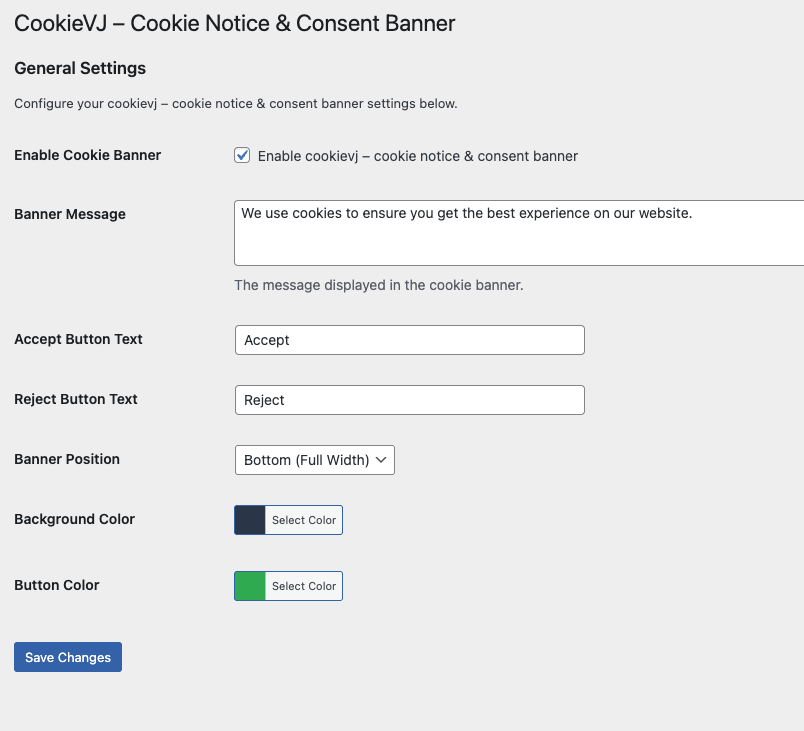
- Enable/Disable cookie banner
- Customize banner message (supports HTML)
- Change accept/reject button text
- Choose banner position (bottom full width, bottom left, bottom right)
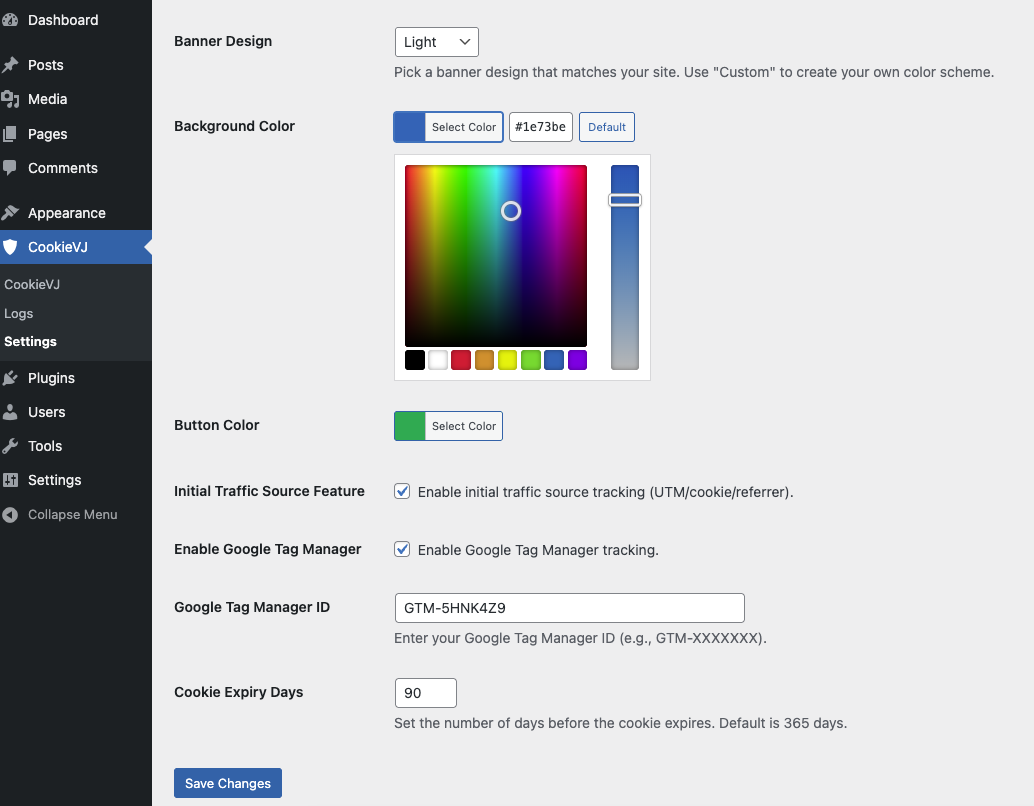
- Select background color with color picker
- Select button color with color picker
- Add Google Tag Manager container ID
- Set cookie expiration time (filterable)
- Simple Setup - Just add your GTM container ID (GTM-XXXXXXX) in the settings
- Consent-Based Loading - GTM script loads automatically only after user accepts cookies
- JavaScript API - Consent status available via
window.cookievjConsentfor conditional tag firing - DataLayer Events - Automatic dataLayer push events for consent changes
- Consent Mode v2 - Compatible with Google Consent Mode v2 for enhanced privacy
- No Code Required - Works immediately without custom JavaScript
- Consent status (accepted/rejected) in a cookie
- User's country code (temporary, for compliance targeting)
- No personally identifiable information (PII)
- No tracking without consent
- Object-oriented architecture
- PSR-4 autoloading
- Proper sanitization and escaping
- Nonce verification for security
- Translation-ready with all strings wrapped
- No jQuery dependency
- Follows WordPress coding standards View full documentation | Report Issues
安装:
- Log in to your WordPress admin panel
- Navigate to Plugins → Add New
- Search for "CookieVJ"
- Click "Install Now" and then "Activate"
- Go to Settings → CookieVJ to configure
- Download the plugin zip file
- Log in to your WordPress admin panel
- Navigate to Plugins → Add New → Upload Plugin
- Choose the downloaded zip file and click "Install Now"
- Click "Activate Plugin"
- Go to Settings → CookieVJ to configure
- Go to Settings → CookieVJ
- Enable the cookie banner
- Customize the message and button text (optional)
- Choose colors and position (optional)
- (Optional) Add your Google Tag Manager container ID (GTM-XXXXXXX)
- Click "Save Changes"
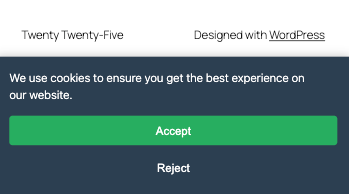
- Visit your website to see the banner in action!
- Log in to your Google Tag Manager account
- Select your container and copy the container ID (format: GTM-XXXXXXX)
- Paste the container ID in CookieVJ Settings → Google Tag Manager
- Save changes
- GTM will now load only after users accept cookies
- (Advanced) Use
window.cookievjConsentin GTM triggers to check consent status
屏幕截图:

常见问题:
Does this plugin block cookies automatically?
No, this plugin displays a consent banner to inform users about cookie usage. You'll need to implement cookie blocking logic based on user consent in your custom code or use additional plugins. The plugin provides the window.cookievjConsent JavaScript variable and PHP $_COOKIE['cookievj_cookie_consent'] to check consent status.
Is this plugin GDPR compliant?
This plugin provides the essential tools to display a cookie consent banner and obtain user consent, which is a key requirement for GDPR compliance. However, full GDPR compliance depends on your entire website setup, including how you handle data collection, storage, and processing. Please consult with a legal professional for complete compliance guidance.
Can I customize the banner design?
Yes! You can customize:
- Background color (with color picker)
- Button color (with color picker)
- Banner position (bottom full width, bottom left, bottom right)
- All text content (message, button labels)
- Banner message supports HTML for links and formatting
Can I translate the plugin?
Yes! The plugin is fully translation-ready. All user-facing strings are wrapped in translation functions. You can translate it using:
- WordPress.org translation system
- Loco Translate plugin
- WPML
- Polylang
- Poedit with the included .pot file
How does Google Tag Manager integration work?
When you add your GTM container ID in settings, the plugin will:
- Wait for user consent before loading GTM
- Load the GTM script only after the user clicks "Accept"
- Push consent events to the dataLayer
- Make consent status available via
window.cookievjConsentThis ensures compliance with privacy regulations by preventing tracking before consent.
Where do I find my GTM container ID?
- Log in to Google Tag Manager
- Select your container
- Find the container ID (format: GTM-XXXXXXX) in:
- Top navigation bar (next to container name)
- Installation code snippet
- Container settings
Can I use GTM without showing the cookie banner?
No, for compliance reasons, the GTM script will only load after explicit user consent when the cookie banner is enabled. This is a core privacy feature to ensure you're not tracking users without their permission.
Does this work with Google Consent Mode?
Yes, the plugin is compatible with Google Consent Mode v2. The consent status is available via JavaScript and dataLayer events, allowing you to configure consent mode settings in your GTM container based on user choices.
Will this slow down my website?
No. CookieVJ is extremely lightweight:
- Minified JavaScript: < 5KB
- No jQuery dependency
- Loads asynchronously
- Minimal CSS
- No external requests (except optional GeoIP)
Is there a way to reset user consent for testing?
Yes, delete the cookievj_cookie_consent cookie from your browser's developer tools (Application/Storage tab) or use an incognito window for testing.
Does it track users who reject cookies?
No. When users click "Reject," only their rejection choice is stored in a cookie. No tracking scripts (including GTM) are loaded, and no analytics data is collected.
更新日志:
- New: Added Google Tag Manager integration
- New: Added GTM container ID field in settings
- New: Implemented consent-based GTM script loading
- New: Added dataLayer push for consent events
- New: Added GeoIP integration to fetch and log user country
- Enhancement: Enhanced settings page with GTM configuration section
- Enhancement: Updated reject button to log consent status via AJAX
- Enhancement: Improved banner message to support HTML content
- Enhancement: Improved documentation for GTM setup
- Initial release
- Cookie consent banner with customizable design
- GDPR & CCPA compliance features
- Multiple banner positions
- Color customization
- Translation ready