
Modern Fields, Custom Fields for Gutenberg
| 开发者 | MaximeBJ |
|---|---|
| 更新时间 | 2026年10月21日 16:01 |
| PHP版本: | 8.1 及以上 |
| WordPress版本: | 7.1 |
| 版权: | GPLv2 or later |
| 版权网址: | 版权信息 |
详情介绍:
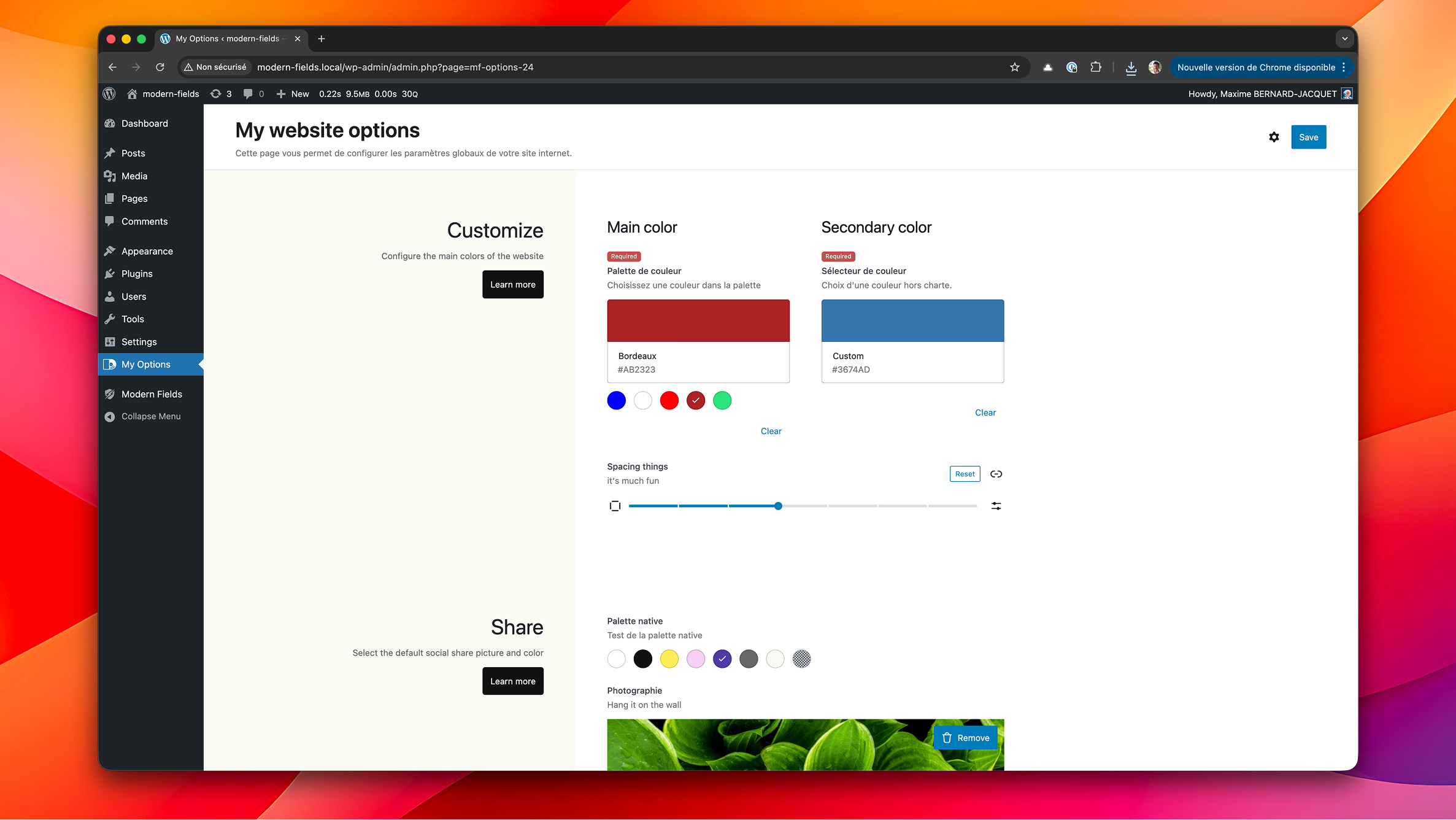
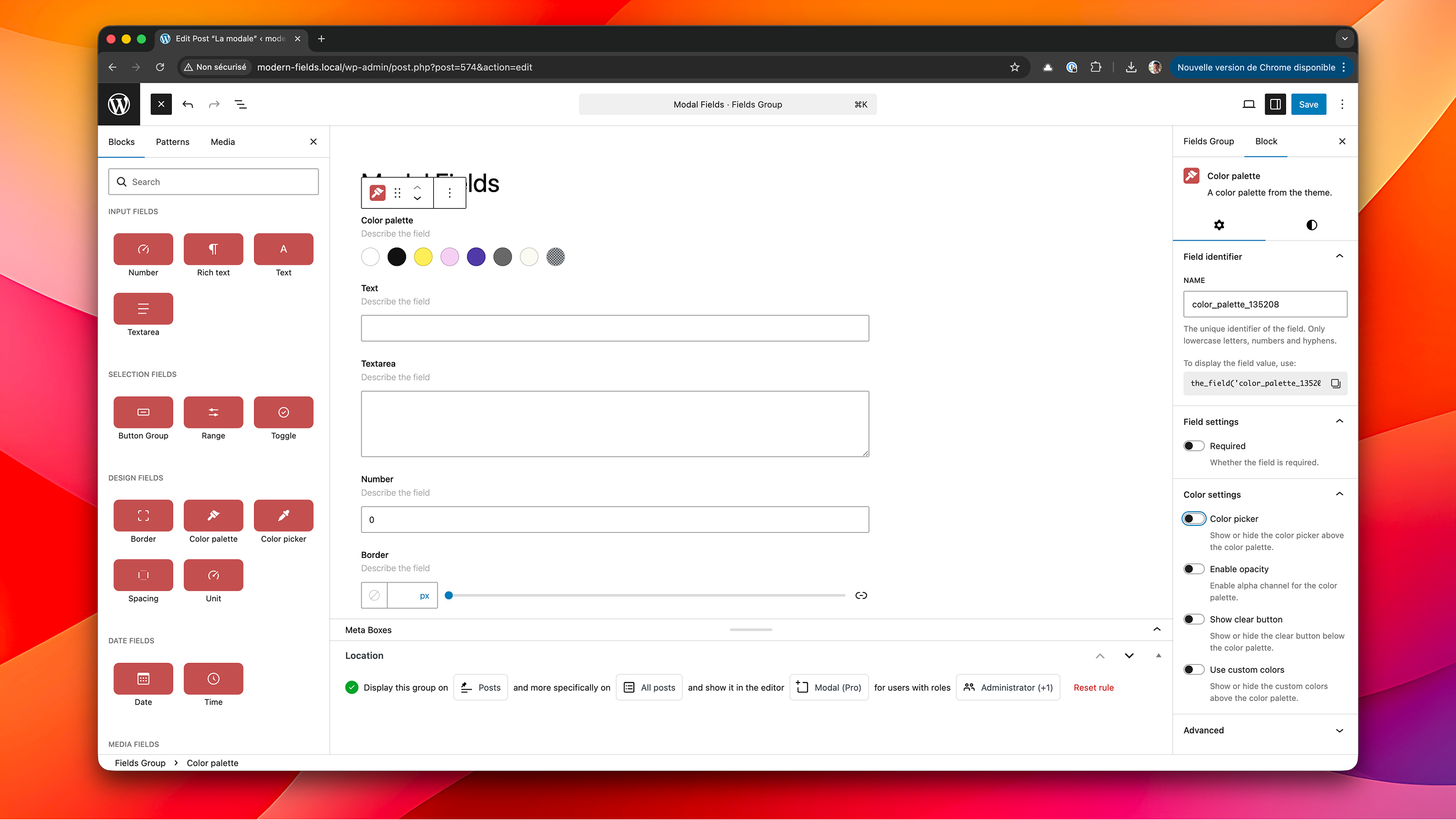
Modern Fields™ brings a visual field builder to the WordPress block editor without sacrificing flexibility.
Create reusable field groups, assign them to posts, pages, custom post types, or options screens, and render them with purpose-built Gutenberg blocks & block bindings.
No code required! Everything is built with native WordPress APIs so it feels at home in your admin and keeps performance top of mind.
[youtube https://youtu.be/vMYajLYcwRA]
安装:
- Upload the plugin files to the
/wp-content/plugins/modern-fieldsdirectory, or install the plugin through the WordPress plugins screen directly. - Activate the plugin through the Plugins screen in WordPress.
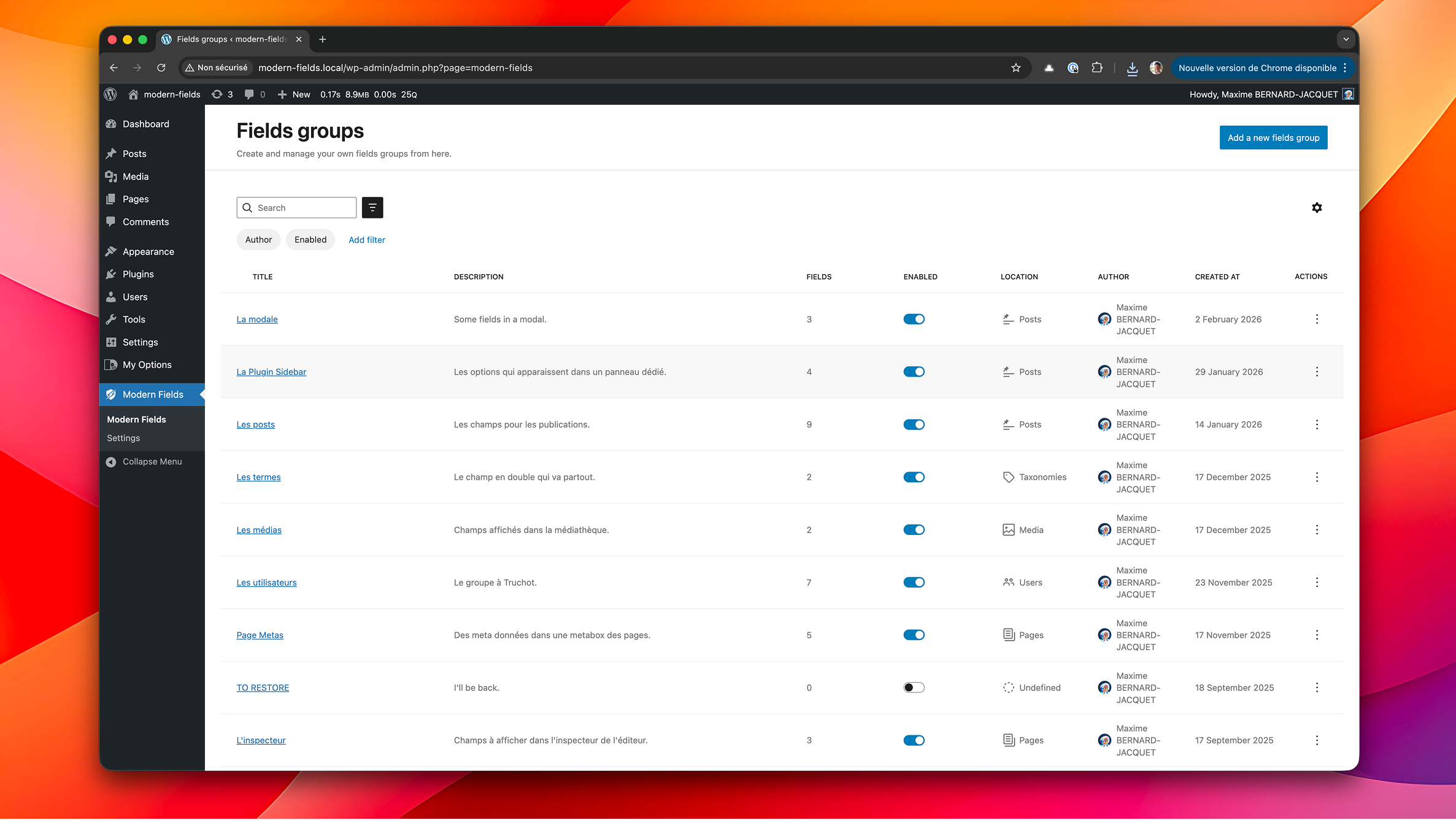
- Navigate to Modern Fields Field Groups to create your first group and start adding field blocks.
- Assign your field group to the desired location and publish it.
- Edit a post or page that matches your rules to start filling in the fields.
- Use the Field value block to display a meta in your content or a template.
屏幕截图:
常见问题:
Does Modern Fields work with the Classic Editor?
Modern Fields is built specifically for Gutenberg but also works on classic editor through metaboxes.
How do I render field values on the frontend?
Use the Field value block to show any value from your fields from the current post, post author or options pages. No code required! It will bind the data to your templates automatically.
You can also use these functions in your custom blocks or template : the_field() or get_field()
Can I limit who can manage field groups?
Yes. Permissions integrate with WordPress roles and capabilities. Only users with the appropriate capabilities can create or edit field groups.
更新日志:
1.5.3
Security:
- Tightened permissions on field groups and on post type and taxonomy definitions: only the users who administer Modern Fields can create, edit, read or delete them
- A field's sanitizing is now always chosen by its field type, never by the content of its field group
- Repeater (Pro): each sub-field's value is now sanitized as the same field is outside a repeater, and a value no sub-field declares is kept as plain text
- Link and Embed fields: an address is now kept only with the http, https, mailto or tel protocol, or as a relative link, in a repeater too
- Pages without fields load lighter: the field styles are no longer printed on every front-end and admin page, only where fields are displayed
- Checkbox, Radio, Select and Button group fields: options without a key or sharing the same key made checking one box toggle several. "Add option" now fills a unique key, and the options list flags a missing or duplicated key
- Spacing field: "Allow custom size" had no effect, the custom size button stayed hidden when filling the field
- Map field: OpenStreetMap support. With no Google Maps API key set, maps are drawn with OpenStreetMap, which needs no key — the Map field works as soon as the plugin is installed
- Map field: search for an address and click the map to fill it in with OpenStreetMap too, with the address in the language of your admin
- Map field: choose the provider explicitly with the MODERN_FIELDS_MAPS_PROVIDER constant, and point OpenStreetMap to your own tile server or geocoder
- modern_fields_get_map_url() links to openstreetmap.org when the site uses OpenStreetMap
- Map field: the settings panel says which provider draws the map, and only offers the settings that provider supports
- Modern Fields admin pages load lighter: the table library behind the Field groups, Post types and Taxonomies screens is loaded once for the whole admin instead of being copied into each screen — around 85 KB less to download, and 350 KB less with Modern Fields Pro active
- Every screen that shows your fields — post, product, user, profile, term, media, dashboard — loads around 150 KB less: the field engine is no longer rebuilt into each one
- The block editor loads lighter too: around 50 KB less on a page using the Gallery field, and 70 KB more than that with Modern Fields Pro active
- Groups located on Posts › Terms never showed up, whatever terms the post had
- Groups located on Taxonomies for pages or post types never showed up. They now appear on the entries that have at least one term in one of the chosen taxonomies
- Groups located on Media with "All … types" never showed up. They now appear on every file of that kind: every image, video, audio file, document (PDF, Office, text…) or application file (archives and the like)
- Groups located on Media MP3, M4A, MOV, MKV, TAR, GZIP or 7Z never showed up, because these choices were saved under types WordPress doesn't give those files. Groups saved with them now match, with no need to edit them
- Groups located on Status › Draft now show up on a new post straight away, instead of only after its first save
- Classic editor and WooCommerce products: values typed into a group were lost when the same save stopped the group from applying — publishing a draft with a group located on Status › Draft, or unticking the category a group is located on. Every group the screen showed now saves what you typed in it
- Saving a post type or a taxonomy stripped every backslash from its settings: accented labels came back as "u00c9vu00e9nement", and a double quote in a label or description broke the whole site, with an error on every page. What you type is now saved as is. Labels already damaged need retyping once
- Duplicating or importing a field group stripped the backslashes from its fields' settings: a label such as "Prix & TVA" came back as "Prix u0026 TVA", and the same went for <, >, " and "--"
- A field with a backslash anywhere in its settings (label, placeholder, default value…) was dropped from its group, and its value was no longer saved. Saving the group again brings it back
- Values typed into a field on the classic editor, a WooCommerce product, a user profile, a term or a media file lost their backslashes: C:\Users was saved as C:Users
- Importing a field group, from the Import screen, WP-CLI or the JSON sync, damaged its fields' settings: every & became & ("Prix & TVA" showed up as "Prix & TVA") and anything between < and > was dropped, choice values included. Imports now follow the rule WordPress applies when you save the group in its editor, so an administrator gets the group back exactly as exported. Settings already damaged need retyping once
- Field categories in the inserter follow the order you build a field group in: Input, Selection, Media, Date, Advanced, then Design
- Map field: the address search followed the system colour scheme rather than the admin's, so on a machine set to dark mode the search box and its list of suggestions came up dark and barely readable inside the light admin
- New Link field: point anywhere — an external URL, or existing content found by searching, using the link picker WordPress uses everywhere else
- Link field: choose whether the field asks for a link text, and whether it offers "Open in new tab"
- New Post or Archive Link field: link to a post or to a post type archive, always chosen from a list rather than typed in
- Post or Archive Link field: restrict the list to the post types, publication statuses and terms of your choice
- Post or Archive Link field: the archive of each post type is offered alongside individual entries, and can be turned off; several destinations can be allowed
- Both link fields display through a Button block, and read in templates with modern_fields_get_link()
- New Embed field: paste a link and preview what it embeds, right under the field
- New User field: pick one or several users, with their avatar in the search results
- User field: restrict the search to the roles of your choice, custom roles included
- New Post Reference field: point to a single post, page or custom post type through a searchable dropdown
- Post Reference field: restrict the search to the post types and the publication statuses of your choice
- Post Reference field: the new Bidirectional option records the reverse relation, so a post can be asked which posts point at it, read with modern_fields_get_linked_posts()
- New Taxonomy field: pick terms with the very interface WordPress uses — a checkbox tree for hierarchical taxonomies, a token field for flat ones
- Taxonomy field: choose the taxonomy to display, and allow missing terms to be created straight from the field
- New File field: import a file or pick one from the media library
- File field: restrict the media library to a category (images, documents, audio, video, archives) or to specific formats
- File field: set a maximum weight, capped by the server limit and shown next to the field
- New Map field: search for an address, click the map or drag the pin, and the coordinates, the address and its city, postcode and country are all stored
- Map field: the stored value uses the very same keys as ACF's Google Map field, so a template moved over keeps working untouched
- Map field: set the default centre, the zoom, the height, the map type, a light or dark theme, and the colour of the pin
- Map field: the Google Maps API key is read from a wp-config constant or from the modern-fields/maps/api_key filter, never stored in the database
- Map field: without a key, the field still takes coordinates by hand and tells you which line to add where
- Map field: limit the address search to the countries of your choice, or turn the search off entirely
- Read a location in templates with get_field(), and link to it with the new modern_fields_get_map_url()
- New Icon field: pick an icon from the WordPress icon library, or upload one from the media library
- Icon field: the whole Dashicons set is published to the WordPress icon registry, so those icons render through the native Icon block, answer wp_get_icon() and appear in every picker that reads the registry
- Icon field: a plugin registering an icon collection of its own shows up in the picker with nothing to configure
- Icon field: the media library tab can be turned off, leaving only registered icons — the ones the native Icon block can display
- New Gallery field: pick several images at once from the media library, reorder them by dragging the thumbnails, and drop one with the cross that appears over it
- Gallery field: set a minimum and a maximum number of images, and the aspect ratio the thumbnails are cropped to
- Gallery field: the value is the ordered list of attachment IDs, read in templates with get_field()
- Field add-ons have one public entry point: window.modernFields.fields.registerFieldType, with window.modernFields.apiVersion beside it. A third-party field type registers its block and its component in a single call, and inherits the label, description, Required badge and settings panels of the native fields
- Theme JSON sync: reading the field group status no longer scans the post type, taxonomy and block files along the way
- Theme JSON sync: a status that fails to load now says so instead of showing an empty column
- Every field's settings moved to the block editor's own settings panels: an option shows at a glance whether it has been changed, resets on its own, and the whole section resets at once
- Editor styles are collected once per stylesheet instead of once per field, so a group of a dozen fields no longer repeats the same CSS a dozen times in the metabox
- Click targets across the plugin are reachable from a keyboard, and what screen readers announce was named properly — the media field's image preview, the checkbox lists, the rich text editor's frame
- Fields storing a structure (Border, Spacing) lost their value when saved from a form rather than the block editor
- Checkbox lists with a capped height squashed their rows instead of scrolling
- Selections were lost when a search narrowed a list of checkboxes
- Role and status pickers now scroll instead of stretching on sites with many roles
- The Link field came up unstyled outside the block editor — on an options page, a term or a user form — because the stylesheet it needs was looked up in the rendered group content, where the marker it looks for no longer exists
- New Dashboard location: display a field group as a widget on the WordPress dashboard. Values are saved as site options (administrators only)
- Field values are no longer publicly exposed in the REST API. Enable the new 'Expose through API' option per field to opt in
- Image field: choose the display ratio
- Filters and trash has been fixed in list views (Field groups, CPT, Taxonomies and blocks)
- Fixed a fatal error when editing a post whose author no longer exists or was never set (e.g. content created through WP-CLI or the API)
- Fixed a blank options page / dashboard widget when the group contains a checkboxes field that was never saved
- The field groups list now shows "No author" instead of an empty cell for groups without an author
- Field groups are now available in WooCommerce products & post types with classic editor
- New filters to change the value returned by getField():
modern-fields/get_field/valueandmodern-fields/get_field/name=field-name - Expose render API to prepare for add-ons Improved:
- Improved RichText field styles in narrow area + color and link dropdowns Fixed:
- Fixed binding meta to a button in Field value block
- The whole Modern Fields admin is now a single-page app: switching between Field Groups, Post Types, Taxonomies, Blocks, Import/Export and Settings no longer reloads the page.
- Trash support: move field groups, post types and taxonomies to the trash, restore them, or delete them permanently, with an Active/Trash filter in each list. Improved:
- Validation notices now appear at the bottom-center of the screen, matching WordPress 7.0.
- Cleaner empty states in the admin lists (column headers are hidden when a list has no items).
- Main menu without icons on small screens (< 1024px) for a tidier layout. Fixed:
- Fixed regression with field name not being slugified, causing some fields to not be displayed.
- Fixed issues with groups locations not correctly displayed
- Fixed inconsistencies with the Modern Fields admin menu.
- Fixed scroll issues in the Post Types, Taxonomies and Blocks pages.
- Fixed an error shown on a field group with no fields yet.
- Fixed links to Post Types, Taxonomies, Blocks and field groups after the single-page rework.
- Fixed a crash in the location picker when a post or page has no title.
- Fixed saving Settings when a palette color was added without picking a color.
- Fixed inconsistencies with Modern Fields admin menu
- Fixed scroll issues in CPT, taxonomies and blocks pages
- Fixed main menu on small screens
- Fixed error on empty field group
- Prepare for Modern Fields premium version release
- Fixed an issue with Custom Post Types: private with show_ui=true are now showing in the list
- Fixed issues where Modern Fields was overriding some theme.json defaults
- Some code optimization
- Fix: native blocks (like Group) no longer lose their color and typography options in the post/page editor when the plugin is active.
- Fixed row selection when clicking the title or toggle in the field groups list (Dataview).
- Fixed image block styles inside field locations.
- Moved the menu below the header for clearer navigation.
- Metabox accordions are now handled natively.
- New: duplicate field group from the groups list
- New: filter
modern-fields/permissionsto change the minimum role permission to acces the plugin - Added connectors with the Pro version
- Improved some styles for WordPress 7.0
- Improved the date time field according to choosen format
- Improved the RichText field to avoid issues in the block editor
- Improved group list table (DataViews)
- Improved: specific specific posts & pages selector now shows draft and pending posts
- Harmonized the filters names
- Fixed meta label in block bindings
- Fixed a crash when saving settings
- Fixed fields label and description encoding
- Fixed default values nto showing in some cases
- New: added import and export via WP CLI
- Fixed an issue with scripts loaded outside the plugin pages
- Fixed image binding in Field value block
- Fixed issue with default CPT icon
- Fixed an issue with display mode option in select field
- Fixed an issue where default fields values didn't showed up
- Fixed admin menu appearing in options pages when it shouldn't
- Fixed a bug on location selector when invalid location is set
- Official stable release!
- Removed beta features
- Fixed issue with locations in CPT
- Stability improvements & bug fixes
- New: JSON sync for Custom Post Types and Taxonomies with the theme
- New: Register Custom Post Types and Taxonomies from the admin
- New: Navigation menu between Modern Fields sections
- New: import / export groups in JSON
- New: Sync fields with your theme in /mf-json/ folder
- Added an onboarding popup when creating your first field group
- Usual roles are pre-selected in location selector
- Fixed duplicate colors in palette field
- Fixed RichText overflow in narrow area like inspector
- Fixed inspector area width
- Fixed image binding with the field value block
- Fixed vendor prefixing on composer dependencies
- Fixed an error with user name in fields list
- Fixed a potential conflict with the fields blocks and third party blocks
- Fixed duplicate fields has different unique ids now
- Fixed default color palette in Modern Fields settings
- New image field option: compact UI
- Fixed color picker when there are custom colors set in appearance
- Fixed missing translations in JavaScript
- New fields: checkboxes, radio, select/combobox, multi token and email
- More reliable field data structure
- Fixed deployment with PHP dependencies
- Added wp.org assets
- First deploy
- Initial beta release.